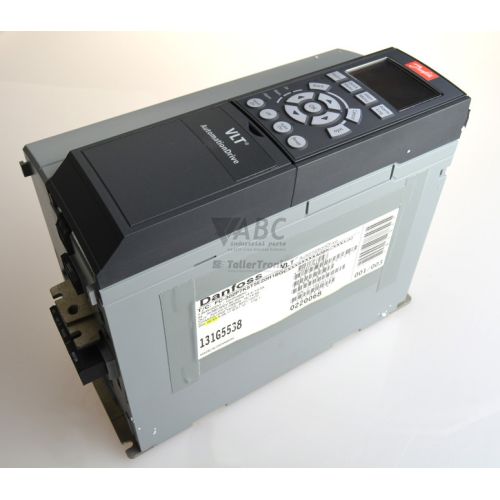
Danfoss 131G0447 FC-302 VLT AutomationDrive 4.0 kW Inverter



Het item werd toegevoegd aan uw offerteaanvraag
Product Information
The Danfoss 131G0447 is a 4.0 kW (5.5 HP) variable frequency drive from the VLT AutomationDrive FC 302 series, engineered for precise motor speed and torque regulation across automated manufacturing processes. Operating on a 3-phase supply voltage ranging from 380 V to 500 V AC, this drive supplies a continuous output current of 10 A, with an intermittent overload capability of 16 A for up to 60 seconds. Built in a compact IP20 enclosure with an A2 frame size, the inverter features Class 3C3 conformal coated printed circuit boards to protect internal electronics in hostile atmospheric environments. It supports standard asynchronous induction motors, permanent magnet motors, and synchronous reluctance motors using advanced Virtual Voltage Vector Control (VVC+) or Flux Vector control methods, while providing integrated Safe Torque Off (STO) functional safety compliant with SIL2 and PL d standards.
System integration and control wiring connect through an array of digital and analog input/output terminals, RS-485 serial interfaces supporting Modbus RTU and FC Protocol, and an integrated USB port for direct connection to setup software. This specific 131G0447 unit comes configured with two factory-installed option modules: an MCA 101 PROFIBUS DP V1 interface card for high-speed industrial network communication up to 12 Mbps, and an MCB 107 24 V DC auxiliary power supply card that keeps control circuits and fieldbus monitoring active during main power line interruptions. Placing a replacement drive into service requires matching these installed hardware options and restoring the original machine configuration. Parameter sets can be backed up and reloaded using the Danfoss VLT Motion Control Tool MCT 10 software or copied directly using the removable LCP 102 graphical local control panel. When replacing a unit in a working process, ABC Industrial Parts can assist with backup parameters, matching spare drive configurations, and verifying fieldbus network settings.
Real-time operational monitoring is provided by the LCP 102 graphical panel and three status LEDs on the front bezel: a green ON indicator for control power, a yellow WARN indicator for active non-tripping warnings, and a red ALARM LED that flashes or stays solid during a fault trip. The drive records diagnostic events in an internal alarm log menu within parameter group 15-4*, retaining the last 10 alarms with timestamp and operational context. Standard fault conditions include phase loss (Alarm 4), overvoltage or undervoltage on the DC link (Alarms 5 through 8), inverter overload (Alarm 9), output overcurrent (Alarm 13), and earth ground faults (Alarm 14). Initial field troubleshooting should focus on input line balance, motor insulation integrity using a megohmmeter, and output wiring connections. When internal microcontroller errors or power card failures occur (such as Alarm 38 or Alarm 29), internal circuit repairs are not field-serviceable, making a fully tested exchange drive or professional workshop repair from ABC Industrial Parts the most reliable path to restore production.
Technical Specifications
| Manufacturer | Danfoss |
| Part Number | 131G0447 |
| Model / Type Code | FC-302P4K0T5E20H2BGCXXXSXXXXA0BXCXXXXD0 |
| Product Family | VLT AutomationDrive |
| Series | FC 302 |
| Component Type | Variable Frequency Drive |
| Rated Power (kW) | 4.0 kW |
| Rated Power (HP) | 5.5 HP |
| Supply Voltage Range | 380 - 500 V AC (3-phase) |
| Continuous Output Current | 10 A |
| Intermittent Current (60s) | 16 A |
| Output Frequency Range | 0 - 590 Hz |
| Efficiency | 97% |
| Enclosure Rating | IP20 |
| Frame Size | A2 |
| Fieldbus Interface | PROFIBUS DP V1 (via MCA 101) |
| Serial Communication | Modbus RTU / FC Protocol (RS-485) |
| Auxiliary Power Backup | 24 V DC (via MCB 107) |
| Functional Safety | Safe Torque Off (STO SIL2 / PL d) |
| PCB Coating | Conformal Coated (Class 3C3) |
Programming and Configuration
Parameterization and drive management for the Danfoss 131G0447 are performed either through the removable LCP 102 graphical local control panel or via a PC running Danfoss VLT Motion Control Tool MCT 10 software over a USB connection. The LCP 102 panel supports multi-language text displays, parameter graph trends, and onboard memory capable of storing complete drive configuration files for quick transfer to another inverter.
During initial setup or drive replacement, application motor parameters, ramp times, I/O terminal assignments, and fieldbus node addresses must be configured to match process specifications. If settings need to be cleared or reset to factory defaults, executing an initialization command will generate Alarm 80, after which saved parameter backups can be reloaded using MCT 10 software to return the system to operation.
Communication and System Integration
Network communication on the Danfoss 131G0447 FC 302 drive is driven by the factory-fitted MCA 101 PROFIBUS DP V1 option card installed in Option Slot A. Supporting communication baud rates up to 12 Mbps, this interface enables cyclic process data exchange and acyclic parameter accesses with higher-level programmable logic controllers across complex automated networks.
In addition to the PROFIBUS DP module, the unit features built-in RS-485 serial communication terminals supporting standard Modbus RTU and Danfoss FC Protocol. Reliable network diagnostics are further enhanced by the factory-installed MCB 107 24 V DC auxiliary backup card in Option Slot D, which maintains fieldbus node communications and status registers even when primary 3-phase AC input power is removed.
Diagnostics and Status Indication
Drive state and operational diagnostics are indicated through three front-mounted LEDs—green for power status, yellow for warning conditions, and red for alarm trips—and displayed in full technical detail on the LCP 102 panel. Real-time diagnostic data including output current, DC link voltage, heatsink temperature, and fieldbus status words can be queried remotely over PROFIBUS DP or locally using MCT 10 software.
Parameter group 15-4* contains an automated alarm log that records details for the 10 most recent alarm events, complete with event indices and operating conditions at the time of fault. When a fault condition trips the inverter, the red ALARM LED flashes or remains illuminated, and the drive locks out output power until the condition is cleared and a manual or remote reset signal is supplied.
Status LED Indicators
| LED | Color/Status | Meaning |
|---|---|---|
| ON | Green - Solid | Control card power is active |
| WARN | Yellow - Solid | A warning condition is active in the drive; drive continues operating |
| ALARM | Red - Flashing / Solid | A fault condition occurred causing the drive to trip. Off indicates normal operation; Flashing indicates alarm trip. |
Replacement and Spare Part Considerations
Replacing a Danfoss 131G0447 inverter requires matching both the physical chassis size and the option board configuration. This model uses an IP20 Frame A2 chassis, rated for 4.0 kW (5.5 HP) output with a 380 V to 500 V AC 3-phase input supply, and contains factory option cards MCA 101 (PROFIBUS DP) and MCB 107 (24 V DC backup power).
Before powering up a replacement unit, technicians must ensure that motor control parameters, fieldbus baud rates, and station addresses are correctly re-established. Parameters can be copied directly from the existing unit using the LCP 102 panel memory or imported from an offline file backup using Danfoss MCT 10 setup software.
Error Codes & Fault Codes
The following error codes may be displayed during operation or diagnostics:
| Code | Name | Description | Possible Cause | Recommended Action |
|---|---|---|---|---|
| 1 | 10V low | 10 V DC output voltage from terminal 50 is below 10 V | Overload or short circuit on terminal 50 line | Remove connection to terminal 50 and check for short circuits |
| 2 | Live zero error | Signal on Analog Input 53 or 54 is less than 50% of the preset lower limit | Broken wire or missing reference signal on analog input | Check wiring and transmitter signal on terminals 53/54 |
| 4 | Mains phase loss | A phase is missing on the supply side, or input voltage imbalance is too high | Blown fuse, bad wiring connection, or severe supply phase asymmetry | Check input supply voltages and fuses |
| 5 | DC link voltage high | Intermediate circuit voltage exceeds overvoltage limit | Regenerative energy from motor overhauling, deceleration ramp time too short | Extend deceleration time, check brake resistor configuration |
| 6 | DC link voltage low | Intermediate circuit voltage drops below undervoltage limit | Mains voltage dip or loss of power supply | Check mains supply voltage |
| 7 | DC overvoltage | DC link voltage exceeds maximum safety limit for inverter protection | Excessive deceleration rate, loss of brake resistor control | Extend ramp-down time, inspect brake chopper and brake resistor |
| 8 | DC undervoltage | DC link voltage drops below critical safety threshold | Mains power failure, brownout | Verify supply voltage |
| 9 | Inverter overload | Drive thermal memory exceeds 100% due to continuous high current | Motor overloaded or drive undersized for application | Reduce motor load, increase ramp times, verify drive rating |
| 13 | Overcurrent | Peak output current limit exceeded (approx. 200% of rated current) | Short circuit at output, fast acceleration with high inertia load, incorrect motor parameters | Check motor wiring for ground fault or short circuit, verify motor data parameters |
| 14 | Earth fault | Current leakage to earth on motor output phases | Ground fault in motor lead cables or motor winding insulation breakdown | Check motor cables and motor insulation with a megohmmeter |
| 16 | Short circuit | Short circuit between motor terminals U, V, or W | Direct phase-to-phase short in motor wiring or motor winding failure | Check output power wiring and motor windings |
| 29 | Power card overtemperature | Heatsink temperature sensor exceeded maximum limit | Blocked heatsink airflow, fan failure, high ambient temperature | Clean heatsink, verify cooling fan operation, check panel ventilation |
| 30 | Motor phase U missing | Motor phase U is not connected or output current is missing on phase U | Open circuit between drive output terminal U and motor | Inspect motor cabling on phase U |
| 31 | Motor phase V missing | Motor phase V is not connected or output current is missing on phase V | Open circuit between drive output terminal V and motor | Inspect motor cabling on phase V |
| 32 | Motor phase W missing | Motor phase W is not connected or output current is missing on phase W | Open circuit between drive output terminal W and motor | Inspect motor cabling on phase W |
| 38 | Internal fault | Internal hardware or micro-controller hardware error | Board hardware component failure or corrupt internal logic | Internal hardware fault — power cycle drive; if persistent, return unit for repair |
| 65 | Control card overtemperature | Temperature sensor on control card detected excessive temperature | Ambient temperature in panel too high or control card fan failure | Check ambient temperature and panel enclosure cooling |
| 80 | Drive initialized to default | Parameter settings were restored to factory defaults | Manual reset or initialization command executed | Re-commission drive and reload saved application parameters |
Frequently Asked Questions
What options are factory installed on the Danfoss 131G0447 drive?
The 131G0447 configuration includes the MCA 101 PROFIBUS DP V1 communication card in Option Slot A and the MCB 107 24 V DC auxiliary backup power option card in Option Slot D.
How do I backup and transfer parameters to a replacement 131G0447 inverter?
Parameters can be saved directly to the removable LCP 102 graphical display panel and transferred to the replacement drive, or backed up and reloaded via USB using Danfoss VLT Motion Control Tool MCT 10 software.
What function does the MCB 107 option card serve in this drive?
The MCB 107 24 V DC external power supply option keeps the drive control card powered and preserves fieldbus network communications and diagnostic monitoring when mains power is disconnected.
How do I troubleshoot an Alarm 13 or Alarm 14 condition?
Alarm 13 (Overcurrent) and Alarm 14 (Earth fault) indicate short circuits or ground leakage in the motor or cabling. Inspect output power cables, test motor windings with a megohmmeter, and verify motor configuration parameters.
What motor types can be controlled by the Danfoss FC 302 drive?
The FC 302 supports standard asynchronous induction motors, permanent magnet (PM) motors, and synchronous reluctance motors using VVC+ or Flux Vector control principles.
Take advantage of our exchange formula
A defective product does not have to be worthless. At ABC Industrial Parts, you can hand in defective products and immediately benefit from a discount on your new purchase. This is a smart way to save money while contributing to a circular economy.
Play it safe with our warranty conditions
Industrial plants prefer to keep running invariably, no matter what. Therefore, it is essential that you can rely on high-quality products and/or sustainable repairs. With our warranty conditions, you can count on certainty, whether you choose new, used or repaired products.
Data backup and recovery
Have you lost valuable parameters or data due to a malfunction while the manufacturer no longer provides support? At ABC Industrial Parts, we help you secure this data, both for common and specific products.
Specific firmware and hardware versions
If you are working with specific hardware or firmware versions that are no longer available from the manufacturer, ABC Industrial Parts is your partner. When making your enquiry, clearly state which versions you need, we will then look at the possibilities of supplying those versions, so that your installations continue to function optimally.
Disclaimer:
We are not an authorised distributor of Danfoss.
Product photos are for illustration purposes only and may differ from the actual product delivered.
Some of the content on this page was created with the help of AI. While we strive to provide accurate and up-to-date information, errors may occur.