Lenze 00489583 ECSDE012C4B – ECS Servo System Axis Drive Module


Het item werd toegevoegd aan uw offerteaanvraag
Product Information
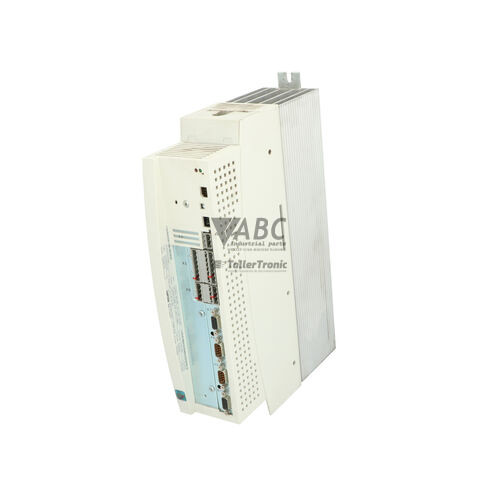
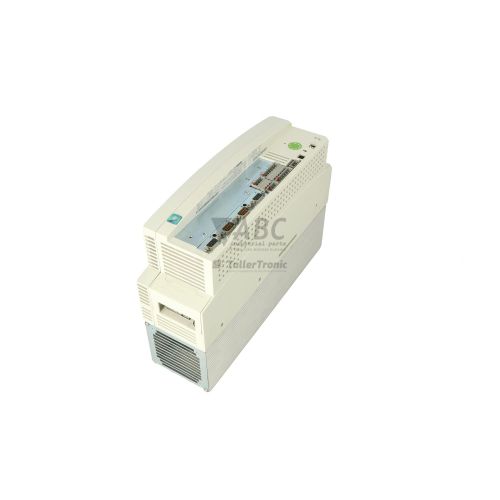
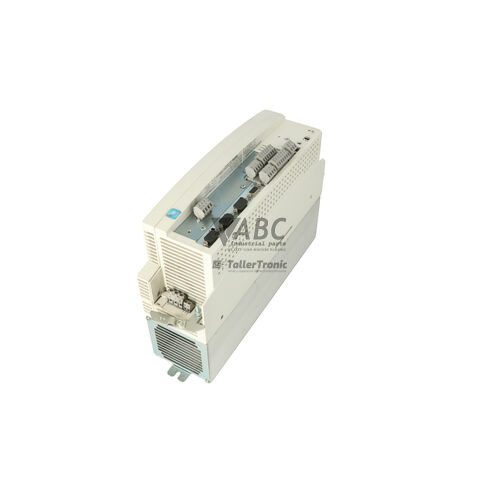
The Lenze 00489583 (model ECSDE012C4B) is a Speed Follower axis module belonging to the Lenze ECS Servo System family. Designed for multi-axis closed-loop speed and torque control applications, this servo drive operates on an intermediate DC bus with a nominal rating of 565 V DC across an operating window of 270 V DC to 775 V DC, typically energized by a central Lenze ECSP power supply module. On the motor side, the unit supplies a 3-phase 0–480 V AC output with a continuous rated current of 6.0 A and a 5-second peak current capability of 12.0 A at an 8 kHz switching frequency. Built around a Coldplate thermal interface, the drive dissipates operational heat directly through a cooling plate, making it ideal for compact pass-through cabinet installations without external heat sink fins.
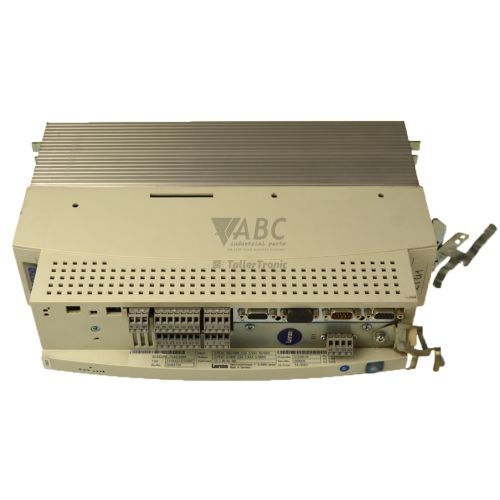
Interfacing the ECSDE012C4B within an automated system relies on dual RJ45 connectors supporting the integrated Lenze System Bus (CANbus) for real-time multi-axis synchronization and electronic gearing. Feedback connections are handled via dedicated Sub-D sockets: a 9-pin Sub-D connector (X7) for resolvers and a 15-pin Sub-D connector (X8) for incremental, SinCos, Hiperface, or EnDat absolute encoders. An integrated automation slot accepts optional fieldbus cards, including PROFIBUS-DP (EMF2133IB), EtherCAT (EMF2192IB), or PROFINET (EMF2193IB). When putting a replacement module into service, parameter configurations must be loaded into the non-volatile EEPROM memory using Lenze Global Drive Control (GDC), L-force EASY Starter software, or a Keypad XT (EMF2177IB) plug-in panel, as new or spare units require parameter alignment to match the host machine application.
Operational monitoring and front-line troubleshooting rely on two status LEDs located on the front panel: a green Ready LED indicating power and drive enable status, and a red TRIP LED indicating warnings or fault shutdowns. Detailed diagnostic data, including historical fault codes, can be accessed via trip register C0168 through the CAN System Bus or GDC software. Common system trips include DC bus overvoltage (OU), undervoltage (LU), phase overcurrent (OC1, OC2, OC5), and coldplate overtemperature (OH). When internal hardware faults like H05 or persistent EEPROM errors (EER) occur, internal power stage or microcontroller damage cannot be serviced in the field; sourcing a tested replacement drive or scheduling repair through ABC Industrial Parts provides a direct route back to production.
Technical Specifications
| Manufacturer | Lenze |
| Part Number | 00489583 |
| Model / Type | ECSDE012C4B |
| Product Family | ECS Servo System |
| Component Type | Servo Drive |
| Drive Execution | Speed Follower Axis Module |
| Continuous Output Current | 6.0 A |
| Peak Output Current | 12.0 A (5 seconds) |
| Nominal DC Bus Voltage | 565 V DC |
| DC Bus Supply Voltage Range | 270 - 775 V DC |
| Maximum Output Voltage | 480 V AC (3-Phase) |
| Switching Frequency | 8 kHz |
| Cooling Method | Coldplate Technology |
| Integrated Interface | CANbus / Lenze System Bus (Dual RJ45) |
| Resolver Feedback Interface | 9-pin Sub-D Connector (X7) |
| Encoder Feedback Interface | 15-pin Sub-D Connector (X8) |
Programming and Configuration
Configuration of the Lenze 00489583 ECSDE012C4B servo drive is executed through Lenze Global Drive Control (GDC) or L-force EASY Starter software environments, connected via the onboard system bus interface. Operational parameters—including speed follower ratios, current limits, switching frequency adjustments, and feedback configuration (C0025)—are adjusted within software and saved directly to non-volatile internal EEPROM storage.
Alternatively, local parameter adjustment and status monitoring can be performed using the optional Keypad XT (EMF2177IB), which plugs directly into the drive's diagnostic port. For drive commissioning or unit swapping, parameter sets saved on a host PC or backup storage can be uploaded directly into the replacement drive. If corrupted parameter data triggers an EEPROM fault (EER), a full reset to factory default settings can be initiated via parameter code C0002 before reloading the application machine profile.
Communication and System Integration
The ECSDE012C4B features integrated dual RJ45 sockets configured for the Lenze System Bus (CANbus protocol). This dual-port arrangement allows simple daisy-chained networking across multi-axis system line-ups, facilitating high-dynamic speed synchronization, torque sharing, and electronic gearing commands between central motion controllers and follower drives without excessive field wiring.
For higher-level fieldbus architecture integration, the drive features a dedicated automation slot that accepts modular communication cards. Supported expansion options include the EMF2133IB for PROFIBUS-DP networks, the EMF2192IB for EtherCAT environments, and the EMF2193IB for PROFINET installations. Network parameters such as CAN node IDs and baud rates must be properly mapped and terminated with standard 120-Ohm resistors at physical bus ends to prevent signal reflection and communication faults (CE0/CE1).
Diagnostics and Status Indication
Real-time operational status is displayed on the drive's front panel using two LED status indicators. The green Ready LED reflects supply status and controller enable, while the red TRIP LED signals warnings or active drive shutoffs. Diagnostic analysis can be extended via software using Global Drive Control (GDC) to monitor real-time oscilloscope trace channels, operational state flags, and internal trip registers.
When a fault triggers a drive shutdown, the specific fault code is logged into internal trip register C0168, accessible over the CAN system bus or GDC software. The dual LED indicators provide instantaneous physical feedback to assist onsite maintenance personnel during initial diagnostic checks.
Status LED Indicators
| LED | Color/Status | Meaning |
|---|---|---|
| Ready LED | Green - Off / Flashing / Solid | Off: No supply voltage or controller inhibit active. Flashing: Controller ready / drive inhibited. Solid ON: Drive enabled / running normally. |
| TRIP / Fault LED | Red - Off / Flashing / Solid | Off: No active error. Flashing: Warning active. Solid ON: Fault / TRIP condition triggered (drive output disabled). Persistent solid ON indicates internal hardware failure requiring service. |
Replacement and Spare Part Considerations
When replacing a failed Lenze ECSDE012C4B drive, technical personnel must verify that the replacement unit matches the exact part number (00489583) and model designation to ensure identical power stage output (6.0 A continuous, 12.0 A peak) and control card capabilities. Because the drive utilizes Coldplate cooling technology, improper thermal installation will result in rapid thermal shutoffs (OH code). A uniform layer of thermal compound or a dedicated thermal interface pad must be applied across the rear contact plate before mounting the drive tightly against the cabinet cooler.
A newly installed spare drive will not operate out of the box until parameter data and communication settings are transferred. Maintenance teams should extract parameter sets from the donor unit or load verified backup files via Global Drive Control (GDC) or L-force EASY Starter software. Optional expansion cards, such as PROFIBUS (EMF2133IB) or PROFINET (EMF2193IB) modules, should be swapped into the automation slot of the replacement drive prior to powering up. ABC Industrial Parts can support maintenance teams with pre-tested replacement drives and repair solutions to reduce unscheduled machine downtime.
Error Codes & Fault Codes
The following error codes may be displayed during operation or diagnostics:
| Code | Name | Description | Possible Cause | Recommended Action |
|---|---|---|---|---|
| OC1 | Short Circuit | Short circuit on motor phase terminals U, V, W or internal power stage fault | Motor cable short circuit, inter-turn winding fault in motor, line capacity too high, or short circuit in output stage | Check motor wiring and insulation, verify motor windings. If fault persists with motor disconnected, internal hardware fault present — replace drive. |
| OC2 | Earth Fault | Ground fault / earth leakage current detected on output terminals | Motor winding grounded, damaged motor cable insulation, excessive cable capacitance to earth | Check motor wiring for ground fault, test motor insulation resistance with megohmmeter. |
| OC5 | I x t Overload | Drive thermal overload protection limit exceeded | Continuous current demand exceeds rated drive current (6.0 A) for extended period, mechanical jam or heavy acceleration profile | Check mechanical load for blockage, optimize acceleration time, or resize drive if continuous load requirement is higher. |
| OU | Overvoltage DC Bus | DC bus voltage exceeds maximum allowed voltage limit (> 775 V DC) | Regenerative energy from decelerating motor too high, brake chopper failure, defective braking resistor, or high mains supply voltage | Check braking resistor circuit and brake chopper operation on power module. Extend deceleration time ramps. |
| LU | Undervoltage DC Bus | DC bus voltage dropped below minimum operating limit (< 270 V DC) | Mains supply power outage, blown power supply line fuse, DC bus bar connection loose | Check AC supply voltage to power module, check DC bus interconnect bar tightening torques. |
| OH | Heatsink Overtemperature | Drive heatsink / coldplate temperature exceeded thermal threshold (> 90 °C) | Insufficient cooling thermal contact on coldplate, fan failure, ambient temperature too high, dirty cooler surface | Check thermal paste / thermal mounting interface on coldplate rear surface. Ensure adequate cabinet cooling. |
| OH4 | Motor Overtemperature | Motor thermal contact / PTC / KTY sensor triggered overtemperature fault | Motor heavily overloaded, fan on motor defective, motor thermal sensor wiring shorted or open | Allow motor to cool down. Check motor loading and thermal sensor connection on terminal block X6. |
| OH7 | Interior Overtemperature | Internal temperature inside the drive housing exceeded safety limit | Control cabinet temperature excessively high, ambient thermal limit exceeded | Improve control cabinet ventilation and ambient cooling. |
| OH8 | Motor Temp Sensor Wire Break | Open circuit detected on motor thermal sensor monitoring terminals | Motor thermal cable disconnected or damaged, sensor missing | Check sensor wiring on X6. Verify thermistor/PTC resistance. |
| CE0 | CAN System Bus Error | Communication failure or bus-off condition on integrated Lenze System Bus | CAN network bus interruption, incorrect baud rate setting, missing bus termination resistor (120 Ohm), noise interference | Check RJ45 bus cabling on X14/X15, verify terminating resistors at physical bus ends, verify node IDs. |
| CE1 | Process Data CAN Communication Fault | Process data object (PDO) timeout on system bus | Master PLC / controller stopped cyclic CAN data transmission | Check master controller operational state and communication cycle timing. |
| EER | EEPROM Fault | Read/write checksum failure in internal parameter memory EEPROM | Non-volatile memory corrupted or internal hardware defect | Internal hardware failure — restore default factory settings (C0002). If fault persists, board level error requires unit return for repair or replacement. |
| H05 | Internal Hardware Error | Internal micro-controller hardware or power board fault detected during self-test | Internal component failure or power supply supply rail fault inside drive | Internal hardware fault — non-field-serviceable. Replace the drive module or return for repair. |
| Sd2 | Resolver Fault | Signal loss or track error on resolver feedback input X7 | Resolver cable broken or disconnected, resolver shield damaged, improper resolver signal level | Check resolver feedback cable connection on Sub-D connector X7. Check shield grounding. |
| Sd3 | Encoder Signal Fault | Incremental or SinCos encoder track error on connector X8 | Encoder cable defect, track loss (A/B/Z), broken wire or bad pin connection | Inspect 15-pin Sub-D connector X8 and cable for continuity and mechanical damage. |
| Sd6 | Feedback Signal Missing | Motor speed/position sensor feedback absent during start or motion | Feedback cable unplugged or wrong feedback encoder type configured in drive parameters (C0025) | Check encoder parameter selection (C0025) and feedback cable connection. |
| Sd7 | Absolute Encoder Communication Fault | Serial communication timeout with Hiperface or EnDat absolute encoder | Serial data line fault, noise interference, supply voltage to encoder inadequate | Check encoder cable shielding and line termination. Verify encoder supply voltage. |
| PI | Initialization Error | Drive failed self-test initialization upon power-up | Internal board initialization failure or corrupt firmware | Power cycle 24V supply. If fault recurs, internal hardware error — return unit for service. |
Frequently Asked Questions
What software is used to configure and program the Lenze ECSDE012C4B servo drive?
The drive is configured using Lenze Global Drive Control (GDC) or L-force EASY Starter software over the system bus interface. Alternatively, local parameter adjustments can be made using the optional Keypad XT (EMF2177IB).
What feedback sensor types are supported by the ECSDE012C4B drive?
The module supports 2-pole and multi-pole resolvers on Sub-D connector X7, as well as incremental, SinCos, Hiperface, and EnDat absolute encoders on Sub-D connector X8.
How does the Coldplate cooling design impact mounting and thermal installation?
The Coldplate design (variant C) transfers operational heat directly through a rear contact plate to an external cooler. Proper installation requires applying thermal paste or a thermal contact foil on the rear interface surface to prevent heatsink overtemperature faults (OH).
What causes an OC1 fault code on the Lenze ECSDE012C4B?
An OC1 fault indicates a short circuit on motor phase terminals U, V, W or an internal power stage failure. If the fault persists after disconnecting the motor cable, an internal hardware defect is present and the drive must be repaired or replaced.
Can optional fieldbus modules be installed on the ECSDE012C4B?
Yes, the unit features an integrated automation slot that accepts optional fieldbus cards, including PROFIBUS-DP (EMF2133IB), EtherCAT (EMF2192IB), and PROFINET (EMF2193IB).
What should I check if the red TRIP LED remains solid ON after powering up?
A solid red TRIP LED indicates an active drive fault or severe internal failure. Read the active error code from trip register C0168 using GDC software or the CAN bus; persistent internal codes such as H05 or PI indicate board-level failures that require unit exchange or repair.
Take advantage of our exchange formula
A defective product does not have to be worthless. At ABC Industrial Parts, you can hand in defective products and immediately benefit from a discount on your new purchase. This is a smart way to save money while contributing to a circular economy.
Play it safe with our warranty conditions
Industrial plants prefer to keep running invariably, no matter what. Therefore, it is essential that you can rely on high-quality products and/or sustainable repairs. With our warranty conditions, you can count on certainty, whether you choose new, used or repaired products.
Data backup and recovery
Have you lost valuable parameters or data due to a malfunction while the manufacturer no longer provides support? At ABC Industrial Parts, we help you secure this data, both for common and specific products.
Specific firmware and hardware versions
If you are working with specific hardware or firmware versions that are no longer available from the manufacturer, ABC Industrial Parts is your partner. When making your enquiry, clearly state which versions you need, we will then look at the possibilities of supplying those versions, so that your installations continue to function optimally.
Disclaimer:
We are not an authorised distributor of Lenze.
Product photos are for illustration purposes only and may differ from the actual product delivered.
Some of the content on this page was created with the help of AI. While we strive to provide accurate and up-to-date information, errors may occur.