Omron 3G3MX2-AB007-E MX2 Inverter Variable Frequency Drive



Het item werd toegevoegd aan uw offerteaanvraag
Product Information
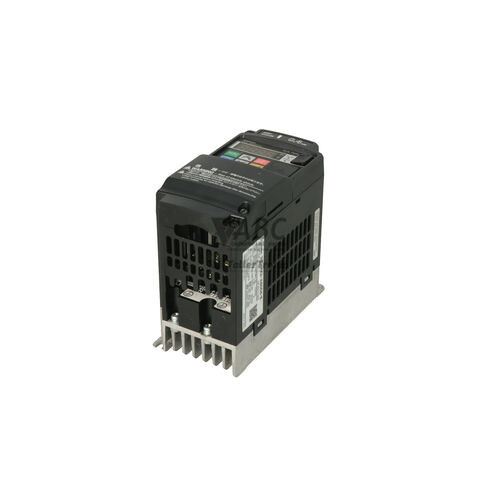
The Omron 3G3MX2-AB007-E is a compact variable frequency drive from the Omron MX2 series, designated under model number MX2-AB007-E. Designed for industrial automation systems including material handling conveyors, packaging machinery, centrifugal fans, and pumps, this inverter accepts a single-phase supply voltage ranging from 200 to 240 V AC (170 to 264 V AC operational range) and converts it to control three-phase AC induction motors. The drive features a dual power rating architecture: Heavy Duty mode provides 0.75 kW rating at 5.0 A output current with 150% overload capacity for 60 seconds, while Normal Duty mode delivers 1.1 kW rating at 6.0 A output current with 120% overload capacity. Sensorless vector control and V/f control methods allow precise open-loop speed and torque regulation from 0.1 Hz up to 400 Hz, supported locally by an integrated 4-digit 7-segment digital operator display.
System connectivity includes standard RS-485 Modbus RTU communication and a dedicated USB 2.0 Mini-B port, which allows drive parameter configuration and testing without connecting main AC power. High-speed network integration is achieved via optional expansion cards, including EtherCAT (3G3AX-MX2-ECT), EtherNet/IP (3G3AX-MX2-EIP-E), and PROFINET (3G3AX-MX2-PNT). Commissioning a replacement unit requires more than physical mounting; complete parameter sets, motor thermal protection values, and any custom DriveProgramming sequence logic—up to 1,000 lines developed using CX-Drive or Sysmac Studio—must be uploaded to the new unit. Rotary switches, option modules, and Safe Torque Off (STO) functional safety wiring on terminals GS1 and GS2 must also be verified. ABC Industrial Parts can assist with extracting stored parameter profiles and transferring logic to ensure replacement drives are prepared correctly for installation.
Real-time operational status is displayed through four front LED indicators—POWER, RUN, ALARM, and PRG / SET—and live terminal monitoring parameters d001 through d104. A fault register stores up to six recent trip events with contextual frequency, current, and voltage readings. Operating faults such as overcurrent (E01–E03), overvoltage (E07), or thermal overload (E05, E20) can often be resolved by verifying external line power, cooling airflow, or motor load wiring. However, recurring internal system alerts including EEPROM memory failure (E08), current sensor errors (E10), gate driver faults (E30), or internal processor errors (E11, E22) indicate component failures on the internal circuit board. When hardware faults prevent normal operation, sourcing a tested replacement drive or scheduling repair through ABC Industrial Parts provides a reliable path back to full operational capability.
Technical Specifications
| Manufacturer | Omron |
| Part Number | 3G3MX2-AB007-E |
| Model / Type | MX2-AB007-E |
| Component Type | Variable Frequency Drive |
| Supply Voltage | 200-240 V AC |
| Supply Voltage Range | 170-264 V AC |
| Input Phases | 1 phase |
| Output Voltage | 200-240 V AC |
| Rated Power (Heavy Duty) | 0.75 kW |
| Output Current (Heavy Duty) | 5.0 A |
| Rated Power (Normal Duty) | 1.1 kW |
| Output Current (Normal Duty) | 6.0 A |
| Output Frequency Range | 0.1-400 Hz |
| Switching Frequency | 2-15 kHz |
| Control Method | Sensorless Vector Control / V/f Control |
| Built-in Interface | RS-485 (Modbus RTU), USB 2.0 Mini-B |
| Safety Rating | Safe Torque Off (STO) ISO 13849-1 Cat 3 / PLd |
Programming and Configuration
The Omron MX2 drive platform features embedded sequence logic control known as DriveProgramming. This functionality allows engineers to create up to 1,000 lines of custom sequence code directly within the inverter using CX-Drive or Sysmac Studio automation software. By executing simple control routines locally, the drive can handle standalone machine tasks without requiring an external micro-controller or PLC.
Drive configuration parameters determine motor operating curves, carrier switching frequency (selectable from 2 to 15 kHz), acceleration and deceleration ramps, and motor thermal electronic protection (parameters b012 and b013). Parameter modification can be performed directly through the integrated 4-digit keypad, using the optional 3G3AX-OP05 LCD remote operator panel, or via PC connection over USB. In situations requiring factory parameter restoration, parameter initialization is performed using parameter b084.
Communication and System Integration
Native serial communication on the 3G3MX2-AB007-E is supplied through an RS-485 port supporting Modbus RTU protocol, facilitating standard network integration with controllers and industrial displays. In addition, a front-mounted USB 2.0 Mini-B interface allows technicians to connect PC-based commissioning software directly to the control board, enabling full parameter backup and logic transfers even when main power is disconnected.
To integrate into higher-level fieldbus networks, the drive accepts a range of optional communication modules mounted directly to the unit. Supported network expansions include EtherCAT (3G3AX-MX2-ECT), EtherNet/IP (3G3AX-MX2-EIP-E), PROFINET (3G3AX-MX2-PNT), as well as PROFIBUS DP, DeviceNet, and CompoNet. Functional safety integration is built directly into the control hardware via dual Safe Torque Off (STO) terminal inputs compliant with ISO 13849-1 Cat 3 / PLd and IEC 61800-5-2 STO standards.
Diagnostics and Status Indication
The front panel of the 3G3MX2-AB007-E contains four status LEDs alongside a 4-digit 7-segment display for immediate diagnostic evaluation. Real-time visual signals show line power presence, active inverter output, active alarm conditions, and programming mode status. Parameter monitoring codes d001 through d104 allow technicians to inspect live digital and analog I/O terminal status directly from the display.
For in-depth troubleshooting, the internal control memory logs the six most recent trip events into a fault history register. Each recorded entry includes the specific fault code along with motor operating frequency, current, and DC bus voltage recorded at the time of the fault, accessible via the digital operator or CX-Drive diagnostic windows.
Status LED Indicators
| LED | Color/Status | Meaning |
|---|---|---|
| POWER | Green - Solid | Lit green when input AC power is applied to the main/control circuit. |
| RUN | Green - Solid | Lit green during inverter operation/output generation. |
| ALARM | Red - Solid or Flashing | Lit red or flashing red when a fault/trip or warning condition has occurred. |
| PRG / SET | Green - Solid | Lit when in parameter setting / programming mode. |
Replacement and Spare Part Considerations
When selecting a spare unit to replace an existing 3G3MX2-AB007-E, confirm the operating duty mode of the original drive. Because this model supports both Heavy Duty (0.75 kW / 5.0 A) and Normal Duty (1.1 kW / 6.0 A) operation, the replacement unit must be set to match the original application duty cycle. Setting parameters including acceleration/deceleration rates and electronic thermal overload limits must be reviewed to ensure motor protection matches line conditions.
Before placing a replacement unit into service, transfer all parameter settings and custom DriveProgramming sequence logic from the original drive using CX-Drive software connected via Mini-USB. If an optional communication expansion card (such as EtherCAT, EtherNet/IP, or PROFINET) is installed, transfer the option module to the replacement drive, ensuring proper connector seating and ground fixing. Verify that dual Safe Torque Off (STO) safety circuit wiring on terminals GS1 and GS2 is connected correctly before initiating machine operation.
Error Codes & Fault Codes
The following error codes may be displayed during operation or diagnostics:
| Code | Name | Description | Possible Cause | Recommended Action |
|---|---|---|---|---|
| E01 | Overcurrent during constant speed | Inverter output current exceeded the overcurrent threshold during constant speed operation. | Inverter output short circuit, ground fault, motor locked, or abrupt load variation. | Check motor wiring for short circuits/ground faults, verify load conditions, and check acceleration/deceleration settings. |
| E02 | Overcurrent during deceleration | Inverter output current exceeded the overcurrent threshold during deceleration. | Deceleration time too short, regenerative energy excess, or short circuit at output. | Increase deceleration time, install braking resistor if necessary, and check motor wiring. |
| E03 | Overcurrent during acceleration | Inverter output current exceeded the overcurrent threshold during acceleration. | Acceleration time too short, motor capacity mismatch, output short circuit, or mechanical load locked. | Increase acceleration time, check motor load, and inspect output cables for short circuit. |
| E04 | Overcurrent during stop/other status | Inverter output current exceeded threshold while stopped or in other operating states. | Short circuit at inverter output or failure of internal current sensor/power module. | Check motor output wiring. If fault occurs immediately upon power-up without motor connected, internal hardware fault is present — replace inverter unit. |
| E05 | Overload protection (Thermal trip) | Electronic thermal protection detected motor overload condition. | Motor continuously operated above rated current, incorrect thermal protection parameter setup. | Reduce load, extend cycle time, or adjust motor thermal electronic protection parameters (b012/b013) to match motor nameplate. |
| E06 | Braking resistor overload | Regenerative braking resistor load factor exceeded setting. | Deceleration energy too high, braking duty cycle exceeded limit. | Lengthen deceleration time or verify braking resistor capacity and duty cycle parameter b090. |
| E07 | Overvoltage protection | DC bus voltage exceeded internal protection limit due to excessive regenerative energy. | Deceleration time too short, excessive motor regenerative feedback, or high input power voltage. | Increase deceleration time, enable overvoltage suppression function, install braking resistor, or correct supply voltage. |
| E08 | EEPROM / Memory error | Built-in EEPROM memory error detected during parameter reading/writing. | Noise interference during writing or non-volatile memory element failure. | Perform parameter initialization (b084). If power cycle and initialization do not clear the error, internal hardware failure has occurred — replace unit. |
| E09 | Undervoltage protection | DC bus voltage dropped below operational threshold during run. | Input voltage drop, power line interruption, or inadequate power supply capacity. | Check power supply lines, input power wiring, fuse/breaker ratings, and contactor circuits. |
| E10 | Current detector error | Internal current sensor anomaly detected. | Internal current sensing circuit failure or internal board component damage. | Internal hardware fault — power cycle drive. If fault persists, replace the unit. |
| E11 | CPU error | Built-in microcomputer malfunction or communication timeout between internal processors. | Excessive electrical noise, control board failure. | Power cycle unit and verify grounding. Internal hardware fault — return for repair or replace unit if persistent. |
| E12 | External trip | External trip signal was commanded via multi-function digital input terminal. | External protective relay or safety device connected to configured EXT input terminal activated. | Check external devices and terminal wiring connected to the designated input. |
| E13 | USP (Unattended Start Protection) error | Run command was already present when power was applied. | Inverter turned ON while the run command terminal was held in ON state. | Turn OFF run command before cycling power, or adjust USP function parameter configuration if intended. |
| E14 | Ground fault detection | Ground fault detected between output terminal and earth ground. | Motor insulation breakdown, short to ground in output cable. | Inspect output cable and motor insulation resistance with a megohmmeter. |
| E15 | Input overvoltage | AC input supply voltage exceeded acceptable upper threshold. | Power line voltage surge or input line phase irregularity. | Measure input power line voltage and ensure it stays within 200–240 V AC (+10%). |
| E20 | Inverter thermal protection | Inverter heat sink temperature exceeded safe operating limit. | Cooling fan stopped, ambient temperature too high, or heat sink fins clogged with dust. | Clean heat sink cooling fins, replace malfunctioning cooling fan, and verify cabinet ventilation. |
| E21 | Temperature detector error | Built-in thermistor sensor error detected on heat sink. | Internal temperature sensor fault or board circuit damage. | Internal hardware fault — replace inverter unit. |
| E22 | CPU communication error | Communication fault between main processor and sub-processor. | Internal circuit noise or component failure. | Power cycle unit. Internal board-level hardware fault requiring unit replacement if error persists. |
| E25 | Main circuit error / Relay failure | Inrush current suppression circuit relay/contactor failed to operate correctly. | Inrush resistor or bypass relay contact damage. | Power cycle drive. Internal hardware fault — unit requires repair or replacement. |
| E30 | Driver error | Internal gate driver protection or power module overcurrent detected. | IGBT short circuit or driver board component defect. | Internal power module fault — unit requires replacement. |
| E36 | Instantaneous power failure | AC input power was interrupted for longer than allowable limit during operation. | Transient line drop or power outage. | Check power line reliability and input connection stability. |
| E37 | Safe stop (STO) circuit error | Discrepancy detected between safety inputs GS1 and GS2 or safety circuit self-test failure. | Wiring fault on GS1/GS2 inputs or external safety controller timing mismatch. | Verify GS1 and GS2 terminal connection logic and pulse synchronization. |
| E40 | Option card communication error | Communication lost between inverter control board and installed optional communication card. | Poor option board connector seating or option card fault. | Power off, remove and re-seat option card, ensure grounding connector is fixed, and re-test. |
| E41 | Option card error | Internal processing fault or initialization error on optional interface card. | Defective option card module. | Replace optional communication card module. |
| E60 | Fieldbus communication error | Fieldbus network watchdog timeout or network communication disconnect. | Broken fieldbus cable, PLC/Master stopped, or incorrect baud rate/node address. | Check fieldbus cabling, master PLC status, and node configuration parameters. |
| E80 | Encoder pulse disconnection | Pulse encoder feedback signal was lost while feedback control was active. | Encoder cable disconnected, broken wire, or damaged encoder. | Inspect encoder wiring and PG option card connections. |
| E81 | Speed error / Excessive speed deviation | Deviation between motor speed command and encoder speed feedback exceeded limit. | Motor stall, mechanical jam, or incorrect speed loop tuning. | Check load mechanics, motor parameter settings, and encoder PPR parameter. |
Frequently Asked Questions
What is the difference between Heavy Duty and Normal Duty mode on the 3G3MX2-AB007-E?
Heavy Duty mode provides a 0.75 kW power rating with 5.0 A output current and 150% overload protection for 60 seconds, suitable for constant torque applications like conveyors and mixers. Normal Duty mode provides a 1.1 kW power rating with 6.0 A output current and 120% overload protection, designed for variable torque loads like centrifugal fans and pumps.
Which software packages can be used to configure the Omron MX2 inverter?
The drive can be configured using Omron CX-Drive software or the Sysmac Studio automation platform connected via the built-in Mini-USB port. Parameters and DriveProgramming logic can also be modified using the local keypad or an optional 3G3AX-OP05 LCD panel.
Can I program and back up the 3G3MX2-AB007-E without main AC power?
Yes, the built-in USB 2.0 Mini-B port powers the internal control logic via the USB connection from a PC, allowing full parameter transfer, configuration, and sequence programming without applying main AC line power.
What fieldbus communication options are supported on this drive?
The drive features built-in Modbus RTU over RS-485 and supports optional expansion cards for EtherCAT (3G3AX-MX2-ECT), EtherNet/IP (3G3AX-MX2-EIP-E), PROFINET (3G3AX-MX2-PNT), PROFIBUS DP, DeviceNet, and CompoNet.
What does error code E08 indicate on the MX2 drive?
Error code E08 indicates an EEPROM memory error during parameter read or write cycles. You can attempt a parameter initialization using parameter b084. If power cycling and initialization fail to clear the error, an internal hardware failure has occurred requiring unit replacement.
Take advantage of our exchange formula
A defective product does not have to be worthless. At ABC Industrial Parts, you can hand in defective products and immediately benefit from a discount on your new purchase. This is a smart way to save money while contributing to a circular economy.
Play it safe with our warranty conditions
Industrial plants prefer to keep running invariably, no matter what. Therefore, it is essential that you can rely on high-quality products and/or sustainable repairs. With our warranty conditions, you can count on certainty, whether you choose new, used or repaired products.
Data backup and recovery
Have you lost valuable parameters or data due to a malfunction while the manufacturer no longer provides support? At ABC Industrial Parts, we help you secure this data, both for common and specific products.
Specific firmware and hardware versions
If you are working with specific hardware or firmware versions that are no longer available from the manufacturer, ABC Industrial Parts is your partner. When making your enquiry, clearly state which versions you need, we will then look at the possibilities of supplying those versions, so that your installations continue to function optimally.
Disclaimer:
We are not an authorised distributor of Omron.
Product photos are for illustration purposes only and may differ from the actual product delivered.
Some of the content on this page was created with the help of AI. While we strive to provide accurate and up-to-date information, errors may occur.