Bosch Rexroth R911305276 CSB01.1N-SE-ENS-NNN-NN-S-NN-FW IndraDrive Control Section


Het item werd toegevoegd aan uw offerteaanvraag
Product Information
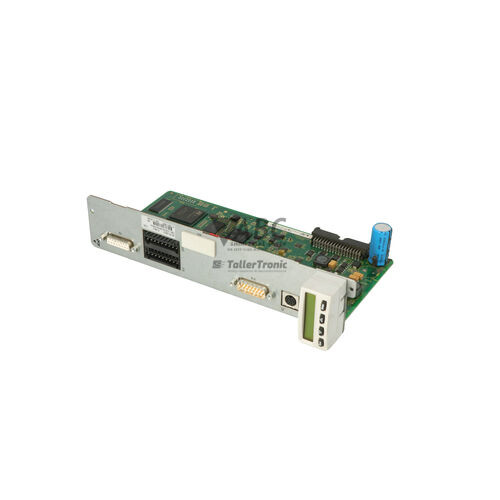
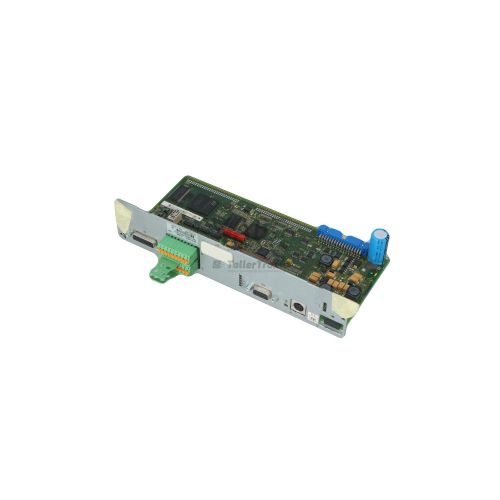
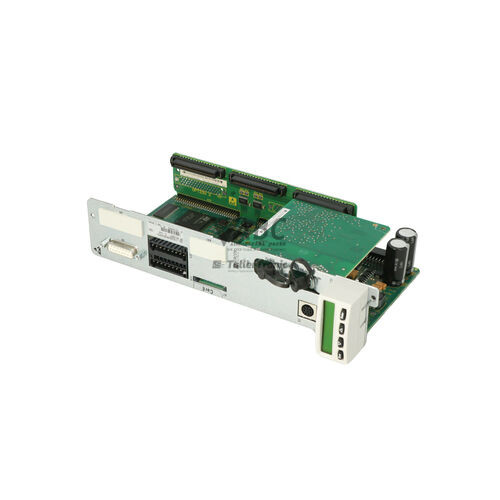
The Bosch Rexroth R911305276, designated by model type CSB01.1N-SE-ENS-NNN-NN-S-NN-FW, is a single-axis basic servo control section from the IndraDrive product family. Designed for high-precision motion control, this control section plugs directly into IndraDrive C compact drive converters or IndraDrive M modular power sections. It integrates drive control logic, encoder processing, and real-time network communications into a single modular unit, delivering closed-loop speed and torque regulation as well as high-speed single-axis positioning across industrial automation systems.
Fieldbus communication is provided through an integrated SERCOS III real-time Ethernet master interface equipped with dual RJ45 ports operating at 100 Mbps, supporting line and ring network topologies. Primary feedback evaluation uses the universal ENS encoder interface connected via a 15-pin D-sub female port, accommodating Bosch Rexroth IndraDyn motors as well as EnDat 2.1, Hiperface, 1Vpp sine/cosine, and TTL incremental feedback devices. Commissioning a spare unit is simplified because drive parameters and runtime firmware are stored on a removable MMC flash memory card. Transferring the MMC card into an identical control section shell enables rapid hardware restoration without requiring software parameter reloads, with ABC Industrial Parts providing tested replacement units to support continuous operation.
Local status indication is available on the front panel via an H1 single-digit 7-segment display alongside S3 and S4 link LEDs that display SERCOS III port activity. Detailed diagnostic history and operating status can be monitored using IndraWorks DS engineering software via the 9-pin D-sub RS232 serial interface or across the SERCOS III network. Initial field checks include inspecting encoder connections, verifying auxiliary 24 V power supply inputs, and checking DC bus voltage. Unresolvable internal processor or board-level failures require module replacement, where spare units from ABC Industrial Parts ensure minimal machine downtime.
Technical Specifications
| Manufacturer | Bosch Rexroth |
| Part Number | R911305276 |
| Model / Type Designation | CSB01.1N-SE-ENS-NNN-NN-S-NN-FW |
| Component Type | Servo Control Section |
| Product Family | IndraDrive |
| Control Section Variant | Basic Single-Axis |
| Master Communication Interface | SERCOS III |
| SERCOS III Port Count | 2 x RJ45 |
| SERCOS III Speed | 100 Mbps |
| Primary Encoder Interface | ENS (IndraDyn, Hiperface, EnDat 2.1, 1Vpp, TTL) |
| Encoder Connector Type | 15-Pin D-Sub Female |
| Serial Port | RS232 (9-Pin D-Sub Female) |
| Firmware & Parameter Storage | Removable MMC Memory Card |
| Drive Power Unit Compatibility | IndraDrive C Compact / IndraDrive M Power Sections |
Programming and Configuration
Parameterization, motor setup, and drive tuning for the R911305276 control section are performed using Bosch Rexroth IndraWorks DS engineering software. Technical personnel can establish a service connection either through the local RS232 serial port using a standard 9-pin D-sub cable or remotely over the SERCOS III Ethernet network.
Complete drive configuration parameters and runtime firmware are saved directly onto a removable MMC flash memory card inserted in the control module. This card-based storage structure decouples configuration settings from the physical processor hardware, permitting direct configuration cloning and physical card migration during component replacement.
Communication and System Integration
The CSB01.1N-SE-ENS-NNN-NN-S-NN-FW control unit includes integrated SERCOS III real-time Ethernet fieldbus communications, represented by the 'SE' master communication option. Equipped with two RJ45 connectors running at 100 Mbps, the unit supports deterministic cyclic motion commands and fieldbus topologies such as line structures and ring redundancy.
Feedback evaluation relies on the universal 'ENS' encoder hardware option accessed through a front-panel 15-pin D-sub female connector. This interface processes signals from Bosch Rexroth IndraDyn motors as well as third-party encoder systems including EnDat 2.1, Hiperface, 1Vpp sine/cosine, and TTL digital signals for closed-loop positioning and velocity control.
Diagnostics and Status Indication
Local status evaluation is accessible directly on the front panel of the control unit. An H1 single-digit 7-segment readout provides real-time operational status, system warnings, and active fault codes. S3 and S4 LED indicators provide link status and data transmission activity for SERCOS III Port 1 and Port 2.
Comprehensive diagnostic logging, historical message logs, and active status registers can be viewed through IndraWorks DS engineering software connected via RS232 or over SERCOS III.
Status LED Indicators
| LED | Color/Status | Meaning |
|---|---|---|
| H1 Display | Red/Green/Yellow - Single-digit 7-segment readout | Displays real-time drive operating status, warning indicators, and active fault codes. |
| S3 / S4 LEDs | Green/Yellow - Solid / Flashing | Indicates network link status and communication activity on SERCOS III Port 1 and Port 2. |
Replacement and Spare Part Considerations
When selecting a replacement control section, verify that the type designation CSB01.1N-SE-ENS-NNN-NN-S-NN-FW matches the original hardware configuration. The master communication designation ('SE' for SERCOS III) and feedback designation ('ENS' for universal feedback) must correspond to system network and motor feedback requirements.
To complete a hardware swap without re-commissioning, physically transfer the original MMC parameter card into the replacement CSB01.1 control section prior to powering on the system. The new unit will load the existing drive parameters, network settings, and firmware, allowing rapid resumption of motion control.
Error Codes & Fault Codes
The following error codes may be displayed during operation or diagnostics:
| Code | Name | Description | Possible Cause | Recommended Action |
|---|---|---|---|---|
| F208 | Error in encoder phase sequence | The signals from the motor encoder or external encoder do not match expected phase sequence. | Faulty encoder cable, wrong encoder parameter setting, or defective encoder hardware. | Check encoder cable connection, verify encoder parameters, or replace encoder. |
| F218 | Heatsink overtemperature shutdown | Temperature of power section heatsink exceeded allowed maximum threshold. | Inadequate cooling, clogged heat sink, fan failure, or high ambient temperature. | Clean heatsink, verify fan operation, and reduce ambient temperature or drive load. |
| F219 | Motor overtemperature shutdown | Motor temperature sensor reported temperature above shutdown limit. | Motor overload, defective motor fan, or damaged sensor cable. | Allow motor to cool, check motor loading, and verify temperature feedback cable. |
| F228 | Excess position deviation | Position lag error exceeded configured maximum limit value. | Mechanical blockage, excessive acceleration settings, or incorrect loop gains. | Check axis mechanics for bind, review gain tuning, or adjust position lag window. |
| F8022 | Power supply failure | Control voltage or internal power supply rail out of tolerance. | Defective internal power board or auxiliary 24V supply under-voltage. | Verify 24V auxiliary supply. If power supply is correct, internal hardware fault — replace control section/power unit. |
| F8060 | Overvoltage in DC bus | DC bus voltage exceeded upper threshold limit. | Regenerative energy during deceleration exceeded brake resistor capability or brake resistor open circuit. | Check brake resistor connections and resistance value; extend deceleration ramp times. |
| F8069 | Undervoltage in DC bus | DC bus voltage fell below minimum operation limit during drive enable. | Mains supply interruption, phase loss, or blown line fuse. | Verify mains input line voltage and fuses. |
| F888 | Control section hardware error | Fatal internal self-test failure within control section processor or memory. | Internal electronic component failure or corrupted firmware flash memory. | Internal hardware fault — power cycle drive unit. If fault persists, replace control section. |
Frequently Asked Questions
How do I transfer drive parameters when replacing the R911305276 control section?
All drive parameter settings and runtime firmware reside on the removable MMC memory card. Power down the system, remove the MMC card from the faulty control unit, insert it into the replacement CSB01.1 module, and restore power. No commissioning software or parameter downloads are required.
What engineering software is used to diagnose or configure this control section?
Bosch Rexroth IndraWorks DS engineering software is used for setup, parameterization, and diagnostic analysis. It connects to the unit via the 9-pin D-sub RS232 serial port or over the SERCOS III network.
Which encoder types are supported by the ENS interface?
The universal ENS encoder option supports Bosch Rexroth IndraDyn motors, EnDat 2.1, Hiperface, 1Vpp sine/cosine, and TTL incremental encoders via a 15-pin D-sub female connector.
What does fault code F888 indicate on the drive display?
Fault F888 indicates a control section hardware error caused by internal electronic processor failure or memory corruption. Power cycle the drive unit; if the fault persists, the control section must be replaced.
Which Rexroth power sections are compatible with this control unit?
The CSB01.1 control section plugs directly into Bosch Rexroth IndraDrive C compact drive converters and IndraDrive M modular power sections.
Take advantage of our exchange formula
A defective product does not have to be worthless. At ABC Industrial Parts, you can hand in defective products and immediately benefit from a discount on your new purchase. This is a smart way to save money while contributing to a circular economy.
Play it safe with our warranty conditions
Industrial plants prefer to keep running invariably, no matter what. Therefore, it is essential that you can rely on high-quality products and/or sustainable repairs. With our warranty conditions, you can count on certainty, whether you choose new, used or repaired products.
Data backup and recovery
Have you lost valuable parameters or data due to a malfunction while the manufacturer no longer provides support? At ABC Industrial Parts, we help you secure this data, both for common and specific products.
Specific firmware and hardware versions
If you are working with specific hardware or firmware versions that are no longer available from the manufacturer, ABC Industrial Parts is your partner. When making your enquiry, clearly state which versions you need, we will then look at the possibilities of supplying those versions, so that your installations continue to function optimally.
Disclaimer:
We are not an authorised distributor of Rexroth.
Product photos are for illustration purposes only and may differ from the actual product delivered.
Some of the content on this page was created with the help of AI. While we strive to provide accurate and up-to-date information, errors may occur.