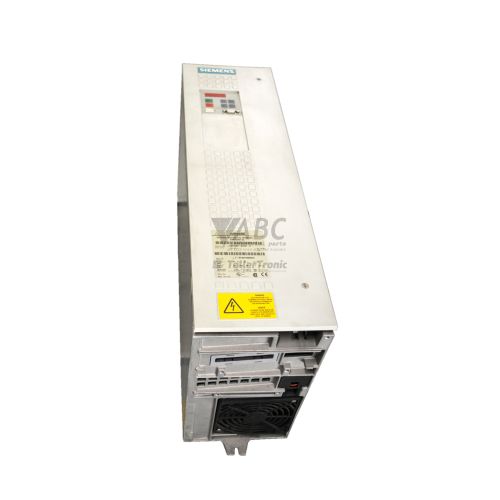
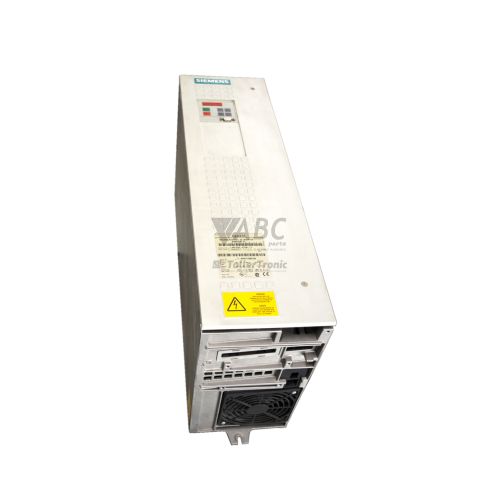
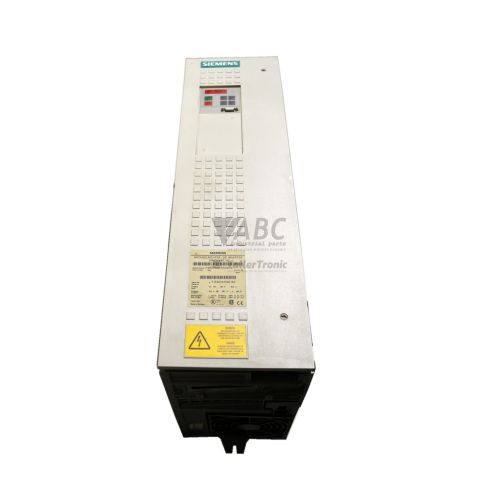
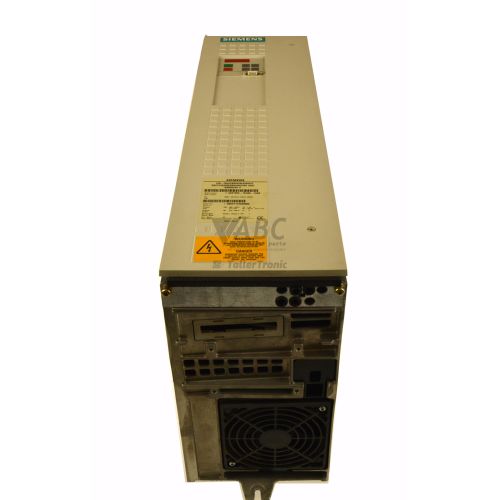
Siemens 6SE7022-6TC61-Z Simovert VC Frequency Inverter


Het item werd toegevoegd aan uw offerteaanvraag
Product Information
The Siemens 6SE7022-6TC61-Z is a 15 kW variable frequency inverter belonging to the SIMOVERT MASTERDRIVES Vector Control family. Operating on a 3-phase supply voltage range from 500 V AC to 600 V AC, this drive delivers a rated output current of 25.5 A for demanding industrial processing lines, heavy-duty material handling, and metals processing equipment. Utilizing field-oriented vector control algorithms, the unit provides dynamic speed and torque regulation for both induction motors and synchronous machines in open-loop or closed-loop modes.
Connecting and installing a replacement 6SE7022-6TC61-Z unit requires attention to its communication and control configuration. This specific model features the factory-installed Z=G11 option code, which equips the drive with an integrated CBP2 PROFIBUS DP communication card fitted into Slot C of the CUVC control unit. Local control and communication are provided via an onboard RS485 interface using the Siemens USS protocol. Before putting a spare unit into service, application parameters stored in non-volatile EEPROM memory must be loaded using an OP1S operator panel, the onboard PMU display, or software tools such as Siemens DriveMonitor or STARTER. ABC Industrial Parts can support maintenance teams requiring tested exchange units or assistance with legacy drive parameter extraction.
Diagnostic information is visible directly on the drive through status LEDs and the PMU 7-segment display. The green RUN LED indicates active drive operation or pre-charging states, while the red FAULT LED signals active warnings or trip faults. When troubleshooting, fault codes and display parameters such as r001, r002, r947, and r949 assist in isolating external issues, including line phase loss, DC link overvoltage, or output earth faults. Basic field maintenance includes verifying supply voltage limits, checking braking resistors, and inspecting motor cabling and encoder wiring. Persistent memory faults or internal processor errors indicate board-level failures on the CUVC card, where unit replacement or specialized repair through ABC Industrial Parts provides the fastest route back to production.
Technical Specifications
| Manufacturer | Siemens |
| Part Number | 6SE7022-6TC61-Z |
| Model / Type | Simovert VC |
| Product Family | SIMOVERT MASTERDRIVES |
| Component Type | Frequency Inverter |
| Supply Voltage Range | 500 - 600 V AC (3-phase) |
| Rated Current | 25.5 A |
| Rated Power Output | 15 kW |
| Control Method | Field-Oriented Vector Control (VC) |
| Onboard Serial Interface | RS485 (USS Protocol) |
| Fieldbus Communication Option (Z=G11) | CBP2 PROFIBUS DP |
Programming and Configuration
Parameter management and drive commissioning for the Siemens 6SE7022-6TC61-Z are conducted using the integrated PMU 7-segment display keyboard or the optional handheld OP1S operator control panel. For comprehensive system integration and backup management, technicians can connect via PC using Siemens DriveMonitor software version 5.4 or higher, as well as the Siemens STARTER commissioning platform.
Drive settings are stored securely within non-volatile EEPROM parameter memory located on the CUVC control card. This ensures parameter values remain intact during power outages. When installing a replacement unit, parameter backups can be transferred directly to the new drive, or a factory reset can be executed by setting parameter P060=2 before downloading existing configuration files. Key parameter adjustments, such as acceleration time (P462) and deceleration time (P464), allow precise motor tuning for specific mechanical load profiles.
Communication and System Integration
The 6SE7022-6TC61-Z features fieldbus communication provided by option Z=G11, which includes a pre-installed CBP2 communication board in Slot C. This interface supports PROFIBUS DP communication across DP-V0 and DP-V1 protocols at data rates up to 12 Mbit/s, enabling fast cyclic telegram exchanges and acyclic parameter transfers with SIMATIC S7-300 and S7-400 controllers.
In addition to PROFIBUS DP network capabilities, the drive features a built-in serial RS485 communication port running the Siemens USS protocol. This onboard port facilitates direct point-to-point connections with operator panels, handheld devices, or PC-based diagnostics tools. Proper network operation relies on correct physical installation, including active PROFIBUS DP bus termination switches, shielded communication cables, and matching fieldbus node addresses.
Diagnostics and Status Indication
The drive provides dual status LEDs on its front panel for visual diagnostics. The green RUN LED illuminates continuously during active operation and flashes during pre-charging or ready states. The red FAULT LED lights solid to indicate an active trip fault (Fxxx) and flashes when a warning condition (Axxx) is triggered.
Detailed diagnostic analysis is supported by parameter monitoring functions. Operational states can be monitored via parameters r001 and r002 on the PMU display or OP1S panel. Active trip faults and historic fault events are logged in the fault buffer parameter r947, while specific diagnostic fault values are retrieved through parameter r949 to isolate the exact cause of a shutdown.
Status LED Indicators
| LED | Color/Status | Meaning |
|---|---|---|
| RUN | Green - Solid / Flashing | Solid green indicates continuous drive operation; flashing indicates pre-charging or ready state. |
| FAULT | Red - Solid / Flashing | Solid red indicates an active trip fault (Fxxx); flashing red indicates an active warning (Axxx). |
Replacement and Spare Part Considerations
When sourcing a replacement for a 6SE7022-6TC61-Z inverter, maintaining exact electrical and option code compatibility is critical. The replacement unit must match the 500 V to 600 V AC input rating, 25.5 A rated output current, and 15 kW power capacity. The presence of the Z=G11 option code is essential, as it indicates the factory inclusion of the CBP2 PROFIBUS DP card necessary for fieldbus integration.
Prior to putting a replacement drive into service, the existing unit's parameter set must be extracted and downloaded into the replacement. If the original drive experiences internal control board failure, option boards such as the CBP2 card or encoder feedback modules (SBR2/SBM2) can be transferred to the spare chassis, provided physical connectors and slot positions are carefully verified during installation.
Error Codes & Fault Codes
The following error codes may be displayed during operation or diagnostics:
| Code | Name | Description | Possible Cause | Recommended Action |
|---|---|---|---|---|
| F001 | Main phase failure | DC link voltage ripple exceeds threshold or line phase lost during operation. | Line supply voltage interrupted, blown input fuse, or main contactor open. | Check line input voltages, check main supply fuses and input contactor. |
| F002 | Pre-charging fault | DC link pre-charging time threshold exceeded without reaching minimum DC link voltage. | Low line voltage, pre-charging resistor defect, short circuit in DC link, or defective main contactor. | Check supply voltage, inspect pre-charging resistor and DC link capacitance. |
| F006 | DC link overvoltage | DC link voltage exceeded the maximum allowable threshold. | Deceleration ramp time too short, motor regeneration without braking chopper or braking resistor active. | Increase deceleration time (P464), check braking chopper unit and external braking resistor. |
| F008 | DC link undervoltage | DC link voltage fell below the minimum operating threshold in OFF state. | Line supply voltage lost or too low, supply dip. | Verify line input voltage is within 500V-600V AC limits. |
| F009 | DC link undervoltage in operation | DC link voltage dropped below allowable limit while drive was running. | Transient power supply interruption, heavy load surge on weak mains supply. | Check supply stability and mains feeder capacity. |
| F011 | Overcurrent | Output current exceeded inverter peak current limit limit. | Short circuit or earth fault at drive output, acceleration ramp too steep, motor overloaded or stalled. | Check motor and motor cabling for short circuit or insulation fault, increase acceleration time (P462). |
| F015 | Motor stalled / locked rotor | Drive operates at current limit longer than specified stall timeout. | Mechanical blockage of motor shaft, excessive load torque, incorrect motor parameters. | Check motor mechanical load, verify motor nameplate data in parameter setup. |
| F020 | Motor overtemperature | Motor temperature sensor (KTY84 / PTC) registered temperature above limit. | Motor thermal overload, insufficient motor cooling, defective sensor wire. | Allow motor to cool down, inspect forced ventilation fans, check temperature sensor wiring. |
| F023 | Inverter overtemperature | Heatsink temperature exceeded upper limit. | Cabinet cooling failure, internal drive fan defect, ambient temperature too high, dirty heatsink fins. | Check internal cooling fans, clean heatsink, ensure panel ambient temperature is within specification. |
| F025 | Output phase failure | Unbalance detected in motor output currents or phase output open. | Disconnected motor cable phase, motor winding open circuit, output contactor opened during run. | Check motor output wiring, motor terminal box connection, and winding resistances. |
| F026 | Earth fault / Ground fault | Sum of output phase currents non-zero (ground fault detected). | Ground fault in output cable or motor winding, current transformer defect. | Inspect motor cables and motor insulation resistance with megohmmeter. |
| F029 | Pulse encoder fault | Encoder feedback signal lost, open circuit, or corrupted pulse sequence. | Defective encoder cable, encoder supply fault, physical mechanical failure of encoder. | Check encoder wiring, shielding, connector seating, and encoder power supply board (SBR2/SBM2). |
| F051 | EEPROM parameter memory fault | Internal EEPROM checksum error or read/write failure on control board. | Internal EEPROM memory corruption, control board power interruption during parameter saving. | Attempt factory reset (P060=2) and restore parameters. If fault persists, replace CUVC control board (internal hardware failure). |
| F052 | RAM memory fault | RAM test failed during system boot or self-diagnostics. | Defective RAM on CUVC control card. | Internal hardware fault — replace CUVC control board or entire drive unit. |
| F053 | ROM / EPROM firmware checksum fault | Firmware memory checksum error detected. | Corrupted firmware EPROM or flash memory. | Internal hardware failure — reload firmware or return board/unit for repair. |
| F080 | Option board fault | Error in communication or hardware check on option card in Slot A, B, or C. | Option board (e.g. CBP2 PROFIBUS card) improperly seated, defective option board, or corrupted option firmware. | Check physical seating of option board in Slot C, inspect connector pins, or replace CBP2 board. |
| F082 | TB/CB communication timeout | Cyclic telegram communication lost between drive CUVC and fieldbus board (CBP2). | PROFIBUS cable disconnected, PLC master stopped, termination resistor missing, or baud rate mismatch. | Check PROFIBUS DP cabling, bus connectors, termination switches, and master PLC status. |
| F100 | Internal hardware processor fault | Control processor hardware failure or unexpected watchdog trip. | Severe electrical noise, board hardware failure, internal supply voltage drop. | Internal board failure — turn power off/on. If error recurs, replace CUVC control board. |
Frequently Asked Questions
What does the Z=G11 option code indicate for the Siemens 6SE7022-6TC61-Z drive?
The Z=G11 option code specifies that the drive comes equipped with a factory-installed CBP2 PROFIBUS DP communication board fitted into Slot C of the CUVC control unit.
What input supply voltage and current ratings apply to this Simovert VC inverter?
The drive operates on a 3-phase input supply voltage of 500 V AC to 600 V AC, delivering a continuous output current of 25.5 A and a rated motor power of 15 kW.
Which software programs can be used to configure and back up parameters for this drive?
Configuration, parameter backup, and diagnostics can be performed using Siemens DriveMonitor software version 5.4 or higher, or the Siemens STARTER commissioning software.
How do I resolve a fieldbus timeout error such as fault code F082?
Fault F082 indicates lost cyclic communication between the CUVC control unit and the CBP2 PROFIBUS board. Check the PROFIBUS DP cable, inspect bus connectors and termination switches, and confirm the master PLC status and network baud rate.
What steps are required when replacing a faulty 6SE7022-6TC61-Z drive?
Ensure the spare unit matches the 15 kW 500-600V rating and contains the CBP2 PROFIBUS option card. Transfer parameter settings stored in EEPROM memory via DriveMonitor, STARTER, or an OP1S panel to the new drive before restoring power.
Can internal memory faults like F051 or F052 be repaired in the field?
Faults F051 (EEPROM fault) and F052 (RAM fault) indicate hardware failures on the CUVC control board. A factory reset (P060=2) can be attempted for F051, but if the fault persists, replacing the CUVC board or swapping the drive unit is required.
Take advantage of our exchange formula
A defective product does not have to be worthless. At ABC Industrial Parts, you can hand in defective products and immediately benefit from a discount on your new purchase. This is a smart way to save money while contributing to a circular economy.
Play it safe with our warranty conditions
Industrial plants prefer to keep running invariably, no matter what. Therefore, it is essential that you can rely on high-quality products and/or sustainable repairs. With our warranty conditions, you can count on certainty, whether you choose new, used or repaired products.
Data backup and recovery
Have you lost valuable parameters or data due to a malfunction while the manufacturer no longer provides support? At ABC Industrial Parts, we help you secure this data, both for common and specific products.
Specific firmware and hardware versions
If you are working with specific hardware or firmware versions that are no longer available from the manufacturer, ABC Industrial Parts is your partner. When making your enquiry, clearly state which versions you need, we will then look at the possibilities of supplying those versions, so that your installations continue to function optimally.
Disclaimer:
We are not an authorised distributor of Siemens.
Product photos are for illustration purposes only and may differ from the actual product delivered.
Some of the content on this page was created with the help of AI. While we strive to provide accurate and up-to-date information, errors may occur.