Stöber FDS4040/B POSIDRIVE FDS 4000 Frequency Inverter


Het item werd toegevoegd aan uw offerteaanvraag
Product Information
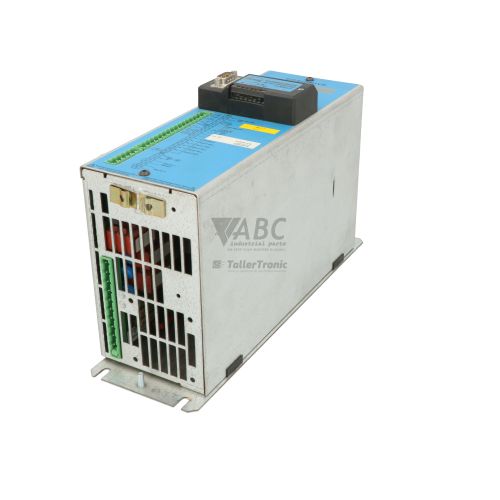
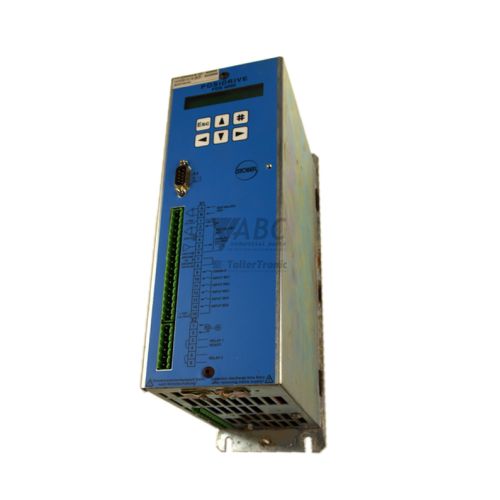
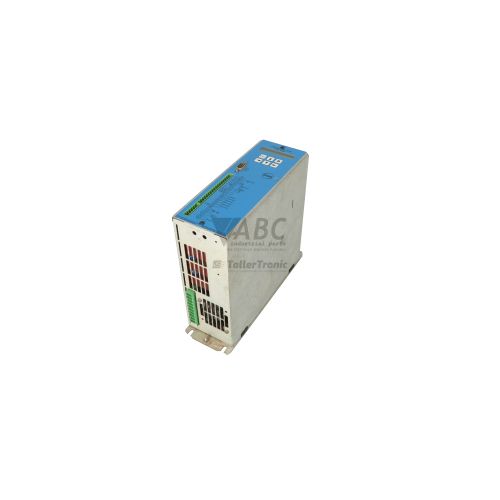
The Stöber Antriebstechnik FDS4040/B is a 4.0 kW vector-controlled frequency inverter belonging to the POSIDRIVE FDS 4000 series. Designed for precision motor control in industrial drive systems, this AC drive operates on a 380 V to 480 V AC nominal supply within a 323 V to 528 V AC operating range and supplies a continuous rated output current of 9.5 A, with a peak overload capacity of 14.3 A for up to 60 seconds. The unit features standard vector control architecture suitable for driving both three-phase asynchronous induction motors and dynamic synchronous servo motors across an output frequency range of 0 to 400 Hz. Key hardware features include an integrated Class A EMC filter for radio interference suppression and an integrated braking chopper, designated by the /B model suffix, which enables direct connection to an external braking resistor for dynamic deceleration.
Connecting and installing a replacement FDS4040/B drive requires matching physical wiring and properly restoring device parameters. The drive is equipped with standard 24 V DC digital inputs and outputs, differential analog inputs, an RS232 programming port, and option card slots supporting fieldbus communication via optional plug-in modules such as PROFIBUS-DP (PDP 4000), CANopen (CAN 4000), or EtherCAT (ECA 4000). A replacement inverter cannot run on factory defaults in a programmed machine line; configuration parameter sets must be loaded prior to operation. Transferring settings is simplified by using the removable PAR 4000 parameter memory module, which permits direct zero-PC parameter cloning from the donor unit, or by transferring parameter backups via the POSITOOL PC commissioning software. Technical support from ABC Industrial Parts can assist in verifying hardware option compatibility and backing up parameter sets during replacement.
Diagnostic information is visible directly on the drive faceplate via a dual-color Ready / Fault LED, where solid green indicates normal operation and solid or blinking red highlights fault or warning conditions. Comprehensive diagnostics and numerical fault codes, such as E01 for overcurrent or E02 for DC bus overvoltage, are accessible via the optional ASP 4001 keypad display or within the diagnostic screens and fault history log of POSITOOL software. Basic field troubleshooting includes inspecting 3-phase mains supply voltage across all phases, verifying motor cable and winding insulation, checking external brake resistor connections, and confirming option board seating. When diagnostics indicate internal hardware failures, EEPROM corruption (E11), or power stage faults (E12), internal components are not field-serviceable, and sourcing a tested replacement unit or utilizing repair services through ABC Industrial Parts provides the fastest solution to restore production.
Technical Specifications
| Manufacturer | Stöber Antriebstechnik |
| Part Number | FDS4040/B |
| Model / Type | POSIDRIVE FDS 4000 |
| Component Type | Frequency Inverter |
| Rated Power | 4 kW |
| Supply Voltage | 400 V AC |
| Supply Voltage Range | 323 - 528 V AC |
| Rated Output Current | 9.5 A |
| Maximum Output Current | 14.3 A |
| Output Frequency Range | 0 - 400 Hz |
| Switching Frequency | 4 kHz |
| Brake Chopper | Integrated |
| EMC Suppression Filter | Integrated Class A |
Programming and Configuration
The POSIDRIVE FDS 4000 series utilizes the POSITOOL PC software suite as its primary engineering tool for commissioning, parameter adjustment, and diagnostic analysis. Connecting a PC via the integrated RS232 serial interface allows service technicians to configure motor parameter profiles, adjust vector control loop gains, set acceleration and deceleration ramps, and monitor live drive telemetry.
For field replacement without requiring a PC on the factory floor, the drive features a slot for the PAR 4000 removable parameter memory card. When inserted into a functional drive, parameter sets can be saved directly to the card and subsequently inserted into a replacement unit to clone full operating parameters instantly. Alternatively, the optional ASP 4001 plug-in keypad display provides manual parameter access and status viewing directly on the front panel of the drive.
Communication and System Integration
The Stöber FDS4040/B inverter includes standard physical control interfaces for centralized automation architectures. It features 24 V DC digital inputs and outputs for run, stop, limit switch, and status feedback, along with differential analog inputs for external velocity or torque reference signals.
For fieldbus network integration, the unit supports modular expansion slots that accept optional plug-in communication cards. Supported expansion options include the PDP 4000 module for PROFIBUS-DP networks, the CAN 4000 module for CANopen fieldbus systems, and the ECA 4000 module for EtherCAT networks, enabling direct integration into high-speed PLC control loops and distributed drive networks.
Diagnostics and Status Indication
System health and operational status are monitored continuously by internal control routines and indicated on the front panel by a combined Ready / Fault LED. A solid green light signifies normal operational status, whereas solid red or blinking red states alert operators to active faults or warning conditions.
Detailed fault identification is accomplished using the ASP 4001 keypad module, which displays exact alphanumeric error codes (E01 through E18), or by connecting to POSITOOL software to review the internal fault history register and live diagnostic screens.
Status LED Indicators
| LED | Color/Status | Meaning |
|---|---|---|
| Ready / Fault LED | Green / Red - Solid Green / Red or Blinking Red | Green indicates normal operational state; Red or blinking red indicates fault or warning condition. |
Replacement and Spare Part Considerations
When replacing an existing drive with a spare Stöber FDS4040/B, ensure that the full part number matches completely, specifically noting the /B suffix. The /B designation indicates the presence of the internal brake chopper circuit necessary for dynamic braking applications using external resistors.
Before putting a replacement unit into service, parameter configuration must be transferred from the original unit. This can be accomplished rapidly by swapping the removable PAR 4000 parameter memory card into the replacement drive or by downloading the machine parameter backup file using POSITOOL software over the RS232 port. Additionally, if optional fieldbus cards such as PDP 4000, CAN 4000, or ECA 4000 are fitted, transfer the option module and verify fieldbus node switch addressing and network termination.
Error Codes & Fault Codes
The following error codes may be displayed during operation or diagnostics:
| Code | Name | Description | Possible Cause | Recommended Action |
|---|---|---|---|---|
| E01 | Overcurrent | Overcurrent detected in inverter output stage. | Short circuit at motor output, ground fault, acceleration time too short, motor incorrectly dimensioned or defect. | Check motor cable and winding insulation; increase acceleration ramp times; check motor load. |
| E02 | Overvoltage DC link | DC bus voltage exceeds maximum limit. | Deceleration time too short, excessive regenerative energy, braking chopper or braking resistor disconnected or defective. | Increase deceleration ramp time; check braking resistor connections and braking chopper circuit. |
| E03 | Undervoltage DC link | DC bus voltage drops below minimum operational threshold. | Mains supply failure, transient supply voltage dip, line phase missing, input fuse blown. | Check main power supply lines, fuses, and line switch voltage levels. |
| E04 | Overtemperature Heatsink | Inverter heatsink temperature limit exceeded. | Ambient temperature too high, fan failure, dirty or blocked heatsink cooling fins, insufficient enclosure ventilation. | Clean heatsink, ensure adequate cooling airflow, verify cabinet fan function. |
| E05 | Overtemperature Motor | Motor thermistor/PTC contact triggered or motor thermal model limit exceeded. | Motor overloaded, mechanical jam, motor cooling fan defective. | Allow motor to cool down, inspect load mechanism, verify PTC wiring and motor cooling. |
| E06 | I2t Motor Overload | Calculated motor load integral exceeds allowable thermal limit. | Continuous motor operation above rated torque level. | Reduce mechanical load or re-evaluate motor drive sizing. |
| E07 | I2t Inverter Overload | Inverter thermal load capacity exceeded. | Excessive continuous load current at low motor speeds or high switching frequency. | Reduce switching frequency or decrease load duty cycle. |
| E08 | Ground Fault | Earth current detected on output phase. | Ground fault in motor leads, breakdown of insulation in motor winding. | Check motor cables and motor stator windings with megohmmeter. |
| E09 | Brake Chopper / Resistor Fault | Braking transistor overload or brake resistor circuit fault. | Brake resistor resistance value too low, short circuit in brake resistor cable, damaged brake chopper. | Verify braking resistor value and cabling. Internal hardware failure — if brake transistor shorted, return unit for repair. |
| E10 | Phase Loss | Loss of one input power phase. | Blown main fuse, loose power terminal connection, unstable main supply network. | Check input wiring and main fuses for all three input phases. |
| E11 | EEPROM / Parameter Fault | Checksum error during reading parameter data from internal EEPROM. | Power failure during write cycle, EEPROM corrupted or defective. | Reload factory defaults or re-upload project parameters via POSITOOL. If error persists, internal memory failure — return unit for repair. |
| E12 | Hardware Fault / Internal Error | Internal diagnostic failure in power board or control circuit. | Internal component defect, microprocessor fault, corrupted microcode. | Internal hardware fault — power cycle unit. If error recurs, unit is not field-serviceable and must be returned for repair. |
| E13 | Option Module / Fieldbus Fault | Communication failure or initialization error with plug-in option module. | Option module loose, improper bus address, bus cable fault or missing bus termination. | Check option board seating, fieldbus cabling, master configuration, and terminal resistors. |
| E14 | Encoder / Feedback Fault | Speed or position encoder signal error. | Broken encoder cable, loose connector, encoder power supply fault, defective encoder. | Inspect encoder wiring, shield connection, and encoder signals. |
| E15 | Following Error | Position deviation between command and actual position exceeds limit. | Mechanical blockage, gain settings too low, excessive acceleration demand. | Check mechanical drive train; verify gain settings and acceleration profiles. |
| E16 | Limit Switch Triggered | Hardware position limit switch activated. | Machine axis moved past software soft-limits onto hardware switch. | Move axis back into valid travel range using manual operation mode. |
| E17 | Emergency Stop Triggered | Emergency stop signal open on digital input control. | E-Stop circuit opened. | Reset emergency stop circuit and send fault reset signal. |
| E18 | Safety Relay Open / STO Active | Safety contact (STC/STO switch) open. | Safety circuit tripped or loose wiring on safety input circuit. | Verify safety circuit integrity and close safety circuit contacts. |
Frequently Asked Questions
What does the /B suffix in the Stöber FDS4040/B part number signify?
The /B suffix indicates that the inverter includes an integrated braking chopper circuit, allowing the drive to connect directly to an external braking resistor for dynamic deceleration.
How can I transfer parameters to a replacement FDS4040/B inverter without a PC?
You can clone parameters by transferring the removable PAR 4000 parameter memory card from the original drive to the replacement unit, transferring configuration settings directly without needing POSITOOL software.
What motor types can be controlled by the POSIDRIVE FDS 4000 series?
The FDS4040/B utilizes vector control architecture that supports both standard three-phase asynchronous induction motors and high-performance synchronous servo motors.
Which optional fieldbus communication modules are compatible with this drive?
The drive supports plug-in expansion modules including the PDP 4000 for PROFIBUS-DP, CAN 4000 for CANopen, and ECA 4000 for EtherCAT networks.
What should I check if fault code E02 appears on the drive display?
Fault E02 indicates a DC link overvoltage. Check that deceleration ramp times are not too short, verify external braking resistor connections, and check the functionality of the braking chopper circuit.
Take advantage of our exchange formula
A defective product does not have to be worthless. At ABC Industrial Parts, you can hand in defective products and immediately benefit from a discount on your new purchase. This is a smart way to save money while contributing to a circular economy.
Play it safe with our warranty conditions
Industrial plants prefer to keep running invariably, no matter what. Therefore, it is essential that you can rely on high-quality products and/or sustainable repairs. With our warranty conditions, you can count on certainty, whether you choose new, used or repaired products.
Data backup and recovery
Have you lost valuable parameters or data due to a malfunction while the manufacturer no longer provides support? At ABC Industrial Parts, we help you secure this data, both for common and specific products.
Specific firmware and hardware versions
If you are working with specific hardware or firmware versions that are no longer available from the manufacturer, ABC Industrial Parts is your partner. When making your enquiry, clearly state which versions you need, we will then look at the possibilities of supplying those versions, so that your installations continue to function optimally.
Disclaimer:
We are not an authorised distributor of Stöber Antriebstechnik.
Product photos are for illustration purposes only and may differ from the actual product delivered.
Some of the content on this page was created with the help of AI. While we strive to provide accurate and up-to-date information, errors may occur.