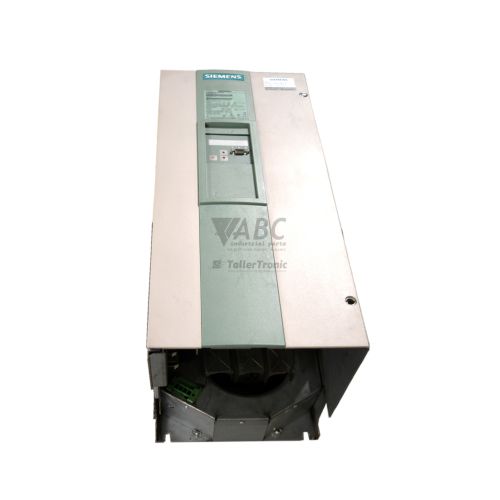
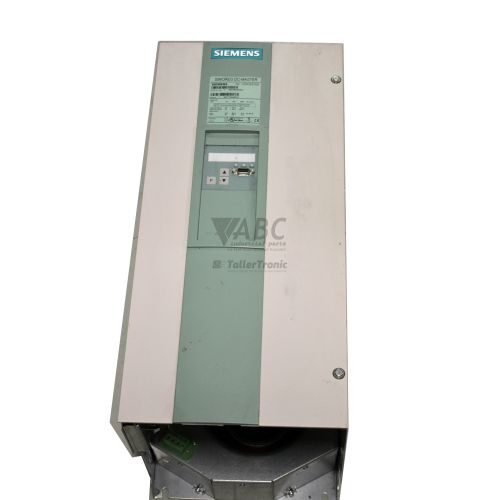
Siemens 6RA7085-6FV62-0-Z SIMOREG DC-Master Power Converter



Het item werd toegevoegd aan uw offerteaanvraag
Product Information
The Siemens 6RA7085-6FV62-0-Z is a fully digital microprocessor-controlled DC power converter from the SIMOREG DC-MASTER 6RA70 series. Built for high-power industrial applications such as extrusion lines, metal rolling mills, cranes, and material handling systems, this open-chassis IP00 unit operates across four power quadrants to enable precise speed and torque control with full regenerative braking energy recovery back into the supply grid. Mains power is supplied via a 3-phase 575 V AC armature connection to deliver a rated 680 V DC armature output at up to 600 A continuous current, providing an armature output power of 408 kW. This drive is complemented by a 400 V AC field supply connection rated for 30 A DC output and features factory option package Z=G94+D64+S00+K01+K11, integrating communication, expansion I/O, and internal technology software function blocks directly into the CUD1 control architecture.
Integrating a replacement converter into an operating system requires matching the installed option board configuration and reloading drive parameter sets. Fieldbus communication is provided by the installed CBP2 PROFIBUS DP board under option G94, supporting network transmission speeds up to 12 Mbit/s, while options K01 and K11 equip the drive with expansion terminal modules EB1 and EB2 for additional analog and digital signal channels. Because replacing a converter involves transferring specific motor tuning, field excitation, and application parameters, the drive cannot function on factory defaults alone. Parameter backup files can be reloaded using Siemens STARTER or DriveMonitor software over a diagnostic connection, or loaded directly using an OP1S handheld operator panel (part number 6SE7090-0XX84-2FK0). For facilities facing parameter extraction issues on faulty control electronics, ABC Industrial Parts can assist with configuration transfer and donor unit preparation.
Operating conditions and fault status are displayed directly on the unit's front PMU 7-segment display panel, accompanied by status LEDs on the CUD1 main board that indicate operational status and fieldbus activity. Active faults generate red F status codes on the PMU display, while warnings appear as yellow A alarm codes, both of which can be investigated further in parameter r047 for fault code values and parameter r049 for time stamps. Initial field diagnostics should confirm line voltage balance across armature input terminals U1, V1, W1 and field supply terminals C1/D1, alongside checking pulse generator wiring and motor thermal sensors. Internal switch-mode power supply failures, processor self-test faults, or non-volatile EEPROM checksum errors on the CUD1 board represent hardware degradation that cannot be serviced on site; replacing the CUD1 board or installing a tested exchange converter from ABC Industrial Parts provides a direct route to restoring production uptime.
Technical Specifications
| Manufacturer | Siemens |
| Part Number | 6RA7085-6FV62-0-Z |
| Model / Type | SIMOREG DC-MASTER Base Converter |
| Product Family | SIMOREG |
| Series | SIMOREG DC-MASTER 6RA70 |
| Component Type | DC Power Converter |
| Armature AC Supply Voltage | 575 V AC |
| Rated DC Armature Voltage | 680 V DC |
| Rated DC Armature Current | 600 A |
| Field AC Supply Voltage | 400 V AC |
| Rated Field DC Current | 30 A |
| Armature Power Output | 408 kW |
| Operating Quadrants | 4 |
| Fieldbus Protocol | PROFIBUS DP |
| Protection Rating | IP00 |
Programming and Configuration
Drive parameterization for the Siemens 6RA7085-6FV62-0-Z is conducted using Siemens STARTER or DriveMonitor software, or locally via the pluggable OP1S operator keypad. The internal CUD1 microprocessor utilizes dedicated parameter addresses to configure motor nameplate values, armature and field current limits, acceleration/deceleration ramp generators, and speed controller feedback loops. Performing a factory reset is executed by setting parameter P051 to 21, clearing customized settings before writing a verified configuration profile.
Option S00 activates internal technology software function blocks directly within the converter architecture. This feature allows technicians to execute complex closed-loop control routines, mathematical operations, and localized motion sequences within the drive microprocessor, reducing the processing burden on the central PLC. All user parameters are stored in non-volatile EEPROM memory to prevent data loss during power cycles.
Communication and System Integration
Fieldbus communication across industrial networks is managed by the CBP2 PROFIBUS DP interface board installed under option G94. Operating at transmission rates up to 12 Mbit/s, the module supports standard PROFIBUS DP control profiles, enabling high-speed transmission of control words, speed setpoints, operating status, and cyclic diagnostic data between the converter and a master PLC.
To expand the converter's physical I/O interface capability, option codes K01 and K11 equip the drive with expansion terminal modules EB1 and EB2. These option cards supply additional digital inputs, digital outputs, analog inputs, and analog outputs directly on the drive chassis, allowing direct connection of limit switches, auxiliary feedback sensors, and external reference signals without needing extra remote I/O hardware.
Diagnostics and Status Indication
The SIMOREG 6RA70 converter provides comprehensive diagnostic capabilities via front-panel displays and internal parameters. The PMU 7-segment display gives immediate visual alerts for active operational states, warnings, and trip conditions. For detailed fault evaluation, parameter r047 stores active and historical fault codes, while parameter r049 records the corresponding fault time stamp. Real-time signal tracing and status register monitoring can also be performed via STARTER or DriveMonitor software.
Status LED Indicators
| LED | Color/Status | Meaning |
|---|---|---|
| PMU Fault Display | Red - F status code display | Fault indicator active on front panel 7-segment display |
| PMU Alarm Display | Yellow - A status code display | Alarm indicator active on front panel 7-segment display |
| CUD1 Status LEDs | Green/Red - Solid / Flashing | Indicates CUD1 board operational state and fieldbus communication activity |
Replacement and Spare Part Considerations
When replacing an existing Siemens 6RA7085-6FV62-0-Z unit, verifying the exact option code suffix Z=G94+D64+S00+K01+K11 is essential. Ensuring that substitute units contain matching CBP2 PROFIBUS DP modules and EB1/EB2 terminal expansion cards prevents field bus communication mismatches and wiring discrepancies during installation.
Prior to putting a replacement converter into service, drive parameters must be loaded from a saved backup file using DriveMonitor, STARTER, or an OP1S operator keypad. For long-term facility modernization, this drive design directly maps to the Siemens SINAMICS DCM successor series under part number 6RA8085-6FV22-0AA0.
Error Codes & Fault Codes
The following error codes may be displayed during operation or diagnostics:
| Code | Name | Description | Possible Cause | Recommended Action |
|---|---|---|---|---|
| F001 | Failure of internal supply voltage | Internal power supply voltage failed or fell below tolerance limit during operation. | Fault on CUD1 control board or power supply board switch-mode power supply. | Check line supply; if supply is correct, internal hardware fault is present — requires service or replacement of CUD1 board / unit. |
| F004 | Phase failure in armature supply | Armature supply voltage phase missing, voltage imbalance, or line frequency out of range. | Blown input fuse, loose line wire connection, or mains contactor failure. | Check AC line fuses, line voltage levels on terminals U1, V1, W1, and mains contactor. |
| F005 | Fault in field supply | Field line voltage failure or current feedback loop interrupted. | Field supply AC voltage missing or field circuit wiring open. | Check supply voltage on terminals C1/D1, verify field winding continuity and fuses. |
| F006 | Undervoltage in armature supply | Armature line voltage dropped below threshold setting (P078). | Mains supply brownout or temporary line collapse under load. | Check AC supply network and line transformer settings. |
| F007 | Overvoltage in armature supply | Armature line supply voltage exceeded upper threshold limit. | Line voltage surge or incorrect transformer tapping. | Check mains line voltage stability and parameter P078 nominal setting. |
| F011 | Interruption of field current | Actual field current fell below minimum threshold (P394) while field reference was active. | Open field winding on motor, field cable broken, or field controller output stage damaged. | Inspect DC motor field circuit connections and measure field resistance. |
| F030 | Speed controller / pulse generator monitoring | Deviation between actual speed feedback (encoder/tacho) and speed setpoint or current limits exceeded expected limit. | Encoder cable failure, inverted encoder signals, mechanical blockage, or tachometer failure. | Check encoder wiring, encoder channel pulses, coupling, and mechanical load. |
| F038 | Overspeed fault | Actual measured speed exceeded maximum threshold limit (P596/P597). | Field loss, runaway motor condition, incorrect speed feedback calibration. | Check field current, motor load, and speed controller parameter tuning. |
| F040 | Converter overtemperature | Power module / heatsink temperature exceeded maximum permissible limit. | Cooling fan failed, heatsink clogged with dirt, ambient temperature too high, or excessive overload. | Inspect heatsink fans, clean ventilation channels, check cabinet ambient environment. |
| F042 | Motor overtemperature | Motor temperature sensor (PTC/KTY84) detected overtemperature or thermal model tripped. | Motor overload, blocked motor cooling, or sensor fault. | Check motor current load, fan operation on motor, and thermal sensor connections. |
| F050 | Internal hardware failure / CUD1 failure | Microprocessor self-test or memory check failed. | Internal CUD1 board hardware fault, corrupted firmware, or damaged component. | Internal hardware failure — replace CUD1 control board or entire converter unit. |
| F052 | EEPROM checksum fault | Data corruption detected when reading parameter values from internal non-volatile EEPROM memory. | Power failure during parameter store write sequence or worn EEPROM chip. | Perform factory reset (P051=21) and restore parameter backup. If fault persists, replace CUD1 board. |
Frequently Asked Questions
What are the main power ratings for the 6RA7085-6FV62-0-Z converter?
The converter operates on a 3-phase 575 V AC armature supply to deliver a 680 V DC armature output at 600 A, providing 408 kW of armature power output. The field circuit connects to a 400 V AC supply and supplies up to 30 A DC.
Which option modules are included in option code Z=G94+D64+S00+K01+K11?
This option package includes the CBP2 PROFIBUS DP interface board (Option G94), expansion terminal modules EB1 (Option K01) and EB2 (Option K11), and activated S00 technology software function blocks.
How are parameters transferred to a replacement SIMOREG unit?
Parameter sets are backed up and reloaded using Siemens STARTER or DriveMonitor software via a serial connection, or downloaded directly using an OP1S handheld operator panel (6SE7090-0XX84-2FK0).
What causes fault code F004 and how is it resolved?
Fault F004 indicates a phase failure in the armature AC supply caused by a blown line fuse, loose wiring on terminals U1, V1, or W1, or a tripped mains contactor. Check incoming line fuses, mains contactors, and terminal connections.
What is the recommended modern replacement series for this drive?
For complete plant modernization, this model maps directly to the Siemens SINAMICS DCM successor series under part number 6RA8085-6FV22-0AA0.
Take advantage of our exchange formula
A defective product does not have to be worthless. At ABC Industrial Parts, you can hand in defective products and immediately benefit from a discount on your new purchase. This is a smart way to save money while contributing to a circular economy.
Play it safe with our warranty conditions
Industrial plants prefer to keep running invariably, no matter what. Therefore, it is essential that you can rely on high-quality products and/or sustainable repairs. With our warranty conditions, you can count on certainty, whether you choose new, used or repaired products.
Data backup and recovery
Have you lost valuable parameters or data due to a malfunction while the manufacturer no longer provides support? At ABC Industrial Parts, we help you secure this data, both for common and specific products.
Specific firmware and hardware versions
If you are working with specific hardware or firmware versions that are no longer available from the manufacturer, ABC Industrial Parts is your partner. When making your enquiry, clearly state which versions you need, we will then look at the possibilities of supplying those versions, so that your installations continue to function optimally.
Disclaimer:
We are not an authorised distributor of Siemens.
Product photos are for illustration purposes only and may differ from the actual product delivered.
Some of the content on this page was created with the help of AI. While we strive to provide accurate and up-to-date information, errors may occur.