Lenze 00410629 E82ZAFS001 System Bus CAN Module


Het item werd toegevoegd aan uw offerteaanvraag
Product Information
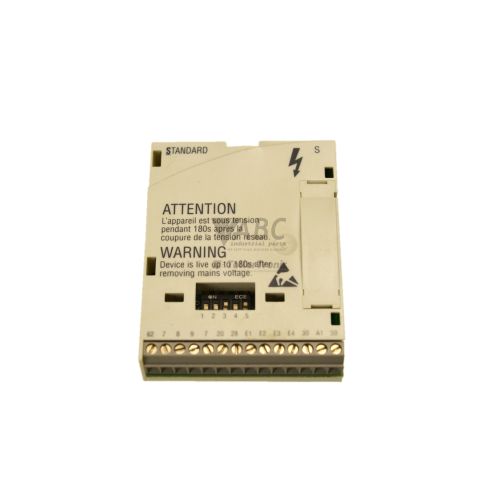
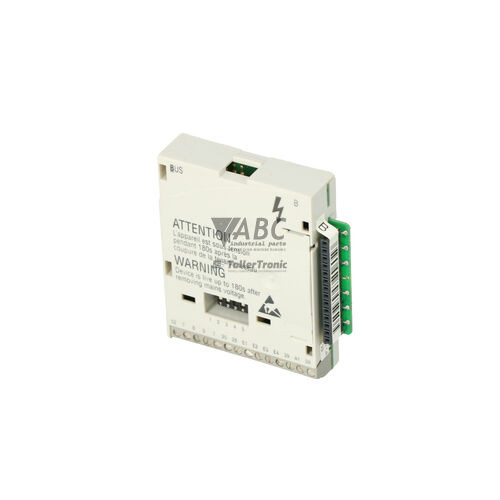
The Lenze 00410629 E82ZAFS001 is a System Bus CAN function module designed for direct integration into Lenze 8200 vector and 8200 motec frequency inverters. Operating as a communication interface on ISO 11898 standard CAN networks, this module connects directly to the host drive Function Interface (FIF) slot via a multi-pin system header. Power is derived internally from the host inverter, eliminating the need for external power wiring. Supporting configurable transmission speeds from 20 kbit/s to 500 kbit/s in a line topology, the unit facilitates rapid speed and torque synchronization between drives as well as high-speed integration with centralized machinery controllers.
Fieldbus connections are established using pluggable screw terminals for CAN-High, CAN-Low, and shield wiring. Commissioning a replacement unit requires configuring communication parameters and node addresses stored in host drive memory, which can be accessed through Lenze Global Drive Control (GDC) software or the E82ZBC00 Keypad / Operating Module XT. Because node settings, baud rates, and PDO timeout parameters are saved on the inverter, replacing a damaged module involves seating the spare into the FIF slot and verifying network parameter alignments. When replacing failed interface hardware on existing lines, ABC Industrial Parts provides tested replacement units to quickly restore network communications.
System status and fieldbus health are monitored through onboard LEDs and diagnostic parameters C0158 and C0168. A green CAN-RUN LED indicates pre-operational or active system bus status, while a red CAN-ERR LED highlights transmission errors, bus-off conditions, or missing line termination. Field errors like missing 120 Ohm termination resistors or incorrect node addresses generate trip codes CE0 through CE4 for PDO communication timeouts. If the host inverter reports an H05 FIF hardware error that persists after turning off power and reseating the unit, an internal hardware failure has occurred. In such cases, replacing the board with a tested spare unit from ABC Industrial Parts offers a dependable path back to full production.
Technical Specifications
| Manufacturer | Lenze |
| Part Number | 00410629 |
| Model/Type | E82ZAFS001 |
| Component Type | Communication Module |
| Product Family | 8200 vector |
| Protocol | Lenze System Bus (CAN / ISO 11898) |
| Minimum Transmission Speed | 20 kbit/s |
| Maximum Transmission Speed | 500 kbit/s |
| Bus Topology | Line structure |
| Termination Resistor | 120 Ohm |
| Power Supply | Internal via host inverter FIF slot |
| Host Interface Connector | Multi-pin plug-in FIF system header |
| Fieldbus Connection | Pluggable screw terminal block |
Programming and Configuration
Parameterization and functional tuning of the Lenze 00410629 E82ZAFS001 module are handled directly through the host drive using Lenze Global Drive Control (GDC) engineering software or an E82ZBC00 Keypad / Operating Module XT. The communication parameters, node ID assignments, and network baud rates are retained in the memory of the host Lenze 8200 vector or 8200 motec inverter rather than on the module itself.
Key diagnostic and operational configuration codes include parameter C0158 and C0168 for querying system bus activity and status. Additionally, parameter C0357 governs process data monitoring and timeout thresholds for Process Data Objects (PDO1 through PDO4). Setting appropriate timeout values ensures that loss of network synchronization or master transmission failures immediately trigger protective fault routines within the drive.
Communication and System Integration
The E82ZAFS001 operates according to the ISO 11898 standard for CAN fieldbus systems in a line structure bus topology. Designed for deterministic drive-to-drive communication and master controller integration, it supports transmission speeds between 20 kbit/s and 500 kbit/s. Physical connection to the network is established via a pluggable screw terminal block providing dedicated terminals for CAN-High, CAN-Low, and shield connections.
Proper network integration requires fitting a 120 Ohm termination resistor at both physical ends of the CAN bus line to prevent signal reflection. The module relies on process data transmission structures using PDO1 through PDO4, enabling real-time speed, torque, and command transfer across coordinated multi-drive automation equipment such as packaging machinery and conveyor systems.
Diagnostics and Status Indication
Visual status indication on the E82ZAFS001 module is provided by two onboard front panel LEDs labeled CAN-RUN and CAN-ERR. The green CAN-RUN LED indicates power supply status, pre-operational state, or active system bus operation. The red CAN-ERR LED illuminates or flashes during telegram errors, CAN warning conditions, missing line termination, or full bus-off failure states.
Detailed network analysis can be performed by reading parameters C0158 and C0168 via GDC software or the XT Keypad module. System errors trigger specific fault trip codes on the drive controller, allowing maintenance staff to differentiate between physical cable interruptions, timeout errors, and hardware interface seating faults.
Status LED Indicators
| LED | Color/Status | Meaning |
|---|---|---|
| CAN-RUN | Green - Off / Blinking / Solid | Off = No power or internal module fault; Blinking = Pre-operational state; On = System bus operational |
| CAN-ERR | Red - Off / Blinking / Solid | Off = No communication error; Blinking = CAN warning state / telegram errors; On = Bus-Off state, line error, or missing termination |
Replacement and Spare Part Considerations
When replacing an existing Lenze E82ZAFS001 module, ensure that the power to the host 8200 vector or 8200 motec inverter is completely isolated before inserting or removing the hardware from the Function Interface (FIF) slot. The module plugs directly into the multi-pin system header inside the slot.
Because operational parameters and network settings reside in the host inverter memory, installing a replacement module generally does not require downloading new firmware to the board itself. However, matching the physical baud rate, line termination, and pluggable screw terminal wiring (CAN-High, CAN-Low, Shield) is required to establish communication upon power-up.
If the host drive indicates an H05 fault after replacing or reseating the module, verify that the header pins are clean and fully engaged. Persistent hardware errors or inability to clear a CE0 CAN-TRIP fault despite intact external cabling indicate a module failure requiring a hardware replacement.
Error Codes & Fault Codes
The following error codes may be displayed during operation or diagnostics:
| Code | Name | Description | Possible Cause | Recommended Action |
|---|---|---|---|---|
| CE0 | CAN-TRIP | System bus communication failure / Bus-Off state | Bus line interrupted, bad connection, incorrect baud rate setting, missing 120 Ohm line termination, or duplicate node address. | Check wiring, bus termination, baud rate parameters, and cable shielding. If wiring is intact and fault persists on valid network, internal interface board failure may require module replacement. |
| CE1 | CAN Time-out PDO1 | Process Data Object 1 communication time-out | Master device stopped sending CAN telegrams or cycle time exceeded monitor timeout threshold. | Verify host controller (PLC) cycle timing, check network traffic and timeout monitoring setting in parameter C0357. |
| CE2 | CAN Time-out PDO2 | Process Data Object 2 communication time-out | Master device stopped sending PDO2 telegrams or node cable disconnected. | Check master application program and CAN connection to node. |
| CE3 | CAN Time-out PDO3 | Process Data Object 3 communication time-out | PDO3 telegram expected by drive was not received within the configured monitoring time. | Inspect CAN transmitter configuration and signal line integrity. |
| CE4 | CAN Time-out PDO4 | Process Data Object 4 communication time-out | PDO4 telegram failure or missing node heartbeat. | Check master node transmission cycles and bus cable continuity. |
| H05 | FIF Fault / Hardware Error | Fault in Function Interface (FIF) module slot | Module incorrectly seated in FIF slot, corrupted contact pins, or hardware defect in function module. | Power off, remove and re-seat E82ZAFS001 module. Replace module if fault recurs after reseating. |
Frequently Asked Questions
How is the Lenze 00410629 E82ZAFS001 communication module installed and powered?
The E82ZAFS001 module installs directly into the Function Interface (FIF) slot on Lenze 8200 vector and 8200 motec frequency inverters via a multi-pin system header. It derives its power directly from the host inverter, requiring no external power supply wiring.
What software or keypad is used to configure parameters on the E82ZAFS001?
Parameters are configured through the host drive using Lenze Global Drive Control (GDC) software or the Lenze E82ZBC00 Keypad / Operating Module XT.
What transmission speeds are supported by the E82ZAFS001 CAN module?
The module supports configurable transmission speeds ranging from 20 kbit/s up to 500 kbit/s operating on an ISO 11898 standard CAN system bus in a line topology.
What do the CAN-RUN and CAN-ERR LEDs indicate?
The green CAN-RUN LED indicates power, pre-operational state (blinking), or active bus operation (solid). The red CAN-ERR LED indicates no errors (off), CAN warning or telegram errors (blinking), or bus-off states, line errors, and missing termination (solid).
How do I resolve a CE0 CAN-TRIP fault code?
A CE0 trip indicates a bus failure or bus-off state. Check the signal wiring, ensure 120 Ohm termination resistors are present at the ends of the bus line, verify baud rates and duplicate node addresses, and confirm shield grounding. If the bus is verified and the fault persists, the module hardware may need replacement.
What should I do if the inverter displays an H05 fault code?
An H05 fault indicates an issue in the Function Interface (FIF) slot. Turn off power to the inverter, remove the E82ZAFS001 module, check contact pins for damage or corrosion, and firmly re-seat the module. If the fault reappears after restoration of power, replace the function module.
Take advantage of our exchange formula
A defective product does not have to be worthless. At ABC Industrial Parts, you can hand in defective products and immediately benefit from a discount on your new purchase. This is a smart way to save money while contributing to a circular economy.
Play it safe with our warranty conditions
Industrial plants prefer to keep running invariably, no matter what. Therefore, it is essential that you can rely on high-quality products and/or sustainable repairs. With our warranty conditions, you can count on certainty, whether you choose new, used or repaired products.
Data backup and recovery
Have you lost valuable parameters or data due to a malfunction while the manufacturer no longer provides support? At ABC Industrial Parts, we help you secure this data, both for common and specific products.
Specific firmware and hardware versions
If you are working with specific hardware or firmware versions that are no longer available from the manufacturer, ABC Industrial Parts is your partner. When making your enquiry, clearly state which versions you need, we will then look at the possibilities of supplying those versions, so that your installations continue to function optimally.
Disclaimer:
We are not an authorised distributor of Lenze.
Product photos are for illustration purposes only and may differ from the actual product delivered.
Some of the content on this page was created with the help of AI. While we strive to provide accurate and up-to-date information, errors may occur.