Parker SLVD5ND Servo Drive – SLVD5N D Digital Motion Controller



Het item werd toegevoegd aan uw offerteaanvraag
Product Information
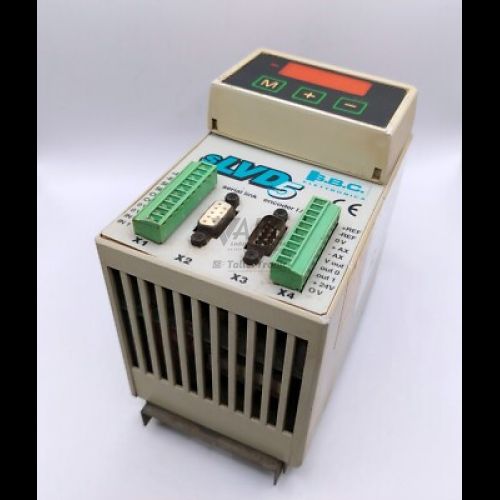
The Parker SLVD5ND is a compact single-axis digital servo drive designed for precise speed, position, and torque control of permanent magnet AC brushless servomotors. Operating from a single-phase or three-phase 200 VAC to 240 VAC power supply, the drive provides a rated power output of 2.3 kVA, delivering 5 A continuous RMS output current with peak current capabilities up to 10 A RMS for high-dynamic acceleration cycles. As part of the Parker SLVD-N series (model type SLVD5N D), this compact controller is engineered to reduce electrical cabinet panel footprint while maintaining robust power delivery and closed-loop motion performance with resolver motor feedback.
To integrate into machine control architectures, the SLVD5ND features an integrated CANopen fieldbus interface supporting DS301 and DSP402 profiles for multi-axis motion control, alongside an RS422 and RS485 serial communication port using the Parker SB-BUS protocol over an RJ45 connector. The drive provides four opto-isolated 24 VDC digital inputs, two 24 VDC digital outputs, one differential ±10 V analog input with 14-bit resolution, and two ±10 V analog outputs for external monitoring. Commissioning or replacing a drive in production requires uploading the specific application parameters stored in non-volatile EEPROM memory. Using Parker MotionConfig PC software, maintenance technicians can quickly backup and transfer configuration files from an existing unit to a spare drive, with technical support available from ABC Industrial Parts to verify parameter transfers and connection settings.
Real-time operating conditions and alarm states are indicated via a front-panel 7-segment display that shows system readiness, active state codes, and fault numbers. When troubleshooting machine interlocks or motion faults, initial checks should focus on AC main supply lines, resolver connector seating, CANopen bus termination, and motor phase wiring. Internal power stage failures or unrecoverable memory errors indicate internal hardware damage that cannot be serviced in the field; in these instances, sourcing a fully tested replacement drive or sending the unit to ABC Industrial Parts for professional repair provides the fastest path to restoring production.
Technical Specifications
| Manufacturer | Parker |
| Part Number | SLVD5ND |
| Model / Type | SLVD5N D |
| Product Family | SLVD-N |
| Component Type | Servo Drive |
| Supply Voltage | 200 - 240 V AC |
| Continuous Output Current | 5 A |
| Peak Output Current | 10 A |
| Rated Power Output | 2.3 kVA |
| Switching Frequency | 8 / 16 kHz |
| Motor Feedback Interface | Resolver |
| Fieldbus Interface | CANopen (DS301, DSP402) |
| Serial Interface | RS422 / RS485 (SB-BUS) |
| Digital Inputs | 4 (24 V DC) |
| Digital Outputs | 2 (24 V DC) |
| Analog Inputs | 1 (±10 V) |
| Analog Outputs | 2 (±10 V) |
Programming and Configuration
Configuration of the Parker SLVD5ND servo drive is performed using Parker MotionConfig PC software connected via the RS422/RS485 serial interface. The software allows technicians to configure motor parameters, adjust control loop gains, setup digital and analog I/O functions, and utilize real-time oscilloscope tools for axis tuning and system diagnostics.
All operational parameters, motor profiles, and fieldbus settings are retained in internal non-volatile EEPROM memory. This non-volatile storage ensures settings are preserved through power cycles without battery backup. When preparing a spare drive for installation, parameters can be saved to a PC file via MotionConfig and written directly to the replacement unit to duplicate factory motion profiles.
Communication and System Integration
The SLVD5ND provides distributed multi-axis communication through its integrated CANopen fieldbus interface, accessible via a standard 9-pin D-Sub connector. Supporting CANopen DS301 communication and DSP402 motion profile standards, the drive operates at baud rates up to 1 Mbps, enabling integration into central PLC or dedicated motion control networks.
Serial communication for setup, diagnostic monitoring, and point-to-point parameter control is established through an RS422/RS485 port utilizing the Parker SB-BUS protocol over an RJ45 physical connector. Motor feedback signals are captured via a dedicated 9-pin resolver interface, offering thermal stability and noise rejection in high-interference industrial environments.
Diagnostics and Status Indication
The front panel of the Parker SLVD5ND drive features a numeric/alpha 7-segment display that communicates live operational status, system readiness codes, and diagnostic fault numbers. During normal operation, the display reflects drive enable states, while an active fault condition triggers an error code prefix (Er) followed by a two-digit numeric fault identifier.
Comprehensive diagnostic monitoring is also accessible remotely via Parker MotionConfig software over the serial connection. The software provides dynamic status displays, active error logs, and real-time scope views for tracing current, velocity, and position response.
Status LED Indicators
| LED | Color/Status | Meaning |
|---|---|---|
| 7-Segment Display | Numeric / Alpha display | Displays drive status, readiness code, active state, or alarm code number. |
Replacement and Spare Part Considerations
When replacing an existing Parker SLVD5ND servo drive, ensure that the replacement hardware matches the exact part number and option suffix. The SLVD5ND includes the built-in CANopen interface (D option) and resolver feedback hardware, which must correspond to the fieldbus network cabling and servomotor feedback configuration in the host machine.
Because drive parameters are customized to the specific motor and axis mechanical profile, installing a new drive requires reloading the original configuration parameter file via Parker MotionConfig software. Before swapping hardware, back up the parameter set from the original unit's EEPROM if possible, and verify that CANopen node address switches, baud rate settings, and 120 Ohm bus termination resistors are correctly configured on the replacement drive.
Error Codes & Fault Codes
The following error codes may be displayed during operation or diagnostics:
| Code | Name | Description | Possible Cause | Recommended Action |
|---|---|---|---|---|
| Er01 | Overvoltage | DC bus voltage exceeded internal high-voltage safety limit. | Excessive deceleration energy, braking resistor disconnected or undersized, supply line surge. | Check deceleration ramps, verify external braking resistor wiring and resistance value, measure AC line voltage. |
| Er02 | Undervoltage | DC bus voltage dropped below minimum operating limit. | AC supply line phase loss, line voltage drop, power supply interruption. | Check AC main supply connection and incoming voltage lines. |
| Er03 | Overcurrent / Short Circuit | Instantaneous peak current limit exceeded on output phases. | Short circuit between motor phases or to ground, incorrect motor parameters, damaged motor winding. | Disconnect motor cables and inspect for short circuit to ground or between phases. Inspect drive power stage; if fault persists with motor disconnected, internal hardware fault requires unit repair. |
| Er04 | Motor Over-temperature | Motor thermal protection active (I2t thermal model or thermal contact). | Continuous motor overload, mechanical binding, motor thermal sensor triggered or disconnected. | Check mechanical load, motor temperature, and thermal sensor wiring. |
| Er05 | Drive Over-temperature | Drive power stage heatsink temperature exceeded maximum limit. | Inadequate cabinet ventilation, cooling fan failure, excessive ambient heat or overload. | Inspect cabinet cooling airflow, heatsink surface cleanliness, and panel operating conditions. |
| Er06 | Feedback Fault | Loss or corruption of motor feedback signal (Resolver / Encoder). | Resolver cable disconnected, wire break, electrical noise interference, faulty feedback sensor. | Check resolver/encoder cabling, connector seating, and cable shielding integrity. |
| Er07 | External Fault | External interlock input opened or active. | Safety circuit or external enable/fault signal opened. | Check external safety circuits and digital input assignment for external fault signal. |
| Er08 | EEPROM Memory Error | Checksum failure or corrupted memory data stored in non-volatile memory. | Power interrupted during parameter saving, internal EEPROM failure. | Reload factory default parameters or re-download parameters via MotionConfig. If fault cannot be cleared, internal board-level hardware failure requires return for repair. |
| Er09 | Braking Resistor Overload | Braking resistor energy absorption model exceeded thermal capacity. | Frequent dynamic braking cycles, incorrect braking resistor power parameter setting. | Increase deceleration time or install higher capacity braking resistor; verify parameter settings. |
| Er10 | Following Error / Speed Error | Position/speed tracking error exceeded programmed threshold. | Excessive mechanical load, gain tuning too low, motor stalled. | Check mechanical axis freedom, review gain settings, increase position window if appropriate. |
| Er12 | CANopen Communication Fault | Loss of CANopen network communication or bus off state. | CAN bus wire disconnection, missing bus termination resistor, node ID mismatch, bad baud rate. | Inspect CAN cabling, line termination resistors (120 Ohm), network master status, and node ID. |
Frequently Asked Questions
How do I back up and restore parameters on the Parker SLVD5ND?
Parameters are stored in non-volatile EEPROM memory and can be backed up or uploaded using Parker MotionConfig PC software via an RS422/RS485 serial cable connected to the drive's RJ45 port.
What type of motor feedback is required for the SLVD5ND drive?
The SLVD5ND is designed to interface directly with resolver feedback sensors, connected through a dedicated 9-pin connector on the drive panel.
What does an Er03 fault code indicate on the SLVD5ND display?
Er03 indicates an overcurrent or short circuit condition where peak output current limits were exceeded. This can be caused by a phase-to-phase short, ground fault in the motor cabling, damaged motor windings, or an internal power stage failure.
Which communication protocols are integrated into the SLVD5ND?
The drive features an integrated CANopen interface supporting DS301 and DSP402 motion profiles via a 9-pin D-Sub connector, as well as RS422/RS485 serial communication using Parker SB-BUS protocol.
What should I check if an Er12 error appears on the front display?
Er12 signals a CANopen communication fault. Verify the CAN bus cabling connections, verify that 120 Ohm termination resistors are present at network ends, and check that the drive's node ID and baud rate settings match the CANopen network master.
Take advantage of our exchange formula
A defective product does not have to be worthless. At ABC Industrial Parts, you can hand in defective products and immediately benefit from a discount on your new purchase. This is a smart way to save money while contributing to a circular economy.
Play it safe with our warranty conditions
Industrial plants prefer to keep running invariably, no matter what. Therefore, it is essential that you can rely on high-quality products and/or sustainable repairs. With our warranty conditions, you can count on certainty, whether you choose new, used or repaired products.
Data backup and recovery
Have you lost valuable parameters or data due to a malfunction while the manufacturer no longer provides support? At ABC Industrial Parts, we help you secure this data, both for common and specific products.
Specific firmware and hardware versions
If you are working with specific hardware or firmware versions that are no longer available from the manufacturer, ABC Industrial Parts is your partner. When making your enquiry, clearly state which versions you need, we will then look at the possibilities of supplying those versions, so that your installations continue to function optimally.
Disclaimer:
We are not an authorised distributor of Parker.
Product photos are for illustration purposes only and may differ from the actual product delivered.
Some of the content on this page was created with the help of AI. While we strive to provide accurate and up-to-date information, errors may occur.