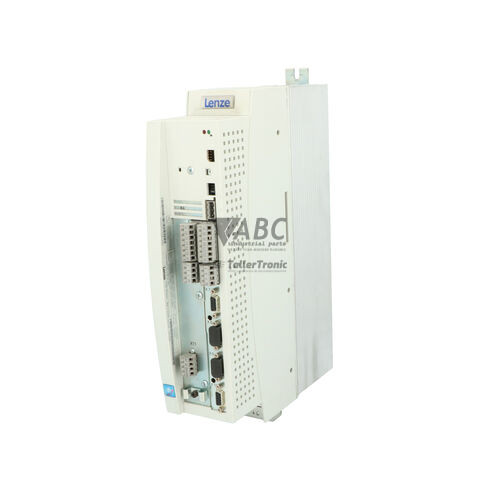
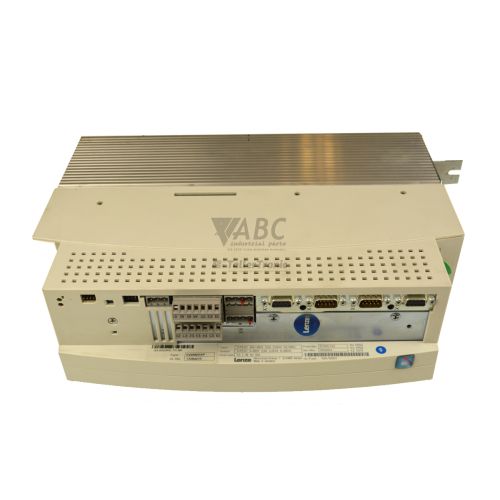
Lenze 13294257 EVS9321-EPV004 Servo Drive Controller
Het item werd toegevoegd aan uw offerteaanvraag
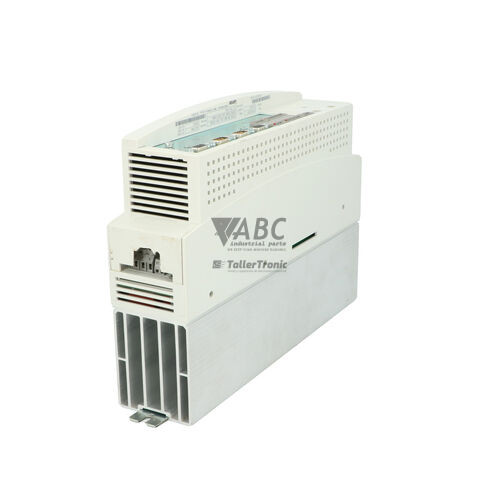
Product Information
The Lenze EVS9321-EPV004 (part number 13294257) is a panel-mount servo positioning controller from the Lenze 9300 family designed for high-precision motion control applications. Operating on a 3-phase supply range from 320 V AC to 528 V AC with a 24 V DC control supply voltage, this 0.37 kW (1.5 kVA) drive integrates speed, torque, and position management into a single unit. It provides a continuous output current of 2.5 A with a maximum peak output current of 3.75 A to accommodate dynamic accelerations and changing load conditions at an 8 kHz switching frequency.
Connecting to AC servo motors via a 9-pin Sub-D resolver feedback input, the drive also offers master frequency tracking and simulated encoder outputs for coordinated multi-axis operation. An integrated CAN system bus operating up to 500 kbps allows drive-to-drive synchronization, while the Automation Interface (AIF) slot supports fieldbus modules such as PROFIBUS-DP (EMF2133IB), INTERBUS (EMF2102IB), and DeviceNet (EMF2173IB). Bringing a replacement unit into service requires matching the non-volatile internal EEPROM configuration, which stores up to four independent parameter sets. Parameters can be copied using the EMF2101IB Keypad XT or uploaded using Lenze Global Drive Control (GDC) software via the EMF2177IB PC System Bus Adapter, with expert assistance available through ABC Industrial Parts for parameter transfer and unit substitution.
System status is monitored through three diagnostic LEDs indicating drive ready status, active drive faults, and system bus activity. Further diagnostic details are available by accessing the error code log memory in parameter code C0168 using the Keypad XT or the GDC online diagnostic monitor. Faults such as overcurrent (OC1), DC bus overvoltage (OU), or positioning tracking error (P12) highlight external electrical or mechanical issues. Internal hardware failures like code H05 or EEPROM memory errors (EER) indicate board-level defects that cannot be serviced in the field, making a tested replacement or professional repair through ABC Industrial Parts the quickest route to restoring operation.
Technical Specifications
| Manufacturer | Lenze |
| Part Number | 13294257 |
| Model / Type | EVS9321-EPV004 |
| Product Family | 9300 |
| Component Type | Servo Drive Controller |
| Rated Power | 0.37 kW |
| Apparent Power | 1.5 kVA |
| Supply Voltage Range | 320 - 528 V AC |
| Control Supply Voltage | 24 V DC |
| Continuous Output Current | 2.5 A |
| Maximum Peak Output Current | 3.75 A |
| Switching Frequency | 8 kHz |
Programming and Configuration
Configuration and parameter setting for the Lenze EVS9321-EPV004 are performed using Lenze Global Drive Control (GDC) software or the plug-in Keypad XT EMF2101IB. The internal non-volatile EEPROM memory retains up to four complete parameter sets, allowing engineers to store alternate operational profiles or backup configurations directly on the drive controller. Connection to a PC for software commissioning requires the Lenze PC System Bus Adapter EMF2177IB connected to the CAN interface.
When commissioning a replacement controller, all parameter structures—including positioning profiles, speed controller gains, and motor data—must be transferred from the existing unit or project backup. Direct parameter copying using Keypad XT enables rapid field replacement by transferring stored data from one drive directly to another. Following parameter download, motor feedback alignment and axis limit parameters must be verified prior to enabling the power stage.
Communication and System Integration
The EVS9321-EPV004 features an integrated CAN system bus running at transmission speeds up to 500 kbps. This on-board interface facilitates fast drive-to-drive synchronization, multi-axis master-slave coupling, and decentralized system architectures without requiring higher-level motion controllers.
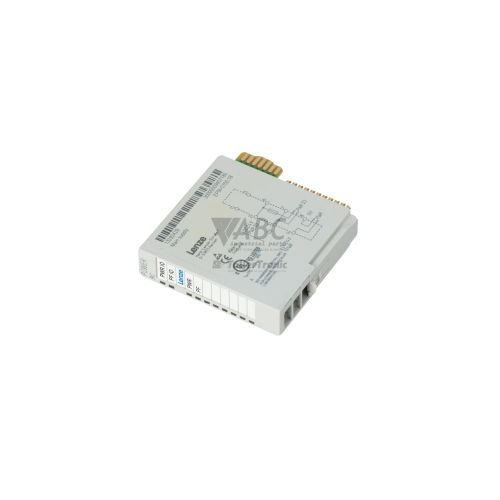
For integration into broader plant automation networks, the drive includes an Automation Interface (AIF) slot. This expansion slot accepts plug-in fieldbus modules, including the EMF2133IB for PROFIBUS-DP, EMF2102IB for INTERBUS, and EMF2173IB for DeviceNet. Motor feedback integration relies on the 9-pin Sub-D resolver input, supplemented by master frequency input terminals and simulated encoder outputs for secondary positioning control.
Diagnostics and Status Indication
Visual diagnostics on the drive housing rely on three front-panel LEDs. The green DRIVE READY LED lights solid when the controller is operational and ready. The red DRIVE FAULT LED illuminates solid during an active fault condition when the power stage is inhibited. The yellow BUS STATUS LED flashes to indicate active communication on the CAN system bus.
Detailed fault diagnostics are retrieved through parameter code C0168, which stores the fault code history in the drive memory. Technicians can view error messages directly on the Keypad XT display or monitor live drive status, I/O states, and diagnostic codes in real time using the Global Drive Control online diagnostic monitor.
Status LED Indicators
| LED | Color/Status | Meaning |
|---|---|---|
| DRIVE FAULT | Red - Solid | Active drive fault or error condition; power stage inhibited. |
| DRIVE READY | Green - Solid | Drive controller operational / ready for operation. |
| BUS STATUS | Yellow - Flashing | System bus / communication status (flashing = communication active). |
Replacement and Spare Part Considerations
Replacing an EVS9321-EPV004 requires verifying both electrical ratings and the installed module options. Ensure the replacement matches the 0.37 kW power rating and 320 to 528 V AC operating voltage. Any installed fieldbus communication module in the Automation Interface (AIF) slot—such as a PROFIBUS EMF2133IB—must be transferred from the original unit to the replacement drive.
Before putting a spare unit into production, parameter sets stored in non-volatile EEPROM must be transferred. Copying settings using Keypad XT EMF2101IB or uploading the project file via Global Drive Control software ensures correct motor parameters, positioning profiles, and CAN bus node IDs are established. After parameter transfer, verify resolver feedback signals and safety interlocks before restoring power to the motor stage.
Error Codes & Fault Codes
The following error codes may be displayed during operation or diagnostics:
| Code | Name | Description | Possible Cause | Recommended Action |
|---|---|---|---|---|
| OC1 | Short circuit / Overcurrent | Short circuit at motor output terminals or extreme overcurrent in power stage. | Short circuit in motor cable, motor winding defect, or acceleration ramp too short. | Check motor cable and motor windings for insulation fault/short circuit; verify acceleration time parameters. |
| OC5 | Earth fault | Ground fault at motor output terminals. | Motor phase connected to earth/ground or motor cable insulation failure. | Check motor lead cables and motor phase insulation resistance to ground. |
| OU | Overvoltage DC bus | DC bus voltage exceeded upper limit. | Excessive regenerative energy during deceleration; braking resistor missing, open, or undersized. | Extend deceleration time, connect brake chopper / braking resistor, or check main line voltage. |
| LU | Undervoltage DC bus | DC bus voltage fell below lower threshold. | Mains supply voltage drop, phase failure, or power supply interruption. | Check AC mains supply voltage, fuses, and line contactor. |
| OH | Heatsink overtemperature | Drive heat sink temperature exceeded maximum operating threshold. | Insufficient cooling, ambient temperature too high, dirty heatsink, or fan failed. | Clean heat sink fins, check enclosure ventilation/fan, and ensure ambient temperature is within range. |
| OH4 | Motor thermal overload | Motor temperature sensor threshold exceeded. | Motor thermal overload, continuous operation beyond motor rating, or sensor wiring fault. | Allow motor to cool down, inspect load mechanism for mechanical bind, check motor PTC sensor wiring. |
| NMAX | Overspeed | Motor speed exceeded maximum permissible limit. | Incorrect speed controller gain, feedback phase mismatch, or external drive load driving motor. | Verify encoder feedback polarity/wiring, check speed controller gain parameters. |
| H05 | Internal hardware fault | Internal control board or power circuit error detected during self-test. | Internal component failure or control board defect. | Internal hardware fault — power cycle drive; if fault persists, replace the drive unit or return for repair. |
| EER | EEPROM memory error | Non-volatile parameter storage checksum fault or read failure. | Data corruption in internal EEPROM memory. | Load factory defaults and reload parameters. If error recurs, hardware is defective — repair or replace unit. |
| CE0 | Communication error AIF module | Communication failure between drive controller and plug-in automation module (AIF slot). | Loose module, bad contacts, defective plug-in module, or fieldbus timeout. | Re-seat the communication module in the AIF slot; check module power supply and cabling. |
| P12 | Positioning tracking error | Following error exceeded set limit during positioning execution. | Mechanical obstruction, excessive load acceleration, or drive output current limit reached. | Check mechanical axis for jamming; increase position loop gain or adjust following error limit window. |
Frequently Asked Questions
How do I transfer parameters to a new Lenze EVS9321-EPV004 replacement drive?
Parameters can be copied directly using the Lenze Keypad XT EMF2101IB by reading settings from the donor unit and saving them to the new drive's internal EEPROM. Alternatively, Lenze Global Drive Control (GDC) software can download saved configuration files via the EMF2177IB PC System Bus Adapter.
What feedback devices are supported by the EVS9321-EPV004 servo controller?
The drive features a dedicated 9-pin Sub-D connector for resolver feedback input. It also supports master frequency tracking and provides simulated encoder outputs for secondary position evaluation.
How are fieldbus networks integrated into this drive?
Fieldbus connectivity is achieved via the integrated Automation Interface (AIF) slot, which accepts plug-in modules such as PROFIBUS-DP (EMF2133IB), INTERBUS (EMF2102IB), or DeviceNet (EMF2173IB). Built-in CAN bus is available directly on the drive.
What does fault code H05 indicate on the EVS9321-EPV004?
Code H05 indicates an internal hardware fault detected during self-test on the control board or power circuit. Power cycle the drive; if the fault remains active, internal repair or unit replacement is necessary.
What does a solid red DRIVE FAULT LED signify?
A solid red DRIVE FAULT LED indicates an active fault condition within the drive controller, causing the power stage output to be inhibited until the error is cleared.
Take advantage of our exchange formula
A defective product does not have to be worthless. At ABC Industrial Parts, you can hand in defective products and immediately benefit from a discount on your new purchase. This is a smart way to save money while contributing to a circular economy.
Play it safe with our warranty conditions
Industrial plants prefer to keep running invariably, no matter what. Therefore, it is essential that you can rely on high-quality products and/or sustainable repairs. With our warranty conditions, you can count on certainty, whether you choose new, used or repaired products.
Data backup and recovery
Have you lost valuable parameters or data due to a malfunction while the manufacturer no longer provides support? At ABC Industrial Parts, we help you secure this data, both for common and specific products.
Specific firmware and hardware versions
If you are working with specific hardware or firmware versions that are no longer available from the manufacturer, ABC Industrial Parts is your partner. When making your enquiry, clearly state which versions you need, we will then look at the possibilities of supplying those versions, so that your installations continue to function optimally.
Disclaimer:
We are not an authorised distributor of Lenze.
Product photos are for illustration purposes only and may differ from the actual product delivered.
Some of the content on this page was created with the help of AI. While we strive to provide accurate and up-to-date information, errors may occur.