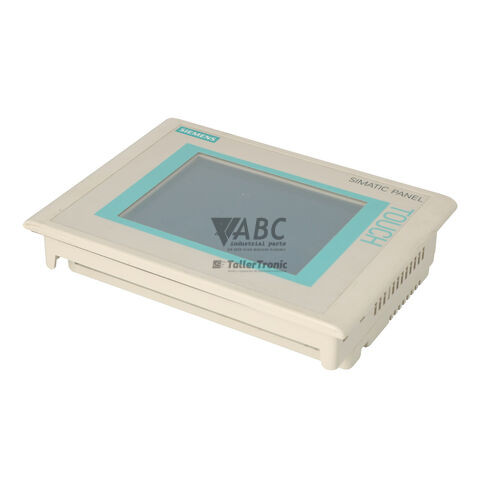
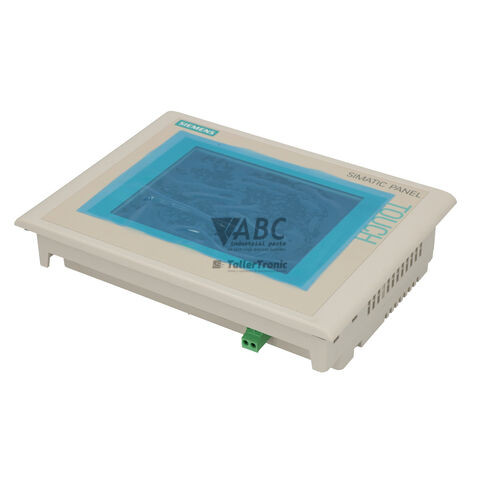
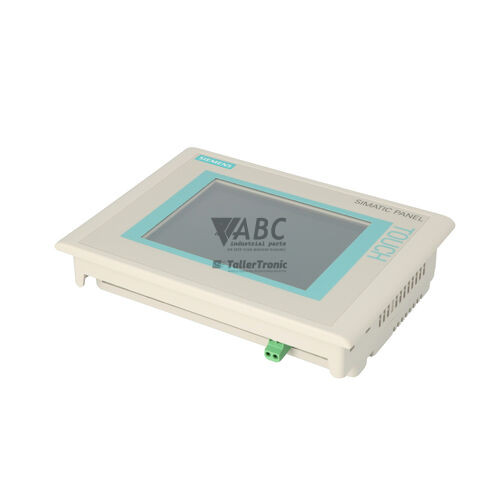
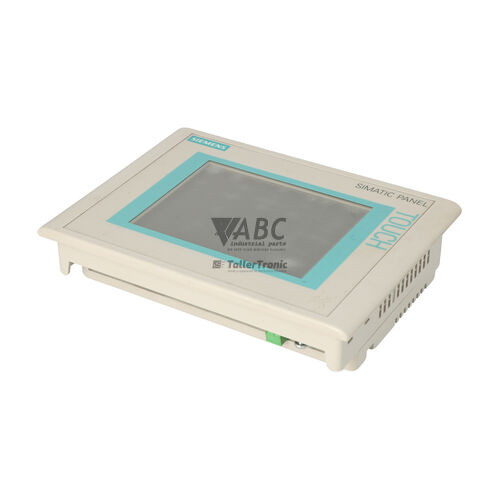
Siemens 6AV6642-0EA01-3AX0 SIMATIC MP 177 6" Touch HMI Panel


Het item werd toegevoegd aan uw offerteaanvraag
Product Information
The Siemens 6AV6642-0EA01-3AX0 is a SIMATIC MP 177 6" Touch operator panel designed for machine-level control, process visualization, and operational monitoring in automated industrial environments. Operating as a Multi Panel within the SIMATIC HMI family, this human-machine interface incorporates a 5.7-inch analog resistive TFT touchscreen display delivering a resolution of 320 x 240 pixels in 65,536 colors. Operating on a nominal 24 V DC power supply with an allowable range from 19.2 to 28.8 V DC and a rated current of 0.24 A, the unit provides compact visual oversight for machinery across packaging, automotive manufacturing, food and beverage processing, and water treatment operations.
For physical integration and communication, the MP 177 features a Sub-D 9-pin interface for RS-422 and RS-485 serial communication over MPI and PROFIBUS DP at transmission speeds up to 12 Mbit/s, alongside an RJ45 Ethernet port for PROFINET and Industrial Ethernet connections. It also includes a USB Type A host port and an SD/MMC card slot for local memory expansion and parameter storage. Putting a replacement unit into service requires loading the existing runtime application and configuration onto the 2 MB onboard user memory. This transfer can be executed directly using an SD card with automated backup and restore functionality or via software tools such as SIMATIC WinCC flexible 2008 Compact or SIMATIC WinCC in TIA Portal versions V11 through V14. ABC Industrial Parts can support maintenance teams requiring tested replacement units or assistance in transferring configuration files to minimize downtime.
System diagnostics are communicated through on-screen status messages, PLC connection banners, and a multi-function POWER / SPEED / LINK LED indicator that reflects supply status and network link activity. A non-lit power indicator suggests a supply failure or an internal power board malfunction. Standard runtime errors include fault code 140000 for PLC disconnections, code 140001 for communication timeouts, and code 200000 for memory card access failures. If a general system error such as code 100000 persists after a power cycle and OS image update using SIMATIC ProSave, the unit likely has an internal hardware failure. Because internal circuit board faults cannot be serviced in the field, sourcing a tested exchange panel from ABC Industrial Parts offers a fast route back to full production.
Technical Specifications
| Manufacturer | Siemens |
| Part Number | 6AV6642-0EA01-3AX0 |
| Model / Type | MP 177 6" Touch |
| Product Family | SIMATIC HMI |
| Component Type | Human Machine Interface |
| Display Size | 5.7 in |
| Display Type | TFT Touchscreen (Analog Resistive) |
| Display Resolution | 320 x 240 pixels |
| Display Colors | 65536 |
| Usable User Memory | 2 MB |
| Supply Voltage | 24 V DC |
| Supply Voltage Range | 19.2 - 28.8 V DC |
| Rated Current | 0.24 A |
| MPI / PROFIBUS DP Interface | RS-422 / RS-485 Sub-D 9-pin |
| Ethernet / PROFINET Interface | 1x RJ45 (10/100 Mbit/s) |
| USB Interface | 1x USB Type A Host (USB 1.1) |
| External Storage | SD / MMC Card Slot |
| Lifecycle Status | Discontinued |
Programming and Configuration
The Siemens 6AV6642-0EA01-3AX0 relies on SIMATIC WinCC flexible 2008 Compact (Service Pack 1 or higher) or SIMATIC WinCC within TIA Portal (versions V11 through V14) for project engineering and configuration. The HMI panel offers 2 MB of non-volatile onboard user flash memory allocated for graphic screens, alarm logs, operational recipes, and machine parameter sets.
To transfer a project or maintain operating parameters, engineers can connect via Ethernet or PROFIBUS interfaces using SIMATIC ProSave maintenance software. The integrated SD/MMC memory card slot enables automatic backup and restore operations without requiring an engineering PC on the shop floor, allowing operators to insert a formatted card in FAT, FAT16, or FAT32 format to duplicate runtime files directly at the machine.
Communication and System Integration
Networking capability is central to the MP 177 operator panel, which features dual fieldbus integration options. The 9-pin Sub-D connector supports RS-422 and RS-485 interfaces for MPI and PROFIBUS DP networks operating at baud rates up to 12 Mbit/s, facilitating direct integration into SIMATIC S7-200, S7-300, and S7-400 control architectures.
In addition to serial fieldbuses, the unit contains a 10/100 Mbit/s RJ45 Ethernet port for PROFINET and Industrial Ethernet communications. Built-in Modbus RTU and Modbus TCP protocol drivers broaden network flexibility, enabling seamless connectivity with third-party controllers alongside advanced software options like WinCC flexible SmartAccess, SmartService, and OPC server operation.
Diagnostics and Status Indication
The panel features real-time diagnostic reporting through WinCC flexible System Diagnostics, on-screen alarm message classes, and connection status banners that alert operators to PLC disconnects or timing out data transfers. Maintenance personnel can perform operating mode readbacks and connection tests directly using SIMATIC ProSave or via Control Panel diagnostic menus on the display.
A hardware status indicator labeled POWER / SPEED / LINK signals the operating status of the 24 V DC power supply and active Ethernet network communication. A non-illuminated power indicator points directly to an interrupted main power feed or an internal power supply unit failure.
Status LED Indicators
| LED | Color/Status | Meaning |
|---|---|---|
| POWER / SPEED / LINK | Lit / Non-lit | Indicates power supply availability and Ethernet network connection / link activity. Non-lit Power LED indicates power failure or internal power supply fault requiring repair. |
Replacement and Spare Part Considerations
Since Siemens announced the product lifecycle end for the MP 177 series in October 2022, retaining identical 6AV6642-0EA01-3AX0 replacement units allows plant operators to avoid immediate enclosure modifications or costly project re-engineering. The panel fits directly into existing physical cutouts without requiring hardware adaptations.
When commissioning a spare unit, the project binary, operating system image, and runtime settings must be transferred using SIMATIC ProSave software or a restored SD/MMC card backup. For long-term modernization strategies, existing projects can be upgraded and migrated to the successor SIMATIC TP700 Comfort panel (6AV2124-0GC01-0AX0) within TIA Portal.
Error Codes & Fault Codes
The following error codes may be displayed during operation or diagnostics:
| Code | Name | Description | Possible Cause | Recommended Action |
|---|---|---|---|---|
| 100000 | General System Error | System error occurred during runtime operation. | Firmware conflict, memory corrupted, or internal hardware malfunction. | Perform hardware power cycle. If error persists, re-flash operating system image via ProSave OS Update. If failure continues, unit has internal board failure and requires repair or replacement. |
| 140000 | PLC Connection Disconnected | Communication link to the connected PLC / controller has been broken. | Network cable disconnected, incorrect baud rate/node address, PLC powered down, or faulty bus connector. | Check physical cable connections, verify MPI/PROFIBUS/PROFINET communication parameters, and ensure target PLC is online and running. |
| 140001 | PLC Communication Timeout | Panel requested data from controller but did not receive response within timeout period. | High bus load, incorrect tag address configuration, or intermittent wiring fault. | Verify tag addresses in project match PLC block addresses; inspect communication cable shielding and bus termination. |
| 190000 | Printer Error | Print job failed or designated printer is not responding. | USB printer disconnected, out of paper, or incompatible printer driver selected. | Check USB interface connection and printer status; confirm printer driver selected in WinCC flexible project matches connected model. |
| 200000 | Memory Card Access Error | Failed to read from or write to the inserted SD/MMC card. | Card not formatted, incompatible filesystem, card removed during write operation, or memory card failure. | Re-insert card, verify card format (FAT/FAT16/FAT32), or replace damaged SD/MMC card. |
Frequently Asked Questions
How do I back up and transfer project data to a replacement Siemens 6AV6642-0EA01-3AX0 panel?
Project backups can be created using an SD/MMC card formatted to FAT, FAT16, or FAT32 directly on the panel's external memory slot, or by using SIMATIC ProSave software connected via Ethernet or PROFIBUS to complete a full non-volatile system backup and restore.
Which engineering software versions are compatible with the SIMATIC MP 177 6" Touch?
The panel is configured using SIMATIC WinCC flexible 2008 Compact (Service Pack 1 or higher) or SIMATIC WinCC in TIA Portal versions V11 through V14.
What should I check if fault code 140000 or 140001 appears on screen?
These codes indicate communication loss or timeouts with the PLC. Check physical network cabling, Sub-D 9-pin bus connectors, shielding, termination, MPI/PROFIBUS/PROFINET node addresses, and verify that the target SIMATIC S7 PLC is powered on and running.
Can the 6AV6642-0EA01-3AX0 panel directly replace an existing unit without modifying the panel cutout?
Yes, substituting an identical 6AV6642-0EA01-3AX0 part number provides an exact drop-in replacement that uses the existing enclosure cutout and mounting arrangement without mechanical alterations.
What is the official successor model for the Siemens MP 177 series?
Siemens designates the SIMATIC TP700 Comfort panel (part number 6AV2124-0GC01-0AX0) as the official successor model for upgrading projects in TIA Portal.
Take advantage of our exchange formula
A defective product does not have to be worthless. At ABC Industrial Parts, you can hand in defective products and immediately benefit from a discount on your new purchase. This is a smart way to save money while contributing to a circular economy.
Play it safe with our warranty conditions
Industrial plants prefer to keep running invariably, no matter what. Therefore, it is essential that you can rely on high-quality products and/or sustainable repairs. With our warranty conditions, you can count on certainty, whether you choose new, used or repaired products.
Data backup and recovery
Have you lost valuable parameters or data due to a malfunction while the manufacturer no longer provides support? At ABC Industrial Parts, we help you secure this data, both for common and specific products.
Specific firmware and hardware versions
If you are working with specific hardware or firmware versions that are no longer available from the manufacturer, ABC Industrial Parts is your partner. When making your enquiry, clearly state which versions you need, we will then look at the possibilities of supplying those versions, so that your installations continue to function optimally.
Disclaimer:
We are not an authorised distributor of Siemens.
Product photos are for illustration purposes only and may differ from the actual product delivered.
Some of the content on this page was created with the help of AI. While we strive to provide accurate and up-to-date information, errors may occur.