B&R 4PP065.0571-K68 Power Panel PP65 HMI Touch Screen Terminal



Het item werd toegevoegd aan uw offerteaanvraag
Product Information
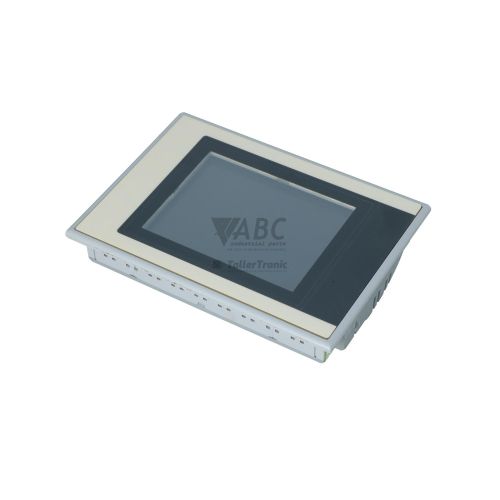
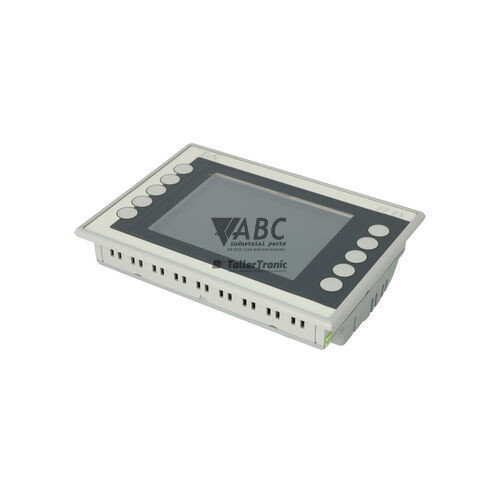
The B&R 4PP065.0571-K68 is a Power Panel 65 human-machine interface (HMI) operator terminal designed for machine-level control and process visualization. Featuring a 5.7-inch TFT color display with 320x240 QVGA resolution and an analog resistive touch screen, this panel module delivers reliable interactive operation across automated industrial environments. Under the front panel, the unit is powered by an x86-compatible 500 MHz Geode LX800 processor paired with 128 MB of system memory. Designed for panel mounting, the device operates on a standard 24 VDC power supply with an allowable input range of 18 VDC to 30 VDC.
For network connectivity and expansion, the 4PP065.0571-K68 provides a 10/100 Mbit/s RJ45 Fast Ethernet port with Auto-MDIX, two USB 2.0 Type-A ports, and an integrated rear X20 system bus interface. The local X20 bus interface allows B&R X20 Series I/O slice modules to clip directly onto the rear of the terminal, creating a compact combined controller and visualization system. The unit supports industrial protocols including Ethernet POWERLINK, Modbus TCP, and INA2000, and is programmed using B&R Automation Studio version 3.0 or higher. Commissioning a replacement unit requires downloading the existing application project and runtime configuration via Automation Studio, as spare units require software loading to function. Assistance with panel replacement and project loading is available through ABC Industrial Parts.
Diagnostic monitoring is provided through multiple onboard and network-based methods. On the rear panel, the r/e status LED shows green for normal operation and red during operating system or hardware fault conditions, while the Link/Act LED indicates physical network connection and activity. Systems can also be diagnosed remotely using a standard web browser via the web-based System Diagnostics Manager (SDM) or through the Automation Studio Online Diagnostics interface. Common operational faults include system errors such as error code 10001 or memory allocation issues like error code 10012, which can often be resolved by power cycling or refining project parameters. When internal hardware faults prevent boot execution or network communication, ABC Industrial Parts offers repair services and tested replacement units to restore machine operation.
Technical Specifications
| Manufacturer | B&R Industrial Automation |
| Part Number | 4PP065.0571-K68 |
| Model / Type | Power Panel 65 |
| Component Type | HMI / Operator Terminal |
| Display Size | 5.7 inch |
| Display Resolution | 320x240 pixels (QVGA) |
| Display Type | TFT color |
| Touch Screen Technology | Analog resistive |
| Processor | Geode LX800 500 MHz |
| Data Memory | 128 MB |
| Nominal Supply Voltage | 24 V DC |
| Supply Voltage Range | 18 - 30 V DC |
| Ethernet Interface | 1x RJ45 10/100 Mbit/s (Auto-MDIX) |
| USB Interface | 2x USB 2.0 Type A |
| Local Expansion Bus | X20 System Bus |
| Communication Protocols | Ethernet POWERLINK, Modbus TCP, INA2000 |
Programming and Configuration
The B&R 4PP065.0571-K68 Power Panel 65 is configured and programmed using B&R Automation Studio version 3.0 or higher. Application logic, graphical touch screen layouts, and fieldbus parameters are compiled within Automation Studio and downloaded directly to the terminal's 128 MB system memory via the Ethernet interface or USB connection.
When commissioning a spare operator terminal, engineers must transfer the compiled application project and Automation Runtime environment to the new hardware. Proper memory allocation must be configured in Automation Studio to ensure that project files, screen graphics, and operational tasks fit within the physical memory limits of the device.
Communication and System Integration
The 4PP065.0571-K68 terminal includes a Fast Ethernet interface with Auto-MDIX operating at 10/100 Mbit/s, permitting direct integration into networked industrial systems. The unit supports multiple protocols, including Ethernet POWERLINK for real-time motion and I/O synchronization, Modbus TCP for master/slave fieldbus communication, and B&R INA2000 protocols.
To provide localized I/O capabilities without increasing cabinet footprint, the terminal is equipped with a rear X20 system bus interface. B&R X20 series slice I/O modules snap directly onto the back of the operator panel. Peripheral expansion is further supported through two USB 2.0 Type-A ports for connecting external flash drives and peripheral accessories.
Diagnostics and Status Indication
Hardware state evaluation is supported by rear status LEDs. The dual-color r/e (Run / Error) LED illuminates solid green when the operating system and Automation Runtime are functioning normally, while a solid or flashing red state indicates an operating system error, hardware fault, or stop condition. Network link status and data transmission are indicated by the green Link / Act LED.
Detailed diagnostics can be executed remotely over the Ethernet network using the web-based System Diagnostics Manager (SDM) through a standard browser interface. Technicians can also utilize the Online Diagnostics tool within B&R Automation Studio to review system logs, evaluate task timing, and clear active error conditions.
Status LED Indicators
| LED | Color/Status | Meaning |
|---|---|---|
| r/e (Run / Error) | Green / Red - Solid / Flashing | Green indicates normal operation / operating system running; Red indicates operating system error, hardware fault, or stop condition. |
| Link / Act | Green - Solid / Flashing | Green indicates Ethernet physical link established; Flashing indicates Ethernet network activity. |
Replacement and Spare Part Considerations
When replacing a failed 4PP065.0571-K68 operator terminal, verify that the unit matches the required part number and operates within the 18 to 30 VDC supply voltage range. Replacement terminals do not hold factory pre-loaded application programs; the machine-specific application project must be loaded using Automation Studio v3.0 or higher.
Ensure that any connected X20 series slice modules on the rear expansion bus are fully seated and connected prior to powering up the system. If downloading the application project results in memory allocation error 10012, review the project configuration in Automation Studio to verify memory limits before putting the unit into active service.
Error Codes & Fault Codes
The following error codes may be displayed during operation or diagnostics:
| Code | Name | Description | Possible Cause | Recommended Action |
|---|---|---|---|---|
| 10001 | Target System Error | General system error reported by Automation Runtime. | Firmware conflict, corrupted runtime environment, or hardware initialization failure. | Power cycle unit. Re-download application software via Automation Studio. Internal hardware fault if error persists, contact repair service. |
| 10012 | Memory Allocation Error | Insufficient DRAM or flash space available for task execution. | Application project exceeds target RAM/Flash memory configuration. | Optimize application size in Automation Studio or verify memory limits. |
Frequently Asked Questions
What software version is required to program the B&R 4PP065.0571-K68?
Programming and project download require B&R Automation Studio version 3.0 or higher.
Can I connect local I/O modules directly to the back of this panel?
Yes, the terminal features an onboard rear X20 system bus interface that allows B&R X20 Series I/O slice modules to mount directly onto the back of the panel.
What communication protocols does the 4PP065.0571-K68 support?
The terminal supports Ethernet POWERLINK, Modbus TCP, and B&R INA2000 protocols via its 10/100 Mbit/s RJ45 Ethernet interface.
How can I access hardware diagnostics on this panel without software tools?
System diagnostics can be accessed using a standard web browser over Ethernet via the B&R System Diagnostics Manager (SDM), or by observing the rear panel status LEDs (r/e and Link/Act).
What should I do if fault code 10001 occurs after installation?
Fault code 10001 indicates a Target System Error. Power cycle the unit and re-download the application software via Automation Studio. If the error persists, an internal hardware failure may be present.
Take advantage of our exchange formula
A defective product does not have to be worthless. At ABC Industrial Parts, you can hand in defective products and immediately benefit from a discount on your new purchase. This is a smart way to save money while contributing to a circular economy.
Play it safe with our warranty conditions
Industrial plants prefer to keep running invariably, no matter what. Therefore, it is essential that you can rely on high-quality products and/or sustainable repairs. With our warranty conditions, you can count on certainty, whether you choose new, used or repaired products.
Data backup and recovery
Have you lost valuable parameters or data due to a malfunction while the manufacturer no longer provides support? At ABC Industrial Parts, we help you secure this data, both for common and specific products.
Specific firmware and hardware versions
If you are working with specific hardware or firmware versions that are no longer available from the manufacturer, ABC Industrial Parts is your partner. When making your enquiry, clearly state which versions you need, we will then look at the possibilities of supplying those versions, so that your installations continue to function optimally.
Disclaimer:
We are not an authorised distributor of B&R.
Product photos are for illustration purposes only and may differ from the actual product delivered.
Some of the content on this page was created with the help of AI. While we strive to provide accurate and up-to-date information, errors may occur.