Exor UniOp ETOP312U301 eTOP312 12.1 Touchscreen HMI Panel



Het item werd toegevoegd aan uw offerteaanvraag
Product Information
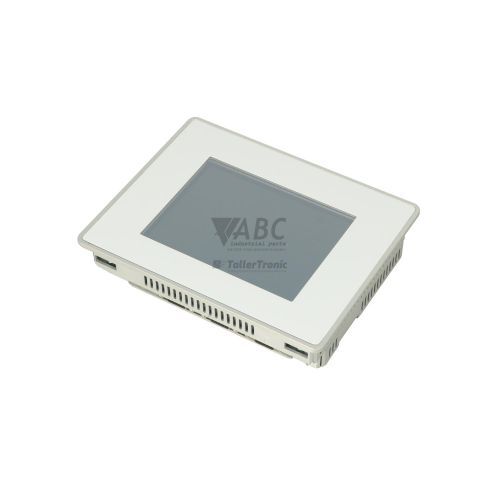
The Exor UniOp ETOP312U301 eTOP312 is a 12.1-inch industrial operator interface terminal from the eTOP Series 300 family designed for machine visualization and operational control. Built around an 800x600 pixel SVGA TFT display supporting 65,536 colors, the unit provides clear visual monitoring and responsive tactile inputs through an analog resistive touchscreen. Designed for demanding panel installations, it features a rugged IP66-rated front housing and operates from a nominal 24 V DC power supply across an extended voltage range of 10.5 to 32 V DC with a 0.95 A rated current draw.
Network integration and system connectivity are provided through dual 10/100 Mbit/s Ethernet ports with an internal switch, a DB9 male serial port supporting configurable RS-232, RS-422, or RS-485 signals, USB 2.0 host and device ports, and an SD card slot. An internal expansion slot allows installation of Exor TCM modules for fieldbus communication such as PROFIBUS-DP or CANopen. Commissioning a replacement unit requires transferring the runtime project developed in UniOp Designer 6 via USB, network download, or an SD card memory backup. Expert technical support from ABC Industrial Parts can assist maintenance teams with parameter alignment and backup project recovery during terminal replacement.
Operational status and hardware diagnostics are indicated directly by front and port LED indicators including PWR, STAT, and ETH Link/Act. The terminal includes internal System Menu routines for touch calibration, memory testing, and loopback verification, alongside an active on-screen alarm banner and Designer 6 online monitoring capabilities. When startup failures or persistent memory error codes occur, board-level component issues are not field-serviceable, making an exchange unit or professional repair through ABC Industrial Parts the quickest route to restoring production line functionality.
Technical Specifications
| Manufacturer | Exor UniOp |
| Part Number | ETOP312U301 |
| Model / Type | eTOP312 |
| Product Family | eTOP Series 300 |
| Component Type | HMI Panel |
| Display Size | 12.1 in |
| Display Resolution | 800x600 pixels |
| Display Colors | 65536 |
| Touchscreen Technology | Analog Resistive |
| Flash Application Memory | 64 MB |
| RAM System Memory | 256 MB |
| Supply Voltage | 24 V DC (10.5 - 32 V DC) |
| Rated Current | 0.95 A |
| Front Panel Protection Rating | IP66 |
Programming and Configuration
The ETOP312U301 operator panel is programmed using UniOp Designer 6 configuration software. The unit features 64 MB of Flash application memory for screen layouts, alarm handling, and graphic assets, supported by 256 MB of RAM system memory for efficient execution during runtime operations.
When commissioning or transferring software to a spare unit, the application project must be compiled with the target hardware defined specifically as the eTOP312 / U301 variant. Project files can be loaded into the panel through a direct USB connection via the USB device port, across an Ethernet link, or copied via an SD card inserted into the panel's card slot.
Communication and System Integration
The eTOP312 integrates two 10/100 Mbit/s Ethernet ports backed by an integrated switch, facilitating simple line network topologies without requiring external switches. Native network drivers support Modbus TCP and EtherNet/IP protocols for straightforward communication with modern PLCs.
A DB9 male serial interface is built into the panel, configurable for RS-232, RS-422, or RS-485 operational modes to communicate with controllers running Modbus RTU or Siemens MPI/PPI drivers. Additional fieldbus protocols, including PROFIBUS-DP and CANopen, can be integrated using optional Exor TCM fieldbus expansion modules installed in the internal expansion slot.
Diagnostics and Status Indication
Physical diagnostics are provided on the panel by status LEDs for power input, system runtime health, and Ethernet network activity. Technicians can perform interactive checks using the built-in System Menu routines, which include screen touch calibration, RAM/Flash memory checks, and serial port loopback testing.
Advanced system troubleshooting is supported using the Designer 6 Diagnostic and Online Monitor tool. This allows live monitoring of active PLC communication tags and protocol diagnostic flags, while active fault conditions trigger on-screen alarm messages directly on the HMI.
Status LED Indicators
| LED | Color/Status | Meaning |
|---|---|---|
| PWR / Power | Green - Solid | Green indicates proper DC power supply voltage applied; Off indicates missing power input. |
| STAT / Status | Green / Red - Flashing / Solid | Green blinking indicates normal runtime boot/operation; Red indicates internal system fault or hardware initialization failure requiring service. |
| ETH Link/Act | Green / Yellow - Solid / Flashing | Green/Yellow on Ethernet port indicates active physical link and network activity. |
Replacement and Spare Part Considerations
Before replacing an existing ETOP312U301 unit, ensure the runtime application project is saved and accessible in Designer 6 or stored on an SD card. Verify that physical serial port mode settings and station addresses match the original panel configuration.
Ensure that the target hardware selected in Designer 6 corresponds exactly to the eTOP312 / U301 profile prior to downloading the application file. When mounting the spare panel into the enclosure cutout, ensure the front sealing gasket is in good condition to preserve the IP66 ingress protection rating.
Error Codes & Fault Codes
The following error codes may be displayed during operation or diagnostics:
| Code | Name | Description | Possible Cause | Recommended Action |
|---|---|---|---|---|
| COM_ERR | Communication Error | The HMI cannot establish or maintain communication with the connected PLC or controller. | Faulty wiring, incorrect baud rate/parity setting, wrong station address, or PLC powered off. | Check cable connection, verify pinout, check communication settings in Designer 6 and PLC parameters. |
| INVALID_FW | Invalid Firmware Version | The loaded project firmware does not match the hardware architecture of the panel. | Attempting to download project built for a different platform variant. | Recompile project in Designer 6 selecting correct target hardware variant (eTOP312 / U301). |
| MEM_FAIL | Memory Access Error | Internal Flash or RAM read/write failure detected during startup. | Corrupted project data or internal board-level hardware fault. | Perform full memory erase/restore via system menu. If fault persists, internal hardware error — return unit for repair. |
| TOUCH_UNFAIL | Touchscreen Calibration Failed | Touch screen controller failed to calibrate target points. | Touch overlay damage, constant pressure applied on screen during calibration, or hardware failure. | Re-run touchscreen calibration routine from System Menu ensuring no screen pressure. Replace unit if touch glass damaged. |
Frequently Asked Questions
Which software is used to program the ETOP312U301 HMI?
The panel is programmed using UniOp Designer 6 configuration software.
How can a project be transferred to a replacement ETOP312U301 panel?
Projects can be loaded using an SD card inserted into the panel slot, via a direct USB connection to the programming port, or over an Ethernet network.
What protocols does the ETOP312U301 support natively?
The unit natively supports Modbus TCP, Modbus RTU, Siemens MPI/PPI, and EtherNet/IP protocols.
What does a solid red STAT LED indicate on the front panel?
A solid red STAT LED indicates an internal system fault or hardware initialization failure occurring during startup that requires technical service or repair.
How do you resolve a COM_ERR fault on the panel?
Check the communication cable and pinouts, verify the connected PLC is powered on, and confirm that station addresses, baud rates, and driver settings match in Designer 6 and the PLC.
Take advantage of our exchange formula
A defective product does not have to be worthless. At ABC Industrial Parts, you can hand in defective products and immediately benefit from a discount on your new purchase. This is a smart way to save money while contributing to a circular economy.
Play it safe with our warranty conditions
Industrial plants prefer to keep running invariably, no matter what. Therefore, it is essential that you can rely on high-quality products and/or sustainable repairs. With our warranty conditions, you can count on certainty, whether you choose new, used or repaired products.
Data backup and recovery
Have you lost valuable parameters or data due to a malfunction while the manufacturer no longer provides support? At ABC Industrial Parts, we help you secure this data, both for common and specific products.
Specific firmware and hardware versions
If you are working with specific hardware or firmware versions that are no longer available from the manufacturer, ABC Industrial Parts is your partner. When making your enquiry, clearly state which versions you need, we will then look at the possibilities of supplying those versions, so that your installations continue to function optimally.
Disclaimer:
We are not an authorised distributor of UniOp.
Product photos are for illustration purposes only and may differ from the actual product delivered.
Some of the content on this page was created with the help of AI. While we strive to provide accurate and up-to-date information, errors may occur.