Beckhoff C6220 Control Cabinet Industrial PC



Het item werd toegevoegd aan uw offerteaanvraag
Product Information
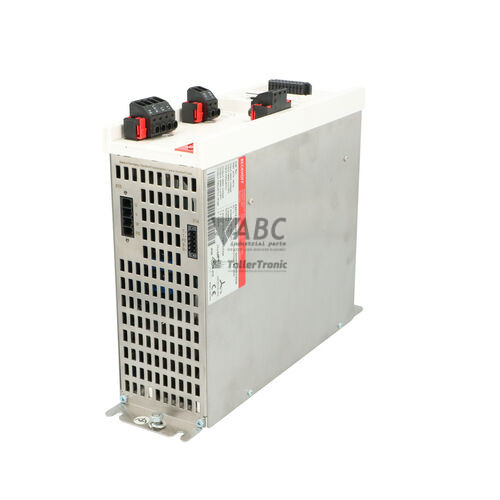
The Beckhoff C6220 is a control cabinet Industrial PC built for real-time PLC execution, multi-axis motion control, SCADA integration, machine vision processing, and central data acquisition. Housed in a durable aluminum and sheet-steel enclosure, the device is engineered for direct mounting on cabinet backplanes or side panels to optimize panel space and heat dissipation. Powered by a 24 V DC power supply unit, this industrial computer delivers reliable processing performance inside automated production machinery, automotive manufacturing systems, semiconductor equipment, and specialized machine tools.
Network integration and field connectivity are driven by two independent Gigabit Ethernet ports (10/100/1000 Mbit/s RJ45), providing native real-time EtherCAT communication when running Beckhoff TwinCAT software. Additional interfaces include USB 3.0/2.0 ports, DisplayPort/DVI video outputs, and optional RS-232 serial interfaces. Two short PC plug-in slots allow hardware expandability using PCI or PCIe expansion cards, accommodating additional fieldbus cards for PROFINET or EtherNet/IP, vision frame grabbers, or communication interfaces. Bringing a replacement unit into service requires transferring or restoring the operating system and project runtime from the storage media (2.5-inch SSD/HDD, CFast, or M.2) and verifying TwinCAT system configuration. ABC Industrial Parts can support maintenance teams with pre-tested replacement units to minimize operational downtime.
System hardware status is indicated directly on the front panel via LED indicators for power state (PWR), storage read/write activity (HDD/Storage), and TwinCAT runtime status (TC). System monitoring is supported through the Beckhoff IPC Management Tool for CPU temperature, fan speed, and supply voltages, as well as software diagnostics via MDP and Windows Event Viewer. Initial troubleshooting should verify the 24 V DC power connection, storage drive seating, fieldbus cabling, and TwinCAT execution state. If physical hardware components or internal power circuits fail, ABC Industrial Parts provides tested replacement units and repair options to quickly restore system availability.
Technical Specifications
| Manufacturer | Beckhoff |
| Part Number | C6220 |
| Model / Type | Control Cabinet PC |
| Component Type | Industrial PC |
| Supply Voltage | 24 V DC |
| Enclosure Material | Aluminum and sheet steel |
| Mounting Type | Backplane or side panel mounting |
| Expansion Slots | 2 short PC expansion slots (PCI / PCIe generation dependent) |
| Ethernet Interfaces | 2x 10/100/1000 Mbit/s RJ45 |
| Supported Fieldbus Protocols | EtherCAT (built-in via TwinCAT), PROFINET (optional), EtherNet/IP (optional) |
| Storage Options | 2.5-inch SSD/HDD, CFast, or M.2 |
Programming and Configuration
The Beckhoff C6220 Industrial PC runs in combination with Beckhoff TwinCAT 2 or TwinCAT 3 real-time automation software. The TwinCAT system environment turns the PC into a real-time controller for motion control, high-speed PLC programs, and process tasks, running alongside standard operating systems for human-machine interface (HMI) or SCADA software.
When commissioning a replacement device, the storage media—such as a 2.5-inch SSD/HDD, CFast card, or M.2 module—can be directly swapped from the existing unit into the replacement hardware. Alternatively, system disk images and TwinCAT project files must be loaded onto the replacement device to restore hardware configuration, device drivers, and fieldbus communication settings.
Communication and System Integration
Communication in the Beckhoff C6220 is anchored by two independent 10/100/1000 Mbit/s Gigabit Ethernet interfaces using standard RJ45 connections. Combined with TwinCAT real-time software, these ports provide native high-speed EtherCAT master capability for distributed I/O modules, servo drives, and industrial devices across the control network.
To expand communication capability, the unit features two free short PC plug-in card slots for PCI or PCIe expansion boards. These slots allow installation of dedicated fieldbus communication interfaces, including PROFINET or EtherNet/IP cards, or vision processing capture cards. Additional standard interfaces include USB 3.0 and USB 2.0 ports, DisplayPort or DVI video outputs, and optional RS-232 serial connections.
Diagnostics and Status Indication
Diagnostic monitoring on the Beckhoff C6220 combines physical LED status indicators on the unit with software diagnostic tools. Hardware health parameters—including CPU temperature, cooling fan operation speed, and operating supply voltages—are continuously monitored through the Beckhoff IPC Management Tool to prevent overheating and power faults.
For system-level diagnostics, software engineers can use the TwinCAT System Manager, Model Based Device Description (MDP) interface, and Windows Event Viewer logs. These tools provide full visibility into real-time task execution, EtherCAT bus integrity, system errors, and operating system events.
Status LED Indicators
| LED | Color/Status | Meaning |
|---|---|---|
| PWR | Green / Off - Solid Green when active / Off when powered down | Green: Power supply nominal and system running. Off: Power disconnected or internal power supply failure. |
| HDD / Storage | Green / Yellow - Flashing | Flashing green/yellow indicates storage media read/write access active. |
| TC / TwinCAT | Green / Yellow / Blue / Red - Multi-state indicator | Green: TwinCAT in Run mode. Yellow/Blue: TwinCAT in Stop/Config mode. Red: TwinCAT error or system failure. |
Replacement and Spare Part Considerations
Replacing a Beckhoff C6220 in an active installation requires matching the physical expansion slot configurations (PCI or PCIe generation dependent) and connected fieldbus hardware options. Ensuring compatible expansion cards and storage interfaces is critical for seamless hardware transfer.
Service downtime can be minimized by directly swapping the primary storage medium (2.5-inch SSD/HDD, CFast, or M.2) from the failed computer to the replacement unit, or by deploying a verified backup disk image. Once powered up, verify that the 24 V DC supply is within specifications, check that status LEDs indicate active power and nominal TwinCAT state, and confirm network connectivity across all Ethernet interfaces.
Frequently Asked Questions
Which real-time software suites are supported on the Beckhoff C6220?
The Beckhoff C6220 supports Beckhoff TwinCAT 2 and TwinCAT 3 real-time software suites for PLC, motion control, and automation tasks.
What expansion slots are available on the Beckhoff C6220?
The C6220 provides two free expansion slots for standard short PC plug-in cards, supporting PCI or PCIe card types depending on hardware generation.
How are fieldbus networks such as EtherCAT connected to the C6220?
EtherCAT communication is supported natively via the integrated Gigabit Ethernet RJ45 ports running TwinCAT software. Additional fieldbus networks like PROFINET or EtherNet/IP can be added using optional software drivers or dedicated expansion cards.
What storage media options are available for replacing or backing up the unit?
The unit supports 2.5-inch SSD/HDD drives, CFast cards, and M.2 storage modules, allowing direct storage media transfer for rapid hardware replacement.
What do the TC status LEDs indicate on the front panel?
The TC (TwinCAT) status LED indicates software runtime state: solid green means TwinCAT is in Run mode, yellow or blue indicates Stop/Config mode, and red indicates a TwinCAT error or system failure.
Take advantage of our exchange formula
A defective product does not have to be worthless. At ABC Industrial Parts, you can hand in defective products and immediately benefit from a discount on your new purchase. This is a smart way to save money while contributing to a circular economy.
Play it safe with our warranty conditions
Industrial plants prefer to keep running invariably, no matter what. Therefore, it is essential that you can rely on high-quality products and/or sustainable repairs. With our warranty conditions, you can count on certainty, whether you choose new, used or repaired products.
Data backup and recovery
Have you lost valuable parameters or data due to a malfunction while the manufacturer no longer provides support? At ABC Industrial Parts, we help you secure this data, both for common and specific products.
Specific firmware and hardware versions
If you are working with specific hardware or firmware versions that are no longer available from the manufacturer, ABC Industrial Parts is your partner. When making your enquiry, clearly state which versions you need, we will then look at the possibilities of supplying those versions, so that your installations continue to function optimally.
Disclaimer:
We are not an authorised distributor of Beckhoff.
Product photos are for illustration purposes only and may differ from the actual product delivered.
Some of the content on this page was created with the help of AI. While we strive to provide accurate and up-to-date information, errors may occur.