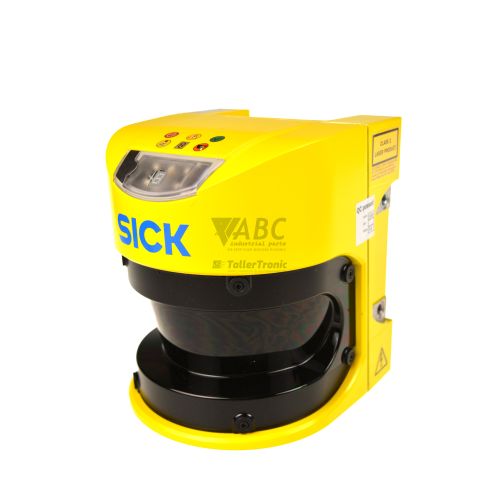
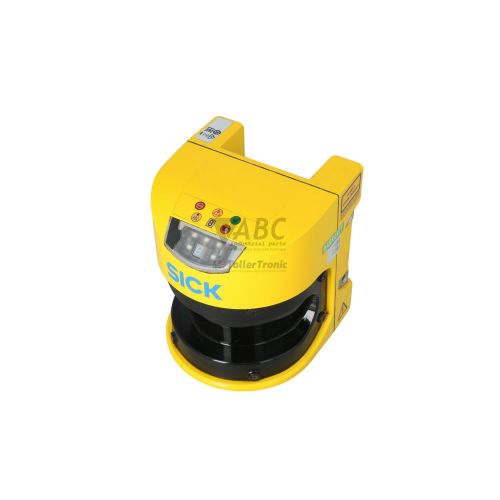
SICK 1023548 S30A-6011EA S3000 Advanced Safety Laser Scanner


Het item werd toegevoegd aan uw offerteaanvraag
Product Information
The SICK 1023548 S30A-6011EA is an electro-sensitive optical safety laser scanner from the S3000 Advanced series designed for hazardous area monitoring and personnel protection in machinery, press systems, and automated guided vehicles (AGVs). Operating on a nominal 24 V DC supply voltage across a range of 16.8 to 28.8 V DC, this optical scanner covers a 190-degree sensing arc with a maximum protective field range of 5.5 meters and an extended warning measuring range of up to 49 meters. Housed in a durable IP65 enclosure, the device supports up to 4 switchable field sets and 12 monitoring fields with a minimum optical resolution of 30 mm, enabling flexible safety zone adaptations across changing machine operating modes.
System integration is facilitated through 4 digital inputs for control functions such as External Device Monitoring (EDM), reset interlock, and zone switching, combined with 5 digital outputs featuring dual fail-safe PNP OSSD safety outputs and 3 application diagnostic outputs. Parameterization and field geometry setup are managed using SICK CDS (Configuration & Diagnostic Software) connected via an M8 4-pin RS-232/RS-422 configuration interface. Spare unit deployment is streamlined by non-volatile configuration memory integrated directly into the S3000 system plug. Connecting the existing system plug to a replacement scan head automatically loads stored settings without requiring immediate PC-based re-commissioning, while ABC Industrial Parts can assist maintenance teams with spare hardware selection and configuration recovery options.
Diagnostic feedback and system state monitoring are accessible directly on the unit via an integrated 7-segment display and status LED indicators for OSSD activity, warning zones, and restart interlocks. Operational conditions such as reset interlocks, protective zone breaches, dirty optics pre-warnings, or External Device Monitoring mismatches display dedicated alphanumeric fault codes on the front screen. If front optics cleaning fails to resolve dirty window codes, or if code E flags an unrecoverable internal circuit or optical measurement error, internal hardware components are not field-serviceable. Under these conditions, replacing the scanner head or utilizing tested exchange units from ABC Industrial Parts provides a safe and rapid return to production.
Technical Specifications
| Manufacturer | SICK |
| Part Number | 1023548 |
| Model / Type | S30A-6011EA |
| Product Family | S3000 |
| Series | S3000 Advanced |
| Component Type | Safety Laser Scanner |
| Protective Field Range | 5.5 m |
| Warning Field Range | 49 m |
| Distance Measuring Range | 49 m |
| Scanning Angle | 190 deg |
| Number of Field Sets | 4 |
| Number of Monitoring Fields | 12 |
| Minimum Resolution | 30 mm |
| Angular Resolution | 0.5 deg |
| Response Time | 60 ms |
| Supply Voltage | 24 V DC |
| Supply Voltage Range | 16.8 - 28.8 V DC |
| Current / Power Consumption | 0.8 A |
| Digital Inputs | 4 |
| Digital Outputs | 5 |
| Configuration Interface | RS-232 / RS-422 (M8 4-pin) |
| Enclosure Rating | IP65 |
Programming and Configuration
Parameterization of the S30A-6011EA is performed using SICK CDS (Configuration & Diagnostic Software) through a dedicated M8 4-pin service connection on the front of the device. Through this interface, technicians define individual field set geometries, establish warning and protective zones, assign minimum resolution settings down to 30 mm, and configure functional response times as low as 60 ms to match specific machinery stopping times.
Configuration data is saved directly into non-volatile memory located within the S3000 system plug assembly. This architecture decouples device programming from the physical scanner head. When performing field replacements or routine maintenance, transferring the configured system plug to a replacement head ensures instant parameter loading, bypassing the need to reconnect a programming PC for standard device swaps.
Communication and System Integration
The S30A-6011EA integrates into safety control systems via dual PNP OSSD (Output Signal Switching Device) fail-safe outputs, allowing direct connection to safety evaluation units, safety relays, or fail-safe PLCs. Three additional application outputs provide status feedback to standard control PLCs for warning zone warnings, dirty window pre-warnings, or reset status.
Control wiring connects to 4 digital inputs dedicated to External Device Monitoring (EDM), manual or automatic reset interlocks, and dynamic zone switching. Diagnostic and engineering communications utilize RS-232 or RS-422 signaling standard across the M8 4-pin serial configuration interface.
Diagnostics and Status Indication
Real-time visual monitoring is provided by a multi-function 7-segment display and dedicated status LEDs on the front panel. The display indicates current operational states, active field set numbers, and numerical or alphabetical fault identifiers during error conditions. Detailed real-time optical tracking and diagnostic logs can also be retrieved directly via SICK CDS software.
Individual LEDs communicate safety output status: solid green indicates clear protective fields with active OSSD outputs, solid red signals an interrupted field or system lockout, and solid yellow alerts operators to warning field intrusions or an active restart interlock requiring reset activation.
Status LED Indicators
| LED | Color/Status | Meaning |
|---|---|---|
| 7-Segment Display | Numeric / Alpha | Displays device operational state, active field set, or fault/error code number |
| Red LED (OSSD OFF) | Red - Solid | Protective field interrupted or system lockout; safety outputs in OFF state |
| Green LED (OSSD ON) | Green - Solid | Protective field clear; safety outputs in ON state |
| Yellow LED | Yellow - Solid | Warning field interrupted or restart interlock active (reset required) |
Replacement and Spare Part Considerations
When selecting a replacement safety scanner, confirm that the part number matches 1023548 and model designation S30A-6011EA to maintain complete mechanical and electrical compatibility with the existing S3000 series installation. Ensure that the original system plug is retained during removal, as transferring the plug automatically migrates field set geometries and operational parameters to the new scan head.
After physical mounting and system plug reattachment, perform an optical check of the front screen window to ensure it is free of dust or debris that could trigger pre-warning codes. Verify that external contactors connected to the EDM inputs match the expected switching states to avoid startup interlocks.
Error Codes & Fault Codes
The following error codes may be displayed during operation or diagnostics:
| Code | Name | Description | Possible Cause | Recommended Action |
|---|---|---|---|---|
| 1 | Reset interlock active | Scanner is waiting for a reset signal after protective field clearance. | Protective field was object-interrupted and is clear again; restart interlock engaged. | Press restart / reset control switch. |
| 3 | Protective field interrupted | An object or person is detected inside the protective field. | Object in protective field sensing range. | Clear the protective field zone of objects or personnel. |
| 4 | Warning field interrupted | An object or person is detected inside the warning field. | Object entering warning zone. | Clear warning field zone. |
| 5 | External device monitoring (EDM) fault | Feedback contacts of connected safety contactors do not match output state. | Defective external contactor, broken wire, or incorrect EDM timing configuration. | Inspect connected safety contactors, verify wiring on EDM input, and test contactor response. |
| 6 | Optics window dirty warning | Front screen contamination detected (pre-warning threshold). | Dust, film, or dirt built up on the front optical window. | Clean front window with a soft cloth and plastic cleaner. |
| C | Optics window dirty fault | Front window severely contaminated, causing optical signal loss and OSSD shutdown. | Heavy dirt coating or damaged front screen optical window. | Clean front window. If error persists after cleaning, replace the front screen module. |
| E | Internal error / Hardware fault | Internal hardware failure detected during self-test. | Internal circuit board failure, optical measurement system error, or EEPROM fault. | Internal hardware fault — power cycle unit. If error remains, replace scan head or return unit for repair. |
Frequently Asked Questions
What is the maximum protective field range of the SICK 1023548 S30A-6011EA scanner?
The scanner provides a maximum protective field range of 5.5 meters and a warning field or distance measuring range up to 49 meters over a 190-degree scanning angle.
How are parameter settings transferred when replacing an S30A-6011EA scanner head?
System parameters are saved in non-volatile memory inside the S3000 system plug. Attaching the existing system plug to the replacement scanner automatically transfers all stored field sets and device settings without requiring a PC.
Which software tool is required to configure field sets on this safety scanner?
Field sets, response times, and input/output parameters are configured using SICK CDS (Configuration & Diagnostic Software) via the front M8 4-pin RS-232/RS-422 service interface.
What does fault code C indicate on the scanner's 7-segment display?
Fault code C indicates an optics window dirty fault, meaning the front screen is severely contaminated and optics signal loss has forced safety OSSD outputs to the OFF state. Cleaning or replacing the optical screen module is required.
What corrective action should be taken if the display shows code E?
Code E represents an internal hardware fault or optical measurement system failure. Power cycle the scanner; if the code persists, the scan head requires board-level repair or full unit replacement.
Take advantage of our exchange formula
A defective product does not have to be worthless. At ABC Industrial Parts, you can hand in defective products and immediately benefit from a discount on your new purchase. This is a smart way to save money while contributing to a circular economy.
Play it safe with our warranty conditions
Industrial plants prefer to keep running invariably, no matter what. Therefore, it is essential that you can rely on high-quality products and/or sustainable repairs. With our warranty conditions, you can count on certainty, whether you choose new, used or repaired products.
Data backup and recovery
Have you lost valuable parameters or data due to a malfunction while the manufacturer no longer provides support? At ABC Industrial Parts, we help you secure this data, both for common and specific products.
Specific firmware and hardware versions
If you are working with specific hardware or firmware versions that are no longer available from the manufacturer, ABC Industrial Parts is your partner. When making your enquiry, clearly state which versions you need, we will then look at the possibilities of supplying those versions, so that your installations continue to function optimally.
Disclaimer:
We are not an authorised distributor of Sick.
Product photos are for illustration purposes only and may differ from the actual product delivered.
Some of the content on this page was created with the help of AI. While we strive to provide accurate and up-to-date information, errors may occur.