Phoenix Contact 2737203 ILC 350 ETH Inline PLC CPU Module


Het item werd toegevoegd aan uw offerteaanvraag
Product Information
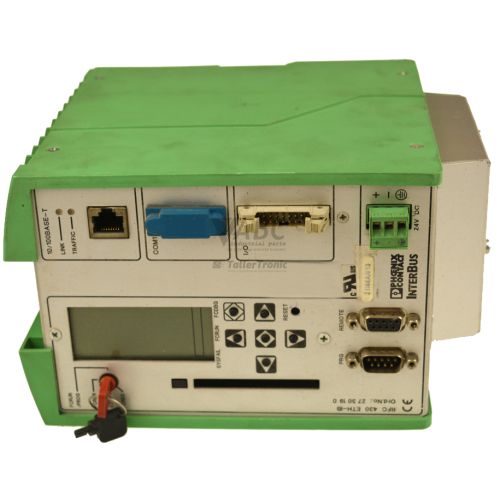
The Phoenix Contact 2737203 (Model ILC 350 ETH) is a compact central processing unit in the Inline product family, designed for mid-range industrial control, modular machine control, and distributed automation systems. Operating as a PLC CPU module on a 24 V DC supply (permissible range 19.2 to 30 V DC) with a 1.25 A rated current, this controller combines processing power with integrated communication interfaces. The core processing unit provides 512 kB of program memory, 512 kB of data memory, and 64 kB of retentive NVRAM to preserve critical parameters during power loss. For direct localized machine control, the unit features 8 onboard 24 V DC digital inputs and 4 digital outputs rated at 0.5 A per channel.
Network integration and fieldbus connectivity are central features of the ILC 350 ETH. The controller includes an onboard 10/100 Mbps RJ45 Ethernet port supporting Modbus TCP, TCP/IP, UDP, HTTP, and FTP protocols, alongside a dedicated 6-pin MINI-DIN RS-232 port for direct local serial connection. As an Inline local bus master operating at 500 kbit/s, it supports direct physical attachment of up to 63 Inline local bus expansion modules on a single node. Control projects are programmed using PC WORX version 3.0 or higher in compliance with IEC 61131-3 standards. Commissioning and maintenance are streamlined by a plug-in parameterization memory card slot, enabling project configurations and network IP parameters to be transferred to a replacement unit without requiring on-site software re-engineering, with tested spare units and expert support available through ABC Industrial Parts.
System health and operational monitoring are accessible through front-panel diagnostic LEDs and embedded communication services. Diagnostic indicators include RUN and ACTIVE status lights, bus and system fault LEDs (SF, BF, FAIL, DB), data transmission indicators (TR, L/A), and force state monitoring (FR). Technicians can review detailed diagnostic status registers using PC WORX software or access the integrated HTTP web server for remote status overviews. First-line troubleshooting involves checking that supply voltage remains above 19.2 V DC, inspecting Inline bus connections, and verifying memory card seating. If an internal hardware POST error or system non-volatile memory failure occurs, the unit cannot be serviced in the field, making unit replacement or repair through ABC Industrial Parts the standard route to restore machine operation.
Technical Specifications
| Manufacturer | Phoenix Contact |
| Part Number | 2737203 |
| Model / Type | ILC 350 ETH |
| Product Family | Inline |
| Component Type | PLC CPU Module |
| Supply Voltage Range | 19.2 - 30 V DC (24 V DC nominal) |
| Rated Current | 1.25 A |
| Program Memory | 512 kB |
| Data Memory | 512 kB |
| Retentive NVRAM | 64 kB |
| Onboard Digital Inputs | 8 |
| Onboard Digital Outputs | 4 (0.5 A per channel) |
| Ethernet Interface | 1x RJ45 (10/100 Mbit/s) |
| Local Bus Expansion Limit | Up to 63 Inline expansion modules |
Programming and Configuration
The Phoenix Contact 2737203 ILC 350 ETH is programmed and configured using PC WORX engineering software, requiring version 3.0 or higher. Application programs are developed following standard IEC 61131-3 control logic programming models. Execution and operational settings rely on 512 kB of program memory and 512 kB of data memory, while key variable states and retentive parameters are preserved in 64 kB of non-volatile NVRAM during system shutdown or power loss.
To simplify hardware maintenance and system deployment, the controller is equipped with a plug-in parameterization memory card slot. Application projects, network parameters, and IP configuration settings can be saved directly to the memory card. When swapping a controller in the field, moving the memory card to a replacement module transfers the user program and communication profile without requiring direct connection to a programming PC or additional engineering software intervention.
Communication and System Integration
Network integration for the ILC 350 ETH is established via an onboard 10/100 Mbps RJ45 Ethernet port. The interface supports multiple concurrent protocols including Modbus TCP, TCP/IP, UDP, HTTP, and FTP. These protocols enable direct communication with industrial field devices, supervisory control systems, human-machine interfaces (HMIs), and remote monitoring equipment over standard Ethernet networks.
For physical I/O expansion, the unit features an integrated Inline local bus master interface operating at 500 kbit/s. A single controller node can support direct local attachment of up to 63 Inline local bus expansion modules. Local serial programming and point-to-point diagnostic communication are conducted via a integrated 6-pin MINI-DIN RS-232 interface.
Diagnostics and Status Indication
Diagnostic evaluation on the ILC 350 ETH is conducted using status LED indicators on the module, register readouts in PC WORX software, or web-based overview pages served by the integrated HTTP web server. The web server provides real-time access to diagnostic registers and system state data via a standard web browser.
Front-panel LED indicators display hardware states, local bus activity, and communication events. Real-time feedback covers CPU execution status, force states, network link speed and traffic, bus segment fault conditions, and global hardware faults.
Status LED Indicators
| LED | Color/Status | Meaning |
|---|---|---|
| SF | Red - Solid | System Fault - internal system error or major fault condition |
| BF | Red - Solid | Bus Fault - bus communication error on Inline local bus |
| RUN | Green - Solid | Controller state - PLC user program is executing |
| FAIL | Red - Solid | Execution fault - control execution error or halted program state |
| ACTIVE | Yellow - Solid | Local bus active - Inline local bus master operation is active |
| FR | Yellow - Solid | Force - forced inputs or outputs are active |
| DB | Yellow - Solid | Detached Bus - local bus segment is disconnected or detached |
| TR | Yellow - Flashing | Transmit/Receive - Ethernet data transmission activity |
| L/A | Green - Solid | Link/Activity - established Ethernet physical connection |
Replacement and Spare Part Considerations
When replacing a Phoenix Contact 2737203 (ILC 350 ETH) unit, ensure the spare module matches the required physical and electrical specifications. The unit requires a main 24 V DC power supply maintaining between 19.2 V DC and 30 V DC, with a rated current capacity of at least 1.25 A. Ensure all connected Inline local bus modules (up to 63 expansion units) are securely seated to prevent local bus interruption errors upon power-up.
To complete a rapid physical replacement, transfer the plug-in parameter card from the existing unit to the replacement hardware. If the memory card is unavailable or corrupt, reflash the project application using PC WORX (v3.0 or higher) and verify that the firmware version aligns with the project configuration. For long-term hardware modernization strategies, the recommended successor series is the AXC 1050 (2700988).
Error Codes & Fault Codes
The following error codes may be displayed during operation or diagnostics:
| Code | Name | Description | Possible Cause | Recommended Action |
|---|---|---|---|---|
| 0001 | LOCAL_BUS_ERROR | Local bus communication interruption or master hardware failure | Faulty Inline I/O module, improper bus termination, or physical bus interruption | Check connected Inline local bus modules, secure connectors, and verify terminal supply voltage. |
| 0002 | VOLTAGE_ERROR | Supply voltage dropped below permissible minimum operating threshold (< 19.2 V DC) | Power supply drop or overloaded 24 V DC main circuit | Measure 24 V DC input voltage at the power connector terminals and check power supply capacity. |
| 0004 | MEMORY_CARD_ERROR | Plug-in parameter memory card read/write error or memory card missing | Card unseated, defective card, or corrupt parameter filesystem | Re-seat memory card, reformat card in PC WORX, or replace memory card. |
| 0008 | FIRMWARE_MISMATCH | Firmware invalid, unverified, or incompatible with application project configuration | Interrupted firmware update process or firmware version mismatch | Reflash firmware via PC WORX or reload supported firmware version. |
| 0010 | HARDWARE_FAULT | Internal hardware or processor board-level error detected during POST or runtime | Internal circuit failure or corrupted system non-volatile memory | Internal hardware fault — power cycle unit; if condition persists, return unit for repair or replace controller. |
Frequently Asked Questions
Which software is required to program the Phoenix Contact 2737203 controller?
Programming and configuration are carried out using PC WORX software version 3.0 or higher, adhering to IEC 61131-3 standards.
How can I transfer the program and IP parameters to a replacement ILC 350 ETH without a PC?
You can transfer the application and network configuration by moving the plug-in parameterization memory card from the original controller directly into the replacement module.
How many local I/O modules can be attached directly to the ILC 350 ETH?
The integrated Inline local bus master interface supports direct physical attachment of up to 63 Inline expansion modules on a single node.
What Ethernet protocols are supported by the 2737203 CPU?
The onboard RJ45 10/100 Mbps Ethernet port supports Modbus TCP, TCP/IP, UDP, HTTP, and FTP protocols.
What does a solid red SF light on the front panel mean?
A solid red SF light indicates a System Fault, signifying an internal system error or major fault condition within the controller.
What power supply voltage is required for correct operation?
The nominal operating voltage is 24 V DC, with a permissible operating supply range of 19.2 V DC to 30 V DC and a rated current of 1.25 A.
Take advantage of our exchange formula
A defective product does not have to be worthless. At ABC Industrial Parts, you can hand in defective products and immediately benefit from a discount on your new purchase. This is a smart way to save money while contributing to a circular economy.
Play it safe with our warranty conditions
Industrial plants prefer to keep running invariably, no matter what. Therefore, it is essential that you can rely on high-quality products and/or sustainable repairs. With our warranty conditions, you can count on certainty, whether you choose new, used or repaired products.
Data backup and recovery
Have you lost valuable parameters or data due to a malfunction while the manufacturer no longer provides support? At ABC Industrial Parts, we help you secure this data, both for common and specific products.
Specific firmware and hardware versions
If you are working with specific hardware or firmware versions that are no longer available from the manufacturer, ABC Industrial Parts is your partner. When making your enquiry, clearly state which versions you need, we will then look at the possibilities of supplying those versions, so that your installations continue to function optimally.
Disclaimer:
We are not an authorised distributor of Phoenix Contact.
Product photos are for illustration purposes only and may differ from the actual product delivered.
Some of the content on this page was created with the help of AI. While we strive to provide accurate and up-to-date information, errors may occur.