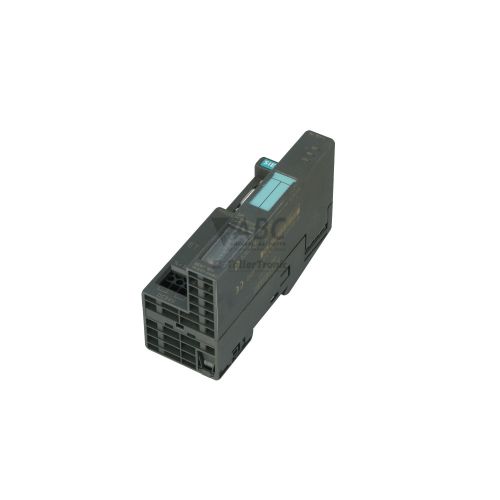
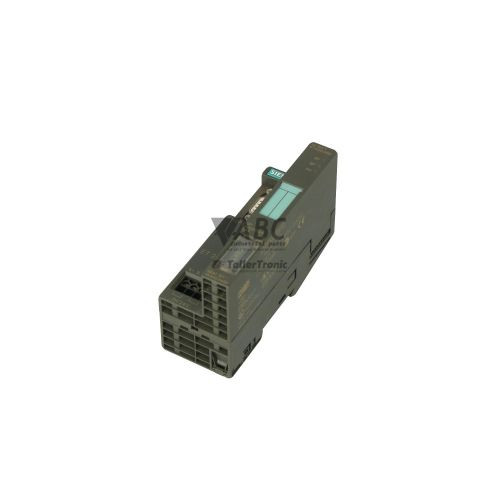
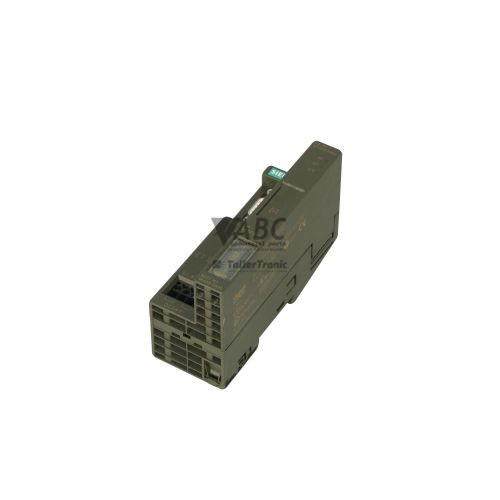
Siemens 6ES7151-1AA05-0AB0 SIMATIC ET 200S IM 151-1 Standard Interface Module


Het item werd toegevoegd aan uw offerteaanvraag
Product Information
The Siemens 6ES7151-1AA05-0AB0 is a SIMATIC ET 200S IM 151-1 Standard interface module designed to connect distributed I/O stations to a central PROFIBUS DP master PLC. Operating as a DP slave over an RS-485 interface with automatic baud rate detection up to 12 Mbit/s, this module manages fieldbus communication across modular assembly lines and remote I/O islands. Powered by a nominal 24 V DC supply with an operating range of 20.4 to 28.8 V DC, the unit draws a maximum input current of 0.1 A with a low power dissipation of 1.5 W. It supports station expansions up to 1 meter in width, accommodating up to 63 electronic I/O modules with an address space capacity of 128 bytes for inputs and 128 bytes for outputs.
Interfacing with the fieldbus via a 9-pin Sub-D female RS-485 connector, the module links remote sensor and actuator signals to the central control architecture. Commissioning or replacing a spare unit requires setting the matching station address from 1 to 125 using the integrated hardware DIP switches located behind the protective front door. Because the PROFIBUS DP master automatically downloads all station configuration and parameter settings during startup, no memory card or local programming tool is required when replacing a unit. When integrating into engineering platforms such as Siemens STEP 7 (V5.3 SP2 or higher) or third-party controllers, standard GSD files are used to define the station layout. Maintenance teams can rely on ABC Industrial Parts to supply tested replacement modules and assist with system hardware compatibility verification.
Real-time diagnostic information is displayed directly on the front panel using three visual status indicators: the green ON LED for power supply presence, the red SF LED for group or system faults, and the red BF LED for bus communication errors. Comprehensive diagnostic data is also available via STEP 7 hardware diagnostics, the DP master diagnostic buffer, and standard 6-byte PROFIBUS DP slave diagnostics. First-line troubleshooting for communication issues includes verifying the 24 V DC power feed, checking cable connections and terminating resistors (6ES7193-4JA00-0AA0), and confirming that the DIP switch address matches the hardware project. If the module reports internal hardware failure or backplane communication loss that cannot be cleared by isolating adjacent modules, internal board faults are not field-repairable. In these situations, sourcing a replacement unit or utilizing repair services through ABC Industrial Parts provides a rapid path back to full operational status.
Technical Specifications
| Supply Voltage (Nominal) | 24 V DC |
| Supply Voltage Range | 20.4 - 28.8 V DC |
| Input Current (Max) | 0.1 A |
| Power Loss | 1.5 W |
| Physical Interface | RS-485 (9-pin Sub-D female) |
| Communication Protocol | PROFIBUS DP (DP Slave) |
| Transmission Rate | 12 Mbit/s |
| Input Address Space (Max) | 128 bytes |
| Output Address Space (Max) | 128 bytes |
| Connectable Modules (Max) | 63 |
| Maximum Extension Width | 1 m |
Programming and Configuration
Configuration of the Siemens 6ES7151-1AA05-0AB0 IM 151-1 Standard interface module is managed within Siemens STEP 7 software (version V5.3 SP2 or higher) or via generic GSD configuration files in non-Siemens PROFIBUS master systems. The central control system defines the rack layout, specifying the precise order and parameters of up to 63 connected electronic I/O modules within the 128-byte input and 128-byte output address limits.
Hardware station assignment is accomplished using physical DIP switches located on the module, allowing node addresses from 1 to 125 to be set directly without electronic tools. During initial power-up or replacement, the DP master transmits all operational parameters directly to the module over the fieldbus. This automatic parameter transfer eliminates the need for card-based storage or local memory modules, allowing fast, cardless module swaps during system maintenance.
Communication and System Integration
The IM 151-1 Standard module links the SIMATIC ET 200S distributed I/O station to high-level PLCs via a 9-pin Sub-D female RS-485 connection. Operating as a PROFIBUS DP slave, it supports transmission speeds up to 12 Mbit/s with automatic baud rate detection, allowing seamless integration into multi-vendor or standard Siemens fieldbus networks.
System backplane communications connect the interface module to up to 63 individual I/O modules across a maximum rack extension width of 1 meter. Reliable power distribution across the station requires compatible power modules, such as the PM-E DC 24V, along with a SIMATIC DP Terminating Module (6ES7193-4JA00-0AA0) installed at the end of the backplane bus to maintain physical bus continuity.
Diagnostics and Status Indication
Visual diagnostic feedback is provided by three front-panel LEDs: ON (green) indicating active 24 V DC power supply, SF (red) indicating system or parameterization faults, and BF (red) indicating PROFIBUS communication status or baud rate search conditions. These status lights enable field technicians to immediately determine power, bus, and hardware states without connecting diagnostic devices.
Detailed diagnostic evaluation is accessible through STEP 7 hardware diagnostics, the DP master diagnostic buffer, and PROFIBUS DP standard slave diagnostics, which provide 6 bytes of standard diagnostic data along with module-specific and channel-level diagnostic status.
Status LED Indicators
| LED | Color/Status | Meaning |
|---|---|---|
| SF | Red - Solid | Group Fault / System Fault: indicates internal module fault, parameterization error, missing module, or bus error. |
| BF | Red - Solid / Flashing | Bus Fault: indicates loss of PROFIBUS DP communication, baud rate detection failure, invalid PROFIBUS address, or disconnected cable. |
| ON | Green - Solid | Supply Voltage: indicates 24 V DC power supply to module is present. |
Replacement and Spare Part Considerations
Replacing a 6ES7151-1AA05-0AB0 interface module requires verifying that the physical DIP switch address on the replacement unit matches the setting of the original device. Before restoring power, technicians must ensure that all backplane power modules (PM-E DC 24V) and I/O modules are firmly seated, and that the mandatory backplane terminating module (6ES7193-4JA00-0AA0) is installed at the end of the rack.
Because system parameters are automatically transferred from the PROFIBUS DP master upon startup, no local memory transfer or external software tool is needed during hardware replacement. For planned hardware upgrades or component replacements where this exact part number is required, note that model 6ES7151-1AA06-0AB0 serves as the direct functional successor in the SIMATIC ET 200S product family.
Error Codes & Fault Codes
The following error codes may be displayed during operation or diagnostics:
| Code | Name | Description | Possible Cause | Recommended Action |
|---|---|---|---|---|
| SF_ON_BF_ON | Bus fault / Baud rate search | IM 151-1 is searching for set baud rate or no physical link detected on PROFIBUS connection. | PROFIBUS cable disconnected, incorrect wiring, incorrect baud rate or master not active. | Check PROFIBUS cable connection, termination resistors, and DP master station status. |
| SF_ON_BF_FLASH | Parameterization or Configuration Error | Interface module is connected to bus but configuration sent by DP master does not match actual hardware setup. | Incorrect module order/type in STEP 7 configuration, address mismatch, or missing I/O module. | Verify hardware configuration in STEP 7 against actual rack configuration and check for missing/defective I/O modules. |
| SF_ON_BF_OFF | Internal hardware or module fault | Station diagnostic fault reported by installed I/O module, power module, or internal interface module hardware failure. | Faulty module attached to backplane, backplane bus interruption, missing terminating module, or internal module error. | Ensure terminating module is installed at the end of the rack. Inspect station diagnostic buffer in STEP 7. If fault persists after isolating modules, replace internal IM 151-1 unit. |
Frequently Asked Questions
How is the PROFIBUS address set on the Siemens 6ES7151-1AA05-0AB0?
The PROFIBUS address is configured using physical hardware DIP switches located behind the protective front door of the module, supporting address settings from 1 to 125.
Is a memory card or software download required when replacing the IM 151-1 Standard module?
No external memory card or software downloading tool is required for replacement. Upon startup, the PROFIBUS DP master automatically transfers all configured parameters to the module once the DIP switch address matches the system project.
How many I/O modules can be connected to the 6ES7151-1AA05-0AB0 interface module?
The module supports up to 63 connectable I/O modules per station, across a maximum rack extension width of 1 meter, with a maximum address space of 128 bytes for inputs and 128 bytes for outputs.
What do the front-panel status LEDs indicate?
The green ON LED indicates that 24 V DC power is supplied. The red SF LED indicates a group or system fault, such as parameterization errors or internal hardware issues. The red BF LED indicates a bus fault or baud rate search condition.
What is the direct functional successor to the 6ES7151-1AA05-0AB0 module?
The direct functional successor for the 6ES7151-1AA05-0AB0 interface module is model 6ES7151-1AA06-0AB0.
Take advantage of our exchange formula
A defective product does not have to be worthless. At ABC Industrial Parts, you can hand in defective products and immediately benefit from a discount on your new purchase. This is a smart way to save money while contributing to a circular economy.
Play it safe with our warranty conditions
Industrial plants prefer to keep running invariably, no matter what. Therefore, it is essential that you can rely on high-quality products and/or sustainable repairs. With our warranty conditions, you can count on certainty, whether you choose new, used or repaired products.
Data backup and recovery
Have you lost valuable parameters or data due to a malfunction while the manufacturer no longer provides support? At ABC Industrial Parts, we help you secure this data, both for common and specific products.
Specific firmware and hardware versions
If you are working with specific hardware or firmware versions that are no longer available from the manufacturer, ABC Industrial Parts is your partner. When making your enquiry, clearly state which versions you need, we will then look at the possibilities of supplying those versions, so that your installations continue to function optimally.
Disclaimer:
We are not an authorised distributor of Siemens.
Product photos are for illustration purposes only and may differ from the actual product delivered.
Some of the content on this page was created with the help of AI. While we strive to provide accurate and up-to-date information, errors may occur.