Siemens 6GK7343-1CX10-0XE0 CP 343-1 Lean Communication Module


Het item werd toegevoegd aan uw offerteaanvraag
Product Information
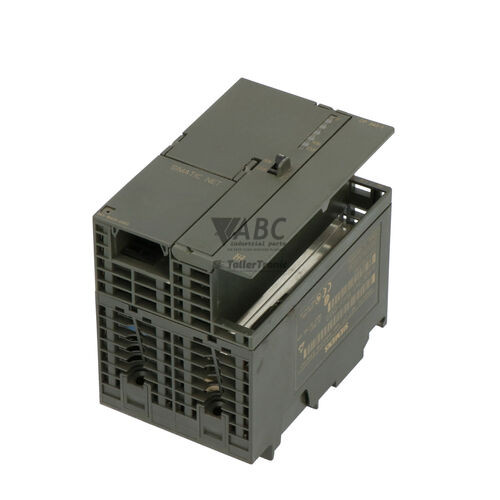
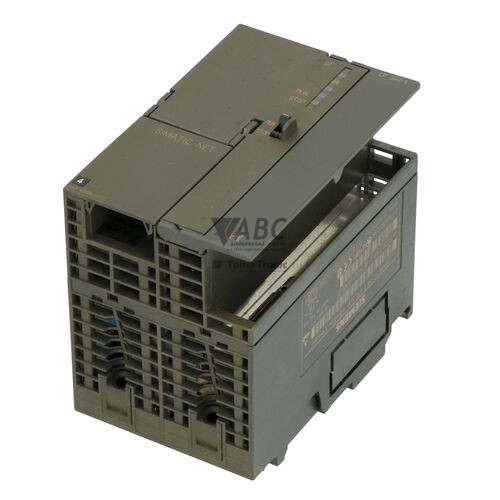
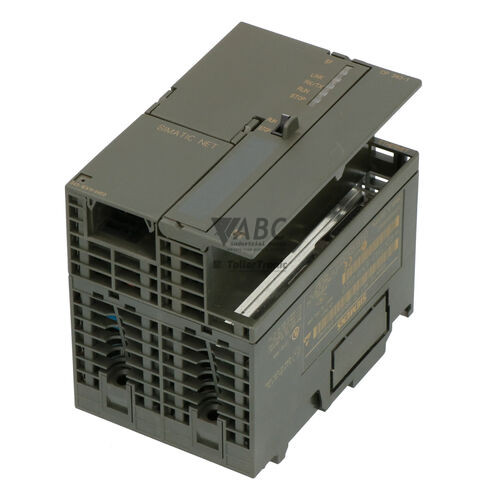
The Siemens 6GK7343-1CX10-0XE0 is a SIMATIC S7-300 CP 343-1 Lean communications processor designed to connect SIMATIC S7-300 programmable logic controllers to Industrial Ethernet networks. Operating as a dedicated communication module within automated control systems, this unit links standard controller racks to supervisory software, HMI stations, and decentralized network nodes. Equipped with an integrated 2-port RJ45 Ethernet switch using ERTEC 200 technology, the module supports line-topology structures directly without requiring external network switches. It operates on an external 24 V DC power supply while drawing 0.20 A from the backplane bus, delivering 10/100 Mbit/s transmission rates with autonegotiation and autocrossover capabilities.
For physical connection and network integration, the 6GK7343-1CX10-0XE0 features two RJ45 sockets, supporting up to 8 S7 server connections alongside Open IE protocols using TCP/IP and UDP with multicast support, as well as PROFINET IO Device functions. Engineering and commissioning are executed using STEP 7 V5.4 SP1 or higher with NCM S7, or TIA Portal STEP 7 Professional V11 or higher. Replacing a failed module in the field does not require a programming device on-site, as configuration parameters are automatically reloaded from the host S7-300 CPU Micro Memory Card during startup. ABC Industrial Parts provides tested replacement units and technical guidance to ensure seamless integration into existing control networks.
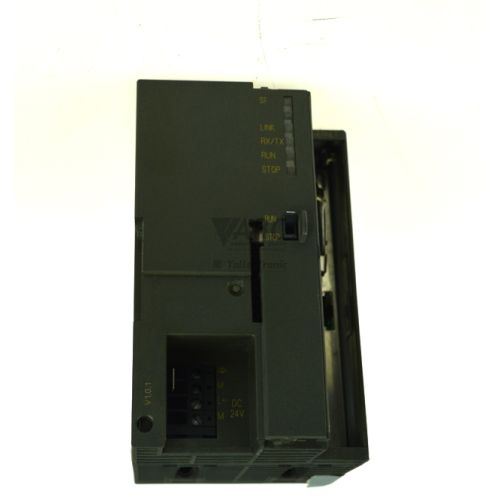
System status and line connectivity are displayed via front-panel LEDs, including SF for group/system faults, RUN, STOP, and individual P1 LINK/ACT and P2 LINK/ACT indicators for both Ethernet ports. Diagnostic monitoring is supported via an embedded HTTP web browser interface, SNMP V1 network management queries, PROFINET IO diagnostic interrupts, and the S7 Diagnostic Buffer accessible through STEP 7. Initial troubleshooting should verify external 24 V DC power, check RJ45 cabling for physical link integrity, and confirm that IP address parameters match the host network without duplicates. Internal ASIC or hardware component failures—such as persistent self-test faults—cannot be resolved by field servicing, making module replacement or unit exchange through ABC Industrial Parts the most practical path to minimizing system downtime.
Technical Specifications
| Manufacturer | Siemens |
| Part Number | 6GK7343-1CX10-0XE0 |
| Model / Type | CP 343-1 Lean |
| Product Family | SIMATIC S7-300 |
| Component Type | Communication Module |
| Supply Voltage | 24 V DC |
| Current Consumption (24V DC) | 0.16 A |
| Current Consumption (Backplane) | 0.20 A |
| Power Loss | 5.8 W |
| Ethernet Interfaces | 2 x RJ45 |
| Transmission Rate | 10/100 Mbit/s |
| Max S7 Connections | 8 |
| Max Open IE Connections | 8 |
Programming and Configuration
Configuration of the Siemens 6GK7343-1CX10-0XE0 communication module is carried out within the engineering environment using STEP 7 V5.4 SP1 or higher combined with NCM S7, or through TIA Portal STEP 7 Professional V11 or higher. During setup, engineers define the module in the HW Config station layout, establishing parameter assignment, interface mode, and IP network settings corresponding to the host SIMATIC S7-300 system.
Parameter storage is maintained directly on the host CPU Micro Memory Card (MMC). When the control rack powers up, configuration data transfers from the CPU memory card to the communications processor, allowing maintenance staff to complete module replacements without requiring an external programming terminal or software download.
Communication and System Integration
The CP 343-1 Lean features an integrated 2-port RJ45 Ethernet switch utilizing ERTEC 200 technology, supporting 10/100 Mbit/s full-duplex transmission rates with autonegotiation and autocrossover features. The dual-port layout allows field control panels to be linked directly in line topology networks without requiring standalone Ethernet switches, reducing cabinet wiring and installation hardware requirements.
Operating as a PROFINET IO Device, the module integrates seamlessly into distributed automation architectures. It supports up to 8 concurrent S7 server connections for SCADA and HMI data exchange, alongside up to 8 Open IE connections over TCP/IP and UDP protocols with multicast capabilities.
Diagnostics and Status Indication
Comprehensive operational monitoring is delivered through embedded diagnostic tools and physical indicators. Visual state indication is provided by five front-panel LEDs for SF, RUN, STOP, P1 LINK/ACT, and P2 LINK/ACT, allowing field personnel to inspect module operating modes and network port activity instantly.
Detailed diagnostic investigation can be conducted remotely via the integrated HTTP web server interface using a standard web browser. Network administration systems can query the unit using SNMP V1, while automation controllers collect real-time events through PROFINET IO diagnostic interrupts and the S7 Diagnostic Buffer in STEP 7 or NCM S7.
Status LED Indicators
| LED | Color/Status | Meaning |
|---|---|---|
| SF | Red - Solid | Group Fault / System Fault: Solid RED indicates hardware/software fault, active diagnostic event, or configuration error. |
| RUN | Green - Solid / Flashing | Solid GREEN indicates normal operating mode; Flashing GREEN indicates startup or initialization phase. |
| STOP | Yellow - Solid | Solid YELLOW indicates module is in STOP mode, waiting for configuration, or executing firmware update. |
| P1 LINK / ACT | Green / Yellow - Solid / Flashing | GREEN indicates active physical Ethernet link on Port 1. Flashing YELLOW/GREEN indicates data transmission on Port 1. |
| P2 LINK / ACT | Green / Yellow - Solid / Flashing | GREEN indicates active physical Ethernet link on Port 2. Flashing YELLOW/GREEN indicates data transmission on Port 2. |
Replacement and Spare Part Considerations
When installing a replacement 6GK7343-1CX10-0XE0 module, ensure that the part number matches the installed hardware configuration in STEP 7 or TIA Portal. Because operating parameters and network settings are stored on the host CPU Micro Memory Card, inserting a replacement unit into the S7-300 rack triggers automatic configuration download upon powering on the system.
Before powering up the replacement module, verify physical cable connections to both RJ45 ports and check that the 24 V DC power wiring is connected securely. Following startup, check the RUN and link LEDs to confirm proper bootup and network connection, and verify using STEP 7 or Primary Setup Tool (PST) that no IP or MAC address conflicts exist on the local network.
Error Codes & Fault Codes
The following error codes may be displayed during operation or diagnostics:
| Code | Name | Description | Possible Cause | Recommended Action |
|---|---|---|---|---|
| F9C1 | CP Hardware Fault | Internal hardware failure detected during module self-test. | Defective internal component or ASIC error on the CP board. | Power cycle the rack. If fault persists, replace the CP 343-1 Lean module (internal hardware failure, return unit for repair). |
| F5C1 | Configuration / Parameter Error | The configuration data received from the S7-300 CPU is invalid or incompatible with module hardware version. | Mismatch between STEP 7 HW Config project and actual module firmware/type. | Check STEP 7 hardware configuration, verify order number and firmware revision match, and re-download hardware configuration. |
| F1C1 | Ethernet Link Loss / Network Disruption | Loss of Ethernet communication link on active PROFINET / IP interface. | Disconnected RJ45 cable, failed switch port, or broken line topology. | Check RJ45 cabling, verify status of connected Ethernet switch or peer device, check Port 1/Port 2 LED status. |
| F0C1 | MAC Address / IP Address Conflict | Duplicate IP address or MAC address detected on the local Ethernet network. | Another network node is configured with the same IP address. | Verify IP addresses across all network nodes using STEP 7 / Primary Setup Tool (PST) and assign unique IP address. |
Frequently Asked Questions
How is configuration restored when replacing a 6GK7343-1CX10-0XE0 module?
Configuration data is automatically reloaded from the host S7-300 CPU Micro Memory Card (MMC) when the control system powers up, allowing replacement without using a programming terminal.
Which software tools are required to configure the Siemens CP 343-1 Lean?
The module is configured using STEP 7 V5.4 SP1 or higher with NCM S7, or TIA Portal STEP 7 Professional V11 or higher.
What communication protocols does the 6GK7343-1CX10-0XE0 support?
It functions as a PROFINET IO Device and supports up to 8 S7 server connections, as well as Open IE communications over TCP/IP and UDP with multicast capabilities.
What remote diagnostic options are available on the CP 343-1 Lean?
Diagnostics can be accessed via an embedded HTTP web browser interface, SNMP V1 network management queries, PROFINET IO diagnostic interrupts, and the S7 Diagnostic Buffer in STEP 7.
What does a solid red SF LED indicate on the module?
A solid red SF (System Fault) LED indicates a hardware or software fault, an active diagnostic event, or a configuration parameter error.
Take advantage of our exchange formula
A defective product does not have to be worthless. At ABC Industrial Parts, you can hand in defective products and immediately benefit from a discount on your new purchase. This is a smart way to save money while contributing to a circular economy.
Play it safe with our warranty conditions
Industrial plants prefer to keep running invariably, no matter what. Therefore, it is essential that you can rely on high-quality products and/or sustainable repairs. With our warranty conditions, you can count on certainty, whether you choose new, used or repaired products.
Data backup and recovery
Have you lost valuable parameters or data due to a malfunction while the manufacturer no longer provides support? At ABC Industrial Parts, we help you secure this data, both for common and specific products.
Specific firmware and hardware versions
If you are working with specific hardware or firmware versions that are no longer available from the manufacturer, ABC Industrial Parts is your partner. When making your enquiry, clearly state which versions you need, we will then look at the possibilities of supplying those versions, so that your installations continue to function optimally.
Disclaimer:
We are not an authorised distributor of Siemens.
Product photos are for illustration purposes only and may differ from the actual product delivered.
Some of the content on this page was created with the help of AI. While we strive to provide accurate and up-to-date information, errors may occur.