Beckhoff CX5020-0111 CX5020 CPU Base Unit Embedded PC


Het item werd toegevoegd aan uw offerteaanvraag
Product Information
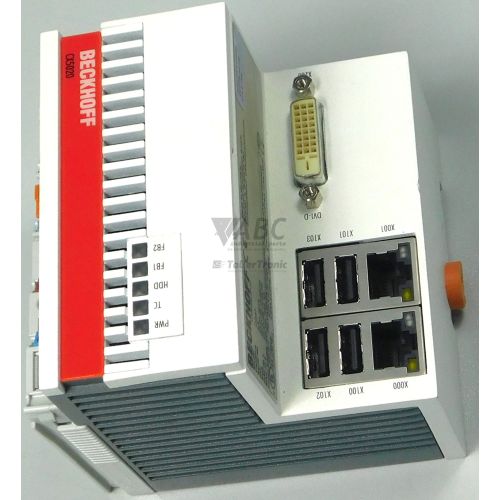
The Beckhoff CX5020-0111 is a DIN-rail mountable industrial CPU base unit from the CX Embedded PC family, designed for real-time PLC logic, motion control, and data acquisition tasks. Powered by an Intel Atom Z530 single-core processor running at 1.33 GHz with 512 MB of DDR2 main memory, this x86-based controller combines low power consumption with reliable processing performance. Operating on a 24 V DC power supply, the unit features 32-bit Windows Embedded Standard 2009 alongside a pre-installed TwinCAT 2 PLC runtime. An integrated 1-second capacitive UPS preserves volatile persistent data during unexpected power cuts by writing critical system information to internal storage before complete system power-down.
For system connectivity, the CX5020-0111 provides dual independent Gigabit Ethernet (10/100/1000 Mbit/s) RJ45 interfaces, four USB 2.0 host ports, a DVI-D female display port for visual interfaces, and a CompactFlash Type I/II slot. The right-hand side integrated bus interface provides direct plug-in expansion for Beckhoff E-bus EtherCAT Terminals (ELxxxx series) or K-bus Bus Terminals (KLxxxx series) without requiring separate bus couplers or gateways. When commissioning a replacement base unit, technical personnel must transfer or insert the application's CompactFlash memory card, verify network settings, and align the TwinCAT runtime setup. ABC Industrial Parts supports maintenance teams requiring pre-tested replacement hardware to restore machine operation efficiently.
System status and operational readiness are displayed directly on the unit housing via diagnostic LEDs for power supply (PWR), TwinCAT execution state (TC), CompactFlash access activity (HDD/Flash), and network link and activity (L/A1, L/A2). Advanced diagnostics can be conducted via Remote Desktop Connection (RDP) over Ethernet or through ADS queries and terminal state inspection in TwinCAT System Manager software. If basic checks on the 24 V DC supply, memory card seating, or bus connections fail to resolve hardware fault conditions, internal processor or board failure may be present. In such cases, internal repairs are not field-serviceable, and sourcing a replacement unit from ABC Industrial Parts offers a dependable path back to production.
Technical Specifications
| Manufacturer | Beckhoff |
| Part Number | CX5020-0111 |
| Model / Type | CX5020 CPU Base Unit |
| Product Family | CX Embedded PC |
| Component Type | PLC CPU |
| Processor | Intel Atom Z530 (1.33 GHz) |
| System RAM | 512 MB DDR2 |
| Flash Memory Slot | CompactFlash Type I/II |
| Operating System | Windows Embedded Standard 2009 (32-bit) |
| Control Runtime | TwinCAT 2 PLC |
| Supply Voltage | 24 V DC |
| Integrated UPS | 1-second capacitive UPS |
| I/O Bus Support | E-bus (EtherCAT Terminals) / K-bus (Bus Terminals) |
| Ethernet Interfaces | 2 x 10/100/1000 Mbit/s RJ45 |
| USB Ports | 4 x USB 2.0 Host |
| Display Interface | DVI-D Female |
Programming and Configuration
The CX5020-0111 base unit runs the 32-bit Windows Embedded Standard 2009 operating system paired with the licensed TwinCAT 2 PLC runtime software. Engineering, logic design, and configuration are performed using TwinCAT 2 PLC software (version 2.11 or later) or a TwinCAT 3 runtime (version 3.1 32-bit target). System software, runtime environment files, and control projects reside directly on an industrial CompactFlash Type I/II card.
During normal execution, the integrated 1-second capacitive UPS guards against persistent data corruption when main power fails. Upon loss of the 24 V DC supply, the UPS delivers internal power for one second, allowing TwinCAT to write retained persistent data onto the CompactFlash card before shutdown. Inserting a fully configured CompactFlash card into a replacement base unit restores the operating environment and project parameters, provided IP configurations and runtime licensing match system requirements.
Communication and System Integration
Network integration is handled by two independent Gigabit Ethernet ports (10/100/1000 Mbit/s) with RJ45 connectors. This dual-port architecture enables structural separation between fieldbus communication traffic and upper-level plant networks or programming PCs. Local control interfaces and peripherals connect directly via four USB 2.0 host ports and a female DVI-D port suited for local operator panels.
The unit features a right-hand bus interface that accepts direct side-by-side connection of Beckhoff E-bus EtherCAT Terminals (ELxxxx series) or standard K-bus Bus Terminals (KLxxxx series). The system automatically identifies connected terminal types without requiring additional line drivers or interface modules. A factory option slot is also available for extending fieldbus connectivity to PROFIBUS, CANopen, or PROFINET networks.
Diagnostics and Status Indication
Hardware status monitoring is accessible directly via five front-panel diagnostic LEDs. The PWR LED confirms 24 V DC input status, while the multi-color TC LED indicates the current TwinCAT state, showing green for RUN mode, blue for CONFIG mode, and red for STOP mode or fault conditions. Read and write access to system memory flashes the yellow HDD/Flash LED, while separate green L/A1 and L/A2 LEDs indicate link and activity states on each Ethernet port.
Software-level diagnostics can be carried out remotely across the network. Technicians can start a Remote Desktop Connection (RDP) to access the underlying Windows Embedded desktop, run TwinCAT ADS queries from an engineering workstation, or inspect individual E-bus and K-bus terminal states directly using TwinCAT System Manager software.
Status LED Indicators
| LED | Color/Status | Meaning |
|---|---|---|
| PWR | Green - Solid / Off | Green = 24 V DC power supply operating normally; Off = Power missing or internal power supply failure. |
| TC | Green / Blue / Red - Solid | Green = TwinCAT in RUN mode; Blue = TwinCAT in CONFIG mode; Red = TwinCAT in STOP mode or error state. |
| HDD / Flash | Yellow - Flashing | Yellow blinking = CompactFlash card read/write activity. |
| L/A1 | Green - Solid / Flashing | Green solid = Link established on LAN 1; Green blinking = Network activity on LAN 1 interface. |
| L/A2 | Green - Solid / Flashing | Green solid = Link established on LAN 2; Green blinking = Network activity on LAN 2 interface. |
Replacement and Spare Part Considerations
When replacing an existing CX5020-0111 unit, verifying the base model reference and internal configuration is critical for application compatibility. Maintenance teams should ensure that the CompactFlash card installed in the replacement unit matches the required operating system build, TwinCAT version, and control program.
Prior to restarting the system, ensure the 24 V DC supply is wired with correct polarity and that attached E-bus or K-bus terminals are mechanically aligned and locked. Because the integrated capacitive UPS depends on a functional power supply to remain charged, verifying power stability during commissioning prevents unexpected loss of persistent data during routine power cycling.
Frequently Asked Questions
What operating system and control software run on the Beckhoff CX5020-0111?
The CX5020-0111 operates on 32-bit Windows Embedded Standard 2009 and features a pre-installed TwinCAT 2 PLC runtime. Engineering compatibility includes TwinCAT 2 software version 2.11 or later and TwinCAT 3 version 3.1 (32-bit target).
How does the integrated UPS safeguard system data during a power failure?
The base unit incorporates a 1-second capacitive UPS. If the 24 V DC power supply is interrupted, the capacitive UPS maintains operation for one second, giving the TwinCAT runtime time to save volatile persistent data onto the CompactFlash card before system shutdown.
Which I/O terminals can connect directly to the CX5020-0111 CPU base unit?
The integrated right-hand bus connector automatically supports direct connection to Beckhoff E-bus EtherCAT Terminals (ELxxxx series) and K-bus Bus Terminals (KLxxxx series) without requiring extra gateways or bus couplers.
What do the colors on the TC status LED signify?
The TC status LED displays the TwinCAT runtime status: solid green indicates RUN mode, solid blue indicates CONFIG mode, and solid red signifies STOP mode or an active error condition.
What procedure is recommended when replacing a failed CX5020-0111 base unit?
Transfer the CompactFlash card containing the OS, runtime parameters, and PLC program from the original unit to the spare CPU. Reconnect network interfaces, monitor displays, and terminal blocks, then verify 24 V DC power, IP address settings, and TwinCAT runtime operation.
Take advantage of our exchange formula
A defective product does not have to be worthless. At ABC Industrial Parts, you can hand in defective products and immediately benefit from a discount on your new purchase. This is a smart way to save money while contributing to a circular economy.
Play it safe with our warranty conditions
Industrial plants prefer to keep running invariably, no matter what. Therefore, it is essential that you can rely on high-quality products and/or sustainable repairs. With our warranty conditions, you can count on certainty, whether you choose new, used or repaired products.
Data backup and recovery
Have you lost valuable parameters or data due to a malfunction while the manufacturer no longer provides support? At ABC Industrial Parts, we help you secure this data, both for common and specific products.
Specific firmware and hardware versions
If you are working with specific hardware or firmware versions that are no longer available from the manufacturer, ABC Industrial Parts is your partner. When making your enquiry, clearly state which versions you need, we will then look at the possibilities of supplying those versions, so that your installations continue to function optimally.
Disclaimer:
We are not an authorised distributor of Beckhoff.
Product photos are for illustration purposes only and may differ from the actual product delivered.
Some of the content on this page was created with the help of AI. While we strive to provide accurate and up-to-date information, errors may occur.