Siemens 6ES5095-8MC01 SIMATIC S5 CPU 95U PLC Controller


Het item werd toegevoegd aan uw offerteaanvraag
Product Information
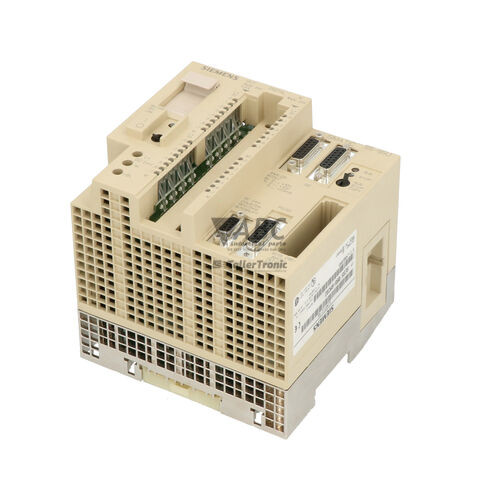
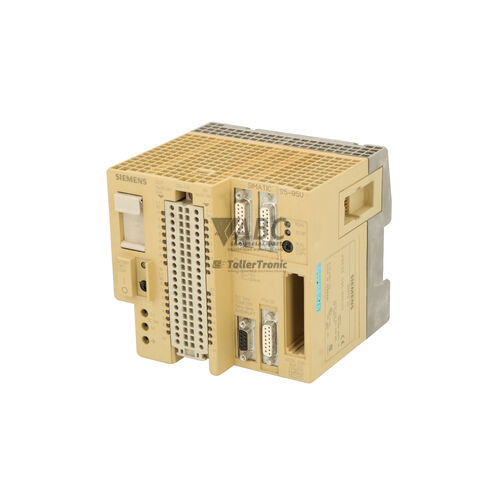
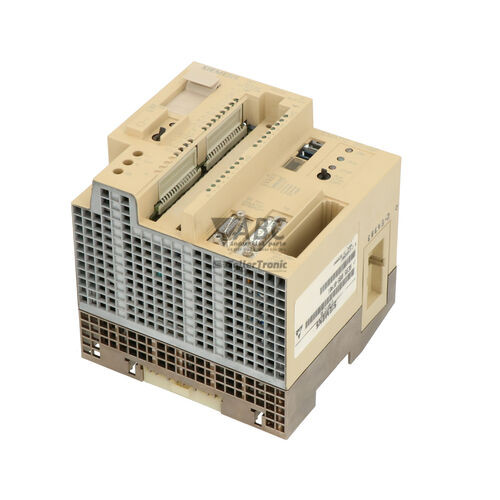
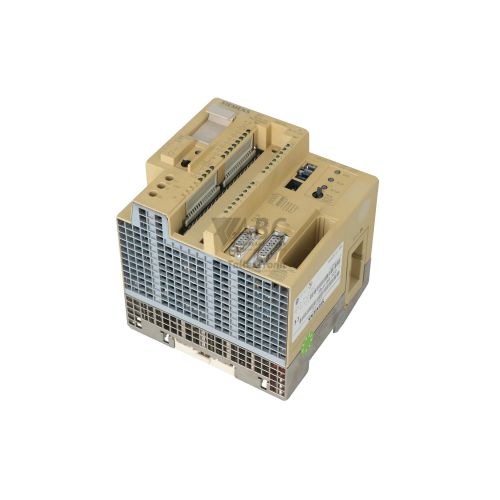
The Siemens 6ES5095-8MC01 is a SIMATIC S5 CPU 95U processor module designed for standalone machine automation and distributed fieldbus applications. Operating on a nominal 24 V DC supply with an acceptable voltage range of 20.4 to 28.8 V DC, this compact PLC CPU integrates 16 KB of RAM program memory alongside built-in process inputs and outputs. The onboard I/O configuration features 16 24V DC digital inputs, 16 24V DC digital outputs rated at 0.5 A, 4 analog inputs, and 1 analog output supporting both voltage and current signals. Additionally, two integrated 10 kHz high-speed counter inputs and two process interrupt inputs allow the unit to process fast signal events directly without increasing overall program scan times.
Integrating a replacement 6ES5095-8MC01 controller into an existing system requires proper hardware setup and configuration transfer before restoring machine operation. Main communication and programming connections are established via a 9-pin Sub-D connector for the PROFIBUS-DP interface and a 15-pin Sub-D 20mA TTY current loop port for programming devices. Commissioning a spare CPU involves setting the DIP switch configuration to match the original network node address, verifying the 3.6V lithium backup battery, and reloading the STEP 5 user program. Memory contents can be restored from host software using a PC-TTY adapter cable or directly loaded via plug-in SIMATIC S5 375-series EPROM or EEPROM submodules. Technical support from ABC Industrial Parts can assist maintenance teams with parameter verification and program transfer to ensure smooth replacement.
Real-time operational status and network health are communicated through four front-panel LED indicators: RUN (green), STOP (red), System Fault (SF, red), and Bus Fault (BF / L2, red/yellow). If a fault condition arises, technicians can analyze diagnostic details using STEP 5 ISTACK and BSTACK display screens, COM PROFIBUS online diagnostic tools, or system data area monitoring in RS bytes 120-127. Diagnostic fault conditions include I/O acknowledge delay errors (QVZ), cycle time overruns (ZYKL), stack overflow or underflow (STUEB, STUFE), syntax errors (SYN), non-existent block calls (NIP), and peripheral transfer errors (TRAUG). While bus wiring issues or logic errors can be cleared in the field, hardware-level failures or corrupted internal memory require a replacement unit or bench repair to minimize machine downtime through ABC Industrial Parts.
Technical Specifications
| Manufacturer | Siemens |
| Part Number | 6ES5095-8MC01 |
| Model / Type | CPU 95U (L2-DP Slave) |
| Product Family | SIMATIC S5 |
| Component Type | PLC CPU |
| Supply Voltage | 24 V DC |
| Supply Voltage Range | 20.4 - 28.8 V DC |
| Program Memory Capacity | 16 KB RAM |
| Digital Inputs Onboard | 16 channels (24 V DC) |
| Digital Outputs Onboard | 16 channels (24 V DC, 0.5 A) |
| Analog Inputs Onboard | 4 channels |
| Analog Outputs Onboard | 1 channel |
| High-Speed Counter Inputs | 2 channels (10 kHz) |
| Process Interrupt Inputs | 2 channels |
| TTY Interface Transmission Speed | 9.6 kbit/s |
| PROFIBUS-DP Interface Transmission Speed | 1.5 Mbit/s |
Programming and Configuration
Programming and configuring the Siemens 6ES5095-8MC01 is performed using Siemens STEP 5 programming software, supporting versions V3.x through V7.x. The CPU communicates with a programming device or PC using a dedicated 15-pin Sub-D TTY 20mA current loop interface via a PC-TTY adapter cable (part number 6ES5 734-1BD20) operating at a transmission speed of 9.6 kbit/s.
The controller features 16 KB of internal RAM program memory, which requires a standard 3.6V lithium battery to preserve volatile program blocks and system parameters during main power interruptions. For non-volatile program retention and rapid program distribution without battery dependency, the CPU accepts plug-in SIMATIC S5 375-series EPROM or EEPROM submodules. When swapping modules, memory contents can be reloaded directly from these submodules or rewritten using STEP 5 software tools.
Communication and System Integration
The 6ES5095-8MC01 includes an integrated PROFIBUS-DP (L2-DP) slave interface accessed through a 9-pin Sub-D connector. This fieldbus interface enables high-speed distributed communication with PROFIBUS-DP master controllers at data transmission rates up to 1.5 Mbit/s. By incorporating the fieldbus slave directly onto the processor, the unit connects to decentralized automation networks without requiring additional interface modules.
For local control and signal processing, the CPU incorporates a built-in I/O point assembly consisting of 16 digital inputs, 16 digital outputs, 4 analog inputs, and 1 analog output. High-speed signal processing is facilitated by two dedicated 10 kHz counter inputs and two process interrupt inputs. Fieldbus parameters, including the slave address and baud rate recognition, are aligned with the PROFIBUS-DP master architecture during integration.
Diagnostics and Status Indication
Local diagnostic feedback on the Siemens 6ES5095-8MC01 is provided by four status LEDs mounted on the front faceplate. The RUN LED (green) remains solid during normal cyclic program processing. The STOP LED (red) illuminates solid when the processor is halted and flashes during startup or when an internal fault is present. The System Fault LED (SF, red) lights up upon detecting program runtime errors, expansion bus faults, or hardware failures. The Bus Fault LED (BF / L2, red/yellow) indicates fieldbus communication breakdown on the L2-DP interface due to master disconnection, baud rate mismatch, or an invalid node address.
Detailed diagnostic analysis is available by connecting a programming device running STEP 5. Maintenance personnel can inspect the Interrupt Stack (ISTACK) and Block Stack (BSTACK) to pinpoint the exact instruction or block where a fault occurred. Further troubleshooting is supported through COM PROFIBUS online diagnostic utilities and system data area monitoring targeting RS bytes 120-127.
Status LED Indicators
| LED | Color/Status | Meaning |
|---|---|---|
| RUN | Green - Solid | CPU is in cyclic program processing mode |
| STOP | Red - Solid or Flashing | Solid when CPU is in STOP mode. Flashes during restart or when an internal fault is present |
| SF | Red - Solid | System Fault indicator showing program runtime error, expansion bus fault, or hardware failure |
| BF / L2 | Red/Yellow - Solid or Flashing | Bus fault on L2-DP interface indicating lost master communication, baud rate mismatch, or invalid address |
Replacement and Spare Part Considerations
Replacing a 6ES5095-8MC01 CPU requires verifying both physical and logic configurations to ensure seamless network and machine operation. Before removing a failed controller, ensure that the DIP switch settings for the PROFIBUS-DP slave address on the spare unit match the active network configuration expected by the PROFIBUS master controller.
Because volatile RAM relies on an active 3.6V lithium battery, check and replace the battery in the spare unit before downloading the STEP 5 application program. Alternatively, transfer the existing SIMATIC S5 375-series EPROM or EEPROM submodule to the replacement CPU to instantly restore non-volatile program code. Following power-up, confirm that the BF / L2 LED turns off and the RUN LED illuminates solid to verify successful communication and cyclic program execution.
Error Codes & Fault Codes
The following error codes may be displayed during operation or diagnostics:
| Code | Name | Description | Possible Cause | Recommended Action |
|---|---|---|---|---|
| QVZ | Acknowledge Delay Error (Quittierungsverzoegerung) | I/O module failed to acknowledge access within expected timeout period or non-existent address accessed. | Faulty expansion module, loose bus connector, or incorrect I/O address in user program. | Check external bus cabling, module addressing, and replace defective expansion module. |
| ZYKL | Cycle Time Exceeded | Program execution time exceeded programmed maximum cycle scan monitoring time. | Infinite loop in block program, excessive block processing, or scan time limit configured too low. | Optimize program logic, check loop conditions, or increase maximum cycle time in system parameters. |
| STUEB | Block Stack Overflow | Maximum nesting depth of block calls has been exceeded. | Recursive block calls or exceeding maximum allowed call level. | Review call hierarchy in user program and eliminate deep or recursive block nesting. |
| STUFE | Block Stack Underflow | Return instruction executed without active block call on stack. | Corrupted block structure or invalid exit instruction execution. | Inspect program logic and rebuild block program. |
| SYN | Syntax Error | CPU encountered uninterpretable or illegal instruction code in memory. | Corrupted RAM memory contents, noise interference, or failed RAM cell. | Perform CPU overall reset (URGL) and re-download program. Repair CPU if error persists. |
| NIP | Non-Existent Block Called | Program executed call instruction to a block missing from program memory. | Missing block in program download or logic configuration error. | Download the missing block to CPU memory. |
| TRAUG | Transfer Error | Peripheral transfer access error or illegal I/O register byte access. | Accessing non-configured analog/digital peripheral memory location. | Verify address range against installed onboard and expansion modules. |
Frequently Asked Questions
What software and cable are required to program the Siemens 6ES5095-8MC01?
Programming requires Siemens STEP 5 software (versions V3.x through V7.x) and a PC-TTY adapter cable (6ES5 734-1BD20) connected to the 15-pin Sub-D TTY interface operating at 9.6 kbit/s.
How is the user program preserved in the 6ES5095-8MC01 CPU during power loss?
The 16 KB RAM memory is maintained during power outages by an internal 3.6V lithium backup battery. Alternatively, programs can be stored permanently without battery dependency using plug-in SIMATIC S5 375-series EPROM or EEPROM submodules.
What does a solid or flashing BF / L2 LED indicate on the CPU 95U?
A solid or flashing BF / L2 LED indicates a bus fault on the integrated PROFIBUS-DP interface. Common causes include loss of communication with the PROFIBUS master, a baud rate mismatch, or an incorrect DIP switch node address setting.
What onboard I/O capabilities are built into the 6ES5095-8MC01 controller?
The unit features 16 digital inputs (24V DC), 16 digital outputs (24V DC, 0.5 A), 4 analog inputs, and 1 analog output. It also includes two 10 kHz high-speed counter inputs and two process interrupt inputs for fast signal processing.
How can I diagnose a SYN or QVZ fault code on the CPU 95U?
A SYN fault indicates corrupted memory or syntax error requiring a CPU memory reset (URGL) and program re-download. A QVZ error indicates an I/O acknowledge delay, which requires checking expansion module connections, wiring, and addressing in the user program.
Take advantage of our exchange formula
A defective product does not have to be worthless. At ABC Industrial Parts, you can hand in defective products and immediately benefit from a discount on your new purchase. This is a smart way to save money while contributing to a circular economy.
Play it safe with our warranty conditions
Industrial plants prefer to keep running invariably, no matter what. Therefore, it is essential that you can rely on high-quality products and/or sustainable repairs. With our warranty conditions, you can count on certainty, whether you choose new, used or repaired products.
Data backup and recovery
Have you lost valuable parameters or data due to a malfunction while the manufacturer no longer provides support? At ABC Industrial Parts, we help you secure this data, both for common and specific products.
Specific firmware and hardware versions
If you are working with specific hardware or firmware versions that are no longer available from the manufacturer, ABC Industrial Parts is your partner. When making your enquiry, clearly state which versions you need, we will then look at the possibilities of supplying those versions, so that your installations continue to function optimally.
Disclaimer:
We are not an authorised distributor of Siemens.
Product photos are for illustration purposes only and may differ from the actual product delivered.
Some of the content on this page was created with the help of AI. While we strive to provide accurate and up-to-date information, errors may occur.