Siemens 6ES5928-3UA12 SIMATIC S5 CPU 928A Module


Het item werd toegevoegd aan uw offerteaanvraag
Product Information
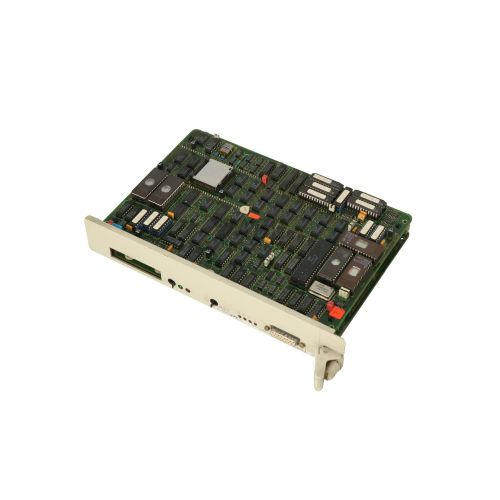
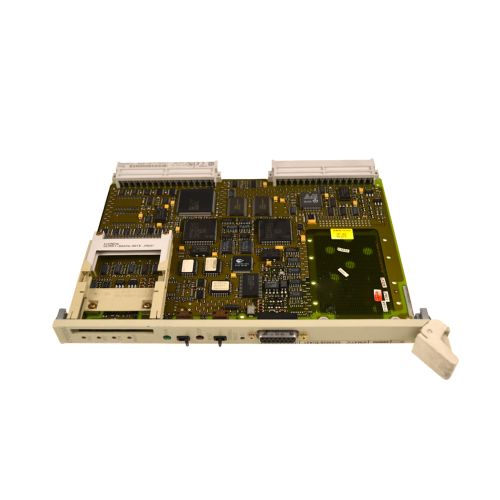
The Siemens 6ES5928-3UA12 is a SIMATIC S5 CPU 928A central processing unit designed for installation in SIMATIC S5-135U (6ES5135-3UA11) and SIMATIC S5-155U (6ES5155-3UA11) central controller racks. Designed for high-speed machine sequence execution and real-time logic control, this processor achieves an instruction execution speed of 0.25 µs for both binary and word operations. The module occupies a single slot on the backplane subrack and draws 1.5 A current from the internal 5V DC bus. Equipped with 46 KB of internal RAM memory for user programs and system data, the CPU 928A supports multiprocessing architectures, allowing up to four CPUs to run concurrently in a single central rack for parallel load sharing and complex automation tasks.
Connecting to the CPU 928A for programming and communication is accomplished via a front-panel 15-pin Sub-D female 20 mA TTY current loop interface running at 9.6 kbit/s. This port supports Siemens AS511 and SINEC L1 protocols for interfacing with STEP 5 programming tools, PC adapters, and operator panels. Putting a replacement module into service requires matching the user program and system configuration. User memory can be loaded using STEP 5 software (versions V6.x or V7.x) via a PC-TTY cable (6ES5734-1BD20) or transferred directly by swapping pluggable SIMATIC S5 374 or 375 series memory submodules (EPROM, EEPROM, or RAM). Internal volatile RAM data is maintained during main power interruptions by the backplane buffer battery located in the rack power supply module. ABC Industrial Parts can support maintenance teams requiring tested spare units and guidance during project migration or memory submodule transfer.
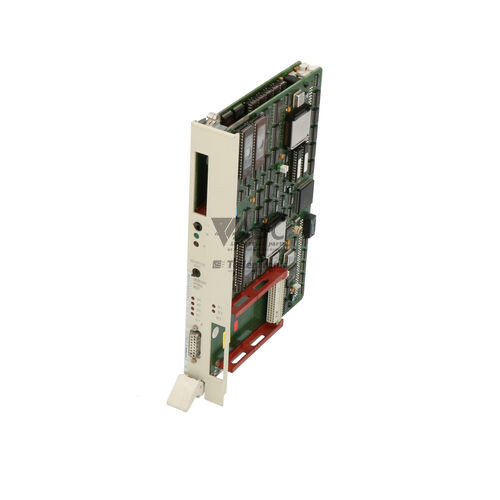
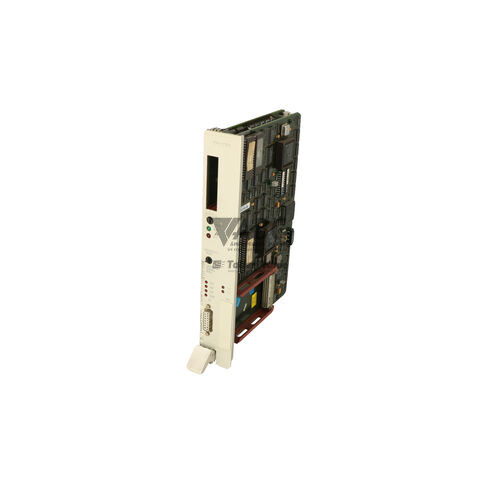
System status and hardware operational states are indicated on the front panel by seven diagnostic LEDs, including RUN, STOP, BASP, REDY, QVZ, ZYK, and PE. When a system fault occurs, detailed error evaluation can be performed using STEP 5 diagnostic tools to analyze the Interrupt Stack (ISTACK), Block Stack (BSTACK), and System Data Area RS. Common operational halts stem from backplane acknowledgement delays (QVZ) when an I/O module fails to respond, or scan cycle monitoring timeouts (ZYK). First-line troubleshooting should include verifying I/O module seating, rack supply voltages, and field fuses. Internal hardware failures or unrecoverable bus faults require unit replacement, where obtaining a tested exchange module from ABC Industrial Parts offers a dependable path to restoring machine operation.
Technical Specifications
| Manufacturer | Siemens |
| Part Number | 6ES5928-3UA12 |
| Model / Type | CPU 928A |
| Product Family | SIMATIC S5 |
| Component Type | PLC CPU Module |
| Binary Instruction Execution Time | 0.25 µs |
| Word Instruction Execution Time | 0.25 µs |
| Internal User Memory (RAM) | 46 KB |
| Current Consumption (5V DC) | 1.5 A |
| Rack Slot Width | 1 Slot |
| Programming Interface | 20 mA TTY Current Loop (15-pin Sub-D female) |
| Interface Data Rate | 9.6 kbit/s |
| Supported Protocols | AS511, SINEC L1 |
Programming and Configuration
Engineering and software configuration for the Siemens 6ES5928-3UA12 CPU 928A is performed using Siemens STEP 5 software (versions V6.x and V7.x). Logic routines, function blocks, and system parameters are written in STEP 5 and transferred over the 20 mA TTY serial interface using a standard PC-TTY programming cable (6ES5734-1BD20). The CPU supports structured programming using organization blocks (OBs), function blocks (FBs), data blocks (DBs), and program blocks (PBs).
Memory management relies on the 46 KB of internal RAM, which can be supplemented or backed up using plug-in SIMATIC S5 374 and 375 series memory submodules. These submodules are available in EPROM, EEPROM, and RAM configurations and plug directly into the front receptacle of the CPU 928A. When using EPROM or EEPROM memory submodules, user programs remain non-volatile even if backplane battery power is lost.
During routine operation with program execution running from RAM, volatile data protection depends on the lithium battery installed in the central controller power supply module (such as in the S5-135U or S5-155U rack). Ensuring a charged battery is installed before shutting down system power prevents loss of user programs and retentive data markers.
Communication and System Integration
The front panel of the 6ES5928-3UA12 features a 15-pin Sub-D female connector dedicated to a 20 mA TTY current loop interface operating at a fixed baud rate of 9.6 kbit/s. This interface utilizes the AS511 protocol for direct connection to programming devices (PGs), industrial PCs, and operator panels (HMI). It also supports the SINEC L1 protocol for field-level network communications between SIMATIC controllers.
System integration occurs across the SIMATIC S5 central backplane bus. The CPU 928A interacts directly with digital I/O, analog I/O, function modules, and communications processors installed in adjacent slots of the 6ES5135-3UA11 (S5-135U) or 6ES5155-3UA11 (S5-155U) central controller racks.
For high-demand processes, the CPU 928A supports multiprocessor operation. Up to four CPUs can be installed in a single central controller rack, sharing backplane communication resources while independently processing assigned logic tasks to distribute computational load across complex installations.
Diagnostics and Status Indication
The CPU 928A provides real-time status feedback through seven LEDs mounted on its front panel. These indicators display operational mode, processor readiness, and active fault states. Status indications allow technicians to quickly distinguish between normal RUN state, forced STOP conditions, output lockouts (BASP), and internal peripheral errors.
Detailed diagnostics can be executed using STEP 5 software connected through the TTY interface. By calling up the Interrupt Stack (ISTACK) and Block Stack (BSTACK), maintenance engineers can identify the exact block number, command counter, and fault type that caused a CPU STOP condition. System Data Area RS provides additional insight into system-level operations and fault registers.
Status LED Indicators
| LED | Color/Status | Meaning |
|---|---|---|
| RUN | Solid | CPU is in execution mode (RUN state). |
| STOP | Solid | CPU is halted (STOP state) due to switch position, error condition, or STEP 5 command. |
| BASP | Solid | Command Output Disable active (Befehlsausgabe gesperrt). Digital and analog outputs are disabled/held safe. |
| REDY | Solid | CPU hardware and internal power supply/firmware initialization ready. |
| QVZ | Solid/Flashing | Acknowledgement delay error (Quittungsverzug). Indicates I/O access error or missing/defective I/O module on backplane. |
| ZYK | Solid/Flashing | Scan cycle time exceeded (Zykluszeitüberschreitung). Program loop execution surpassed configured cycle monitoring limit. |
| PE | Solid | Parity Error / Peripheral Fault. Internal RAM/submodule parity error or bus transfer error. |
Replacement and Spare Part Considerations
When replacing a failed 6ES5928-3UA12 CPU module, verify that the replacement part number matches exactly. In multiprocessor central controller subracks, ensure the replacement unit is installed in the correct rack slot corresponding to its address allocation in the overall STEP 5 system project.
Before inserting a replacement processor into a subrack, turn off the central power supply. Transfer the existing SIMATIC S5 374 or 375 memory submodule from the original processor to the replacement unit. If the program was stored strictly in volatile internal RAM, a fresh download must be executed from a backup copy using STEP 5 software and a PC-TTY cable.
Check the state of the backplane backup battery in the rack power supply module before powering down the rack for maintenance. Replacing an exhausted battery ensures that volatile program data and retentive flags are preserved during hardware servicing.
Error Codes & Fault Codes
The following error codes may be displayed during operation or diagnostics:
| Code | Name | Description | Possible Cause | Recommended Action |
|---|---|---|---|---|
| OB 121 | Synchronous Program Error Interrupt | Triggered by a program execution error, such as a missing function block or addressing outside bounds. | Program block missing, transfer error, or corrupted user program memory. | Check STEP 5 ISTACK to identify faulting block number and reload missing program blocks. |
| OB 122 | Module Acknowledgement Delay (QVZ) Interrupt | Triggered when CPU attempts to access an I/O module address that does not respond within time limit. | Missing I/O module, damaged I/O module, incorrect slot addressing, or loose backplane connection. | Check physical slot addressing, verify supply voltage to I/O racks, inspect for missing or blown fuses on I/O modules. |
Frequently Asked Questions
What software and cable are required to connect to the Siemens 6ES5928-3UA12 CPU?
Connection requires Siemens STEP 5 software (version V6.x or V7.x) and a PC-TTY interface cable (part number 6ES5734-1BD20) attached to the front 15-pin Sub-D 20 mA TTY port.
How is the user program transferred when replacing a CPU 928A module?
The program can be transferred by moving the pluggable SIMATIC S5 374 or 375 series memory submodule (EPROM, EEPROM, or RAM) to the new CPU, or by re-downloading the program file from STEP 5 over the TTY programming port.
What causes the QVZ LED to illuminate on the CPU 928A?
The QVZ (Quittungsverzug) LED signals an acknowledgement delay. This occurs when the CPU attempts to address an I/O module on the backplane that fails to respond, typically caused by a missing module, defective I/O card, incorrect addressing, or backplane connection fault.
Can multiple 6ES5928-3UA12 CPUs be installed in a single rack?
Yes, the CPU 928A supports multiprocessor architecture, allowing up to four CPUs to operate concurrently in a single SIMATIC S5-135U or S5-155U central controller subrack.
How is internal RAM memory retained during power outages?
The 46 KB internal RAM user memory is maintained during system power loss by a backup battery located inside the rack's power supply module.
Take advantage of our exchange formula
A defective product does not have to be worthless. At ABC Industrial Parts, you can hand in defective products and immediately benefit from a discount on your new purchase. This is a smart way to save money while contributing to a circular economy.
Play it safe with our warranty conditions
Industrial plants prefer to keep running invariably, no matter what. Therefore, it is essential that you can rely on high-quality products and/or sustainable repairs. With our warranty conditions, you can count on certainty, whether you choose new, used or repaired products.
Data backup and recovery
Have you lost valuable parameters or data due to a malfunction while the manufacturer no longer provides support? At ABC Industrial Parts, we help you secure this data, both for common and specific products.
Specific firmware and hardware versions
If you are working with specific hardware or firmware versions that are no longer available from the manufacturer, ABC Industrial Parts is your partner. When making your enquiry, clearly state which versions you need, we will then look at the possibilities of supplying those versions, so that your installations continue to function optimally.
Disclaimer:
We are not an authorised distributor of Siemens.
Product photos are for illustration purposes only and may differ from the actual product delivered.
Some of the content on this page was created with the help of AI. While we strive to provide accurate and up-to-date information, errors may occur.