Allen-Bradley 1756-RIO ControlLogix Remote I/O Scanner/Adapter Module



Het item werd toegevoegd aan uw offerteaanvraag
Product Information
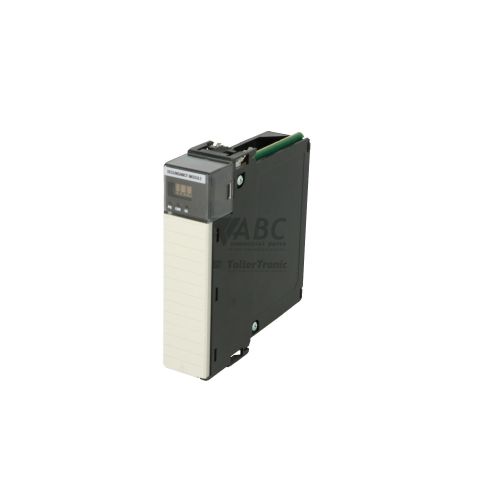
The Allen-Bradley 1756-RIO is a single-slot ControlLogix communication module that acts as a flexible gateway between ControlLogix controllers and legacy Remote I/O (RIO) networks. Designed with a dual-function capability, the module can be configured in software to operate as either an RIO Scanner or an RIO Adapter. This allows a ControlLogix system to control existing 1771 Remote I/O racks, legacy variable frequency drives, and operator terminals, or alternatively allow the ControlLogix chassis to function as a remote drop to a host processor. Physical connectivity is established via a 3-pin removable terminal block for the main twinaxial network and a 9-pin RS-232 D-shell connector for serial communication.
Integrating a replacement 1756-RIO into a ControlLogix system relies on setup within RSLogix 5000 or Studio 5000 Logix Designer (version 10.00 or higher). Network parameters, logical rack assignments, and baud rates (57.6 kbps, 115.2 kbps, or 230.4 kbps) are defined in the software project file and stored in non-volatile flash memory on the module. When installing a spare unit, the ControlLogix controller automatically checks electronic keying and downloads saved configuration settings directly across the backplane without requiring manual ladder logic pass-through routines. Maintenance technicians can rely on ABC Industrial Parts to supply tested replacement modules to ensure prompt restoration of legacy system communication.
Diagnostic information is provided through real-time front panel LED indicators, including OK for module health, RIO for network activity, and PRT for serial port status. System monitoring is further supported by the Module Properties Status tab in Studio 5000, RSLinx Classic diagnostic counters, and controller GSV instructions that read connection fault words. If the OK LED shows a solid red state, an unrecoverable internal hardware fault has occurred that cannot be resolved through field servicing. In these situations, replacing the module with a tested exchange unit from ABC Industrial Parts provides the fastest path to restoring operational productivity.
Technical Specifications
| Backplane Current (5V DC) | 1 A |
| Backplane Current (24V DC) | 0.003 A |
| Isolation Voltage | 30 V |
| Power Dissipation | 5.3 W |
| Thermal Dissipation | 18.1 BTU/h |
| Slot Width | 1 slot |
| Maximum RIO Baud Rate | 230.4 kbps |
Programming and Configuration
The 1756-RIO module is configured using RSLogix 5000 or Studio 5000 Logix Designer software, requiring version 10.00 or higher. All network mapping, baud rate selections, and logical rack assignments are configured within the controller's module properties and written to the module's non-volatile flash memory.
When swapping out a faulty module, the ControlLogix controller performs automatic configuration restoration upon detecting the new unit. The controller verifies electronic keying parameters—such as Exact Match, Compatible Module, or Disable Keying—and pushes saved configuration settings across the backplane, eliminating the need to write custom data transfer ladder logic or program the replacement module offline.
Communication and System Integration
The primary RIO interface on the 1756-RIO features a 3-pin removable terminal block designed for Belden 9463 twinaxial cable connections. The module supports configurable RIO network speeds of 57.6 kbps, 115.2 kbps, and 230.4 kbps, allowing direct integration with 1771-based RIO chassis, legacy PanelView HMIs, and AC drives across existing cabling infrastructure.
In addition to the main network connection, the front faceplate includes a 9-pin D-shell RS-232 serial port. Supporting DF1 full-duplex and half-duplex point-to-point protocols at speeds up to 115.2 kbps, this port enables configuration, local programming, and diagnostic access using standard serial cables such as the 1756-CP3 or 1747-CP3.
Diagnostics and Status Indication
The 1756-RIO provides comprehensive diagnostic monitoring through hardware indicators and software tools. Front-panel LEDs display real-time status for overall module health (OK), network communication (RIO), and serial port operation (PRT). Advanced diagnostic data can be accessed using the Module Properties Status tab in RSLogix 5000 / Studio 5000, RSLinx Classic diagnostic counters, or programmatic Get System Value (GSV) instructions reading connection status fault words in the Logix controller.
Status LED Indicators
| LED | Color/Status | Meaning |
|---|---|---|
| OK | Green/Red - Solid Green / Flashing Green / Solid Red / Flashing Red | Solid Green: Module operational and healthy. Flashing Green: Downloading firmware or initializing. Solid Red: Unrecoverable internal hardware failure. Flashing Red: Recoverable fault or self-test failure. |
| RIO | Green/Red - Solid Green / Flashing Green / Solid Red / Off | Solid Green: RIO network operating normally with active connections. Flashing Green: Waiting for RIO communication or missing configured rack connections. Solid Red: Critical RIO channel fault, duplicate node address, or cable failure. Off: Interface disabled or powered down. |
| PRT | Green - Solid Green / Flashing Green / Off | Solid Green: RS-232 serial port active. Flashing Green: Transmitting or receiving serial packets. Off: Serial port idle or not configured. |
Replacement and Spare Part Considerations
Rockwell Automation officially discontinued the 1756-RIO module on December 31, 2018. While no longer manufactured, it remains widely used in industrial facilities to maintain legacy 1771 Remote I/O chassis, older drive systems, and PanelView HMIs without requiring immediate re-wiring of field devices during ControlLogix platform upgrades.
When replacing a failed 1756-RIO, automatic configuration restoration from the Logix controller simplifies the swapping process. Ensure that electronic keying settings in the software project match the replacement unit's series and firmware revision, or adjust the keying selection to Compatible Module or Disable Keying if substituting a different hardware series.
For long-term modernization strategies or new system designs, facilities may evaluate alternative options such as the 1756-DHRIO module or direct network upgrades to EtherNet/IP using communication modules like the 1756-EN2T.
Error Codes & Fault Codes
The following error codes may be displayed during operation or diagnostics:
| Code | Name | Description | Possible Cause | Recommended Action |
|---|---|---|---|---|
| 16#0108 | Connection Request Timed Out | The connection request to the 1756-RIO module timed out before completing. | Module missing from slot, improper seating in backplane, or insufficient backplane power. | Verify module is securely installed in chassis slot and check power supply capacity. |
| 16#0204 | Connection Timeout / Unreachable Target | Logix controller timed out waiting for response from 1756-RIO module. | Module unresponsive, internal hardware fault, or incorrect slot designation in Logix I/O tree. | Check OK LED indicator. If solid red, internal board failure has occurred; replace module. |
| 16#0315 | Invalid Module Configuration | Configuration data sent to 1756-RIO module is invalid or rejected by module. | Mismatched baud rate, duplicate RIO rack allocation, or unsupported parameters. | Verify RIO network parameters in RSLogix 5000 module properties. |
| 16#0110 | Module Keying / Revision Mismatch | Installed 1756-RIO module identity does not match configured module profile in controller. | Electronic keying mismatch or incompatible hardware series / firmware revision. | Check electronic keying settings (Disable Keying or Compatible Module) or flash module firmware. |
Frequently Asked Questions
What software is required to configure the Allen-Bradley 1756-RIO module?
The 1756-RIO module is configured using RSLogix 5000 or Studio 5000 Logix Designer software version 10.00 or higher.
Can the 1756-RIO operate as both a scanner and an adapter?
Yes, the 1756-RIO features a dual-function design that can be configured in software to operate as either a Remote I/O scanner or a Remote I/O adapter node.
What cabling and baud rates are supported on the RIO network link?
The module uses standard Belden 9463 twinaxial cabling connected via a 3-pin removable terminal block, supporting selectable baud rates of 57.6 kbps, 115.2 kbps, and 230.4 kbps.
How does module replacement work when a unit fails?
When a replacement 1756-RIO module is installed into the chassis slot, the ControlLogix controller validates electronic keying and automatically downloads saved configuration parameters from its project memory to the module.
What does a solid red OK LED mean on the 1756-RIO?
A solid red OK LED indicates an unrecoverable internal hardware failure on the module board, requiring module replacement.
What migration options exist for the discontinued 1756-RIO module?
For system upgrades or new installations, recommended alternatives include migrating to the 1756-DHRIO module or upgrading I/O drops directly to EtherNet/IP using modules like the 1756-EN2T.
Take advantage of our exchange formula
A defective product does not have to be worthless. At ABC Industrial Parts, you can hand in defective products and immediately benefit from a discount on your new purchase. This is a smart way to save money while contributing to a circular economy.
Play it safe with our warranty conditions
Industrial plants prefer to keep running invariably, no matter what. Therefore, it is essential that you can rely on high-quality products and/or sustainable repairs. With our warranty conditions, you can count on certainty, whether you choose new, used or repaired products.
Data backup and recovery
Have you lost valuable parameters or data due to a malfunction while the manufacturer no longer provides support? At ABC Industrial Parts, we help you secure this data, both for common and specific products.
Specific firmware and hardware versions
If you are working with specific hardware or firmware versions that are no longer available from the manufacturer, ABC Industrial Parts is your partner. When making your enquiry, clearly state which versions you need, we will then look at the possibilities of supplying those versions, so that your installations continue to function optimally.
Disclaimer:
We are not an authorised distributor of Allen-Bradley.
Product photos are for illustration purposes only and may differ from the actual product delivered.
Some of the content on this page was created with the help of AI. While we strive to provide accurate and up-to-date information, errors may occur.