Siemens 6ES7138-4DA01-0AB0 SIMATIC DP ET 200S 1 STEP Module


Het item werd toegevoegd aan uw offerteaanvraag
Product Information
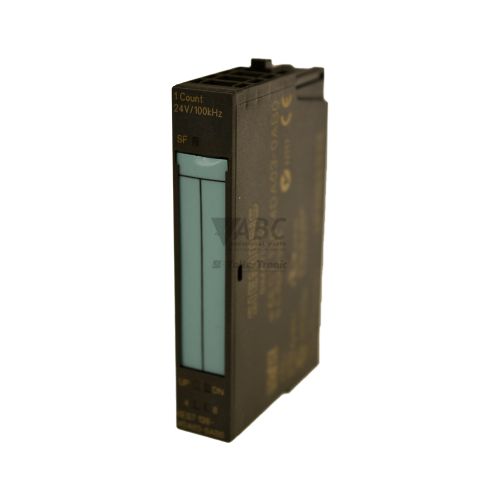
The Siemens 6ES7138-4DA01-0AB0 is a single-channel SIMATIC DP 1 STEP 5V/24V electronic module engineered for single-axis stepper motor positioning control within the ET 200S distributed I/O system. Operating as a pulse-direction signal generator for external power units, this 30 mm wide module drives positioning applications such as rotary indexing tables, packaging machinery, and material handling conveyors. The module operates on a nominal supply voltage of 24 V DC with an allowable voltage range from 20.4 V DC to 28.8 V DC. It provides two selectable signal output modes: 5V RS422 differential outputs supporting pulse frequencies up to 210 kHz, and 24V push-pull outputs supporting up to 50 kHz. Additionally, two integrated 24 V DC digital inputs (DI1 and DI2) compliant with IEC 61131 Type 2 allow direct monitoring of hardware limit switches or external stop conditions.
For integration into an ET 200S modular terminal rack, the 6ES7138-4DA01-0AB0 mounts onto TM-E30S44-01 or TM-E30C44-01 terminal modules and communicates across PROFIBUS DP or PROFINET networks via interface modules such as the IM 151-1 or IM 151-3. System configuration is executed using STEP 7 V5.3 SP2 or higher, or TIA Portal V11 or higher. Operational parameters are defined during engineering and stored centrally on the PLC CPU. Commissioning a replacement unit does not require local software programming tools on the plant floor; when a spare module is installed, the central CPU automatically transfers stored parameter assignments to the new unit. Sourcing tested replacements through ABC Industrial Parts ensures straightforward module recovery during system maintenance.
Diagnostic oversight is performed via front-panel status indicators and network reporting. The module features a red SF LED for group faults along with green DI1 and DI2 LEDs indicating digital input activity. Detailed operational feedback is available through STEP 7 or TIA Portal online diagnostics, OB82 diagnostic interrupts in the controller program, and channel-specific diagnostic bytes in the process image. First-line troubleshooting involves verifying that 24 V DC auxiliary power is present at the potential group and checking sensor and pulse wiring for short circuits. If an internal module failure (Diagnostic bit 0.0) persists after cycling power, internal hardware damage has occurred, making module exchange or repair through ABC Industrial Parts the recommended solution.
Technical Specifications
| Manufacturer | Siemens |
| Part Number | 6ES7138-4DA01-0AB0 |
| Model / Type | ET 200S 1 STEP 5V/24V |
| Product Family | SIMATIC DP |
| Component Type | Stepper Motor Control Module |
| Supply Voltage Range | 24 V DC (20.4 to 28.8 V DC) |
| Number of Channels | 1 |
| Max Output Frequency (5V RS422) | 210 kHz |
| Max Output Frequency (24V Push-Pull) | 50 kHz |
| Digital Inputs | 2 (24 V DC, IEC 61131 Type 2) |
| Width | 30 mm |
| Compatible Terminal Modules | TM-E30S44-01 / TM-E30C44-01 |
| Compatible Interface Modules | IM 151-1 (PROFIBUS) / IM 151-3 (PROFINET) |
| Software Requirements | STEP 7 V5.3 SP2 or higher / TIA Portal V11 or higher |
Programming and Configuration
The 6ES7138-4DA01-0AB0 stepper module is configured using standard Siemens engineering software, such as STEP 7 V5.3 SP2 or higher and TIA Portal V11 or higher. Within the hardware configuration editor, engineers set parameters controlling axis output operating modes (5V RS422 differential or 24V push-pull), signal pulse limits, and digital input functionality.
Because module parameters are maintained centrally in the host CPU memory, on-site software engineering tools are not required when swapping out a damaged unit. Upon inserting a replacement module into the rack and restoring system power, the host CPU automatically downloads the configured parameter set to the unit.
Communication and System Integration
Operating within the SIMATIC DP ET 200S modular architecture, the module interfaces with the primary controller across PROFIBUS DP using an IM 151-1 interface module or PROFINET using an IM 151-3 interface module. Channel-specific diagnostic bytes and control signals are managed via process image data.
Physical connection is established by mounting the module onto terminal modules TM-E30S44-01 or TM-E30C44-01. The module delivers high-frequency pulse-direction control signals to external stepper drives while reading 24 V DC feedback signals from limit switches or stop contacts across its two digital input channels.
Diagnostics and Status Indication
The module provides real-time status evaluation using front-panel LEDs alongside network diagnostics. Hardware diagnostic interrupts are sent directly to the PLC user program, where they can be evaluated via organization block OB82 to pinpoint missing voltage supply or parameter configuration errors.
Status LED Indicators
| LED | Color/Status | Meaning |
|---|---|---|
| SF | Red - Solid | Group Fault detected (missing load voltage, parameter assignment error, or module internal failure) |
| DI1 | Green - Solid | Digital Input 1 active (high signal status) |
| DI2 | Green - Solid | Digital Input 2 active (high signal status) |
Replacement and Spare Part Considerations
When replacing a 6ES7138-4DA01-0AB0 module, isolate power to the potential group prior to swapping the unit on the terminal module. Ensure that the module is correctly snapped onto terminal module TM-E30S44-01 or TM-E30C44-01 to establish proper backplane bus continuity.
Because parameters are transferred automatically from the central CPU during startup, replacing a faulty module with the same part number requires no local configuration. For complete panel modernizations or system upgrades, the ET 200SP series (including TM PTO 1x16KHZ and TM Pulse 2x24V) serves as the successor family.
Error Codes & Fault Codes
The following error codes may be displayed during operation or diagnostics:
| Code | Name | Description | Possible Cause | Recommended Action |
|---|---|---|---|---|
| Diagnostic bit 0.0 | Module fault | General internal module error or hardware malfunction detected. | Internal electronic defect or memory error. | Cycle 24V power. If error persists, internal hardware fault — replace the module. |
| Diagnostic bit 0.2 | External auxiliary voltage missing | Load voltage supply (24 V DC) is missing or out of range. | Power supply module faulty, fuse blown, or supply line disconnected. | Check 24 V DC supply voltage at the power module supplying the ET 200S potential group. |
| Diagnostic bit 0.6 | Parameter assignment error | The parameters transferred from the CPU to the module are invalid or incompatible. | Incorrect parameter settings in HW Config (e.g. invalid frequency or operating mode). | Check hardware configuration in STEP 7 / TIA Portal and re-download configuration to CPU. |
| Diagnostic bit 1.0 | Short circuit / encoder supply overload | Short circuit or overcurrent at 5V sensor/encoder output voltage supply. | Defective wiring, short circuit to ground/M, or overload on 5V supply. | Inspect wiring connected to encoder/pulse outputs and eliminate short circuit. |
Frequently Asked Questions
What engineering software is required for the Siemens 6ES7138-4DA01-0AB0 module?
The module requires Siemens STEP 7 V5.3 SP2 or higher, or TIA Portal V11 or higher for hardware configuration and parameter definition.
Is local software programming required when replacing a failed module?
No. Module parameters are stored centrally in the host CPU. When a spare module is installed, the CPU automatically transfers the configuration data to the unit upon startup.
What max pulse output frequencies does the 6ES7138-4DA01-0AB0 support?
The module supports output frequencies up to 210 kHz when set to 5V RS422 differential mode, and up to 50 kHz when configured for 24V push-pull output mode.
What do the SF, DI1, and DI2 LEDs indicate on the module front panel?
The red SF LED lights solid to indicate a Group Fault caused by missing supply voltage, parameter assignment errors, or internal hardware failure. Green DI1 and DI2 LEDs light up when Digital Inputs 1 and 2 detect active high 24 V DC signals.
How should I resolve Diagnostic bit 0.0 (Module fault)?
Diagnostic bit 0.0 indicates an internal electronic defect or memory failure. Cycle the 24 V DC power supply. If the error condition persists, internal hardware damage has occurred and the module must be replaced.
Take advantage of our exchange formula
A defective product does not have to be worthless. At ABC Industrial Parts, you can hand in defective products and immediately benefit from a discount on your new purchase. This is a smart way to save money while contributing to a circular economy.
Play it safe with our warranty conditions
Industrial plants prefer to keep running invariably, no matter what. Therefore, it is essential that you can rely on high-quality products and/or sustainable repairs. With our warranty conditions, you can count on certainty, whether you choose new, used or repaired products.
Data backup and recovery
Have you lost valuable parameters or data due to a malfunction while the manufacturer no longer provides support? At ABC Industrial Parts, we help you secure this data, both for common and specific products.
Specific firmware and hardware versions
If you are working with specific hardware or firmware versions that are no longer available from the manufacturer, ABC Industrial Parts is your partner. When making your enquiry, clearly state which versions you need, we will then look at the possibilities of supplying those versions, so that your installations continue to function optimally.
Disclaimer:
We are not an authorised distributor of Siemens.
Product photos are for illustration purposes only and may differ from the actual product delivered.
Some of the content on this page was created with the help of AI. While we strive to provide accurate and up-to-date information, errors may occur.