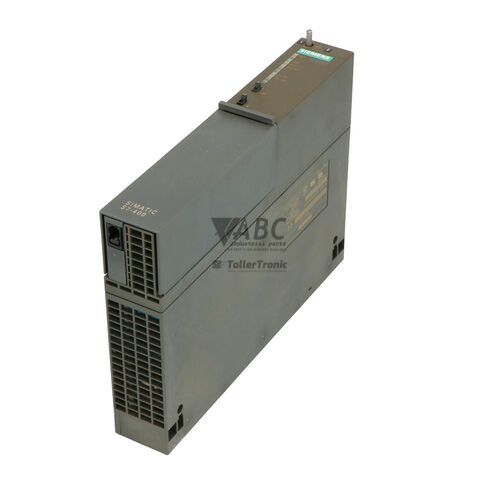
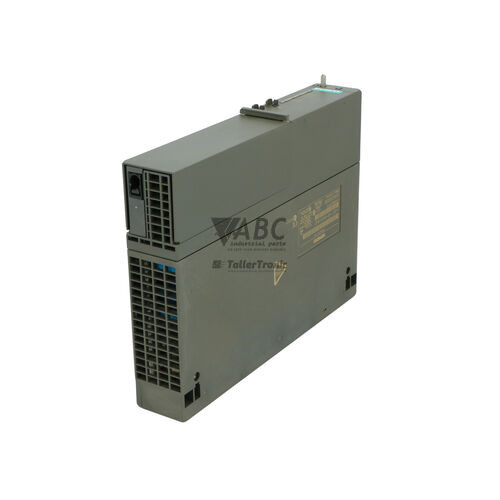
Siemens 6ES7407-0KA02-0AA0 SIMATIC S7-400 PS 407 10A Power Supply Module


Het item werd toegevoegd aan uw offerteaanvraag
Product Information
The Siemens 6ES7407-0KA02-0AA0 is a 10 A power supply module within the SIMATIC S7-400 product family, designated as the PS 407 10A. Designed to deliver centralized power distribution across S7-400 rack assemblies, this module converts incoming AC or DC utility power into regulated system voltages delivered directly across the backplane bus to CPUs and interface components. Operating with a wide-range input of 85 to 264 V AC (47 to 63 Hz) or 88 to 300 V DC, it provides a rated output power of 95 W, delivering 5 V DC at 10 A for internal rack bus electronics and 24 V DC at 1 A for backplane loads. Occupying two standard rack slots, the unit ensures stable power distribution in control cabinet installations across automotive manufacturing, chemical processing, water treatment, and power utilities.
Installing or replacing the 6ES7407-0KA02-0AA0 involves mounting the unit directly into two adjacent slots of an S7-400 rack, such as UR1, UR2, or ER1 backplane configurations. Line power connects at the front terminal interface, while backplane connectors automatically distribute operating power across the rack bus. The module features integrated mains failure buffering capable of sustaining system power through short line dips up to 20 ms. To protect volatile memory during extended plant downtime, the front panel houses two slots for 3.6 V lithium backup batteries that maintain CPU RAM retention. When swapping an existing module, service personnel should isolate incoming power, check battery condition, and verify total backplane current draw. Technical support from ABC Industrial Parts can assist in sourcing verified replacement units and backup battery accessories to minimize downtime.
System state and operational health are monitored directly via front-panel LED indicators. Dedicated lights indicate proper 5 V DC and 24 V DC output levels, internal module status, backplane battery bus continuity, and individual battery charge conditions. If an output overload, short circuit, overtemperature condition, or battery fault occurs, internal diagnostic routines trigger software interrupts within the host controller. The CPU logs these events via Organization Block OB81 and updates the system diagnostic buffer accessible through STEP 7 or TIA Portal. Basic troubleshooting includes verifying input line voltage, checking output LEDs, and testing backup battery voltages. When internal component or circuit failures occur, replacing the faulty power supply with a tested unit from ABC Industrial Parts offers a fast and effective solution for restoring machine operation.
Technical Specifications
| Manufacturer | Siemens |
| Part Number | 6ES7407-0KA02-0AA0 |
| Model / Type | PS 407 10A |
| Product Family | SIMATIC S7-400 |
| Component Type | Power Supply Module |
| Nominal Input Voltage | 120/230 V AC/DC |
| AC Input Voltage Range | 85 - 264 V AC |
| DC Input Voltage Range | 88 - 300 V DC |
| Input Frequency Range | 47 - 63 Hz |
| Rated Input Current at 120 V | 1 A |
| Rated Input Current at 230 V | 0.5 A |
| Maximum Inrush Current | 18 A |
| Output Voltage 1 | 5 V DC |
| Output Current 1 | 10 A |
| Output Voltage 2 | 24 V DC |
| Output Current 2 | 1 A |
| Output Power | 95 W |
| Mains Buffering Time | 20 ms |
| Rack Slot Width | 2 slots |
Programming and Configuration
The Siemens 6ES7407-0KA02-0AA0 power supply operates within the hardware structure configured using STEP 7 (SIMATIC Manager) or TIA Portal. Although the physical power supply requires no complex parameter loading to output backplane voltages, its monitoring capabilities integrate into the overall hardware configuration of the S7-400 rack.
System diagnostic routines rely on Organization Block OB81 (Power Supply Error) in the CPU program environment. When an input supply dip, output overload, or backup battery failure occurs, the power supply asserts diagnostic signals on the backplane, triggering OB81 execution to log fault events into the CPU diagnostic buffer without interrupting overall system control processes.
Diagnostics and Status Indication
The 6ES7407-0KA02-0AA0 contains six front-panel LED indicators that provide immediate visual feedback regarding operational health, output levels, and battery condition. Green LEDs confirm that the internal 5 V DC and 24 V DC buses are operating within specified voltage thresholds, while red fault LEDs identify internal module errors, backplane battery bus issues, or depleted backup cells.
In addition to local visual indications, status information is passed across the backplane bus to the host SIMATIC S7-400 CPU. Detailed diagnostic history, including power supply failure events and low-battery warnings, can be reviewed online through STEP 7 or TIA Portal engineering software.
Status LED Indicators
| LED | Color/Status | Meaning |
|---|---|---|
| INTF | Red - Solid | Internal fault, short circuit, overtemperature, or output voltage out of range. |
| 5VDC | Green - Solid | Output voltage 5 V DC is present and within specified tolerances. |
| 24VDC | Green - Solid | Output voltage 24 V DC is present and within specified tolerances. |
| BAF | Red - Solid | Battery address or backplane battery bus fault. Backup voltage on backplane bus is missing or low. |
| BATT1F | Red - Solid | Battery 1 is exhausted or missing. |
| BATT2F | Red - Solid | Battery 2 is exhausted or missing. |
Replacement and Spare Part Considerations
When selecting a replacement for a Siemens 6ES7407-0KA02-0AA0 power supply, ensure that the mechanical width matches the two-slot requirement of the destination rack assembly. This module is compatible with standard SIMATIC S7-400 UR1, UR2, and ER1 racks, delivering up to 10 A at 5 V DC and 1 A at 24 V DC.
Before swapping modules, turn off incoming main AC or DC power to prevent electrical hazards. If CPU RAM memory retention is required during the power outage, confirm that fresh backup batteries are installed in the module battery compartments prior to shutting down line power.
After physical installation and wiring, apply input power and observe the front panel LEDs. Normal operation is established when the 5VDC and 24VDC LEDs illuminate green and all red fault indicators remain unlit. Diagnostic status can be verified via STEP 7 or TIA Portal to ensure the CPU registers no backplane power or battery alarms.
Frequently Asked Questions
What line voltages are supported by the Siemens 6ES7407-0KA02-0AA0 power supply?
The 6ES7407-0KA02-0AA0 features a wide-range input accepting 85 to 264 V AC at 47 to 63 Hz, or 88 to 300 V DC, covering standard 120/230 V AC and DC industrial power networks.
What are the output ratings for the PS 407 10A power supply module?
The module delivers dual regulated DC outputs across the S7-400 backplane bus: 5 V DC at up to 10 A and 24 V DC at up to 1 A, providing a maximum combined power output of 95 W.
How does the 6ES7407-0KA02-0AA0 preserve CPU memory during power failures?
The front panel houses two slots for backup batteries. When fitted with 3.6 V lithium batteries, the module delivers backup voltage across the backplane bus to retain volatile RAM contents in SIMATIC S7-400 CPUs during mains outages.
Which SIMATIC S7-400 racks accept this power supply module?
The 6ES7407-0KA02-0AA0 occupies two rack slots and is compatible with SIMATIC S7-400 UR1, UR2, and ER1 rack models.
What do the BATT1F and BATT2F LEDs indicate?
A solid red light on BATT1F or BATT2F indicates that battery 1 or battery 2 is either depleted or missing, signaling that the battery needs replacement to ensure CPU RAM retention.
How are power supply fault conditions evaluated in SIMATIC software?
Power supply interrupts execute Organization Block OB81 in the S7-400 CPU, logging hardware faults, battery status updates, and power loss events into the diagnostic buffer accessible via STEP 7 or TIA Portal.
Take advantage of our exchange formula
A defective product does not have to be worthless. At ABC Industrial Parts, you can hand in defective products and immediately benefit from a discount on your new purchase. This is a smart way to save money while contributing to a circular economy.
Play it safe with our warranty conditions
Industrial plants prefer to keep running invariably, no matter what. Therefore, it is essential that you can rely on high-quality products and/or sustainable repairs. With our warranty conditions, you can count on certainty, whether you choose new, used or repaired products.
Data backup and recovery
Have you lost valuable parameters or data due to a malfunction while the manufacturer no longer provides support? At ABC Industrial Parts, we help you secure this data, both for common and specific products.
Specific firmware and hardware versions
If you are working with specific hardware or firmware versions that are no longer available from the manufacturer, ABC Industrial Parts is your partner. When making your enquiry, clearly state which versions you need, we will then look at the possibilities of supplying those versions, so that your installations continue to function optimally.
Disclaimer:
We are not an authorised distributor of Siemens.
Product photos are for illustration purposes only and may differ from the actual product delivered.
Some of the content on this page was created with the help of AI. While we strive to provide accurate and up-to-date information, errors may occur.