Siemens 6SE4210-2NA00 Simovert P Frequency Inverter 0.12kW



Het item werd toegevoegd aan uw offerteaanvraag
Product Information
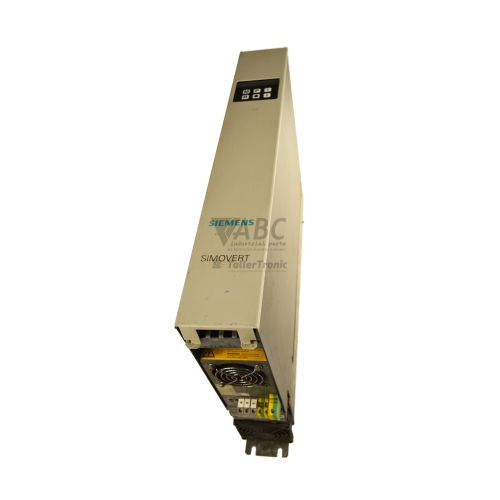
The Siemens 6SE4210-2NA00 is a compact frequency inverter from the Simovert P family, engineered for precise variable speed control of small three-phase AC induction motors. Operating on a single-phase line input of 200 V AC to 240 V AC (+10%/-15%), the drive converts single-phase AC power into a regulated three-phase AC output rated at 0.9 A and 0.12 kW capacity. Utilizing a 16-bit microprocessor-controlled pulse-width modulation system with selectable linear and quadratic V/f characteristic curves, this IP20-rated inverter delivers output frequencies ranging from 0 Hz to 400 Hz. It is typically applied in low-power industrial drive tasks including small conveyor speed regulation, variable speed control for pumps and fans, and packaging or material handling equipment.
Connecting and commissioning a replacement 6SE4210-2NA00 requires proper attention to control terminals and saved parameter data. Hardware connections feature screw terminals for programmable digital inputs, an analog setpoint input supporting 0 to 10 V or 0 to 20 mA signals, and a changeover relay contact for status and fault outputs. An integrated RS-485 serial port supports communication using the native Siemens USS protocol at speeds up to 19.2 kbit/s. Because drive parameters are saved in non-volatile internal EEPROM memory, a replacement unit requires parameter loading prior to operation. Parameter sets can be backed up and reloaded using an OP2 or PMU parameterization keypad panel, or via PC tools such as DriveMonitor and Simovis. Technical support from ABC Industrial Parts can assist engineering teams in parameter extraction and verifying settings during drive replacement.
Diagnostic feedback is delivered via front-panel LEDs and display readouts. The green LED indicates active power and operational status, flashing during motor acceleration or deceleration ramps; the yellow LED indicates an active warning or limiting condition; and the red LED signals a fault trip that disables the power output stage. Specific fault codes, such as F001 for overcurrent or F002 for overvoltage, can be displayed on an attached OP2 panel or read via USS protocol in parameter P000. Basic checks should verify line supply voltage, motor connections, load mechanics, and control wiring. Internal hardware failures, indicated by errors like F051 or F052, are not field-serviceable and require module repair or replacement. Tested exchange units and repair support through ABC Industrial Parts offer a reliable path to restore production when internal failures occur.
Technical Specifications
| Manufacturer | Siemens |
| Part Number | 6SE4210-2NA00 |
| Model / Type | Simovert P |
| Product Family | SIMOVERT |
| Component Type | Frequency Inverter |
| Rated Power | 0.12 kW |
| Supply Voltage Range | 200 - 240 V AC (+10% / -15%) |
| Input Phase Count | 1 Phase |
| Max Output Voltage | 240 V AC |
| Output Phase Count | 3 Phase |
| Rated Output Current | 0.9 A |
| Output Frequency Range | 0 - 400 Hz |
| Control Method | V/f Control (Linear / Quadratic) |
| Serial Interface | RS-485 |
| Native Communication Protocol | USS Protocol (up to 19.2 kbit/s) |
| Protection Rating | IP20 |
| Parameter Memory | Non-volatile EEPROM |
Programming and Configuration
Parameterization of the Siemens 6SE4210-2NA00 Simovert P frequency inverter is performed through dedicated keypad accessories or PC configuration utilities. Operating parameters can be accessed directly on the device using an attachable PMU keypad panel or an OP2 parameterization unit. Alternatively, engineering software such as DriveMonitor or Simovis connects to the drive over its integrated serial bus interface, allowing offline project setup, parameter manipulation, and file archiving.
All drive parameters, motor data, ramp speeds, and setpoint profiles are preserved in non-volatile internal EEPROM memory. This non-volatile architecture prevents data loss during mains power interruptions. When replacing a drive or configuring multiple identical machines, parameter values can be read into an OP2 keypad or PC setup tool and downloaded directly into target inverters to streamline commissioning.
Communication and System Integration
The 6SE4210-2NA00 includes an integrated RS-485 serial interface that supports point-to-point and multi-drop fieldbus communication using the native Siemens USS protocol. Operating at baud rates up to 19.2 kbit/s, the interface facilitates direct networking with higher-level controllers, such as SIMATIC S7 PLCs, without requiring external interface options.
Through the USS protocol, external control systems can transmit control words and speed setpoints, as well as read operating status and parameter data, including parameter P000 diagnostics. Serial integration over two-wire RS-485 reduces hardwiring requirements and allows full digital control within automated machinery layouts.
Diagnostics and Status Indication
The front side of the 6SE4210-2NA00 is equipped with three status LEDs that provide visual indication of operating status, current limits, and fault states. The Green LED stays solid when power is present and the inverter is ready or running, flashing during acceleration and deceleration phases. The Yellow LED indicates active warnings, such as current or voltage limiting. The Red LED lights solid when a fault condition trips the unit and disables the power output stage.
In addition to LED indications, detailed fault codes are displayed numerically on an attached PMU or OP2 operator panel. Diagnostic values can also be retrieved remotely across the USS serial protocol by monitoring diagnostic parameter P000 or using DriveMonitor and Simovis software.
Status LED Indicators
| LED | Color/Status | Meaning |
|---|---|---|
| Green LED | Green - Solid / Flashing | Power supply active and inverter ready / running. Flashing indicates ramp-up or ramp-down phase. |
| Yellow LED | Yellow - Solid | Warning state active / current limit or voltage limit reached. |
| Red LED | Red - Solid | Fault active. Output stage disabled. Requires reset following fault clearance. |
Replacement and Spare Part Considerations
When replacing a failed 6SE4210-2NA00 inverter, maintaining operational consistency requires transferring identical parameter values, including motor settings, acceleration profiles, and terminal assignments. Because the Simovert P series was officially discontinued in October 2001, replacing an active unit typically involves installing a fully tested spare or retrofitting the drive location with a successor model.
For direct like-for-like replacements, maintenance personnel should backup existing parameter data using an OP2 panel or DriveMonitor software prior to hardware removal. For long-term equipment upgrades, Siemens recommends migrating to the modern SINAMICS V20 product line (part number 6SL3210-5BB11-2BV1), which offers enhanced energy efficiency and updated control capabilities in a single-phase frame size.
Error Codes & Fault Codes
The following error codes may be displayed during operation or diagnostics:
| Code | Name | Description | Possible Cause | Recommended Action |
|---|---|---|---|---|
| F001 | Overcurrent | Output current exceeded instantaneous overcurrent trip threshold. | Short circuit or ground fault at inverter output, motor too large for drive, acceleration time too short, incorrect motor parameters. | Check motor wiring for short-circuit or ground fault, inspect motor, increase acceleration time, verify motor data parameters. |
| F002 | Overvoltage | DC link voltage exceeded upper safety threshold. | Supply line voltage transient/excessive, deceleration time set too short during motor braking. | Check main supply line voltage, increase deceleration time. |
| F003 | Undervoltage | DC link voltage fell below minimum operating threshold. | Line voltage failure, supply voltage drop/dip, blown fuse or input phase loss. | Check incoming line voltage supply, fuses, and power connections. |
| F004 | Inverter Overtemperature | Heat sink temperature exceeded permissible limit. | Ventilation blocked, cooling fan defective or missing, ambient temperature too high, drive overloaded. | Check cooling airflow and heatsink fan, clean heatsink fins, verify ambient temperature. |
| F005 | Inverter I2t Overload | Inverter operating load integral exceeded thermal threshold. | Continuous operation above rated current, mechanical binding in load. | Reduce mechanical load, check operating cycle and duty rating of the inverter. |
| F006 | Motor Overload | Thermal motor protection (I2t calculation) triggered. | Motor driven continuously below rated speed at full torque, motor overloaded. | Verify motor cooling, check load duty cycle and current limits. |
| F011 | Motor Stalled | Motor locked or unable to accelerate. | Mechanical lock/jam, current limit reached during acceleration. | Check mechanical load for blockage or binding. |
| F051 | EEPROM Fault | Internal EEPROM non-volatile parameter memory failure. | Internal hardware failure or corrupt parameter sector. | Attempt factory reset parameter load; internal hardware fault — replace the unit if error persists. |
| F052 | Power Stack Fault | Internal power circuit / gate driver circuit error. | Defective internal power module (IGBT / driver board failure). | Internal board-level hardware failure — unit is not field serviceable; return for repair or replace unit. |
| F070 | Option Board Error | Communication or option board hardware initialization failure. | Option board loose or damaged, internal interface fault. | Check option board seat, inspect internal connections or replace option module. |
| F081 | USS Timeout | Serial communication link timeout over USS protocol. | Broken RS-485 connection, baud rate mismatch, host PLC or PC stopped transmitting. | Inspect RS-485 wiring, verify bus master operation and baud rate settings. |
Frequently Asked Questions
What software tools are supported for configuring the 6SE4210-2NA00?
The drive can be configured using DriveMonitor or Simovis PC software connected via the RS-485 serial port, or manually using an attached OP2 or PMU parameterization keypad panel.
What input supply voltage is required for the 6SE4210-2NA00?
The unit operates on a single-phase 200 V AC to 240 V AC supply (+10%/-15%) and delivers a three-phase AC output up to 240 V AC with a rated current of 0.9 A.
How are drive parameters saved and transferred during a unit replacement?
Parameters are saved in non-volatile internal EEPROM memory. Settings can be uploaded into an OP2 keypad panel or saved via DriveMonitor/Simovis software and then written directly to a replacement inverter.
What is the recommended successor model for the 6SE4210-2NA00?
The official Siemens successor for migrating legacy 6SE4210-2NA00 installations is the SINAMICS V20 series, part number 6SL3210-5BB11-2BV1.
What do the front-panel status LEDs indicate?
The Green LED indicates active power and operation (flashing during ramps), the Yellow LED indicates active warnings or current/voltage limits, and the Red LED indicates a fault condition that has disabled the drive output stage.
How should a Power Stack Fault (F052) be handled?
Fault F052 signifies an internal board failure within the IGBT or gate driver circuit. This fault cannot be serviced in the field and requires drive replacement or board repair.
Take advantage of our exchange formula
A defective product does not have to be worthless. At ABC Industrial Parts, you can hand in defective products and immediately benefit from a discount on your new purchase. This is a smart way to save money while contributing to a circular economy.
Play it safe with our warranty conditions
Industrial plants prefer to keep running invariably, no matter what. Therefore, it is essential that you can rely on high-quality products and/or sustainable repairs. With our warranty conditions, you can count on certainty, whether you choose new, used or repaired products.
Data backup and recovery
Have you lost valuable parameters or data due to a malfunction while the manufacturer no longer provides support? At ABC Industrial Parts, we help you secure this data, both for common and specific products.
Specific firmware and hardware versions
If you are working with specific hardware or firmware versions that are no longer available from the manufacturer, ABC Industrial Parts is your partner. When making your enquiry, clearly state which versions you need, we will then look at the possibilities of supplying those versions, so that your installations continue to function optimally.
Disclaimer:
We are not an authorised distributor of Siemens.
Product photos are for illustration purposes only and may differ from the actual product delivered.
Some of the content on this page was created with the help of AI. While we strive to provide accurate and up-to-date information, errors may occur.