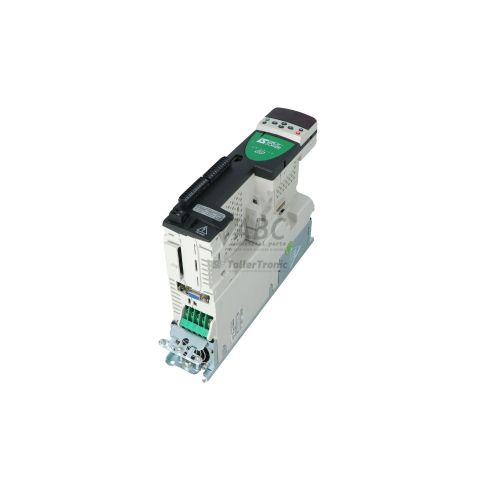
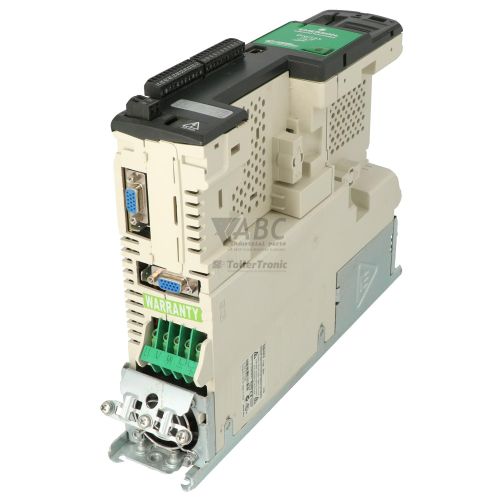
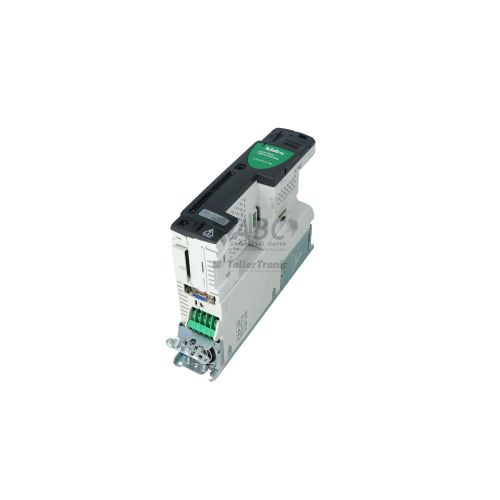
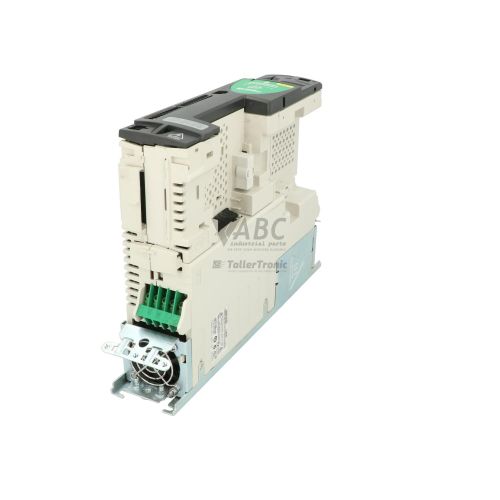
Control Techniques 3098-0080 SP0405 Unidrive SP AC / Servo Drive


Het item werd toegevoegd aan uw offerteaanvraag
Product Information
The Control Techniques 3098-0080 (Model SP0405) is a compact Frame 0 AC and servo drive from the Unidrive SP product family, designed for precise velocity and position control of standard induction and permanent magnet servo motors. Operating on a 380 V to 480 V 3-phase AC power supply at 48 to 62 Hz, this drive provides a rated power output of 1.5 kW (2.0 hp) with a continuous output current of 4.2 A. Supporting versatile operating algorithms including Open-loop V/Hz, Open-loop Vector, Closed-loop Vector, Servo, and Rotor Flux Control (RFC), it delivers dynamic motor control across packaging machinery, material handling systems, and automated machine tools.
Interfacing the SP0405 with host equipment is supported by an onboard 15-way D-type universal encoder feedback interface compatible with Incremental Quadrature, SinCos, SSI, EnDat, and HIPERFACE devices without requiring external feedback cards. Internal expansion is accommodated via three Solutions option slots that accept communication modules such as SM-PROFIBUS DP, SM-PROFINET, SM-EtherCAT, and SM-Ethernet, along with built-in RS-485 Modbus RTU serial communications. Commissioning a replacement unit requires transferring drive parameters using CTSoft software, SyPTLite or SyPTPro programming environments, or directly cloning parameters using a Smartcard. Operating units cannot simply be swapped without transferring parameter sets, and ABC Industrial Parts can assist in preparing replacement drives or parameter transfers to minimize operational downtime.
Diagnostic information on the SP0405 is accessible through optional SM-Keypad or SM-Keypad Plus displays, which indicate system states using mnemonics such as ink, rdy, run, and ACUU alongside specific fault codes. Internal parameters Pr 10.01 through Pr 10.15 report live operational states, while parameters Pr 10.20 through Pr 10.29 store a ten-trip fault history buffer. Fault codes like UU, OU, OI.AC, and Sc highlight external line, load, or cabling conditions that can be verified during first-line troubleshooting. Internal execution or power stage failures designated by codes HF01 through HF11 indicate board-level hardware faults; when such hardware faults occur, contacting ABC Industrial Parts for a tested exchange unit or direct repair service provides a quick route back to production.
Technical Specifications
| Manufacturer | Control Techniques |
| Part Number | 3098-0080 |
| Model / Type | SP0405 |
| Frame Size | 0 |
| Supply Voltage Range | 380 - 480 V AC |
| Supply Phases | 3 |
| Supply Frequency Range | 48 - 62 Hz |
| Rated Power Output | 1.5 kW |
| Rated Horsepower | 2.0 hp |
| Continuous Output Current | 4.2 A |
| Maximum Output Frequency | 550 Hz |
| Default Switching Frequency | 3 kHz |
| Digital Inputs | 5 |
| Configurable Digital I/O | 3 |
| Analog Inputs | 3 |
| Analog Outputs | 2 |
| Relay Outputs | 1 |
Programming and Configuration
Configuring the Control Techniques 3098-0080 SP0405 drive is performed through CTSoft commissioning software or specialized programming tools, including SyPTLite and SyPTPro. These engineering environments provide complete parameter navigation, drive tuning, and custom ladder logic execution. Motor parameters, control modes, and dynamic response settings can be configured to match open-loop induction, closed-loop vector, or high-precision permanent magnet servo setups.
For fast hardware replacements and parameter cloning, the SP0405 supports parameter backup via a Smartcard storage medium. Parameter sets stored on a Smartcard can be directly uploaded to or downloaded from the drive without requiring a PC or specialized software tools, allowing rapid drop-in field replacement during maintenance routines.
Communication and System Integration
The SP0405 features built-in serial communication capability using standard RS-485 connections operating under Modbus RTU or CT-RTU protocols. This allows direct integration with local controllers, operator panels, and monitoring hardware for control and data acquisition.
To integrate into wider plant architecture, the Frame 0 chassis includes three internal Solutions option slots. These slots support option modules including SM-PROFIBUS DP, SM-PROFINET, SM-EtherCAT, SM-Ethernet, CANopen, and DeviceNet, enabling seamless fieldbus integration without expanding the drive physical footprint.
Diagnostics and Status Indication
Diagnostic feedback for the SP0405 drive is made visible via the optional SM-Keypad or SM-Keypad Plus displays. System operational states are displayed through alphanumeric mnemonics representing states such as Inhibit (ink), Ready (rdy), Running (run), and AC Undervoltage (ACUU), as well as direct trip condition codes.
Detailed diagnostic monitoring is available within Menu 10 parameters. Parameters Pr 10.01 through Pr 10.15 display dynamic drive operating parameters, while Pr 10.20 through Pr 10.29 maintain a ten-trip fault history log for investigating transient trip events.
Status LED Indicators
| LED | Color/Status | Meaning |
|---|---|---|
| SM-Keypad Display | Red/Green LED Display - Alphanumeric Status Mnemonic | Displays drive status: 'ink' (Inhibit), 'rdy' (Ready), 'run' (Running), 'ACUU' (AC Undervoltage), or specific trip code (e.g. 'OI.AC', 'OU') |
Replacement and Spare Part Considerations
When swapping a Control Techniques SP0405 drive, ensure that the power rating (1.5 kW / 2.0 hp) and supply specifications (380 V - 480 V 3-phase) match the installed unit. Installing a unit with mismatched ratings or incompatible option cards can result in fieldbus faults or motor trip conditions.
Before placing a spare drive into production, parameter sets must be transferred from the existing drive using a Smartcard or CTSoft software. When migrating hardware directly to modern platforms, the Control Techniques Unidrive M700 / M701 series serves as the recommended migration path.
Error Codes & Fault Codes
The following error codes may be displayed during operation or diagnostics:
| Code | Name | Description | Possible Cause | Recommended Action |
|---|---|---|---|---|
| UU | Undervoltage | DC bus voltage dropped below minimum threshold. | AC supply failure, low line voltage, transient main supply interruption. | Check AC input voltage supply, fuses, and power connections. |
| OU | Overvoltage | DC bus voltage exceeded maximum allowable threshold. | Excessive motor regeneration during deceleration, deceleration ramp set too fast. | Increase deceleration ramp time, fit dynamic braking resistor, or adjust voltage controller. |
| OI.AC | Instantaneous AC Overcurrent | Output current exceeded peak hardware limit. | Short circuit on drive output, phase-to-phase or phase-to-ground fault, excessive motor load, acceleration time too fast. | Check motor and output cabling for short circuits and insulation integrity. Verify motor parameters and acceleration rate. |
| OI.br | Braking Transistor Overcurrent | Instantaneous overcurrent detected in dynamic braking transistor circuit. | Short circuit in dynamic braking resistor wiring or braking resistor resistance value too low. | Check braking resistor wiring and verify resistor value meets minimum ohms requirement. |
| It.AC | Drive Thermal Overload | Drive I squared t thermal accumulator reached 100% capacity. | Continuous high motor current load exceeding drive rated current. | Reduce mechanical load, verify motor parameters, check for mechanical binding. |
| It.br | Braking Resistor Thermal Overload | Braking resistor software thermal accumulator reached 100%. | Repetitive dynamic braking energy exceeds resistor continuous power rating. | Reduce braking frequency/deceleration rate or upgrade braking resistor thermal capacity. |
| O.ht1 | Heatsink Over-temperature | Power module heatsink temperature exceeded maximum operating limit. | Cooling fan failed, blocked heatsink airflow, cabinet ventilation insufficient. | Check cooling fan operation, clear heatsink fins, check cabinet ambient temperature. |
| O.ht2 | Control Board Over-temperature | Internal control board ambient temperature exceeded maximum operating limit. | Excessive temperature inside drive enclosure. | Improve enclosure ventilation or cooling. |
| th | Motor Thermistor Over-temperature | Motor thermistor connected to control terminal tripped due to motor overheating. | Motor thermal overload, cooling fan failure on motor. | Allow motor to cool down, inspect motor load and motor cooling fan. |
| thS | Motor Thermistor Short Circuit | Motor thermistor input wire shorted to 0V. | Short circuit in thermistor cable or shorted thermistor sensor. | Inspect thermistor wiring and sensor resistance. |
| S.CL | Speed Feedback Loss | Speed feedback signal lost while running in closed-loop mode. | Encoder cable disconnected, broken wire, faulty encoder, or incorrect encoder power supply setting. | Check encoder cable, connectors, shield grounding, and encoder power supply voltage parameter. |
| Enc1 | Encoder 1 Fault | Fault detected on primary position feedback encoder connection. | Encoder comms error, checksum failure, or position feedback signal noise. | Check feedback cable wiring, shielding, and encoder connection. |
| EEF | Internal EEPROM Fault | Corrupted parameter data detected in internal non-volatile EEPROM memory. | Interrupted parameter save process, electromagnetic interference, or hardware memory failure. | Perform parameter reset to factory defaults (Pr 0.00 = 1233 or 1244). If error persists, internal hardware fault requires unit repair. |
| Ph | Input Phase Loss | Phase unbalance or complete loss of an AC input supply phase detected. | Blown input fuse, loose main power line wire, unbalanced input supply. | Check input AC supply line voltages and supply fuses. |
| Sc | Output Short Circuit | Hardware overcurrent protection circuit tripped due to output short circuit. | Phase-to-phase or phase-to-ground short circuit on drive output terminals. | Check motor cable and motor windings with insulation tester before re-enabling drive. |
| TunE | Autotune Stopped or Failed | Autotune sequence aborted before completion. | Enable signal removed, trip occurred during autotune, or motor disconnected. | Ensure motor is connected and mechanical brake released, then re-run autotune procedure. |
| HF01 | Hardware Fault 01 (CPU Exception) | Internal microprocessor data processing error. | Internal electronic component failure or corrupted CPU execution. | Internal hardware fault — return unit for repair or replace drive. |
| HF02 | Hardware Fault 02 (DMA Error) | Internal Direct Memory Access controller hardware fault. | Internal circuit board failure. | Internal hardware fault — return unit for repair or replace drive. |
| HF04 | Hardware Fault 04 (Undefined Instruction) | Processor attempted to execute an undefined instruction code. | Internal memory or processor circuit failure. | Internal hardware fault — return unit for repair or replace drive. |
| HF07 | Hardware Fault 07 (EEPROM Hardware Fail) | Physical communication failure with onboard EEPROM chip. | Defective EEPROM IC or control board bus failure. | Internal hardware fault — return unit for repair or replace drive. |
| HF09 | Hardware Fault 09 (Internal Voltage Supply) | Internal power supply rail voltage out of tolerance. | Internal low-voltage power supply board fault. | Internal hardware fault — return unit for repair or replace drive. |
| HF11 | Hardware Fault 11 (Gate Drive Fault) | IGBT gate drive power stage monitoring failure detected. | Defective gate drive circuit or power module failure. | Internal hardware fault — return unit for repair or replace drive. |
Frequently Asked Questions
What software is used to program the Control Techniques SP0405?
The SP0405 is commissioned and configured using CTSoft commissioning software, SyPTLite, or SyPTPro programming tools.
How can parameters be cloned without using a computer?
Parameters can be directly cloned and transferred between drives using a Smartcard inserted into the drive memory slot.
Which encoder types are supported by the integrated encoder interface?
The onboard 15-way D-type universal encoder interface supports Incremental Quadrature, SinCos, SSI, EnDat, and HIPERFACE devices.
What do hardware trip codes HF01 through HF11 indicate?
HF codes (such as HF01, HF02, HF07, HF09, and HF11) indicate internal hardware faults within internal processing or power stage circuits, requiring unit repair or hardware replacement.
What is the recommended migration path for the legacy Unidrive SP series?
The recommended migration platform for Unidrive SP drives is the Control Techniques Unidrive M700 / M701 series.
Take advantage of our exchange formula
A defective product does not have to be worthless. At ABC Industrial Parts, you can hand in defective products and immediately benefit from a discount on your new purchase. This is a smart way to save money while contributing to a circular economy.
Play it safe with our warranty conditions
Industrial plants prefer to keep running invariably, no matter what. Therefore, it is essential that you can rely on high-quality products and/or sustainable repairs. With our warranty conditions, you can count on certainty, whether you choose new, used or repaired products.
Data backup and recovery
Have you lost valuable parameters or data due to a malfunction while the manufacturer no longer provides support? At ABC Industrial Parts, we help you secure this data, both for common and specific products.
Specific firmware and hardware versions
If you are working with specific hardware or firmware versions that are no longer available from the manufacturer, ABC Industrial Parts is your partner. When making your enquiry, clearly state which versions you need, we will then look at the possibilities of supplying those versions, so that your installations continue to function optimally.
Disclaimer:
We are not an authorised distributor of Control Techniques.
Product photos are for illustration purposes only and may differ from the actual product delivered.
Some of the content on this page was created with the help of AI. While we strive to provide accurate and up-to-date information, errors may occur.