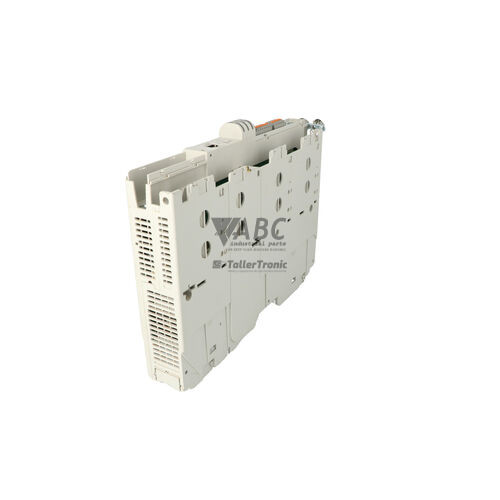
Lenze E94AMHE0094 Multi Drive HighLine Servo Axis Module 4.0kW



Het item werd toegevoegd aan uw offerteaanvraag
Product Information
The Lenze E94AMHE0094 is a 4.0 kW HighLine Multi Drive servo axis module in the Servo Drives 9400 series. Engineered for multi-axis motion control in high-speed machinery, this unit operates within a common DC-bus system accepting 325 to 745 V DC input, typically supplied by an E94APNE power supply module. This shared DC-bus topology allows efficient energy exchange between decelerating and accelerating axes. The module delivers a continuous output current of 9.5 A and a peak load current of 14.3 A at up to 400 V AC output. The HighLine specification embeds motion capabilities directly into the drive, including electronic gearing, positioning, and synchronized motion functions, eliminating the need for separate motion controller hardware in packaging, printing, and material handling applications.
Network integration and feedback handling are achieved through native onboard CANopen system bus communication, an onboard resolver interface, and a multi-encoder interface supporting SinCos, Hiperface, SSI, and incremental encoders. Terminal interfacing includes 8 digital inputs, 4 digital outputs, 2 bipolar analog inputs, and 2 bipolar analog outputs, alongside two expansion slots for optional fieldbus cards such as PROFINET (E94AYCEN), PROFIBUS (E94AYCPM), EtherCAT (E94AYCEC), or EtherNet/IP (E94AYCEI), as well as safety modules like the E94AYAE or E94AYAF. When replacing an existing module, device settings and drive programs are managed via the pluggable MM300 memory module. Swapping the original memory card into a replacement unit enables PC-free commissioning, while ABC Industrial Parts can assist when parameter recovery or verification using Lenze Engineer Software Version 2.0 or higher is required.
System state and communication status are indicated via front panel LEDs including DRV-READY, DRV-ERR, CAN-RUN, and CAN-ERR, as well as through fieldbus diagnostic telegrams, an optional E94AZKAE keypad display, or USB diagnostic port X14. Initial field checks should include verifying the DC-bus supply voltage, motor power terminal connections, encoder feedback wiring at terminals X7 and X8, and proper 120-ohm termination on the CAN bus network. If the module reports severe hardware errors such as fault code 0x00110020 or gate driver failure, internal repairs are not field-serviceable; replacing the axis module or arranging a tested exchange through ABC Industrial Parts provides the fastest path to restoring production.
Technical Specifications
| Manufacturer | Lenze |
| Part Number | E94AMHE0094 |
| Model / Type | Multi Drive HighLine |
| Product Family | Servo Drives 9400 |
| Component Type | Servo Drive Axis Module |
| Rated Motor Power | 4.0 kW |
| Rated Output Current | 9.5 A |
| Peak Output Current | 14.3 A |
| DC Bus Input Voltage Range | 325 - 745 V DC |
| Maximum Output Voltage | 400 V AC |
| Maximum Output Frequency | 599 Hz |
| Default Switching Frequency | 4 kHz |
| Digital I/O Channels | 8 Inputs / 4 Outputs |
| Analog I/O Channels | 2 Inputs / 2 Outputs |
| Integrated Onboard Interface | CANopen / System Bus |
Programming and Configuration
The Lenze E94AMHE0094 HighLine axis module features embedded positioning blocks and motion routines, allowing complex multi-axis synchronization and electronic gearing without external controller cards. Software commissioning, parameter tuning, and motion profiling are performed using Lenze Engineer Software Version 2.0 or higher, connected locally through the USB diagnostic port X14 or remotely across an integrated fieldbus network.
All operating parameters, firmware configurations, and user application programs are stored on the pluggable MM300 memory card. When commissioning a replacement drive, transferring the MM300 card from the original unit automatically loads all device settings into the replacement hardware without requiring a PC connection.
Communication and System Integration
Native system bus communication is provided via an integrated CANopen interface supporting data rates up to 1 Mbit/s for synchronized multi-axis control. Dedicated hardware connections include 8 digital inputs, 4 digital outputs, 2 bipolar analog inputs, and 2 bipolar analog outputs for handling drive control signals, interlocks, and local feedback.
Network capability can be expanded through two hardware option slots. These slots accept fieldbus communication modules including PROFINET (E94AYCEN), PROFIBUS DP (E94AYCPM), EtherCAT (E94AYCEC), and EtherNet/IP (E94AYCEI), as well as functional safety modules such as the E94AYAE or E94AYAF.
Diagnostics and Status Indication
Operational states and fault conditions are displayed via front-panel LEDs, including drive operating state (DRV-READY), active error indication (DRV-ERR), and CAN network status (CAN-RUN and CAN-ERR). Detailed diagnostic records are maintained in a non-volatile diagnostic code buffer accessible using Lenze Engineer software over the X14 USB port, via fieldbus diagnostic telegrams, or on the optional E94AZKAE keypad module display.
Status LED Indicators
| LED | Color/Status | Meaning |
|---|---|---|
| DRV-READY | Green - Solid / Off | Green: Controller is ready for operation. Off: Controller is inhibited or experiencing a fault condition. |
| DRV-ERR | Red - Flashing / Solid | Red blinking/solid: Drive error active. Solid red indicates critical fault or internal hardware error requiring system shutdown. |
| CAN-RUN | Green - Solid | Green: Onboard CAN bus network operational. |
| CAN-ERR | Red - Solid | Red: Onboard CAN bus communication error or bus-off state. |
Replacement and Spare Part Considerations
When replacing an E94AMHE0094 drive, verify that the replacement unit shares the exact same current rating (9.5 A continuous / 14.3 A peak) and HighLine control specification. Ensure that the upstream E94APNE power supply module and shared DC-bus links are fully powered down and discharged before servicing the module.
Commissioning the replacement module involves swapping the existing MM300 memory card into the replacement unit to transfer parameter configurations and programs. Ensure all option cards, including fieldbus communication modules (e.g., PROFINET or EtherCAT) and safety modules (e.g., E94AYAE), are transferred to the matching expansion slots on the replacement unit.
Error Codes & Fault Codes
The following error codes may be displayed during operation or diagnostics:
| Code | Name | Description | Possible Cause | Recommended Action |
|---|---|---|---|---|
| 0x00110001 | Overvoltage DC bus (OU) | The DC bus voltage exceeded the upper warning/trip threshold. | Excessive regenerative energy during deceleration, brake chopper non-functional, or mains voltage too high. | Check deceleration ramps, verify brake resistor connection and operation, check mains supply voltage. |
| 0x00110002 | Undervoltage DC bus (LU) | DC bus voltage fell below minimum required operating threshold. | Mains supply interruption, line fuse blown, power supply module failure, or DC bus fuse failure. | Check power supply module status, verify AC mains feed, inspect DC bus interconnections. |
| 0x00110003 | Overcurrent Motor | Motor current exceeded maximum allowed short-time threshold. | Short circuit in motor cable, short circuit in motor winding, incorrect motor parameters, or sudden mechanical jam. | Check motor wiring and insulation, check motor current control parameters, verify mechanical load. |
| 0x00110004 | Motor Phase Failure | One or more motor output phases are interrupted. | Loose connection at output terminals, broken motor cable wire, or motor contactor opened during operation. | Inspect output terminal block, check motor cable continuity across all three phases. |
| 0x0011000A | Overtemperature Heatsink (OH) | Axis module heatsink temperature exceeded maximum limit. | Inadequate cabinet cooling, fan failure, dirty cooling fins, or continuous operation above rated current. | Clean heatsink, check cabinet ventilation, verify operation of internal unit fan, reduce ambient load. |
| 0x0011000B | Overtemperature Inside Unit | Internal electronic enclosure temperature exceeded safety limit. | Enclosure cooling failure, internal fan failure. | Check internal air flow, reduce ambient temperature, or replace unit if fan failed internally. |
| 0x0011000C | Motor Overtemperature (OC1 / I2t) | Motor thermal model or motor temperature sensor triggered overtemperature warning/fault. | Motor overloaded, motor cooling fan failed, incorrect thermal sensor evaluation setup. | Allow motor to cool, check motor thermal sensor connection (X6/X7/X8), check mechanical load. |
| 0x0011000D | Earth Fault / Ground Fault | Ground current detected on motor output phases. | Ground leak in motor winding or motor cable shield breakdown. | Test insulation resistance of motor and cable with megohmmeter. |
| 0x00110010 | Feedback / Encoder Error | Loss or corruption of position feedback signal from motor encoder. | Defective feedback cable, encoder connector unplugged, noise interference on signal lines. | Check feedback cable shielding and connection at X7/X8 terminals, replace encoder if signal lost. |
| 0x00110014 | System Bus Timeout | Communication failure over onboard CAN system bus. | Bus cable disconnected, termination resistor missing, excessive network traffic or baud rate mismatch. | Check CAN bus wiring, ensure 120 ohm line termination resistors present at network ends. |
| 0x00110020 | Internal Hardware Fault | Power section or internal control board processor failure detected. | Internal component failure, gate driver failure, or EEPROM corruption. | Internal hardware fault — non-field-serviceable, replace axis module unit or contact Lenze service. |
Frequently Asked Questions
What software is used to configure the Lenze E94AMHE0094 servo drive?
The Lenze E94AMHE0094 is configured using Lenze Engineer Software Version 2.0 or higher connected via the USB diagnostic interface X14 or over a fieldbus network.
How are parameters transferred when replacing an E94AMHE0094 drive?
Parameters and user programs are saved on the pluggable MM300 memory module. Moving the MM300 module to a replacement drive restores all configurations without requiring PC software.
What feedback encoder types are supported by the E94AMHE0094?
The drive features an onboard resolver interface as well as a multi-encoder interface supporting SinCos, Hiperface, SSI, and incremental encoders.
How is power supplied to the E94AMHE0094 axis module?
It operates on a common DC bus between 325 and 745 V DC, typically powered by a Lenze E94APNE power supply module.
What action should be taken if fault code 0x00110020 appears?
Fault code 0x00110020 indicates an internal hardware fault on the power section or control board, which is non-field-serviceable and requires unit replacement.



Take advantage of our exchange formula
A defective product does not have to be worthless. At ABC Industrial Parts, you can hand in defective products and immediately benefit from a discount on your new purchase. This is a smart way to save money while contributing to a circular economy.
Play it safe with our warranty conditions
Industrial plants prefer to keep running invariably, no matter what. Therefore, it is essential that you can rely on high-quality products and/or sustainable repairs. With our warranty conditions, you can count on certainty, whether you choose new, used or repaired products.
Data backup and recovery
Have you lost valuable parameters or data due to a malfunction while the manufacturer no longer provides support? At ABC Industrial Parts, we help you secure this data, both for common and specific products.
Specific firmware and hardware versions
If you are working with specific hardware or firmware versions that are no longer available from the manufacturer, ABC Industrial Parts is your partner. When making your enquiry, clearly state which versions you need, we will then look at the possibilities of supplying those versions, so that your installations continue to function optimally.
Disclaimer:
We are not an authorised distributor of Lenze.
Product photos are for illustration purposes only and may differ from the actual product delivered.
Some of the content on this page was created with the help of AI. While we strive to provide accurate and up-to-date information, errors may occur.