Lenze E84AYCERV Extension Module Inverter Drives 8400


Het item werd toegevoegd aan uw offerteaanvraag
Product Information
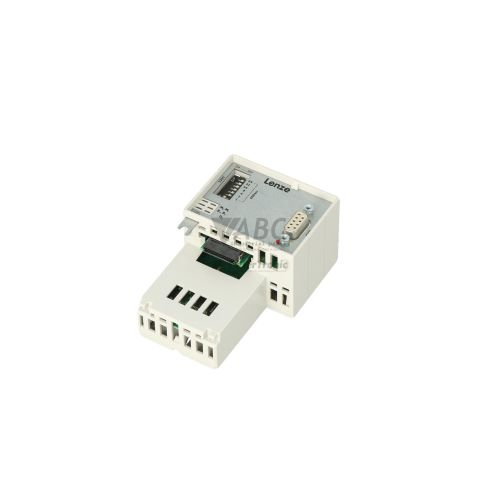
The Lenze E84AYCERV is a dedicated EtherNet/IP communication extension module designed for the Lenze Inverter Drives 8400 family. Operating as an add-on fieldbus interface, this module plugs directly into the internal extension slot of Lenze 8400 StateLine, HighLine, and TopLine frequency inverters. Power is supplied internally from the drive host through the module slot, eliminating the need for external power supply wiring. Equipped with dual RJ45 ports, the module allows frequency inverters to communicate efficiently across automated industrial networks.
Connecting the E84AYCERV to a control network is straightforward thanks to its integrated 2-port Ethernet switch, which supports 100 Mbit/s full duplex communication across line, ring, and star network topologies. The module supports both cyclic implicit messaging for real-time process control data and explicit messaging for parameter access. Hardware configuration is streamlined via onboard DIP switches used to establish the IP address, or settings can be managed electronically using Lenze EASY Starter or Lenze Engineer software. When installing a replacement module, matching the hardware DIP switch settings to the existing unit allows the host drive to automatically synchronize configuration parameters upon power-up, minimizing setup effort with support from ABC Industrial Parts.
Visual status monitoring is provided on the front interface by four dedicated LEDs, including Module Status (MS), Network Status (NS), and Link/Activity indicators (L/A1 and L/A2) for each RJ45 port. These indicators display real-time module readiness, fieldbus connection status, and active network traffic. In the event of a communication failure, technicians can review fault logs via the drive diagnostic buffer or monitor network diagnostic registers. If a hardware fault is indicated on the MS LED or if connection errors persist after checking cabling and slot seating, internal module failures cannot be repaired in the field, making a tested replacement from ABC Industrial Parts the most efficient path back to production.
Technical Specifications
| Manufacturer | Lenze |
| Part Number | E84AYCERV |
| Model / Type | Extension Module Inverter Drives 8400 |
| Product Family | Inverter Drives 8400 |
| Component Type | Communication Module |
| Communication Interface | EtherNet/IP |
| Number of Ports | 2 |
| Connector Type | RJ45 |
| Data Transfer Rate | 100 Mbit/s |
| Duplex Mode | Full Duplex |
| Power Supply | Internal via drive module slot |
Programming and Configuration
The E84AYCERV communication module is configured and commissioned using Lenze Engineer or Lenze EASY Starter software suites. These software tools provide comprehensive access to drive parameters, explicit messaging configuration, and operational diagnostics, ensuring smooth integration into the main PLC system.
Network addressing can be set using hardware DIP switches on the module or stored directly within non-volatile parameter memory on the host inverter. When hardware DIP switches are utilized, the module assigns its network identity immediately, facilitating quick network setup without requiring extensive software configuration.
Parameter retention is managed by the host Lenze 8400 inverter drive. Upon module replacement, parameter data stored in the drive's memory automatically synchronizes with the new communication module as soon as power is applied, provided the hardware DIP switches are configured identically.
Communication and System Integration
The Lenze E84AYCERV equips 8400 series drives with an integrated 2-port Ethernet switch capable of operating at 100 Mbit/s full duplex. Dual RJ45 connectors enable direct daisy-chaining of multiple frequency inverters in line topologies, as well as integration into ring or star network architectures, reducing the need for external network switches inside control cabinets.
Communication across the EtherNet/IP network encompasses both implicit and explicit messaging capabilities. Implicit real-time process data exchange delivers time-critical motor speed and torque control commands between the PLC and inverter drive, while explicit messaging enables remote parameter adjustments, status polling, and monitoring.
Diagnostics and Status Indication
System status and fault diagnostics for the E84AYCERV are primarily monitored through four front-facing diagnostic LEDs: MS (Module Status), NS (Network Status), L/A1 (Port 1 Link/Activity), and L/A2 (Port 2 Link/Activity). These visual indicators provide immediate feedback regarding hardware operational status, fieldbus link condition, and data transfer.
Advanced troubleshooting is available through EtherNet/IP explicit messaging diagnostic registers and the drive diagnostic buffer accessed via Lenze EASY Starter or Lenze Engineer software. These diagnostic tools allow technicians to identify network timeouts, duplicate IP address conflicts, and hardware communication errors between the drive host and extension slot.
Status LED Indicators
| LED | Color/Status | Meaning |
|---|---|---|
| MS | Green / Red - Solid / Flashing | Module Status: Solid Green = Operational / Ready; Flashing Green = Standby / Unconfigured; Flashing Red = Minor fault / Recoverable error; Solid Red = Major internal hardware fault |
| NS | Green / Red - Solid / Flashing | Network Status: Solid Green = Online, Connected; Flashing Green = Online, No Connections Established; Flashing Red = Connection Timeout; Solid Red = Duplicate IP address or critical network error |
| L/A1 | Green - Solid / Flashing / Off | Port 1 Link/Activity: Solid Green = Ethernet link established; Flashing Green = Ethernet activity; Off = No physical link |
| L/A2 | Green - Solid / Flashing / Off | Port 2 Link/Activity: Solid Green = Ethernet link established; Flashing Green = Ethernet activity; Off = No physical link |
Replacement and Spare Part Considerations
When replacing an E84AYCERV module in a Lenze 8400 StateLine, HighLine, or TopLine drive, ensure that power to the frequency inverter is completely disconnected prior to inserting or removing the module from the extension slot. Verify that the module is fully seated and locked in place before applying power to avoid communication faults between the drive controller and the module.
Before restoring power, inspect the hardware DIP switch settings on the replacement module and align them exactly with the settings of the removed unit. Matching these switches ensures proper IP address assignment on the EtherNet/IP network upon bootup.
Because configuration settings and parameter profiles are saved within the host drive's parameter memory, the drive automatically transfers operational settings to the replacement module when powered on. No manual re-programming is required if the replacement module matches the part number and DIP switch configuration.
Error Codes & Fault Codes
The following error codes may be displayed during operation or diagnostics:
| Code | Name | Description | Possible Cause | Recommended Action |
|---|---|---|---|---|
| 0x00b10001 | Communication Module Timeout / Loss of Connection | Cyclic communication between the EtherNet/IP scanner and the module has timed out. | Network cable disconnected, PLC stopped, incorrect scanner cycle time, network interference. | Check Ethernet cabling and RJ45 connectors, verify PLC status and EtherNet/IP scanner configuration, check timeout setting. |
| 0x00b10002 | Communication Module Hardware Fault | The drive controller cannot communicate with the module inserted into the extension slot. | Module not correctly seated in extension slot, internal hardware failure on communication board. | Power off drive, remove and re-seat extension module securely. If error persists, replace E84AYCERV module. |
| 0x00b10003 | IP Address Conflict / Duplicate IP | The module detected another network device with the same IP address. | Duplicate IP address configured on network, incorrect DIP switch settings. | Verify IP address settings via DIP switches or software parameters and ensure unique IP assignment. |
Frequently Asked Questions
Which drives are compatible with the Lenze E84AYCERV communication module?
The E84AYCERV is designed for direct integration into Lenze 8400 series inverter drives, specifically the StateLine, HighLine, and TopLine models.
Does the Lenze E84AYCERV require an external power supply?
No, the module receives its operating power internally directly through the extension slot of the host Lenze 8400 drive.
How are IP addresses configured on the E84AYCERV module?
IP addresses can be configured using hardware DIP switches on the module or assigned electronically via non-volatile parameter memory using software tools.
What software is used to diagnose and parameterize the E84AYCERV module?
The module is supported by Lenze EASY Starter and Lenze Engineer software utilities for parameterization and diagnostic monitoring.
What network topologies are supported by the E84AYCERV module?
Thanks to its integrated 2-port Ethernet switch and dual RJ45 connectors, the module supports line, ring, and star network topologies.



Take advantage of our exchange formula
A defective product does not have to be worthless. At ABC Industrial Parts, you can hand in defective products and immediately benefit from a discount on your new purchase. This is a smart way to save money while contributing to a circular economy.
Play it safe with our warranty conditions
Industrial plants prefer to keep running invariably, no matter what. Therefore, it is essential that you can rely on high-quality products and/or sustainable repairs. With our warranty conditions, you can count on certainty, whether you choose new, used or repaired products.
Data backup and recovery
Have you lost valuable parameters or data due to a malfunction while the manufacturer no longer provides support? At ABC Industrial Parts, we help you secure this data, both for common and specific products.
Specific firmware and hardware versions
If you are working with specific hardware or firmware versions that are no longer available from the manufacturer, ABC Industrial Parts is your partner. When making your enquiry, clearly state which versions you need, we will then look at the possibilities of supplying those versions, so that your installations continue to function optimally.
Disclaimer:
We are not an authorised distributor of Lenze.
Product photos are for illustration purposes only and may differ from the actual product delivered.
Some of the content on this page was created with the help of AI. While we strive to provide accurate and up-to-date information, errors may occur.