Lenze E94AYCEN – Series 9400 EtherNet/IP Communication Module



Het item werd toegevoegd aan uw offerteaanvraag
Product Information
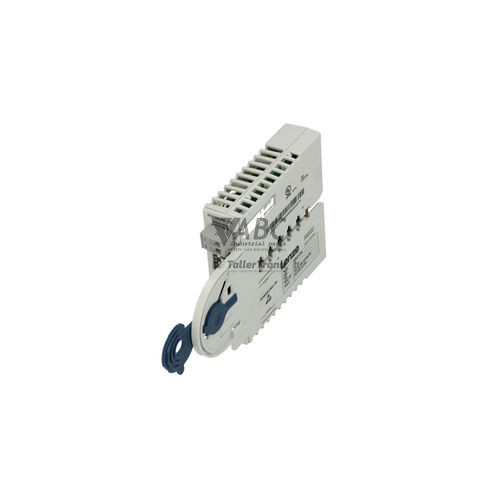
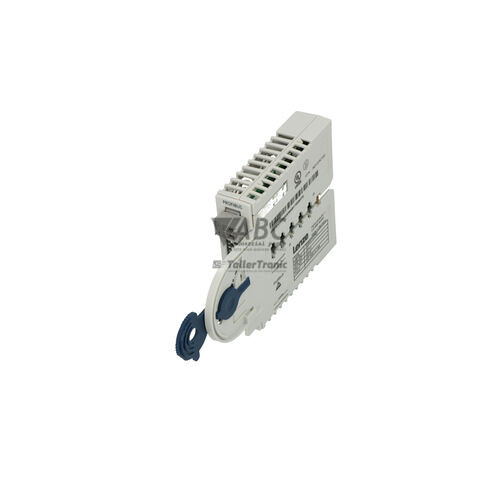
The Lenze E94AYCEN is a communication extension module designed for the Lenze 9400 Servo Drives family, including HighLine and StateLine servo controllers. Functioning as an EtherNet/IP and Modbus TCP interface, this compact plug-in module installs directly into option slot MX1 or MX2 on the host servo drive and receives its 5 V DC power directly from the backplane. The module features two RJ45 Ethernet ports with an integrated two-port switch operating at 10/100 Mbit/s with auto-negotiation and full or half-duplex capabilities. This dual-port design enables efficient line and daisy-chain network cabling directly between drives without requiring external network switches.
Connecting a replacement unit requires plugging the module firmly into slot MX1 or MX2 and securing the RJ45 network cables. When putting a replacement E94AYCEN module into service, drive configuration is streamlined because parameters are maintained within the host Lenze 9400 drive non-volatile memory or removable memory module, enabling automated parameter transfer upon replacement. Network commissioning and IP address assignment can be managed using Lenze Engineer Software or Lenze EASY Starter Software, as well as dynamic addressing via DHCP. Technicians preparing a spare unit or restoring continuous motion control network integration can rely on ABC Industrial Parts for tested replacement components and technical support.
Diagnostic assessment on the Lenze E94AYCEN module is provided via direct status reading from multi-color LEDs, including Module Status (MS), Network Status (NS), and RJ45 Link/Activity indicators. Additional diagnostic methods include EtherNet/IP network status word monitoring, Modbus TCP register interrogation, web server diagnostics, Lenze Engineer software status displays, and the optional drive diagnostic keypad (E94AZKAE). Initial field checks should cover backplane slot seating, cable latching, power cycling, and verifying IP address settings to prevent network conflicts. If internal hardware faults or backplane communication errors persist after verifying mechanical seating and power supply, ABC Industrial Parts offers replacement modules and exchange options to rapidly restore production availability.
Technical Specifications
| Supported Protocols | EtherNet/IP, Modbus TCP |
| Interface Type | 2x RJ45 |
| Maximum Transmission Rate | 100 Mbit/s |
| Integrated Switch Ports | 2 |
| Supply Voltage | 5 V DC |
| Slot Compatibility | Slot MX1 or MX2 |
Programming and Configuration
Commissioning and parameter adjustments for the Lenze E94AYCEN communication module are executed through software tools such as Lenze Engineer Software and Lenze EASY Starter Software. These tools allow engineers to configure EtherNet/IP process data mapping, network speeds, and Modbus TCP register communication parameters.
Because drive and module configuration data are stored in the host Lenze 9400 servo drive non-volatile memory or memory module, replacing a damaged option module does not require re-downloading parameter sets from a PC. Once installed into slot MX1 or MX2, the new module automatically receives stored configuration settings from the drive backplane.
Communication and System Integration
The E94AYCEN extension module provides dual protocol support, combining EtherNet/IP fieldbus communication for real-time deterministic multi-axis motion control with Modbus TCP protocol functionality for concurrent register interrogation and remote diagnostic monitoring. The integrated two-port switch supports 10/100 Mbit/s transmission rates with auto-negotiation and full or half-duplex operation.
With two front-facing RJ45 connectors, the module enables flexible network topologies including line (daisy-chain) and ring structures directly within multi-drive enclosures. This layout eliminates the need for separate external Ethernet switches while maintaining continuous, deterministic control network traffic between PLCs, supervisory hardware, and Lenze 9400 servo drives.
Diagnostics and Status Indication
Comprehensive diagnostic evaluation of the Lenze E94AYCEN is supported through multiple interfaces, including local multi-color LEDs, web server diagnostics, EtherNet/IP status words, Modbus TCP register queries, Lenze Engineer software displays, and the external drive diagnostic keypad (E94AZKAE).
The front face of the module includes distinct status LEDs for Module Status (MS), Network Status (NS), and physical RJ45 Link and Activity. These visual indicators allow rapid on-site verification of operational readiness, standby modes, fieldbus connection states, IP address conflicts, and network traffic.
Status LED Indicators
| LED | Color/Status | Meaning |
|---|---|---|
| MS | Green/Red - Solid/Flashing | Module Status: Off = No power; Green = Operational/ready; Flashing Green = Standby/unconfigured; Red = Unrecoverable internal hardware fault; Flashing Red = Recoverable fault |
| NS | Green/Red - Solid/Flashing | Network Status: Off = Not powered/no IP; Green = Online connected; Flashing Green = Online no connection/idle; Red = Major communication fault/duplicate IP; Flashing Red = Connection timeout |
| Link / Activity (RJ45) | Green/Yellow - Solid/Flashing | Green = Physical Ethernet link established; Flashing Yellow = Network data traffic active |
Replacement and Spare Part Considerations
When replacing an existing Lenze E94AYCEN module, confirm that the spare unit is installed into the matching drive slot (slot MX1 or MX2) as used by the original device. Verify that backplane alignment is precise and that module retention mechanisms are firmly engaged.
Because network parameters and drive settings are stored directly in the host 9400 servo drive memory, replacing the hardware module automatically triggers automated parameter restoration. Technicians should verify that network cable latches click securely into place and check for duplicate IP address alarms on the network following replacement.
Error Codes & Fault Codes
The following error codes may be displayed during operation or diagnostics:
| Code | Name | Description | Possible Cause | Recommended Action |
|---|---|---|---|---|
| 0x00b50011 | Communication error to option module in slot 1 | Internal communication breakdown between 9400 basic drive unit and option module in slot 1. | Module mechanically loose, bad contact on backplane connector, or internal module hardware failure. | Check module seating. Power cycle drive. If fault persists, module hardware is defective and requires replacement. |
| 0x00b50012 | Communication error to option module in slot 2 | Internal communication breakdown between 9400 basic drive unit and option module in slot 2. | Module mechanically loose, bad contact on backplane connector, or internal module hardware failure. | Check module seating. Power cycle drive. If fault persists, module hardware is defective and requires replacement. |
| 0x01b50001 | Fieldbus connection timeout / loss | EtherNet/IP process data communication timeout exceeded configured limit. | Network cable unplugged, Ethernet switch offline, PLC master stopped or in error state, network interference. | Check Ethernet wiring and RJ45 connector latching, verify PLC state and fieldbus cyclic communication configuration. |
| 0x01b50002 | Duplicate IP address detected | EtherNet/IP module detected another device on the network using the same IP address. | IP address conflict on local subnet. | Change IP address of the module using Lenze Engineer or DHCP server configuration. |
Frequently Asked Questions
Which software tools are used to configure the Lenze E94AYCEN extension module?
The module is configured using Lenze Engineer Software or Lenze EASY Starter Software, which facilitate network configuration, parameter monitoring, and diagnostic access.
Does replacing an E94AYCEN module require re-uploading network parameters?
No. Configuration data is retained in the non-volatile memory of the host Lenze 9400 drive or memory module, enabling automatic parameter recovery when a replacement module is installed.
What host drive slots are compatible with the E94AYCEN module?
The E94AYCEN module installs directly into communication slot MX1 or slot MX2 on Lenze 9400 series servo controllers, drawing its 5 V DC operating power directly from the drive backplane.
Which communication protocols are supported simultaneously by the E94AYCEN module?
The module supports EtherNet/IP for real-time process data and multi-axis motion control alongside Modbus TCP for concurrent parameter interrogation, web server access, and remote diagnostics.
What do the MS and NS status LEDs indicate on the front panel?
The MS (Module Status) LED indicates module power, operational readiness, standby state, or internal hardware faults. The NS (Network Status) LED indicates network online connection status, idle state, communication loss, or IP address conflicts.
Take advantage of our exchange formula
A defective product does not have to be worthless. At ABC Industrial Parts, you can hand in defective products and immediately benefit from a discount on your new purchase. This is a smart way to save money while contributing to a circular economy.
Play it safe with our warranty conditions
Industrial plants prefer to keep running invariably, no matter what. Therefore, it is essential that you can rely on high-quality products and/or sustainable repairs. With our warranty conditions, you can count on certainty, whether you choose new, used or repaired products.
Data backup and recovery
Have you lost valuable parameters or data due to a malfunction while the manufacturer no longer provides support? At ABC Industrial Parts, we help you secure this data, both for common and specific products.
Specific firmware and hardware versions
If you are working with specific hardware or firmware versions that are no longer available from the manufacturer, ABC Industrial Parts is your partner. When making your enquiry, clearly state which versions you need, we will then look at the possibilities of supplying those versions, so that your installations continue to function optimally.
Disclaimer:
We are not an authorised distributor of Lenze.
Product photos are for illustration purposes only and may differ from the actual product delivered.
Some of the content on this page was created with the help of AI. While we strive to provide accurate and up-to-date information, errors may occur.