Lenze E94AYCET EtherCAT Extension Module – Servo Drives 9400



Het item werd toegevoegd aan uw offerteaanvraag
Product Information
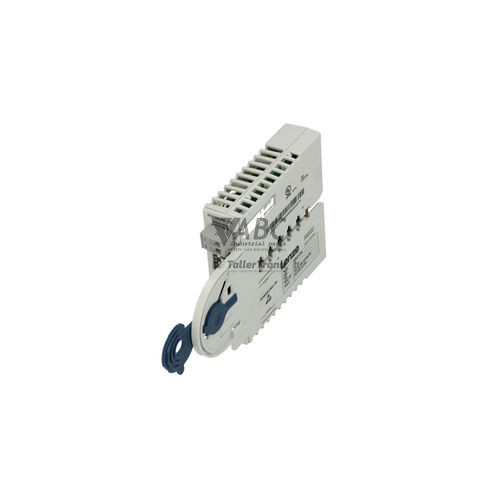
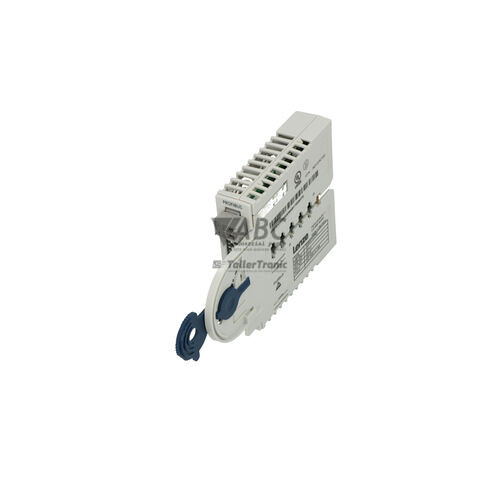
The Lenze E94AYCET is an EtherCAT extension module designed for integration into Lenze Servo Drive 9400 StateLine and HighLine units. Operating as a dedicated fieldbus communication interface, this compact unit plugs directly into host drive expansion slots MXI1 or MXI2, drawing power internally from the drive rather than requiring external power wiring or external gateways. The module provides real-time motion control communication for automated systems, utilizing two 100Base-TX RJ45 ports that enable data transfer rates up to 100 Mbit/s over Cat 5e shielded twisted pair cabling.
Integrating a replacement E94AYCET module into an existing drive system involves establishing physical fieldbus connections and aligning network configurations. With its dual RJ45 interface, the card supports line, tree, and star network topologies, enabling direct daisy-chaining between adjacent drives. Communication relies on the CAN application protocol over EtherCAT (CoE) for process data exchange, parameterization, and drive profile execution. System commissioning and configuration are carried out using Lenze Engineer software or through an EtherCAT master controller using the corresponding XML Device Description File (ESI). Because drive parameters and module configuration settings are stored directly in the host 9400 drive non-volatile memory, replacing a damaged module with a spare unit from ABC Industrial Parts allows rapid restoration without rebuilding parameter structures from scratch.
Diagnostic monitoring for the E94AYCET is managed through four status LEDs alongside software readouts. Onboard indicators provide real-time status for the EtherCAT state machine via the RUN LED, communication error states via the ERR LED, and physical link activity for each RJ45 socket via the L/A Port 1 and L/A Port 2 LEDs. System faults, such as communication timeouts (CE0), slot connection errors (CE1 or CE2), sync errors (CE3), or invalid state transitions (CE4), can be evaluated via Lenze Engineer software or the EtherCAT master diagnostic buffer. First-line troubleshooting includes verifying Cat 5e network cabling, checking master Distributed Clock settings, and ensuring the module is properly seated in the MXI slot. When internal communication errors persist after reseating, internal hardware faults cannot be serviced in the field, making replacement with a tested exchange unit from ABC Industrial Parts the standard route to minimize downtime.
Technical Specifications
| Manufacturer | Lenze |
| Part Number | E94AYCET |
| Model / Type | EtherCAT Extension Module |
| Component Type | Communication Module |
| Product Family | Servo Drives 9400 |
| Slot Compatibility | MXI1 / MXI2 slot |
| Data Transfer Rate | 100 Mbit/s |
| Ethernet Port Count | 2 x RJ45 |
| Communication Protocol | EtherCAT (CoE supported) |
| Supported Topologies | Line, Tree, Star |
| Power Supply | Internal via host drive slot (MXI) |
| Cable Specification | Cat 5e STP (Shielded Twisted Pair) |
Programming and Configuration
Engineering and parameterization of the Lenze E94AYCET extension module are conducted using Lenze Engineer software or standard EtherCAT master development environments. The module utilizes the CAN application protocol over EtherCAT (CoE) to structure parameterization data, status monitoring, and real-time process data exchange in alignment with standard drive profiles.
Integration into third-party EtherCAT master environments requires loading the corresponding XML Device Description File (ESI). Because configuration data and drive parameters are preserved in the non-volatile memory of the host Lenze 9400 Servo Drive, swapping a module retains the underlying parameter set while allowing immediate resynchronization with the bus master upon initialization.
Communication and System Integration
Physical connectivity on the E94AYCET module is established using two 100Base-TX RJ45 connectors designed for Cat 5e shielded twisted pair (STP) cabling. Operating at 100 Mbit/s in full-duplex, the dual-port design permits direct daisy-chain wiring across multi-axis machine layouts without requiring external Ethernet switches.
The module supports flexible system network topologies including line, tree, and star arrangements. Real-time motion performance across multi-axis setups is driven by EtherCAT synchronization, utilizing Distributed Clocks (DC) to synchronize motion commands and process data transfer across automated packaging, material handling, or assembly systems.
Diagnostics and Status Indication
Visual field diagnostics on the E94AYCET extension card are provided by four onboard LEDs indicating operational status and port activity. The RUN LED tracks EtherCAT state machine phases from Init to Operational, while the ERR LED alerts operators to configuration faults, watchdog timeouts, or severe internal failure. Dedicated Link/Activity LEDs for Port 1 and Port 2 indicate physical connection integrity and active data traffic.
Advanced troubleshooting is supported via CoE object dictionary readouts, EtherCAT status words, and the diagnostic monitoring tools embedded within Lenze Engineer software. System controllers can also query the EtherCAT master diagnostic buffer to identify specific network sequence errors or sync pulse mismatches.
Status LED Indicators
| LED | Color/Status | Meaning |
|---|---|---|
| RUN | Green - Off / Blinking / Single Flash / Solid On | EtherCAT state machine status (Off = Init, Blinking = Pre-Operational, Single Flash = Safe-Operational, On = Operational) |
| ERR | Red - Off / Blinking / Single Flash / Double Flash / Solid On | EtherCAT error state (Off = No error, Blinking = Configuration error / invalid state change, Single Flash = Unsolicited state change, Double Flash = Application watchdog timeout, Solid Red = Severe internal module failure) |
| L/A Port 1 | Green - Solid On / Flickering / Off | Link/Activity status for Port 1 (On = Physical link established, Flickering = Data activity, Off = No physical link) |
| L/A Port 2 | Green - Solid On / Flickering / Off | Link/Activity status for Port 2 (On = Physical link established, Flickering = Data activity, Off = No physical link) |
Replacement and Spare Part Considerations
When replacing an E94AYCET communication card, maintenance personnel must confirm that the unit is installed in the correct host slot (MXI1 or MXI2) of a compatible Lenze Servo Drive 9400 StateLine or HighLine unit. Power down the host drive before inserting or removing the card to prevent electrical damage to connector pins or host board interfaces.
A replacement module requires alignment with the network master via the active ESI file version. Since operational parameters are stored in the host drive non-volatile memory, replacing the physical module restores fieldbus connectivity without demanding manual re-entry of motor or control drive parameters.
Persistent communication errors such as slot connection faults (CE1 or CE2) that remain after power-cycling and re-seating indicate internal module hardware failures that are not field-repairable, requiring a tested replacement component to restore production line function.
Error Codes & Fault Codes
The following error codes may be displayed during operation or diagnostics:
| Code | Name | Description | Possible Cause | Recommended Action |
|---|---|---|---|---|
| CE0 | Communication Time-out / Watchdog Error | EtherCAT communication watchdog timer expired; process data transfer interrupted. | EtherCAT master stopped, bus cable disconnected or damaged, severe electromagnetic interference. | Check network cabling, check EtherCAT master operational state, verify network cycle time settings. |
| CE1 | Communication Error Module Slot MXI1 | Internal communication failure between drive control board and extension module in slot MXI1. | Module improperly seated, defective connector pins, or internal module hardware error. | Power down drive and re-seat module. If error persists, replace E94AYCET module. |
| CE2 | Communication Error Module Slot MXI2 | Internal communication failure between drive control board and extension module in slot MXI2. | Module improperly seated, defective connector pins, or internal module hardware error. | Power down drive and re-seat module. If error persists, replace E94AYCET module. |
| CE3 | EtherCAT Sync Error | Distributed Clock (DC) synchronization error or missing sync pulses. | Master DC timing misconfigured, high network jitter, sync cycle time mismatch. | Check master Distributed Clock (DC) settings, cycle time, and sync interval configuration. |
| CE4 | Invalid EtherCAT State Transition | The EtherCAT master requested an unsupported or illegal state transition. | Incompatible ESI file loaded in master, invalid master initialization sequence. | Verify ESI file version in master software and re-configure EtherCAT master state machine. |
Frequently Asked Questions
Which drive models support the Lenze E94AYCET module?
The E94AYCET EtherCAT extension module is designed for direct slot installation in Lenze Servo Drive 9400 StateLine and HighLine drives.
What software tools are required to configure the E94AYCET EtherCAT module?
Configuration and diagnostics can be completed using Lenze Engineer software or any EtherCAT master engineering framework loaded with the module's XML Device Description File (ESI).
Does the E94AYCET module require an external power supply?
No external power wiring is needed; the E94AYCET module draws power internally through the MXI expansion slot of the host 9400 drive.
What do the RUN and ERR status LEDs indicate?
The RUN LED displays the EtherCAT state machine phase (Init, Pre-Operational, Safe-Operational, Operational), while the ERR LED signals communication errors, invalid state transitions, watchdog timeouts, or internal module failures.
What cable type should be used with the module's dual network ports?
The module features two 100Base-TX RJ45 ports that require Cat 5e shielded twisted pair (STP) Ethernet cabling.
Take advantage of our exchange formula
A defective product does not have to be worthless. At ABC Industrial Parts, you can hand in defective products and immediately benefit from a discount on your new purchase. This is a smart way to save money while contributing to a circular economy.
Play it safe with our warranty conditions
Industrial plants prefer to keep running invariably, no matter what. Therefore, it is essential that you can rely on high-quality products and/or sustainable repairs. With our warranty conditions, you can count on certainty, whether you choose new, used or repaired products.
Data backup and recovery
Have you lost valuable parameters or data due to a malfunction while the manufacturer no longer provides support? At ABC Industrial Parts, we help you secure this data, both for common and specific products.
Specific firmware and hardware versions
If you are working with specific hardware or firmware versions that are no longer available from the manufacturer, ABC Industrial Parts is your partner. When making your enquiry, clearly state which versions you need, we will then look at the possibilities of supplying those versions, so that your installations continue to function optimally.
Disclaimer:
We are not an authorised distributor of Lenze.
Product photos are for illustration purposes only and may differ from the actual product delivered.
Some of the content on this page was created with the help of AI. While we strive to provide accurate and up-to-date information, errors may occur.