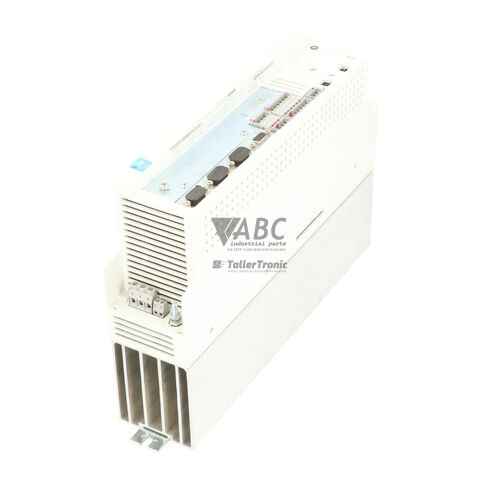
Lenze EVS9322-EP 9300 Servo Positioning Controller



Het item werd toegevoegd aan uw offerteaanvraag
Product Information
The Lenze EVS9322-EP is a panel-mount servo positioning controller within the Lenze 9300 Servo family, designed for precise motion control in automated industrial systems. Operating on a 3-phase supply voltage ranging from 320 V AC to 528 V AC with a nominal rating of 400/480 V AC, this 0.75 kW unit delivers a rated continuous output current of 2.5 A and a maximum peak current of 3.75 A for up to 60 seconds. Utilizing field-oriented vector control up to a maximum output frequency of 480 Hz, the drive operates both synchronous brushless AC servo motors and asynchronous motors. Featuring an integrated positioning profile generator, the unit offloads motion profile calculations directly from master controllers for dynamic positioning tasks.
For physical connections, the EVS9322-EP includes terminal X7 for resolver feedback, terminal X8 for incremental, SinCos, or absolute encoders, along with 4 digital inputs, 2 digital outputs, 2 analog inputs, and 2 analog outputs. System networking is provided through an onboard CAN system bus operating up to 500 kbit/s, supplemented by an Automation Interface (AIF) slot supporting plug-in fieldbus modules such as PROFIBUS-DP (EMF2133IB), CANopen (EMF2175IB), DeviceNet (EMF2173IB), or INTERBUS (EMF2102IB). Commissioning or replacing a drive unit requires parameter configuration transferred via the EMZ9371BC keypad module, EASY Starter, or Lenze Global Drive Control (GDC) software. Internal EEPROM memory stores up to four complete parameter sets, allowing parameter extraction or cloning from a donor unit to bring a replacement drive online quickly. Assistance from ABC Industrial Parts can support sourcing compatible spares and managing parameter transfers.
Diagnostic feedback is provided via onboard Ready (green) and Fault (red) status LEDs, as well as a fault relay output on terminal X5/28. Detailed operational state and error history can be monitored via register C0168 using the keypad module or GDC software. Active trip monitoring covers conditions such as short circuits (OC1), earth faults (OC2), overvoltage on the DC bus (OU), undervoltage (LU), heatsink overheating (OH), and feedback disruptions (Sd1). First-line troubleshooting involves checking mains input voltages, verifying motor wiring insulation, inspecting resolver connections on terminal X7, and ensuring proper line termination on the CAN bus at terminal X4. Unresolvable internal component faults, such as hardware errors (H05) or persistent EEPROM failures (EEr), indicate board-level damage that cannot be serviced in the field, making unit replacement or repair through ABC Industrial Parts the standard procedure to minimize downtime.
Technical Specifications
| Manufacturer | Lenze |
| Part Number | EVS9322-EP |
| Model / Type | 9300 Servo Positioning Controller |
| Product Family | 9300 Servo |
| Component Type | Servo Controller |
| Rated Power | 0.75 kW |
| Supply Voltage | 3x 400 / 480 V AC |
| Supply Voltage Range | 320 ... 528 V AC |
| Rated Continuous Output Current | 2.5 A |
| Maximum Peak Output Current | 3.75 A (60 s) |
| Switching Frequency | 8 kHz |
| Control Method | Field-oriented vector control |
| Maximum Output Frequency | 480 Hz |
| Digital Inputs / Outputs | 4 / 2 |
| Analog Inputs / Outputs | 2 / 2 |
| Onboard Fieldbus | CAN System Bus (500 kbit/s) |
| Expansion Slot | Automation Interface (AIF) |
Programming and Configuration
The Lenze EVS9322-EP integrates complete positioning profiling capabilities within the drive hardware, removing motion control overhead from higher-level PLCs. Engineering and setup are performed using Lenze Global Drive Control (GDC) software, EASY Starter, or directly at the drive using the EMZ9371BC plug-in keypad module. Up to four separate parameter sets can be stored in the controller's internal non-volatile EEPROM memory, facilitating rapid recipe switching or machine adaptation.
When commissioning a new unit or replacing an existing controller, parameter datasets must be transferred to ensure functional alignment. Keypad parameter cloning allows quick transfer of stored configurations without a direct PC connection. Alternatively, GDC software connects via the CAN bus or AIF slot to back up parameter files, adjust velocity or position loop gain parameters, and calibrate motor feedback offsets. Default factory parameters can be restored by setting code C0002 to 1 if parameter dataset inconsistencies occur.
Communication and System Integration
The EVS9322-EP features an integrated CAN system bus running at speeds up to 500 kbit/s, routed through terminal X4. This onboard network enables high-speed multi-axis synchronization, inter-drive communication, and remote drive parameterization across automated production lines. Correct network topology requires 120-ohm bus termination resistors at both physical ends of the CAN system line.
For broader fieldbus integration, the unit includes a modular Automation Interface (AIF) expansion slot. This slot accommodates optional communication modules, including PROFIBUS-DP (EMF2133IB), CANopen (EMF2175IB), DeviceNet (EMF2173IB), and INTERBUS (EMF2102IB). Inserting an AIF module allows the drive to map control words, status words, and position setpoints directly into master controller I/O tables.
Diagnostics and Status Indication
The EVS9322-EP incorporates front-panel status LEDs and diagnostic monitoring registers to aid in rapid fault detection. A continuous green LED indicates that the drive is in a ready state and operating normally, while a blinking red LED signals an active fault, warning, or IMP trip condition. A dedicated fault relay contact on terminal X5/28 offers immediate hardware-level signaling to main machine safety or controller circuits.
Advanced diagnostic feedback is accessed via parameter C0168, which stores a chronological fault history buffer readable through the EMZ9371BC keypad, EASY Starter, or GDC software. The software diagnostic monitor displays real-time DC bus voltage, output current, motor speed, and module communication status, aiding in tracing transient interlocks and operating threshold limits.
Status LED Indicators
| LED | Color/Status | Meaning |
|---|---|---|
| Ready / Power (Green LED) | Green - Solid | Indicates drive ready for operation / operational state when continuously lit. |
| Fault / Error (Red LED) | Red - Blinking | Indicates drive fault (TRIP state). Blinking indicates active warning or IMP trip. |
Replacement and Spare Part Considerations
Replacing a Lenze EVS9322-EP servo positioning controller requires matching the exact electrical ratings and part number to ensure hardware compatibility. Operating on a 3-phase 400/480 V AC supply with 0.75 kW power output and 2.5 A continuous current, the replacement unit must align with the existing motor thermal and power ratings. Additionally, optional AIF fieldbus modules (such as PROFIBUS EMF2133IB or CANopen EMF2175IB) installed in the original controller must be transferred to the spare unit to preserve network connectivity.
Because new or replacement drives do not contain machine-specific positioning profiles or parameter settings out of the box, parameter configuration transfer is essential. Maintenance personnel must transfer the parameter set from the original unit using the EMZ9371BC keypad memory module or upload/download the project dataset using Global Drive Control (GDC) software. Loading parameters transferred from incompatible firmware or drive variants can trigger parameter error fault PEr, requiring re-initialization or default reset via code C0002.
Error Codes & Fault Codes
The following error codes may be displayed during operation or diagnostics:
| Code | Name | Description | Possible Cause | Recommended Action |
|---|---|---|---|---|
| OC1 | Short circuit / Overcurrent | Short circuit or extreme pulse current condition detected at drive output stage. | Short circuit in motor cable, motor winding fault, ground fault, or ground leakage current excessive. | Check motor wiring and insulation, test motor for winding shorts, check acceleration ramp times. |
| OC2 | Earth fault / Ground fault | Current imbalance due to ground fault detected in output phase. | Ground fault in output motor cable, damaged motor insulation, excessive capacitive cable current. | Check motor cable and motor windings for insulation resistance to PE ground. |
| OC5 | I x t Overload | Drive thermal overload protection activated due to continuous overload. | Drive operated above rated continuous current for an extended period, mechanical overload or stall. | Check mechanical load for jam or binding, check motor dimensioning, reduce load or acceleration. |
| OU | Overvoltage DC bus | Intermediate circuit voltage exceeded upper limit threshold (800 V DC). | Regenerative energy from motor during deceleration exceeds braking energy capacity; missing or failed brake chopper/resistor. | Extend deceleration ramp time, verify external brake resistor connection and operation. |
| LU | Undervoltage DC bus | Intermediate circuit voltage dropped below lower limit threshold. | Mains supply voltage too low, phase failure in mains supply, power outage. | Measure mains voltage at L1, L2, L3 terminals; check mains fuses and supply contactor. |
| OH | Heatsink Overheating | Drive heatsink temperature exceeded maximum safety threshold. | Insufficient cooling airflow, dirty heatsink fins, cabinet temperature too high, fan failure. | Clean heatsink, inspect enclosure cooling fans, ensure proper clearance around drive. |
| OH1 | Motor Overheating (PTC / Thermal switch) | Motor temperature sensor reported excessive motor temperature. | Motor thermal overload, cooling fan failure on motor, defective sensor connection at X10. | Allow motor to cool, verify mechanical load, check motor thermistor connections at X10. |
| CE0 | AIF Communication Fault | Communication failure between controller and module in Automation Interface (AIF). | Fieldbus module disconnected, loose contact, bus interruption, fieldbus master failure. | Verify fieldbus connector, check fieldbus cable shielding, inspect module insertion in AIF slot. |
| CE1 | CAN Bus Communication Error (CAN-IN1) | System bus CAN timeout or communication error on CAN object 1. | CAN bus wire broken, missing termination resistor (120 Ohm), baud rate mismatch. | Check CAN wiring at terminal X4, verify line termination resistors, verify master transmission rate. |
| H05 | Internal Hardware Fault | Internal micro-controller or hardware error detected during diagnostic self-test. | Internal component failure, corrupted internal firmware, mainboard failure. | Internal hardware fault — power cycle drive; if persistent, return unit for factory repair or replacement. |
| EEr | EEPROM Fault | Internal parameter memory read/write error. | Corrupted parameter memory, interrupted parameter flash cycle. | Load factory default parameters (C0002 = 1); if unresolvable, internal hardware fault — replace or repair unit. |
| PEr | Program / Parameter Error | Inconsistent parameter dataset loaded into active memory. | Parameter transferred from incompatible firmware version or drive model variant. | Re-initialize parameter dataset from software or reload default parameters. |
| NMAX | Max Speed Exceeded | Actual motor speed exceeded maximum allowable threshold C0596. | Inverted feedback, wrong resolver/encoder resolution settings, gain tuning unstable. | Check encoder wiring, check speed loop gain settings, verify C0596 speed limit. |
| Sd1 | Resolver Feedback Fault | Loss of signal or signal disruption on resolver input (X7). | Resolver cable disconnected, broken wire, signal interference. | Inspect resolver wiring and shielding at terminal X7, verify resolver mechanical coupling. |
Frequently Asked Questions
What software is used to configure and program the Lenze EVS9322-EP?
Lenze Global Drive Control (GDC) software or EASY Starter can be used for configuration, parameter backing up, and diagnostic monitoring. Configuration can also be performed directly using the plug-in EMZ9371BC keypad module.
How do I transfer parameters from a failed EVS9322-EP to a replacement unit?
Parameters stored in the internal non-volatile EEPROM can be cloned using the EMZ9371BC keypad module or transferred via Global Drive Control (GDC) software connected to the CAN bus or AIF interface.
What fieldbus communication options are supported on the EVS9322-EP?
The controller includes an onboard CAN system bus (500 kbit/s) on terminal X4. Additional fieldbus integration is achieved via the Automation Interface (AIF) slot using optional modules such as PROFIBUS-DP (EMF2133IB), CANopen (EMF2175IB), DeviceNet (EMF2173IB), or INTERBUS (EMF2102IB).
What motor feedback types can be connected to the EVS9322-EP?
The drive features two dedicated feedback ports: terminal X7 for standard resolvers and terminal X8 for incremental, SinCos, or absolute encoders. It supports both synchronous brushless AC servo motors and asynchronous motors.
What does fault code H05 indicate on the Lenze EVS9322-EP?
Fault code H05 indicates an internal hardware fault detected during diagnostic self-tests, caused by micro-controller or mainboard failure. If power cycling does not clear the error, the unit requires repair or replacement.
What should I check if fault code OU appears?
Fault code OU indicates high DC bus voltage exceeding 800 V DC, typically caused by regenerative energy during motor deceleration. Check if the deceleration ramp time needs extending and verify that the external brake resistor and brake chopper are properly connected and functional.



Take advantage of our exchange formula
A defective product does not have to be worthless. At ABC Industrial Parts, you can hand in defective products and immediately benefit from a discount on your new purchase. This is a smart way to save money while contributing to a circular economy.
Play it safe with our warranty conditions
Industrial plants prefer to keep running invariably, no matter what. Therefore, it is essential that you can rely on high-quality products and/or sustainable repairs. With our warranty conditions, you can count on certainty, whether you choose new, used or repaired products.
Data backup and recovery
Have you lost valuable parameters or data due to a malfunction while the manufacturer no longer provides support? At ABC Industrial Parts, we help you secure this data, both for common and specific products.
Specific firmware and hardware versions
If you are working with specific hardware or firmware versions that are no longer available from the manufacturer, ABC Industrial Parts is your partner. When making your enquiry, clearly state which versions you need, we will then look at the possibilities of supplying those versions, so that your installations continue to function optimally.
Disclaimer:
We are not an authorised distributor of Lenze.
Product photos are for illustration purposes only and may differ from the actual product delivered.
Some of the content on this page was created with the help of AI. While we strive to provide accurate and up-to-date information, errors may occur.