Siemens 6AV2124-0GC13-0AX0 SIMATIC HMI TP700 Comfort Outdoor Touch Panel


Het item werd toegevoegd aan uw offerteaanvraag
Product Information
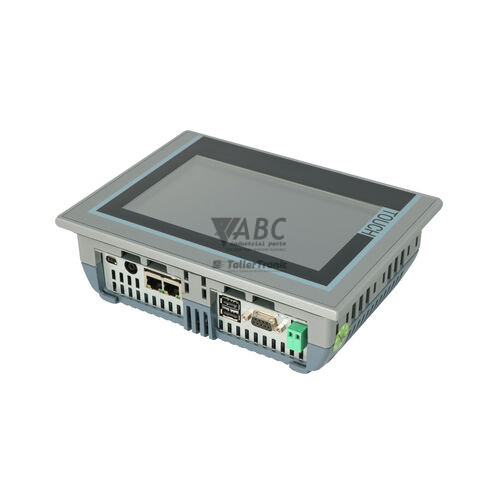
The Siemens 6AV2124-0GC13-0AX0 is a SIMATIC HMI TP700 Comfort Outdoor operator panel designed for high-visibility process visualization and control in demanding environmental conditions. Featuring a 7-inch widescreen TFT display with 800 x 480 pixel resolution and 16,777,216 colors, this human-machine interface delivers high luminance and anti-reflective glass for enhanced readability under direct sunlight. Engineered for harsh industrial and outdoor environments such as water treatment, oil and gas, solar generation, and heavy mobile machinery, the panel is protected by an IP66, NEMA 4X, and NEMA 12 front housing with full UV resistance and operates on a standard 24 V DC power input with a voltage range from 19.2 V DC to 28.8 V DC.
Network integration and peripheral connectivity are provided through an integrated 2-port PROFINET switch with RJ45 interfaces, a 9-pin Sub-D female PROFIBUS DP/MPI port, two USB 2.0 Host Type A ports, a USB Mini-B Client port, and dual SD card slots. Panel configuration is conducted using WinCC Comfort in TIA Portal (V13 SP1 or higher), utilizing 12 MB of non-volatile user memory for project elements, recipes, and archives. Putting a replacement panel into service is streamlined when using a SIMATIC HMI System SD Card, which handles automatic project backups and allows direct zero-tool hardware swaps without requiring an engineering PC on site. When commissioning replacement hardware or updating system projects, ABC Industrial Parts provides tested spare panels and support to keep process lines running smoothly.
System state and fieldbus link health are reported through PROFINET port status LEDs, TIA Portal online diagnostics, ProSave utility tools, screen-based System Diagnostics Control viewers, and an embedded web server accessible via Ethernet. When encountering communication interruptions such as fault code 100000 or tag access errors like fault code 110001, initial troubleshooting should verify cable connections, 24 V DC supply stability, PLC program status, and station IP addressing. In cases where internal hardware failure or screen damage occurs, board-level repairs cannot be serviced in the field; obtaining a fully tested exchange panel or service replacement through ABC Industrial Parts ensures a reliable return to operation.
Technical Specifications
| Manufacturer | Siemens |
| Part Number | 6AV2124-0GC13-0AX0 |
| Model / Type | SIMATIC HMI TP700 Comfort Outdoor |
| Component Type | HMI Touch Panel |
| Display Size | 7 in |
| Display Resolution | 800 x 480 pixels |
| Display Colors | 16777216 |
| User Memory | 12 MB |
| Supply Voltage | 24 V DC |
| Supply Voltage Range | 19.2 - 28.8 V DC |
| Rated Current | 0.5 A |
| Front IP Protection Rating | IP66 / NEMA 4X / NEMA 12 |
| PROFINET Interface | 2 x RJ45 (10/100 Mbit/s, Integrated Switch) |
| PROFIBUS DP / MPI Interface | 1 x Sub-D 9-pin female (12 Mbit/s) |
| USB Ports | 2 x USB 2.0 Host Type A, 1 x USB 2.0 Client Mini-B |
| Memory Card Slots | 2 x SD Card Slots (System Card & Data Card) |
Programming and Configuration
Engineering for the Siemens 6AV2124-0GC13-0AX0 is performed using WinCC Comfort within TIA Portal V13 SP1 or higher. The panel features 12 MB of integrated non-volatile user memory designed to accommodate complex screen graphics, dynamic objects, recipe files, and diagnostic data archives.
Hardware maintenance and project migration are supported by dual SD card slots. Inserting a SIMATIC HMI System SD Card into the dedicated system slot enables continuous, automatic background backups of project binaries, system parameters, and operating system updates. When replacing damaged hardware, inserting the backup card into a new panel automatically transfers the project without requiring an engineering workstation.
Communication and System Integration
The SIMATIC HMI TP700 Comfort Outdoor panel features extensive fieldbus and network connectivity. An integrated 2-port PROFINET switch with twin RJ45 connectors supports 10/100 Mbit/s network topologies, allowing seamless daisy-chaining without external switches. A 9-pin Sub-D female connector provides PROFIBUS DP and MPI communication at rates up to 12 Mbit/s.
Multi-controller integration allows simultaneous connection to SIMATIC S7-1200, S7-1500, S7-300, and S7-400 PLCs. Additionally, native protocol drivers support communication with third-party controllers, including Allen-Bradley PLCs via EtherNet/IP, alongside standard Modbus TCP and Modbus RTU devices.
Diagnostics and Status Indication
Network operation and connection states can be checked visually via dual-color LEDs located on the PROFINET RJ45 sockets. The green LED illuminates continuously when a valid physical link is present, while the yellow LED flashes to indicate active data transmission across the network interface.
Detailed system diagnostics are available through several built-in mechanisms. Maintenance personnel can monitor state warnings via the on-screen SIMATIC HMI System Diagnostics Control viewer, execute remote troubleshooting through the embedded web server using the panel's Ethernet IP address, or perform online analysis using TIA Portal Diagnostics and the ProSave software tool.
Status LED Indicators
| LED | Color/Status | Meaning |
|---|---|---|
| PROFINET Port Link / Activity LEDs | Green / Yellow - Solid Green / Flashing Yellow | Green indicates active network link; Flashing yellow indicates active data transmission. |
Replacement and Spare Part Considerations
When replacing an existing 6AV2124-0GC13-0AX0 unit, confirm that the physical panel model and front housing ratings match the installation location. Due to outdoor exposure to weather, direct sunlight, and washing cycles, verify that the IP66 and NEMA 4X front sealing gasket is properly seated against the cabinet cutout to prevent moisture ingress.
Commissioning a replacement unit does not require downloading project files from an engineering PC if the original panel was configured with a SIMATIC HMI System SD Card. Transferring the SD card directly into the replacement panel restores all runtime projects, authorization files, and system parameters automatically upon initial power-up.
Error Codes & Fault Codes
The following error codes may be displayed during operation or diagnostics:
| Code | Name | Description | Possible Cause | Recommended Action |
|---|---|---|---|---|
| 100000 | Connection disconnected | Communication connection between HMI panel and configured PLC / controller was interrupted or lost. | Network cable disconnected, PLC powered off, incorrect IP address / subnet, or fieldbus timeout. | Check physical cable connections, verify PLC power and status, verify IP settings and station network addresses. |
| 100001 | Connection established | Communication link between HMI panel and configured controller has been established successfully. | Normal system startup or re-establishment of communication following network recovery. | No corrective action required. |
| 110001 | PLC error / tag access failure | HMI panel cannot read or write configured PLC tags or data blocks. | Configured address or data block does not exist in PLC, optimized block access mismatch, or PLC program error. | Verify PLC program contains cited tags/DBs, check symbol table consistency, re-compile and download project. |
| 140000 | Recipe transfer error | Recipe data record import/export or PLC transfer failed. | Storage card missing or full, invalid recipe tag assignment, controller communication error during transfer. | Check memory card status and available space, verify PLC connection and tag limits. |
| 190000 | System Memory Warning | Internal memory or memory card capacity approaching limit. | Excessive log data, archive files, or trace files stored on device. | Clear unused logs, replace memory card with higher capacity, or adjust logging interval. |
Frequently Asked Questions
Which software is required to program the Siemens 6AV2124-0GC13-0AX0?
The panel is programmed using WinCC Comfort in TIA Portal V13 SP1 or higher.
How can I replace a failed TP700 Comfort Outdoor panel without TIA Portal?
If a SIMATIC HMI System SD Card was installed in the system slot of the original unit, moving the card to the replacement panel automatically restores the project, firmware settings, and parameters upon powering up.
Can the 6AV2124-0GC13-0AX0 connect to non-Siemens PLCs?
Yes, the panel supports communication with Allen-Bradley controllers via EtherNet/IP, as well as Modbus TCP and Modbus RTU protocols.
What do the LEDs on the PROFINET ports indicate?
A solid green LED indicates an active network link, while a flashing yellow LED indicates ongoing network data transmission.
What should be checked when fault code 100000 appears?
Fault code 100000 indicates a lost connection to the controller. Check network cabling, verify PLC power and runtime status, and confirm IP address and subnet configuration.
Take advantage of our exchange formula
A defective product does not have to be worthless. At ABC Industrial Parts, you can hand in defective products and immediately benefit from a discount on your new purchase. This is a smart way to save money while contributing to a circular economy.
Play it safe with our warranty conditions
Industrial plants prefer to keep running invariably, no matter what. Therefore, it is essential that you can rely on high-quality products and/or sustainable repairs. With our warranty conditions, you can count on certainty, whether you choose new, used or repaired products.
Data backup and recovery
Have you lost valuable parameters or data due to a malfunction while the manufacturer no longer provides support? At ABC Industrial Parts, we help you secure this data, both for common and specific products.
Specific firmware and hardware versions
If you are working with specific hardware or firmware versions that are no longer available from the manufacturer, ABC Industrial Parts is your partner. When making your enquiry, clearly state which versions you need, we will then look at the possibilities of supplying those versions, so that your installations continue to function optimally.
Disclaimer:
We are not an authorised distributor of Siemens.
Product photos are for illustration purposes only and may differ from the actual product delivered.
Some of the content on this page was created with the help of AI. While we strive to provide accurate and up-to-date information, errors may occur.