Siemens 6AV2124-0MC01-0AX0 TP1200 Comfort HMI Touch Panel


Het item werd toegevoegd aan uw offerteaanvraag
Product Information
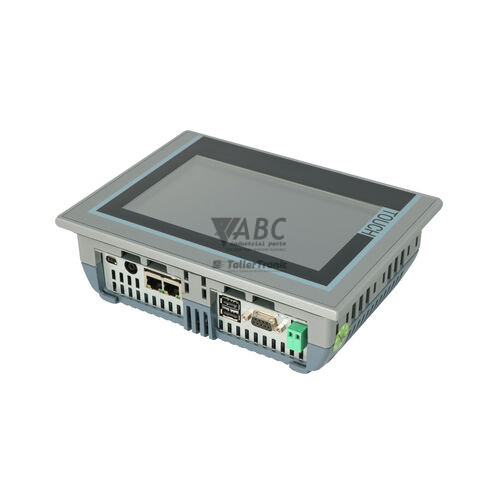
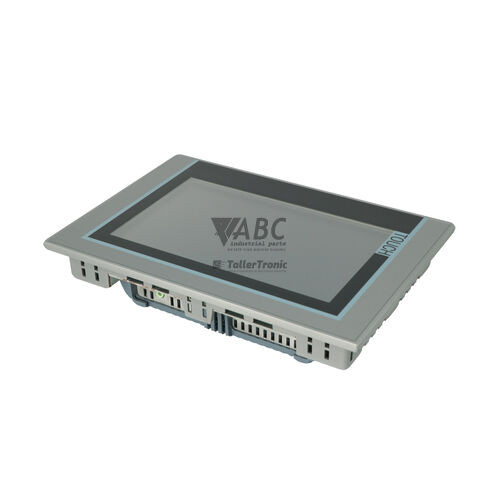
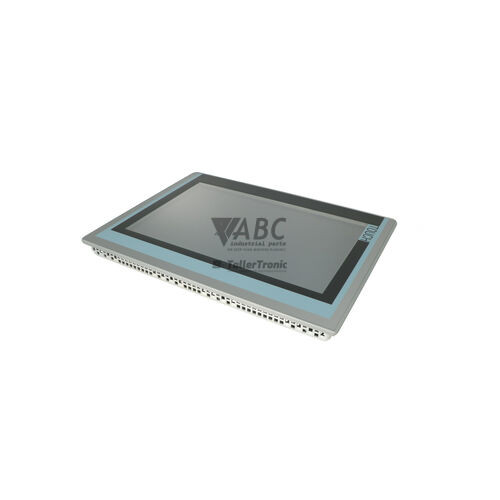
The Siemens 6AV2124-0MC01-0AX0 TP1200 Comfort is an industrial touch operator panel belonging to the SIMATIC HMI Comfort Panels family. Designed for high-clarity machine control and process visualization, this HMI component features a 12.1-inch widescreen TFT display with a resolution of 1280 x 800 pixels and 16,777,216 displayable colors. The display is equipped with a dimmable LED backlight rated for an MTBF of 80,000 hours at 25 °C. Housed in a durable enclosure with an IP65, NEMA 4X, and NEMA 12 rated front bezel, the panel is powered by an external 24 V DC supply operating across a permissible range of 19.2 to 28.8 V DC with a rated current draw of 0.85 A and 20 W power consumption.
Connecting to industrial automation networks is handled through an integrated dual-port PROFINET RJ45 switch supporting 10/100 Mbit/s speeds alongside a 9-pin Sub-D female MPI/PROFIBUS DP interface. Additional connectivity includes two USB 2.0 host ports and one USB Mini-B client interface. Commissioning a replacement 6AV2124-0MC01-0AX0 unit requires restoring the panel configuration project created in WinCC Comfort, WinCC Advanced, or WinCC Professional within TIA Portal V11 or higher into the 12 MB non-volatile flash memory. The panel utilizes dual SD card slots supporting automatic system backup, allowing project recovery directly from a system memory card or via the Siemens ProSave service tool. When preparing a spare HMI or restoring system backup files, technical support from ABC Industrial Parts can assist in verifying runtime alignment and configuration transfer.
System status and network activity are monitored directly through built-in diagnostic tools and screen indicators, including a dedicated PROFINET Link / Activity LED that signals physical connection and Ethernet data exchange. Maintenance personnel can troubleshoot communication and panel operation using the integrated Web server diagnostic pages, WinCC System Diagnostics View, and on-screen alarm displays. First-line operational checks should focus on verifying the 24 V DC power supply level, confirming RJ45 and Sub-D cabling integrity, and checking that the system memory card is seated properly. When internal hardware faults, touch screen degradation, or display failures occur, component-level repairs or a tested replacement panel from ABC Industrial Parts can restore operational functionality quickly.
Technical Specifications
| Manufacturer | Siemens |
| Part Number | 6AV2124-0MC01-0AX0 |
| Model / Type | TP1200 Comfort |
| Product Family | SIMATIC HMI Comfort Panels |
| Component Type | HMI Touch Panel |
| Display Diagonal Size | 12.1 in |
| Display Type | TFT Widescreen Touchscreen |
| Display Resolution | 1280 x 800 pixels |
| Display Colors | 16777216 |
| Backlight MTBF | 80000 h |
| Backlight Dimmability | 0 - 100 % |
| Configuration Memory | 12 MB |
| Operating System | Windows CE 6.0 |
| Supply Voltage | 24 V DC |
| Permissible Voltage Range | 19.2 to 28.8 V DC |
| Rated Current | 0.85 A |
| Power Consumption | 20 W |
| PROFINET Interface | 1 x 2-Port Switch RJ45 (10/100 Mbit/s) |
| MPI/PROFIBUS DP Interface | 1 x Sub-D 9-pin Female |
| USB Ports | 2 x USB 2.0 Host, 1 x USB Mini-B Client |
| Front Protection Rating | IP65 / NEMA 4X / NEMA 12 |
| Rear Protection Rating | IP20 |
Programming and Configuration
The Siemens 6AV2124-0MC01-0AX0 TP1200 Comfort panel is engineered for configuration using TIA Portal software, specifically WinCC Comfort, WinCC Advanced, or WinCC Professional V11 and higher. The panel includes 12 MB of non-volatile configuration memory, providing ample space for graphic screens, alarm management, historical data logging, and complex operator navigation.
Project files and system data can be transferred using standard Ethernet connections, USB storage devices, or the Siemens ProSave service tool. Automated backup functionality is supported using SIMATIC HMI SD memory cards inserted into the dedicated system slot, enabling rapid restoration of user applications and runtime data without requiring direct engineering software intervention during hardware replacements.
Communication and System Integration
Networking capabilities on the TP1200 Comfort include an integrated 2-port PROFINET RJ45 switch operating at 10/100 Mbit/s, enabling linear or ring topology integration without external network switches. Communication options are further extended by a 9-pin Sub-D female connector supporting MPI and PROFIBUS DP protocols up to standard fieldbus speeds.
The panel integrates seamlessly with SIMATIC S7-1200, S7-1500, S7-300, and S7-400 PLCs, while also providing multi-vendor communication support for protocols including EtherNet/IP, Modbus, TCP/IP, DHCP, and SNMP. Auxiliary interfaces include two USB 2.0 host ports for connecting external peripherals or memory expansion, along with one USB Mini-B client port.
Diagnostics and Status Indication
Diagnostic evaluation on the TP1200 Comfort is supported through hardware status LEDs, on-screen system diagnostic controls, and remote diagnostic tools. An integrated Web server provides access to system status pages, while the WinCC System Diagnostics View allows operators to inspect PLC and field device status directly on the HMI touch display.
The panel features an onboard PROFINET Link / Activity LED that provides clear indication of network connectivity and communication traffic on the Ethernet ports. System maintenance and diagnostic firmware functions can also be performed via the ProSave service tool over connected network interfaces.
Status LED Indicators
| LED | Color/Status | Meaning |
|---|---|---|
| PROFINET Link / Activity | Green - Solid / Flashing | Green indicates active network link; flashing indicates active communication on Ethernet port. |
Replacement and Spare Part Considerations
When replacing an existing 6AV2124-0MC01-0AX0 touch panel, ensure that the part number matches exactly, as Comfort Panels possess specific screen dimensions, cutout dimensions, and interface layouts. The replacement unit must be flashed with a firmware version compatible with the TIA Portal project version (V11 or higher) utilized in the control environment.
To transfer operator graphics and control parameters to a new unit, load the existing backup project file using a SIMATIC HMI SD memory card or restore the compiled application using Siemens ProSave or TIA Portal. Verifying power feed stability within 19.2 to 28.8 V DC and confirming physical cable connections ensures immediate compatibility upon system installation.
Frequently Asked Questions
What software is required to program the Siemens 6AV2124-0MC01-0AX0 TP1200 Comfort?
Programming and configuration require Siemens WinCC Comfort, WinCC Advanced, or WinCC Professional (TIA Portal V11 or higher).
How is a project transferred to a replacement TP1200 Comfort panel?
Projects can be loaded directly from TIA Portal, restored using the Siemens ProSave service tool via Ethernet or USB, or automatically transferred using a SIMATIC HMI SD card containing a system backup.
What communication protocols are supported by the 6AV2124-0MC01-0AX0 panel?
The panel natively supports PROFINET, PROFIBUS DP, MPI, EtherNet/IP, Modbus, TCP/IP, DHCP, and SNMP protocols, allowing integration with Siemens S7-1200, S7-1500, S7-300, S7-400 PLCs and third-party controllers.
What are the power supply requirements for this HMI display?
The TP1200 Comfort operates on a 24 V DC supply with a permissible voltage range of 19.2 V DC to 28.8 V DC, drawing a rated current of 0.85 A with a power consumption of 20 W.
What does the green PROFINET LED indicate on the TP1200 Comfort?
A solid green LED indicates an active physical network link on the Ethernet port, while a flashing green LED indicates active communication data transfer.
What protection rating does the front display panel carry?
The front panel bezel is rated IP65, NEMA 4X, and NEMA 12 for ingress protection against dust, dirt, and splash liquids in industrial environments.
Take advantage of our exchange formula
A defective product does not have to be worthless. At ABC Industrial Parts, you can hand in defective products and immediately benefit from a discount on your new purchase. This is a smart way to save money while contributing to a circular economy.
Play it safe with our warranty conditions
Industrial plants prefer to keep running invariably, no matter what. Therefore, it is essential that you can rely on high-quality products and/or sustainable repairs. With our warranty conditions, you can count on certainty, whether you choose new, used or repaired products.
Data backup and recovery
Have you lost valuable parameters or data due to a malfunction while the manufacturer no longer provides support? At ABC Industrial Parts, we help you secure this data, both for common and specific products.
Specific firmware and hardware versions
If you are working with specific hardware or firmware versions that are no longer available from the manufacturer, ABC Industrial Parts is your partner. When making your enquiry, clearly state which versions you need, we will then look at the possibilities of supplying those versions, so that your installations continue to function optimally.
Disclaimer:
We are not an authorised distributor of Siemens.
Product photos are for illustration purposes only and may differ from the actual product delivered.
Some of the content on this page was created with the help of AI. While we strive to provide accurate and up-to-date information, errors may occur.