Lenze 9324MP.2D.80 Control Board – 9300 Servo Drive Module


Het item werd toegevoegd aan uw offerteaanvraag
Product Information
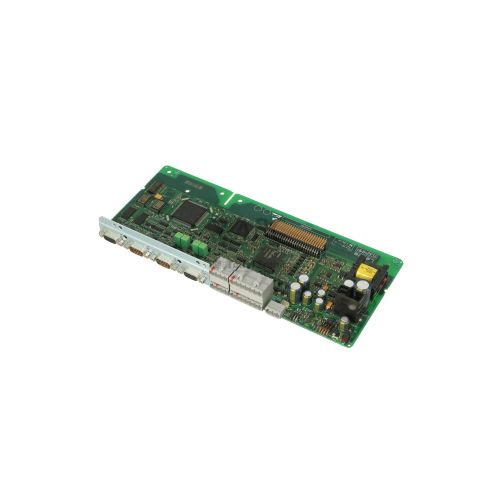
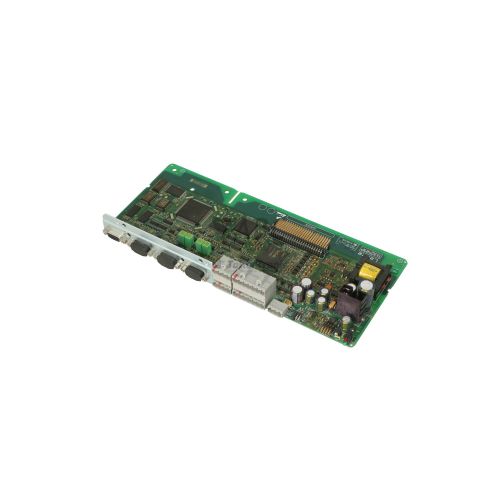
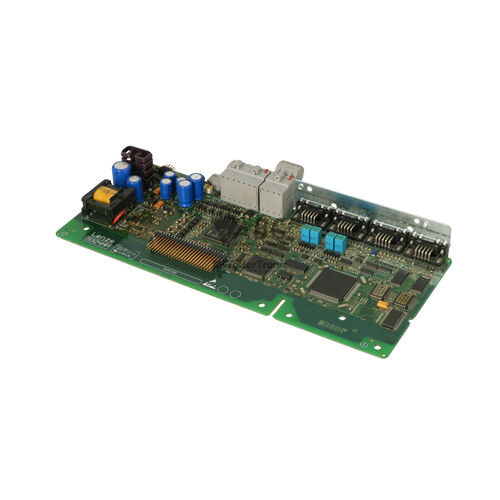
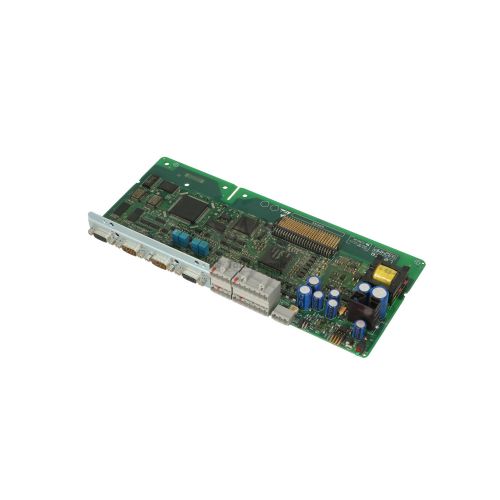
The Lenze 9324MP.2D.80 is a microprocessor control board serving as the central processing and command unit for Lenze 9300 Series Servo and Servo PLC drives. Operating on an external 24 V DC control supply, the card maintains continuous processing logic and parameter retention even during main AC power supply interruptions. Hardware revision 2D and variant 80 designate this control module, which manages precise multi-axis positioning and synchronized motion control across automated industrial machinery, including packaging lines, material handling systems, textile manufacturing, and printing equipment.
Connecting the 9324MP.2D.80 into an existing installation requires matching its physical feedback and network interfaces to the host drive power chassis. The board incorporates a Sub-D resolver input (connector X7), an incremental encoder RS422 input (connector X8), and a frequency output repeater interface (connector X9) for downstream axis synchronization, alongside 8 digital inputs, 4 digital outputs, 2 bipolar analog inputs, and 2 bipolar analog outputs. An integrated modular Automation Interface (AIF) slot accommodates plug-in fieldbus adapters, including PROFIBUS-DP (EMF2133IB), CANopen (EMF2172IB), and INTERBUS (EMF2111IB) modules. Commissioning a spare unit is rarely plug-and-run; parameter settings and control programs stored across up to four memory sets in the non-volatile EEPROM must be transferred using a Keypad XT operator module (EMF2102IB or EMF2101IB) or Lenze Global Drive Control (GDC) software. ABC Industrial Parts can support maintenance teams with parameter extraction and data recovery when transferring operating profiles from an unreadable board.
Diagnostic monitoring on the front faceplate is provided by two status LEDs: a green DRIVE READY indicator and a red DRIVE ERROR indicator. Additional status interrogation can be performed by reading error codes on the Keypad XT, analyzing the C0168 parameter history buffer, checking CAN system bus status words, or using the GDC diagnostic monitor. First-line field checks for trip conditions like OC1 overcurrent, OU overvoltage, or LU undervoltage involve inspecting line fuses, motor insulation, braking resistors, and control supply voltages. Internal board faults such as EEPROM corruption (EER) or central processing self-test failure (H05) indicate hardware failure on the board itself that cannot be serviced in the field. Installing a fully tested exchange board from ABC Industrial Parts offers a fast route to restoring machine operation.
Technical Specifications
| Manufacturer | Lenze |
| Part Number | 9324MP.2D.80 |
| Model / Type | Control Board |
| Component Type | Microprocessor Control Board |
| Product Family | 9300 Series |
| Hardware Revision | 2D |
| Hardware Variant | 80 |
| Control Supply Voltage | 24 V DC |
| Digital Inputs | 8 |
| Digital Outputs | 4 |
| Analog Inputs | 2 (Bipolar) |
| Analog Outputs | 2 (Bipolar) |
| System Bus (CAN) Speed | 500 kbps |
| Resolver Inputs | 1 (Sub-D connector X7) |
| Encoder Interfaces | 2 (RS422 Input X8, Frequency Output X9) |
Programming and Configuration
Configuring the Lenze 9324MP.2D.80 control board requires dedicated engineering software tools or operator hardware. Primary parameter management is conducted using Lenze Global Drive Control (GDC) software connected through a serial interface or via direct input on a Keypad XT operator module (EMF2102IB / EMF2101IB). The card incorporates non-volatile EEPROM memory configured to store up to four complete, independent parameter sets directly on the board.
In 9300 Servo PLC applications, custom motion sequences and PLC programs are written and compiled using Drive PLC Developer Studio (DDS). When replacing a controller board, extracting parameter files from the original board via GDC software and restoring them to the replacement unit ensures accurate motor tuning gains, digital I/O function assignments, and fieldbus addresses. If a memory fault recovery procedure is required, a factory parameter reset can be initiated via parameter C0002=1 prior to reloading valid application projects.
Communication and System Integration
The 9324MP.2D.80 features an onboard CAN system bus capable of transmission speeds up to 500 kbps. This integrated bus allows high-speed multi-axis drive-to-drive communication, synchronization, and master-slave control without requiring external motion controller hardware. Network stability across the system bus relies on correct 120-ohm bus termination resistors at line ends and matched baud rates across all connected nodes.
Broader integration into industrial fieldbus networks is achieved through the integrated Automation Interface (AIF) expansion slot. This multi-pin slot accepts option modules including PROFIBUS-DP (EMF2133IB), CANopen (EMF2172IB), INTERBUS (EMF2111IB), or LECOM serial communication cards. Physical feedback connections are made directly on the board faceplate via connector X7 for Sub-D resolver feedback, connector X8 for RS422 incremental encoder signals, and connector X9 for frequency signal repeating to downstream slave drives.
Diagnostics and Status Indication
Operating status and primary fault conditions on the 9324MP.2D.80 are indicated by two status LEDs located on the faceplate. The green DRIVE READY LED lights solid during normal operation, flashes when a controller inhibit or warning condition exists, and turns off if control power is lost or a hardware failure occurs. The red DRIVE ERROR LED lights solid during active TRIP conditions, flashes when a warning threshold is reached, and remains off during normal fault-free operation.
Detailed diagnostics are accessible by interrogating the C0168 parameter history buffer, which records recent error codes and sub-codes. Maintenance engineers can read fault records directly through the Keypad XT module display or via the online diagnostic monitor in Global Drive Control (GDC) software. Fault states and system status words are also transmitted across the CAN system bus or installed fieldbus network to upper-level controllers.
Status LED Indicators
| LED | Color/Status | Meaning |
|---|---|---|
| DRIVE READY | Green - Solid / Flashing / Off | ON = Drive is ready / operating normally; BLINKING = Controller inhibit or warning active; OFF = Drive not powered or internal failure |
| DRIVE ERROR | Red - Solid / Flashing / Off | ON = Active TRIP fault condition; BLINKING = Warning condition present; OFF = Normal operation without fault |
Replacement and Spare Part Considerations
When replacing a Lenze 9324MP.2D.80 control board, verify that the complete part number, hardware revision (2D), and variant code (80) match the original unit. Deviations in revision level or variant codes can lead to parameter mismatch, I/O pin allocation differences, or incompatibility with the installed drive power unit.
A replacement board must be configured with the parameter values from the original machine. EEPROM parameter sets should be restored using Global Drive Control (GDC) software or transferred via a Keypad XT operator module to maintain correct motor feedback settings, current limits, and communication node addresses. Any option card mounted in the Automation Interface (AIF) slot, such as a PROFIBUS EMF2133IB module, must be transferred to the replacement board and verified for firm seating and correct hardware switch settings.
Error Codes & Fault Codes
The following error codes may be displayed during operation or diagnostics:
| Code | Name | Description | Possible Cause | Recommended Action |
|---|---|---|---|---|
| OC1 | Short Circuit / Overcurrent | Short circuit or extreme pulse current on power output stages. | Short circuit in motor cable, motor winding fault, ground fault, or incorrect motor parameters. | Check motor and motor cable for short circuits/earth faults; verify acceleration ramp times. |
| OC2 | Earth Fault | Ground fault detected on output phase. | Motor lead insulation breakdown or capacitive ground current. | Check motor insulation resistance and cable shielding. |
| OC5 | I*t Overload | Drive overload during acceleration/deceleration. | Ramp time set too short, mechanical overload or drive undersized. | Increase ramp time, reduce mechanical load, verify motor drive sizing. |
| OU | Overvoltage DC Bus | DC bus voltage exceeded upper limit. | Regenerative energy from motor braking too high, missing brake resistor, braking resistor broken. | Check brake chopper/resistor connections, check supply voltage, lengthen deceleration time. |
| LU | Undervoltage DC Bus | DC bus voltage dropped below minimum threshold. | Mains supply failure, supply voltage too low, line phase missing. | Check line supply voltage and line fuses. |
| OH | Heatsink Overtemperature | Power unit heatsink temperature exceeded maximum threshold. | Inadequate ventilation, clogged heatsink, cooling fan defect, ambient temperature too high. | Clean heatsink, ensure free cooling airflow, check cabinet ventilation. |
| OH4 | Drive Inside Overtemperature | Control board / enclosure internal temperature limit exceeded. | Ambient temperature inside control cabinet too high. | Improve cooling of the control cabinet. |
| OH7 | Motor Overtemperature (PTC) | Motor temperature sensor trip (PTC/TKO). | Motor overheated due to overload or inadequate motor cooling. | Allow motor to cool down, check motor load and cooling fan. |
| OH8 | Motor I2t Overtemperature | Calculated motor thermal load exceeded limit. | Continuous low-speed operation with high current. | Check motor current limits and duty cycle. |
| CE0 | AIF Communication Error | Communication failure between control board and automation interface module. | AIF communication module loose, defective, or fieldbus line broken. | Verify seating of optional module in AIF slot, check fieldbus wiring. |
| CE1 | System Bus (CAN) Fault | CAN system bus telegram transmission error or bus off condition. | Missing bus termination resistor, cable interruption, wrong baud rate. | Check CAN bus wiring, 120 ohm termination resistors, and node baud rate settings. |
| EER | EEPROM Fault | Internal EEPROM checksum error during data access. | Internal EEPROM memory corruption or control board hardware defect. | Internal hardware fault — execute factory reset (C0002=1); if error persists, replace control board. |
| H05 | Internal Hardware Error | Control board hardware self-test failure. | Internal processor or board component malfunction. | Internal hardware fault — return unit/board for repair or replace control board 9324MP. |
| NMAX | Speed Limit Exceeded | Actual motor speed exceeded maximum configured threshold. | Incorrect encoder feedback setting or drive runaway. | Check speed controller gains, maximum speed limit parameters, and encoder wiring. |
| Sd7 | Resolver Fault | Resolver signal loss or track fault. | Resolver cable disconnected, broken wire, or resolver failure. | Check resolver wiring, connector X7, and motor resolver windings. |
| PR0 | Program / PLC Error | Execution fault in user PLC program. | Division by zero, array out of bounds, or illegal PLC task timing. | Check user program using Drive PLC Developer Studio (DDS). |
Frequently Asked Questions
What software is used to program and parameterize the Lenze 9324MP.2D.80 control board?
Drive parameters are configured using Lenze Global Drive Control (GDC) software or directly via a Keypad XT operator module (EMF2102IB or EMF2101IB). For 9300 Servo PLC models, custom PLC user programs are developed using Drive PLC Developer Studio (DDS).
Can I install a replacement 9324MP.2D.80 board without configuring software parameters?
No. Replacement boards contain factory default parameters. You must load your machinery's specific parameter backup into the board's EEPROM via Keypad XT or GDC software to restore motor settings, I/O mapping, and fieldbus communication.
Which fieldbus modules fit into the AIF slot on the 9324MP.2D.80 board?
The Automation Interface (AIF) slot supports optional communication modules including PROFIBUS-DP (EMF2133IB), CANopen (EMF2172IB), INTERBUS (EMF2111IB), and LECOM serial interface modules.
What does fault code EER indicate on the 9324MP.2D.80 control board?
Fault code EER indicates an internal EEPROM checksum error. You can attempt a factory reset by setting parameter C0002=1; if the fault condition persists after clearing, the control board hardware is defective and must be replaced.
How do the front status LEDs indicate normal operation on the 9324MP.2D.80?
Under normal operating conditions, the green DRIVE READY LED is illuminated solid and the red DRIVE ERROR LED is off. A flashing green LED indicates a warning or controller inhibit, while a solid red LED signals an active TRIP fault.
Take advantage of our exchange formula
A defective product does not have to be worthless. At ABC Industrial Parts, you can hand in defective products and immediately benefit from a discount on your new purchase. This is a smart way to save money while contributing to a circular economy.
Play it safe with our warranty conditions
Industrial plants prefer to keep running invariably, no matter what. Therefore, it is essential that you can rely on high-quality products and/or sustainable repairs. With our warranty conditions, you can count on certainty, whether you choose new, used or repaired products.
Data backup and recovery
Have you lost valuable parameters or data due to a malfunction while the manufacturer no longer provides support? At ABC Industrial Parts, we help you secure this data, both for common and specific products.
Specific firmware and hardware versions
If you are working with specific hardware or firmware versions that are no longer available from the manufacturer, ABC Industrial Parts is your partner. When making your enquiry, clearly state which versions you need, we will then look at the possibilities of supplying those versions, so that your installations continue to function optimally.
Disclaimer:
We are not an authorised distributor of Lenze.
Product photos are for illustration purposes only and may differ from the actual product delivered.
Some of the content on this page was created with the help of AI. While we strive to provide accurate and up-to-date information, errors may occur.