Siemens 6ES7214-1BD22-0XB0 SIMATIC S7-200 CPU 224 PLC CPU


Het item werd toegevoegd aan uw offerteaanvraag
Product Information
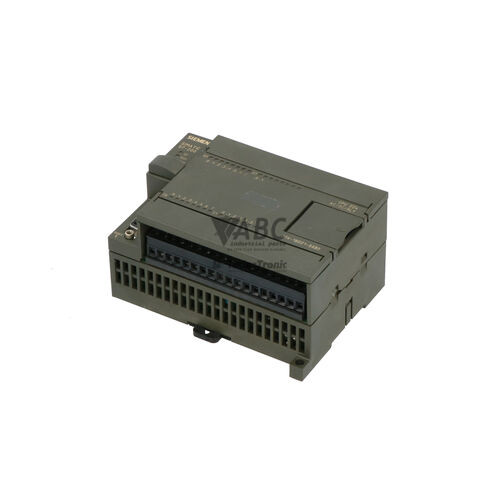
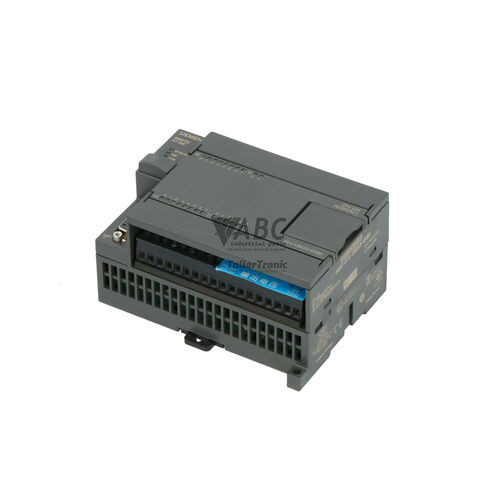
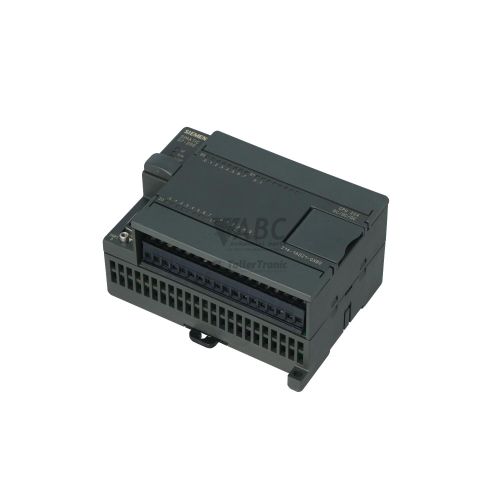
The Siemens 6ES7214-1BD22-0XB0 is a central processing unit for the SIMATIC S7-200 product family, operating as a compact PLC CPU designed for standalone machine tool control, conveyor systems, and process logic applications. Built with an integrated wide-range AC power supply operating from 85 V AC to 264 V AC, this controller combines logic processing, internal power conversion, and field I/O connections into a single unit. The onboard hardware includes 14 digital inputs operating at 24 V DC and 10 digital relay outputs rated for switching loads up to 2 A per channel. An auxiliary integrated 24 V DC sensor power supply output delivers up to 280 mA directly to power connected external field sensors and switches.
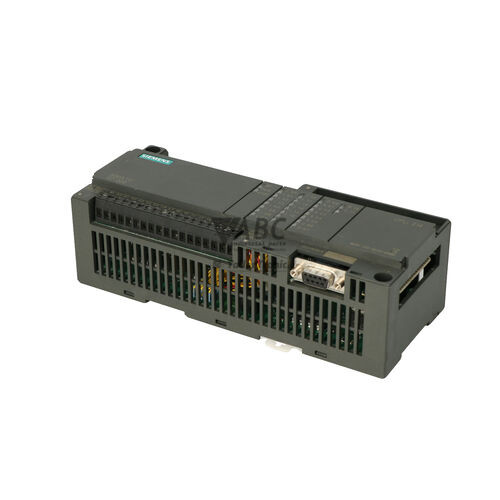
Network connection and engineering access are managed through an integrated RS-485 communication port (Port 0) equipped with a 9-pin female D-sub connector. The interface supports Point-to-Point (PPI) protocol, MPI slave functionality up to 187.5 kbit/s, and user-configurable Freeport mode for custom serial communications. Commissioning a replacement unit involves transferring the program logic and system block settings using STEP 7-Micro/WIN programming software (version 3.2 or 4.0) via a PC/PPI adapter cable, or restoring the logic directly using an optional S7-200 EEPROM Memory Cartridge. The module provides 8 KB of user program memory and 5 KB of user data memory backed permanently by internal EEPROM storage. System expansion is supported for up to seven local SIMATIC S7-200 digital or analog modules via a side ribbon interface. ABC Industrial Parts can assist in supplying fully tested replacement units to restore operations without requiring panel layout alterations.
System health monitoring is provided through onboard front-panel status LEDs and Special Memory (SM) registers SMW0 through SMW26, which can also be inspected using the PLC Information menu in STEP 7-Micro/WIN. The indicator set features a red System Fault (SF) LED for severe system errors, green RUN and yellow STOP indicators for CPU execution state, and dedicated green LEDs for each digital input (Ix.x) and relay output (Qx.x) channel. When addressing system errors such as internal hardware faults (code 0001 or 0002) or EEPROM write issues (code 0007), initial checks should verify input supply voltage, proper seating of ribbon bus cables, and program checksum integrity. Internal hardware and board-level component failures cannot be serviced in the field; obtaining a replacement or dispatching the module to ABC Industrial Parts for repair provides the most efficient solution for minimizing equipment downtime.
Technical Specifications
| Manufacturer | Siemens |
| Part Number | 6ES7214-1BD22-0XB0 |
| Model / Type | SIMATIC S7-200, CPU 224 AC/DC/Relay |
| Component Type | PLC CPU |
| Product Family | SIMATIC S7-200 |
| Supply Voltage Range | 85 - 264 V AC |
| Digital Inputs | 14 (24 V DC) |
| Digital Outputs | 10 (Relay) |
| Relay Output Current Rating | 2 A |
| Integrated Sensor Power Supply Output | 280 mA (24 V DC) |
| User Program Memory | 8 KB |
| User Data Memory | 5 KB |
| Maximum Expansion Modules | 7 |
| Communication Interface Port 0 | RS-485 (9-pin D-sub female) |
| Maximum Baud Rate | 187.5 kbit/s |
| Supported Protocols | PPI, MPI Slave, Freeport |
| Engineering Software | STEP 7-Micro/WIN (v3.2 / v4.0) |
Programming and Configuration
Engineering and logic configuration for the Siemens 6ES7214-1BD22-0XB0 are carried out using STEP 7-Micro/WIN programming software, fully compatible with version 3.2 and version 4.0. The controller contains 8 KB of program memory alongside 5 KB of data memory. All application code and system block settings are saved into non-volatile internal EEPROM storage, protecting the controller against total data loss during long-term power outages. An optional battery module can be fitted to sustain dynamic RAM data when volatile memory retention is required over extended offline periods.
When replacing an existing CPU 224, commissioning requires connecting an engineering workstation to Port 0 using a PC/PPI adapter cable and transferring the compiled application file. Alternatively, an S7-200 EEPROM Memory Cartridge containing the target program can be inserted into the CPU slot while powered off, automatically transferring the configuration upon power-up. If memory corruption or checksum errors occur (fault code 0003), clearing the CPU memory and executing a complete download from STEP 7-Micro/WIN will reset internal registers and re-establish proper logic execution.
Communication and System Integration
System integration is supported through an onboard RS-485 serial interface (Port 0) terminated with a standard 9-pin female D-sub connector. The port operates at baud rates up to 187.5 kbit/s, providing physical connectivity for programming devices, human-machine interfaces (HMIs), and peer-to-peer networking. Standard network communications utilize Point-to-Point Interface (PPI) protocol or MPI slave mode for integration into multi-drop network architectures.
The communication port also supports Freeport mode, allowing custom ASCII or binary serial communication protocols to be programmed directly within the user application logic. Freeport mode enables direct interfacing with third-party automation components, such as barcode scanners, serial printers, weighing scales, and custom industrial sensors, without requiring additional external communication processors.
Diagnostics and Status Indication
The SIMATIC S7-200 CPU 224 features diagnostic status LEDs mounted on the front housing to provide visual status feedback. A red System Fault (SF) LED alerts operators to critical hardware errors, internal memory corruption, or expansion bus faults. Operational status is indicated by a green RUN LED during program execution and a yellow STOP LED when execution is halted. Channel-specific green status LEDs (Ix.x and Qx.x) illuminate to reflect the active high state of individual 24 V DC digital inputs and energized output relays.
Detailed diagnostic evaluation is accessible via STEP 7-Micro/WIN using the PLC Information menu option or by reading Special Memory registers SMW0 through SMW26 in the application logic. Fault conditions such as indirect address range errors, stack overflows, program checksum mismatches, or ribbon cable disconnects on local expansion modules are recorded in these diagnostic registers for troubleshooting.
Status LED Indicators
| LED | Color/Status | Meaning |
|---|---|---|
| SF | Red - Solid | System Fault / Group Fault. Indicates CPU fatal error, internal hardware failure, memory corruption, or expansion module bus fault. |
| RUN | Green - Solid | CPU operating in RUN mode executing user program logic. |
| STOP | Yellow - Solid | CPU operating in STOP mode; execution suspended. |
| Ix.x | Green - Solid | Active 24 V DC signal present on the corresponding digital input channel. |
| Qx.x | Green - Solid | Energized state on the corresponding output relay channel. |
Replacement and Spare Part Considerations
When replacing a failed unit, matching the exact part number 6ES7214-1BD22-0XB0 ensures mechanical compatibility, direct terminal alignment, and identical power specifications (85-264 V AC supply, 14 digital inputs, and 10 relay outputs). Because the SIMATIC S7-200 series was officially discontinued by Siemens in October 2014, sourcing a fully tested replacement module allows plants to maintain existing control enclosure panel layouts without undergoing expensive rewiring or immediate control redesign.
Prior to swapping the hardware, confirm that an offline project backup is available in STEP 7-Micro/WIN or on an S7-200 EEPROM Memory Cartridge. Always isolate the main power before inserting or removing memory cartridges or disconnecting side expansion module ribbon cables. After mounting the replacement CPU, seat all expansion ribbon connectors securely to prevent expansion bus faults (code 0004) upon restoration of power.
For long-term modernization planning, Siemens recommends migrating legacy S7-200 systems to the SIMATIC S7-1200 product family, using the CPU 1214C (part number 6ES7214-1BG40-0XB0) as the direct successor. However, installing a direct replacement CPU 224 unit remains the fastest solution to recover production without requiring complete re-engineering of the ladder logic application or field device wiring.
Error Codes & Fault Codes
The following error codes may be displayed during operation or diagnostics:
| Code | Name | Description | Possible Cause | Recommended Action |
|---|---|---|---|---|
| 0001 | Fatal Internal Failure | Internal CPU software or hardware watchdog timeout / memory corruption detected. | Severe electrical interference, firmware fault, or internal hardware component failure. | Power cycle the CPU. If fault persists, replace the CPU (internal hardware fault, return unit for repair). |
| 0002 | Hardware Fault | Internal hardware failure detected during self-test. | Internal ASIC or memory component defective. | Internal hardware fault — return unit for repair or replace CPU. |
| 0003 | User Program Checksum Error | User program corrupted in RAM or EEPROM. | Power failure during program download, battery depletion, or strong EMC noise. | Clear CPU memory and reload user program from STEP 7-Micro/WIN. |
| 0004 | Expansion Bus / Module Error | CPU lost communication with an expansion module or incorrect module detected. | Loose ribbon cable connector, damaged expansion module, or configuration mismatch. | Check expansion module connection ribbon cables. Re-verify system block configuration in STEP 7-Micro/WIN. |
| 0007 | EEPROM Write Error | Failed write operation to internal non-volatile memory. | EEPROM worn out, excessive write cycles, or hardware defect. | Replace CPU or memory cartridge (internal EEPROM degradation). |
| 0010 | Math Stack Overflow | Non-fatal error: Math calculation caused stack overflow. | Nested calculations exceeded allowable depth in ladder/STL logic. | Review math instructions in program logic and reduce calculation nesting. |
| 0011 | Indirect Address Out of Range | Non-fatal error: Pointer contains an address outside valid CPU memory range. | Pointer manipulation error or uninitialized pointer register. | Correct pointer value calculations in logic code before executing indirect memory access. |
| 0012 | Illegal Instruction / Out of Range | CPU attempted to execute an invalid instruction code or access unsupported function. | Corrupted program memory or downloading program compiled for a higher firmware revision. | Verify CPU type selection in STEP 7-Micro/WIN and re-compile/re-download application. |
| 0018 | Memory Cartridge Error | Memory cartridge inserted is incompatible, corrupted, or removed while powered. | Wrong cartridge type, bad physical connection, or corrupt cartridge contents. | Power off CPU before removing or inserting memory cartridge. Verify cartridge compatibility. |
Frequently Asked Questions
Which programming software is required for the Siemens 6ES7214-1BD22-0XB0?
The CPU 224 is programmed and configured using STEP 7-Micro/WIN software version 3.2 or version 4.0 via a PC/PPI adapter cable.
What power supply voltage is required to operate this controller?
The 6ES7214-1BD22-0XB0 features an integrated wide-range AC power supply accepting input voltages from 85 V AC to 264 V AC.
How many local expansion modules can be attached to this CPU?
The CPU 224 supports up to seven local SIMATIC S7-200 digital or analog expansion modules connected via side-mounted ribbon cables.
What does a solid red SF LED indicate on the front panel?
A solid red SF (System Fault) LED indicates a fatal CPU fault, severe hardware error, memory checksum failure, or expansion module bus disconnect.
Can I transfer the program to a replacement CPU without a PC adapter?
Yes, an optional S7-200 EEPROM Memory Cartridge containing the application program can be inserted into the CPU slot while powered off to transfer logic without a PC connection.
What is the recommended modern successor for this discontinued CPU?
Siemens recommends migrating legacy S7-200 installations to the SIMATIC S7-1200 series, specifically the CPU 1214C (part number 6ES7214-1BG40-0XB0).
Take advantage of our exchange formula
A defective product does not have to be worthless. At ABC Industrial Parts, you can hand in defective products and immediately benefit from a discount on your new purchase. This is a smart way to save money while contributing to a circular economy.
Play it safe with our warranty conditions
Industrial plants prefer to keep running invariably, no matter what. Therefore, it is essential that you can rely on high-quality products and/or sustainable repairs. With our warranty conditions, you can count on certainty, whether you choose new, used or repaired products.
Data backup and recovery
Have you lost valuable parameters or data due to a malfunction while the manufacturer no longer provides support? At ABC Industrial Parts, we help you secure this data, both for common and specific products.
Specific firmware and hardware versions
If you are working with specific hardware or firmware versions that are no longer available from the manufacturer, ABC Industrial Parts is your partner. When making your enquiry, clearly state which versions you need, we will then look at the possibilities of supplying those versions, so that your installations continue to function optimally.
Disclaimer:
We are not an authorised distributor of Siemens.
Product photos are for illustration purposes only and may differ from the actual product delivered.
Some of the content on this page was created with the help of AI. While we strive to provide accurate and up-to-date information, errors may occur.