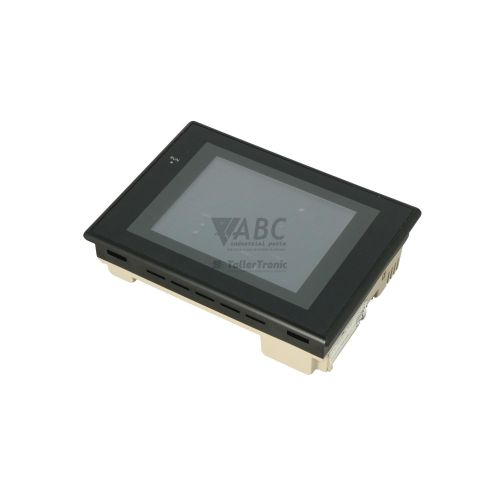
Omron NS5-MQ11-V2 NS Series Interactive Display HMI Terminal


Het item werd toegevoegd aan uw offerteaanvraag
Product Information
The Omron NS5-MQ11-V2 is an interactive HMI display terminal in the Omron NS Series family, engineered for real-time process monitoring and machine control in industrial automation environments. Featuring a 5.7-inch monochrome STN LCD screen with 320 x 240 QVGA resolution and 16 levels of gray scale, this compact touch panel provides clear visualization for machine operators in packaging, automotive manufacturing, and special-purpose machinery design. Encased in an ivory housing, the unit operates on a standard 24 VDC supply voltage across an allowable range of 20.4 to 27.6 VDC, consuming a maximum of 15 W while utilizing a long-life backlight rated for up to 50,000 hours of continuous operation.
Integrating the terminal into a control panel relies on its flexible onboard interfaces, including a 10/100 Mbps Ethernet port (RJ45), dual RS-232C serial ports with 9-pin D-Sub female connectors, a USB 1.1 Type-B slave port, and an industrial CompactFlash card slot (Type I/II). The unit features 60 MB of internal flash project memory and supports FINS, Host Link, NT Link, and Modbus RTU protocols to interface directly with Omron CS1, CJ1, CP1, and C200HX/HG/HE series PLCs. Replacing an existing terminal is rarely a plug-and-play procedure; putting a spare unit into service requires downloading or restoring the application project created in Omron CX-Designer software. Transferring the project can be accomplished via Ethernet, USB, or directly using a FAT/FAT16 formatted industrial CompactFlash card. ABC Industrial Parts can support maintenance teams needing tested replacement hardware to maintain continuous line operations.
First-line operational status is indicated on the front bezel via two indicator lights: a green POWER LED, which remains solid green when 24 VDC power is supplied normally, and a green RUN LED, which stays solid green during normal system operation. Hardware and communication status can be evaluated on the device using the integrated System Menu self-diagnostic screen test, which checks touch panel input, display functionality, memory integrity, and serial or network communication, or remotely using CX-Designer Online Diagnostics. Common operational issues include connection timeouts displaying Connecting..., screen project data corruption, CompactFlash access errors, or internal system loop exceptions. When external cabling, supply voltage, and node address settings are verified but internal hardware faults or unwriteable memory errors persist, board-level faults are not field-serviceable, and sourcing a replacement unit through ABC Industrial Parts provides the fastest route back to production.
Technical Specifications
| Manufacturer | Omron |
| Part Number | NS5-MQ11-V2 |
| Model / Type | Interactive Display |
| Component Type | HMI Terminal |
| Product Family | NS Series |
| Supply Voltage | 24 V DC |
| Voltage Range | 20.4 - 27.6 V DC |
| Power Consumption | 15 W |
| Display Size | 5.7 in |
| Display Resolution | 320 x 240 pixels |
| Display Type | Monochrome STN LCD (16 Gray Scales) |
| Housing Color | Ivory |
| Internal Project Memory | 60 MB |
| Ethernet Interface | 1 x RJ45 (10/100 Mbps) |
| Serial Ports | 2 x RS-232C (D-Sub 9-pin female) |
| USB Interface | 1 x USB 1.1 Type-B Slave |
| Expansion Slot | 1 x CompactFlash Type I/II Slot |
| Supported Protocols | FINS, Host Link, NT Link, Modbus RTU |
| Backlight Service Life | 50000 hours |
Programming and Configuration
The Omron NS5-MQ11-V2 terminal is configured using CX-Designer screen creation software, which operates as part of the Omron CX-One automation software suite. The HMI contains 60 MB of internal flash project memory to host user screens, alarm histories, and graphics. Enhanced System Version V2 features provide expanded project memory management and direct ladder monitor functions, enabling technicians to view and troubleshoot PLC ladder execution directly on the terminal screen without connecting a laptop.
Project deployment and configuration transfers to the terminal can be completed through multiple connection paths. Engineers can download projects using a direct USB connection to the USB 1.1 Type-B slave port, over an established 10/100 Mbps Ethernet network, or via offline media transfer. Inserting a FAT or FAT16 formatted industrial CompactFlash card into the unit's Type I/II slot enables technicians to quickly backup screen projects, perform system firmware updates, or load active runtime data in field environments where software access is limited.
Communication and System Integration
System integration with the NS5-MQ11-V2 is supported through a selection of built-in hardware communication interfaces. The terminal features a 10/100 Mbps RJ45 Ethernet port supporting Omron's FINS protocol for high-speed network communication with PLCs and host computers. Additionally, two independent RS-232C serial ports equipped with 9-pin female D-Sub connectors support Host Link, NT Link, and Modbus RTU protocols, allowing concurrent connections to serial PLCs, barcode readers, and label printers.
The interactive display links seamlessly with multiple generations of Omron automation controllers, including CS1, CJ1, CP1, and C200HX/HG/HE PLC series. By operating as a communication bridge over Ethernet and serial networks, the terminal facilitates efficient field diagnostic monitoring, data collection, and operator input across complex, multi-vendor machinery.
Diagnostics and Status Indication
System state and hardware health on the NS5-MQ11-V2 are monitored through front-panel LED indicators and internal software diagnostic menus. The terminal features an integrated self-diagnostic routine accessible via the System Menu, allowing maintenance technicians to execute hardware tests on the touch panel matrix, LCD display screen, memory modules, and serial or network interfaces. Remote diagnostics can also be executed using CX-Designer Online Diagnostics over Ethernet or USB.
Status LED Indicators
| LED | Color/Status | Meaning |
|---|---|---|
| POWER | Green - Solid Green / Off | Green indicates 24 VDC power is supplied normally; Off indicates no power supplied or internal power failure. |
| RUN | Green - Solid Green / Off | Green indicates HMI operation system is running normally; Off indicates hardware failure, system halt, or unsupplied power. |
Replacement and Spare Part Considerations
When preparing to replace a failed NS5-MQ11-V2 display, maintenance personnel must confirm physical panel cutouts, check 24 VDC supply voltage stability (20.4 to 27.6 VDC range), and record all network settings. Ensure that node addresses, baud rates, and communication protocols on the spare terminal's serial and Ethernet interfaces match the parameters established on the connected host PLC.
Because operational project files reside in internal flash memory, installing a replacement terminal requires loading the application project before the machine can be returned to service. Screen projects should be restored from backup files using CX-Designer software via USB/Ethernet or loaded directly using a FAT/FAT16 formatted industrial CompactFlash card. Verifying that the system firmware version aligns with the project version prevents project loading errors and runtime mismatches.
Error Codes & Fault Codes
The following error codes may be displayed during operation or diagnostics:
| Code | Name | Description | Possible Cause | Recommended Action |
|---|---|---|---|---|
| Connecting... | Host Communication Timeout / Connection Error | The HMI cannot establish communication with the connected PLC or host controller. | Disconnected or damaged communication cable, incorrect baud rate/node address settings, or target PLC is powered off. | Check physical cabling and connections between Serial/Ethernet ports and PLC. Verify communication settings (node number, baud rate, protocol) match PLC configuration. |
| Screen Data Error | Corrupted or Mismatched Screen Project Data | Screen project data in flash memory is missing, incomplete, corrupted, or compiled for an incompatible system version. | Interrupted project download, corrupted flash memory, or mismatched firmware version. | Re-download valid project file from CX-Designer via USB, Ethernet, or Memory Card. If memory remains unwriteable, internal hardware memory fault requires repair or unit replacement. |
| Memory Card Error | CompactFlash Access Error | The terminal is unable to read or write to the inserted CompactFlash card. | Unformatted CF card, unsupported file system (e.g. NTFS), card improperly inserted, or defective card. | Re-insert CF card securely. Ensure card is formatted to FAT/FAT16. Test with a known operational industrial CF card. |
| System Error | Internal System / Hardware Error | An internal software loop exception or board-level hardware fault occurred. | Mainboard component fault, corrupted system firmware, or memory failure. | Cycle 24 VDC power. Re-flash system program files from Memory Card. If error persists, internal hardware fault requires returning unit for repair or replacement. |
Frequently Asked Questions
How do I transfer a screen project to a replacement NS5-MQ11-V2 HMI?
Screen projects can be downloaded using CX-Designer software via a USB connection to the USB 1.1 Type-B slave port or over Ethernet. Alternatively, you can copy the project file to a FAT or FAT16 formatted industrial CompactFlash card and load it directly into the terminal.
Which PLC series are compatible with the Omron NS5-MQ11-V2?
The NS5-MQ11-V2 connects directly with Omron CS1, CJ1, CP1, and C200HX/HG/HE series PLCs using FINS protocol over Ethernet or Host Link/NT Link protocols over RS-232C serial interfaces.
What software suite is used to configure this display?
The terminal is programmed using CX-Designer, which is included within the Omron CX-One software suite.
What causes the 'Connecting...' message to appear on the screen?
This message indicates a communication timeout between the HMI and the controller. Verify that communication cables are securely attached, confirm the target PLC is powered on, and check that node numbers and baud rates match between devices.
How do I resolve a 'Memory Card Error' on the terminal?
Ensure the CompactFlash card is securely inserted and formatted specifically to FAT or FAT16, as NTFS and other file systems are unsupported. If the error persists, test the slot using a known functional industrial CompactFlash card.
Take advantage of our exchange formula
A defective product does not have to be worthless. At ABC Industrial Parts, you can hand in defective products and immediately benefit from a discount on your new purchase. This is a smart way to save money while contributing to a circular economy.
Play it safe with our warranty conditions
Industrial plants prefer to keep running invariably, no matter what. Therefore, it is essential that you can rely on high-quality products and/or sustainable repairs. With our warranty conditions, you can count on certainty, whether you choose new, used or repaired products.
Data backup and recovery
Have you lost valuable parameters or data due to a malfunction while the manufacturer no longer provides support? At ABC Industrial Parts, we help you secure this data, both for common and specific products.
Specific firmware and hardware versions
If you are working with specific hardware or firmware versions that are no longer available from the manufacturer, ABC Industrial Parts is your partner. When making your enquiry, clearly state which versions you need, we will then look at the possibilities of supplying those versions, so that your installations continue to function optimally.
Disclaimer:
We are not an authorised distributor of Omron.
Product photos are for illustration purposes only and may differ from the actual product delivered.
Some of the content on this page was created with the help of AI. While we strive to provide accurate and up-to-date information, errors may occur.