Parker Hannifin SLVD5NS Servo Drive – SLVDN Series 5A Resolver



Het item werd toegevoegd aan uw offerteaanvraag
Product Information
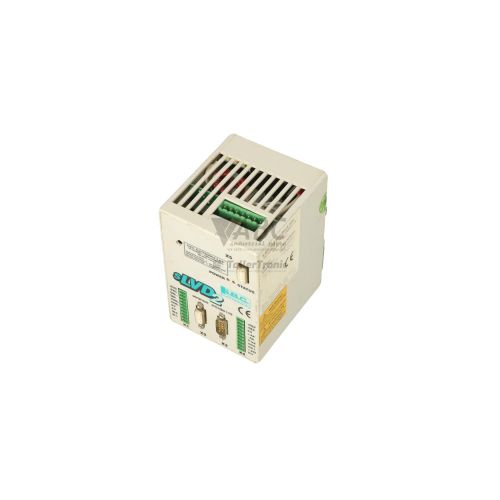
The Parker Hannifin SLVD5NS is a compact digital brushless servo drive designed for high-precision motion control tasks within the SLVDN series. Operating directly from a 200 to 240 V AC single- or three-phase main line supply, this drive eliminates the requirement for external step-down power transformers. It delivers a continuous output current rating of 5 A rms alongside a peak current capacity of 10 A for up to 2 seconds to manage dynamic acceleration phases in demanding industrial automation applications. Dedicated speed and position feedback is provided through a DB15 resolver interface, offering exceptional electrical noise immunity in hostile operating environments.
Integrating the unit into existing control architectures relies on built-in fieldbus and serial interfaces, including CANopen with support for the DS402 drive profile as well as Modbus RTU communication over RS422 and RS485 ports. When commissioning a replacement SLVD5NS unit, exact drive parameters must be loaded to ensure full compatibility with the target motor and machine sequence. System commissioning and parameter management are executed using Parker's MotionWiz engineering software, which allows technicians to configure, back up, and store drive parameters directly in non-volatile EEPROM memory. Maintenance teams sourcing replacement units can rely on ABC Industrial Parts to supply verified hardware for rapid parameter restoration and minimal downtime.
Real-time monitoring and operational status are indicated via an onboard 7-segment display, which presents active operational states and specific fault codes from Er01 through Er15. Diagnostic data is also accessible over serial ports using MotionWiz software or through CANopen diagnostic objects. Standard field checks include verifying incoming line voltage, resolver shield grounding, and motor phase connections. While trip conditions such as overvoltage (Er01) or feedback signal errors (Er07) can often be resolved on-site, internal failures such as hardware fault Er12 indicate damaged internal power or control circuits that cannot be serviced in the field. In these instances, sending the unit for repair or obtaining a pre-tested replacement drive through ABC Industrial Parts provides the fastest route back to full production.
Technical Specifications
| Manufacturer | Parker Hannifin |
| Part Number | SLVD5NS |
| Model / Type | SLVD5NS |
| Product Family | SLVDN |
| Component Type | Servo Drive |
| Supply Voltage Range | 200 - 240 V AC |
| Supply Phase | Single-phase or Three-phase |
| Continuous Output Current | 5 A rms |
| Peak Output Current | 10 A (up to 2 seconds) |
| Feedback Interface | Resolver (DB15 Connector) |
| Fieldbus Interface | CANopen (DS402 Profile) |
| Serial Interface | RS422 / RS485 (Modbus RTU) |
| Configuration Software | Parker MotionWiz |
| Parameter Storage Memory | EEPROM |
| Lifecycle Status | Discontinued |
Programming and Configuration
Drive configuration and motion setup for the Parker SLVD5NS are managed via Parker MotionWiz engineering software. The software allows technicians to perform initial drive setup, configure motor thermal limits, tune current and velocity control loops, and define operational motion parameters through a structured computer interface connected via RS422 or RS485.
All operating parameters are stored in non-volatile EEPROM memory within the drive. MotionWiz facilitates complete drive backup creation and parameter restoration, enabling simple project cloning across identical machine setups or rapid drive replacement. Integrated positioner functionality also enables standalone profile execution, offloading simple motion tasks from central programmable logic controllers.
Communication and System Integration
The SLVD5NS includes an integrated CANopen fieldbus interface that complies with the standardized DS402 drive profile. This interface enables real-time velocity, position, and torque control under central CANopen master controllers, supporting multi-axis synchronization across packaging, textile, and automated assembly machinery.
For serial network integration, the unit features built-in RS422 and RS485 ports operating the Modbus RTU protocol. Motor feedback is routed directly to the drive using a dedicated DB15 resolver connector, ensuring robust signal integrity and immune position tracking even in high electromagnetic noise environments.
Diagnostics and Status Indication
The drive features a integrated 7-segment display located on the front panel to provide instant visual readout of drive states, operational readiness, and numeric error codes ranging from Er01 to Er15. In addition to local display readout, real-time diagnostic parameters and alarm logs can be monitored over serial communication using MotionWiz software or retrieved via standard CANopen diagnostic objects.
Status LED Indicators
| LED | Color/Status | Meaning |
|---|---|---|
| 7-Segment Display | Numeric Display | Displays status codes, ready states, operational status, and fault/error codes (Er01 through Er15). |
Replacement and Spare Part Considerations
Because the Parker SLVDN series has reached discontinued lifecycle status, maintaining verified spare drives or backup parameter files is critical for avoiding extended machine shutdowns. A direct replacement with an identical SLVD5NS ensures full physical and electrical drop-in compatibility without needing control panel modifications.
When installing a replacement SLVD5NS drive, ensure that the EEPROM parameter set from the original drive is downloaded using MotionWiz to preserve motor tuning, thermal safety thresholds, and CANopen network node settings. Verify that the replacement drive utilizes the dedicated DB15 resolver feedback input to match existing resolver cable pinouts.
Error Codes & Fault Codes
The following error codes may be displayed during operation or diagnostics:
| Code | Name | Description | Possible Cause | Recommended Action |
|---|---|---|---|---|
| Er01 | Overvoltage | DC bus voltage exceeded maximum safety threshold. | Regenerative energy from rapid deceleration, missing or incorrect braking resistor. | Check external braking resistor connection and resistance value. Extend deceleration times. |
| Er02 | Undervoltage | DC bus voltage dropped below minimum operating limit. | Line voltage drop, main power interruption, or missing AC supply phase. | Verify incoming AC main line supply voltage and input power connections. |
| Er03 | Overcurrent | Output current trip limit exceeded. | Short circuit on motor phases, phase-to-ground short, or power stage failure. | Inspect motor cables and motor windings for short circuits or ground faults. |
| Er04 | Drive I2t Overload | Thermal load model limit for drive exceeded. | Continuous operation above nominal drive current rating. | Reduce mechanical load or duty cycle. Verify drive sizing. |
| Er05 | Motor I2t Overload | Thermal load model limit for motor exceeded. | Motor thermal overload or incorrect motor parameter configuration. | Check motor current parameters in MotionWiz. Reduce mechanical load. |
| Er06 | Motor Phase Missing | Open circuit detected on motor output phase. | Disconnected or broken motor power conductor. | Check continuity of motor output wiring and terminal connections. |
| Er07 | Feedback Signal Error | Fault detected in resolver feedback signals. | Damaged resolver cable, loose connector, electrical noise, or resolver fault. | Check resolver feedback cable, connector pins, and shield grounding. |
| Er08 | Drive Overtemperature | Drive heatsink temperature exceeded allowable threshold. | Inadequate cabinet ventilation, fan failure, or high ambient temperature. | Ensure proper airflow, clean cooling heatsink, verify ambient cabinet temperature. |
| Er09 | Motor Overtemperature | Motor PTC sensor switch trip. | Motor overheating or disconnected thermal PTC signal. | Allow motor to cool down. Check motor cooling fan and thermal switch wiring. |
| Er10 | External Emergency Trip | External emergency trip input activated. | Safety circuit tripped or external enable/fault signal lost. | Verify safety circuit status and digital input signals. |
| Er11 | Parameter Memory Error | EEPROM parameter checksum validation failure. | Parameter corruption or power loss during parameter save. | Restore parameters from backup using MotionWiz. Re-save default parameters. |
| Er12 | Internal Hardware Fault | Internal control hardware or power circuit error detected. | Internal board component damage. | Internal hardware fault — unit is not field-serviceable and must be returned for repair or replaced. |
Frequently Asked Questions
What software is required to configure the Parker SLVD5NS servo drive?
The SLVD5NS is configured using Parker MotionWiz software. MotionWiz allows parameter setup, control loop tuning, real-time diagnostic monitoring, and backing up or restoring parameters stored in the drive's EEPROM.
What type of feedback device does the SLVD5NS support?
The SLVD5NS features a dedicated DB15 resolver feedback interface designed for high noise immunity in demanding operating environments.
What does error code Er12 mean on the SLVD5NS display?
Error code Er12 indicates an internal hardware fault, such as component damage on the internal control or power boards. The drive cannot be serviced in the field when displaying Er12 and must be repaired or replaced.
Can the SLVD5NS run directly from standard mains AC power?
Yes, the drive operates directly from a 200 to 240 V AC single-phase or three-phase supply, eliminating the need for external power transformers.
Which fieldbus communication protocols are available on the SLVD5NS?
The drive includes integrated CANopen supporting the DS402 drive profile, as well as RS422 and RS485 serial communication using Modbus RTU.
Related products
Take advantage of our exchange formula
A defective product does not have to be worthless. At ABC Industrial Parts, you can hand in defective products and immediately benefit from a discount on your new purchase. This is a smart way to save money while contributing to a circular economy.
Play it safe with our warranty conditions
Industrial plants prefer to keep running invariably, no matter what. Therefore, it is essential that you can rely on high-quality products and/or sustainable repairs. With our warranty conditions, you can count on certainty, whether you choose new, used or repaired products.
Data backup and recovery
Have you lost valuable parameters or data due to a malfunction while the manufacturer no longer provides support? At ABC Industrial Parts, we help you secure this data, both for common and specific products.
Specific firmware and hardware versions
If you are working with specific hardware or firmware versions that are no longer available from the manufacturer, ABC Industrial Parts is your partner. When making your enquiry, clearly state which versions you need, we will then look at the possibilities of supplying those versions, so that your installations continue to function optimally.
Disclaimer:
We are not an authorised distributor of Parker Hannifin.
Product photos are for illustration purposes only and may differ from the actual product delivered.
Some of the content on this page was created with the help of AI. While we strive to provide accurate and up-to-date information, errors may occur.