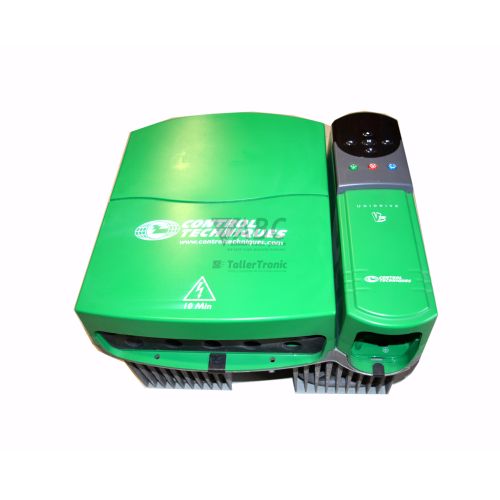
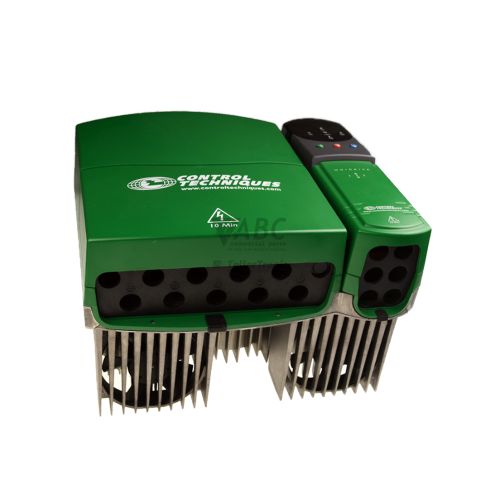
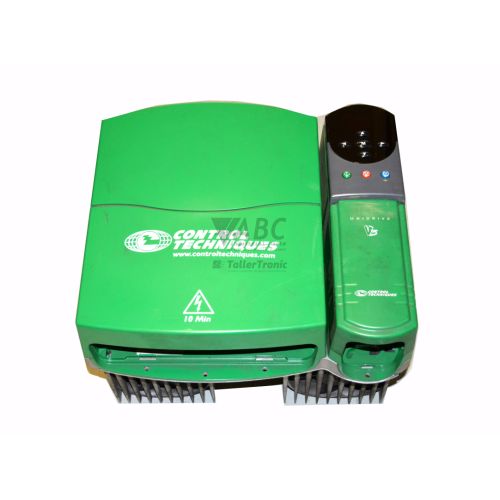
Control Techniques UNI3404 Unidrive Classic Variable Frequency Drive 55kW/75kW


Het item werd toegevoegd aan uw offerteaanvraag
Product Information
The Control Techniques UNI3404 is a Size 3 AC variable frequency drive from the Unidrive Classic product family, designed to provide flexible motor speed and torque regulation across demanding industrial environments. Operating from a 380 V AC to 480 V AC three-phase supply, the UNI3404 features a dual power rating delivering 55 kW (124 A) continuous output in Heavy Duty applications or 75 kW (135 A) continuous output in Normal Duty applications. Its universal control architecture enables software-selectable operational modes—including Open Loop V/Hz, Open Loop Vector, Closed Loop Vector, Permanent Magnet Servo, and Active Regenerative configurations—eliminating the need for separate dedicated drives across different machine tasks. Built in an IP20-rated chassis capable of output frequencies up to 1000 Hz, the unit serves as a core drive solution for heavy-duty machinery, synchronized process lines, and high-torque applications.
Connecting and commissioning the UNI3404 requires matching both physical control connections and drive parameter configurations. Interface hardware includes integrated screw terminal control I/O alongside a dedicated 15-way D-type encoder feedback connector supporting quadrature, SinCos, SSI, and resolver feedback devices. Expandability is provided through internal option slots that accommodate co-processor boards such as the UD70 for custom motion programming, as well as fieldbus modules for PROFIBUS-DP (UD73), DeviceNet, Modbus RTU, and CTNet. Placing a replacement spare into service is not a direct plug-and-play process; line parameters, motor maps, and fieldbus node configurations stored in non-volatile EEPROM must be transferred. Technical personnel can configure parameters manually via the UD98 LED or UD99 LCD keypad, or upload complete parameter sets using CTSoft PC commissioning software. ABC Industrial Parts can support maintenance teams with preparing replacement drives and recovering parameter data from non-responsive units.
Diagnostic conditions and fault identification on the UNI3404 are handled through integrated status monitoring and logging tools. Real-time operation status is indicated on the UD98 or UD99 keypad display via clear status indicators such as 'rd' for drive ready, 'stop' for drive stopped, and 'run' for drive running. When a protective shutdown occurs, the drive records the event in the Menu 10 trip log, storing the last 10 trip codes across parameters Pr 10.20 through Pr 10.29 while Parameter 10.30 reflects the overall status. Common trip codes include supply voltage anomalies like undervoltage (UU) and overvoltage (OU), current spikes (OI.AC), and motor or heatsink overtemperature conditions (th, O.ht1, O.ht2). If the drive displays severe hardware trip codes such as HF01, HF02, HF05, or HF07, internal power or control board failures are indicated which cannot be serviced in the field. Under these circumstances, ABC Industrial Parts offers comprehensive unit repair options and tested exchange drives to restore system production quickly.
Technical Specifications
| Manufacturer | Control Techniques |
| Part Number | UNI3404 |
| Model / Type | Unidrive |
| Component Type | Variable Frequency Drive |
| Product Family | Unidrive Classic |
| Frame Size | Size 3 |
| Supply Voltage Range | 380 V AC - 480 V AC |
| Rated Power (Heavy Duty) | 55 kW |
| Rated Power (Normal Duty) | 75 kW |
| Continuous Output Current (Heavy Duty) | 124 A |
| Continuous Output Current (Normal Duty) | 135 A |
| Maximum Output Frequency | 1000 Hz |
| Protection Rating | IP20 |
Programming and Configuration
Programming and setting up the Control Techniques UNI3404 is accomplished either through keypad interfaces or PC-based software tools. Users can navigate parameters directly using the optional UD98 LED or UD99 LCD keypads, modifying values within designated menu structures. Basic setup relies on Menu 0 parameter configurations to select operating modes between Open Loop, Closed Loop Vector, Servo, or Regenerative operation. Detailed software commissioning, parameter editing, and online diagnostics are managed via CTSoft PC commissioning software connected to the drive interface.
Drive parameter configurations are stored in internal non-volatile EEPROM memory, preventing parameter loss during main power isolation. Restoring factory settings or reinitializing drive configuration can be executed by setting Parameter Pr 0.00 to 1244 or 1253 and issuing a reset. For advanced motion routines, optional co-processor modules such as the UD70 execute user-defined motion control programs independently of the main drive firmware, providing high-speed local processing for synchronized positioning tasks.
Communication and System Integration
The UNI3404 incorporates standard physical control interfaces for field integration, including onboard screw terminals for digital and analog input/output signals. Feedback for closed-loop vector and servo operation is managed through an integrated 15-way D-type feedback connector. This universal feedback interface supports multiple feedback formats, including incremental quadrature encoders, SinCos encoders, SSI absolute encoders, and resolvers.
Network communication and fieldbus integration are achieved through option slots designed to host dedicated communication modules. Supported protocols include PROFIBUS-DP using the UD73 option module, alongside optional cards for DeviceNet, Modbus RTU, and Control Techniques' high-speed CTNet peer-to-peer network. These interfaces enable real-time parameter access, control word sequencing, and status monitoring across automated production networks.
Diagnostics and Status Indication
System diagnostics for the UNI3404 rely on real-time keypad status indications, software monitoring tools, and internal fault logging menus. Operational drive states are shown directly on the optional UD98 LED or UD99 LCD keypads with status readouts including 'rd' (Drive Ready), 'stop' (Drive Stopped), and 'run' (Drive Running). CTSoft software provides a dedicated diagnostic monitoring window for viewing live parameter values and drive operating variables.
Fault tracking is centralized in Menu 10, where parameters Pr 10.20 through Pr 10.29 automatically record a history of the last 10 trip codes. Parameter 10.30 provides a full drive status indicator for fast troubleshooting. In addition to operational trips, the drive performs self-test routines during power-up; failure of critical control circuits, RAM/Flash memory, output current transducers, or internal ribbon communications results in hardware fault trips (HF01 to HF07).
Status LED Indicators
| LED | Color/Status | Meaning |
|---|---|---|
| UD98 Keypad Display | Red - 7-Segment Display 'rd' | Drive Ready |
| UD98 Keypad Display | Red - 7-Segment Display 'stop' | Drive Stopped |
| UD98 Keypad Display | Red - 7-Segment Display 'run' | Drive Running |
Replacement and Spare Part Considerations
When replacing an existing Control Techniques UNI3404 Unidrive Classic drive, maintenance personnel must ensure exact rating alignment and parameter replication. As a Size 3 frame drive with dual power ratings of 55 kW Heavy Duty (124 A) and 75 kW Normal Duty (135 A), physical mounting space, ventilation clearance, and supply wiring must accommodate the physical dimensions and thermal output. Motor operating parameters, motor feedback type, and control I/O mapping must be fully matched prior to applying power.
Because the UNI3404 contains parameter routines stored in EEPROM and may utilize internal option modules like the UD70 application co-processor or UD73 PROFIBUS module, simply transferring power and motor leads to a replacement drive is insufficient. Option cards must be physically installed into the corresponding slots on the spare drive, and complete parameter backups generated via CTSoft or copied from donor units must be loaded to ensure proper system behavior.
As the Unidrive Classic series is obsolete, sourcing exact replacement spares or planning system migration is critical for long-term plant availability. For modernizing installations or replacing degraded units where direct replacements are unavailable, Control Techniques recommends migrating to the Unidrive M700 or M701 series. When upgrading, panel redesign, parameter re-mapping, and control system software adjustment will be required to accommodate the modern drive platform.
Error Codes & Fault Codes
The following error codes may be displayed during operation or diagnostics:
| Code | Name | Description | Possible Cause | Recommended Action |
|---|---|---|---|---|
| UU | DC Bus Undervoltage | DC bus voltage falls below the minimum operating threshold (approx. 435 V DC for 400V drives). | AC supply line voltage too low, AC line phase loss, momentary power outage, soft-start circuit fault. | Check AC supply line voltage and balance across phases; inspect incoming fuses and line contactor. |
| OU | DC Bus Overvoltage | DC bus voltage exceeded maximum safe threshold (830 V DC). | Regenerative energy from motor deceleration too high, deceleration ramp rate too fast, braking resistor value incorrect or disconnected. | Extend deceleration time, fit external dynamic braking resistor, check dynamic brake circuit. |
| OI.AC | Instantaneous Output Overcurrent | Instantaneous drive output current exceeded peak current threshold. | Short circuit or ground fault on output motor leads, motor insulation failure, severe mechanical overload, excessive gain settings in vector loop. | Disconnect motor cables and megger motor and cabling; check motor parameters and gain adjustments. |
| OI.br | Braking Transistor Overcurrent | Instantaneous current limit exceeded in the dynamic braking IGBT circuit. | Short circuit in external braking resistor, braking resistor resistance below minimum allowed value. | Inspect braking resistor cabling and measure resistor resistance. Ensure value meets minimum specification. |
| PS | Internal Power Supply Fault | Internal low-voltage power supply failure detected on control or power board. | Internal hardware fault, power board failure, faulty option module pulling down internal rail. | Remove option modules and re-power drive. If fault persists, internal hardware fault requires unit repair or replacement. |
| Et | External Trip | Trip signal activated via digital input programmed for external trip. | External monitoring device (e.g. thermal overload, safety relay) tripped. | Check external trip circuit connected to digital input terminal. |
| O.SPd | Overspeed | Motor speed feedback exceeded maximum speed limit threshold. | Encoder feedback noise/failure, mechanical load driving motor, improperly tuned speed loop. | Check encoder wiring and shield connections; inspect mechanical load for overhauling conditions. |
| O.ht1 | Heatsink Overtemperature | Main power heatsink temperature exceeded safe limit. | Blocked cooling heatsink fins, cooling fan failure, high ambient temperature, excessive drive load. | Clean heatsink, check cabinet ventilation, verify fan operation, lower switching frequency or load. |
| O.ht2 | Power Board Overtemperature | Internal ambient temperature near power electronics exceeded maximum limit. | High ambient temperature, internal cooling fan failure, excessive enclosure temperature. | Improve enclosure ventilation, replace faulty cooling fan. |
| th | Motor Thermistor Trip | Motor thermal thermistor detected excessive temperature. | Motor thermal overload, low motor cooling air flow at low speeds, thermistor shorted/damaged. | Check motor operating current, check motor fan, measure thermistor resistance across control terminals. |
| thS | Thermistor Short Circuit | Motor thermistor circuit resistance detected below minimum short circuit threshold. | Short circuit in motor thermistor wiring. | Inspect thermistor wiring and connections. |
| I2t | Motor Overload (I2t) | Drive thermal model calculated motor temperature exceedance based on output current. | Continuous operation above rated current, incorrect motor thermal time constant setting. | Check mechanical load, verify motor rated current parameter setting (Pr 0.06 / Pr 5.07). |
| EEFS | EEPROM Failure | EEPROM memory checksum error or write failure. | Corrupted non-volatile parameter memory, power loss during parameter save operation. | Reload factory default parameters (Pr 0.00 = 1244 or 1253) and save parameters. If persistent, replace drive control board. |
| PH | Input Phase Loss | Drive detected imbalance or missing phase on incoming 3-phase AC supply. | Blown supply fuse, loose line connection, severe supply voltage unbalance. | Check input AC supply voltages across all 3 phases under load conditions. |
| EnC1 | Encoder Phase Error | Phase sequence error detected on main encoder feedback signals. | Incorrect quadrature channel A/B wiring, signal interference/noise on encoder lines. | Check encoder wiring pinout and cable shielding. |
| EnC2 | Encoder Wire Break | Wire break detected on encoder line driver signals. | Disconnected encoder cable, broken conductor in encoder cable. | Inspect encoder cable and connector pins; test cable continuity. |
| HF01 | Hardware Fault 01 - Power Board Fault | Internal hardware failure detected on power board during self-test. | Internal hardware circuit failure. | Internal hardware fault — non-field serviceable. Return unit for repair or replace drive. |
| HF02 | Hardware Fault 02 - Control Board Memory Fault | Internal RAM/Flash test failure on control board. | Internal microprocessor or memory hardware failure. | Internal hardware fault — non-field serviceable. Return unit for repair or replace drive. |
| HF05 | Hardware Fault 05 - Current Feedback Fault | Output current transducer feedback offset out of limits. | Failed output current sensor, damaged analog feedback circuitry. | Internal hardware fault — non-field serviceable. Return unit for repair or replace drive. |
| HF07 | Hardware Fault 07 - Internal Communication Failure | Loss of internal communications between control board and power module. | Loose internal ribbon cable connection, control/power board interface failure. | Internal hardware fault — non-field serviceable. Return unit for repair or replace drive. |
Frequently Asked Questions
What software is used to configure and diagnose the Control Techniques UNI3404?
CTSoft PC commissioning software is used for parameter configuration, commissioning, backup saving, and diagnostic monitoring window access.
What display and keypad options are available for the UNI3404 drive?
The UNI3404 supports the UD98 7-segment LED keypad display and the UD99 LCD keypad display for parameter modification and status readouts.
How can I clear or reset an EEPROM memory failure (EEFS trip) on the UNI3404?
An EEFS trip indicates non-volatile memory corruption. To resolve it, reload factory default parameters by setting Parameter Pr 0.00 to 1244 or 1253 and saving parameters. If the fault persists, control board replacement is required.
What feedback devices are compatible with the integrated encoder interface on the UNI3404?
The built-in 15-way D-type feedback connector supports quadrature incremental encoders, SinCos encoders, SSI absolute encoders, and resolvers.
What do hardware fault codes such as HF01, HF02, HF05, or HF07 signify?
These codes indicate internal hardware failures within the power board, control board memory, current feedback transducers, or internal ribbon communications. These faults are non-field-serviceable and require drive repair or unit replacement.
What is the recommended modern successor if migrating away from the legacy Unidrive UNI3404?
Control Techniques recommends migrating to the Unidrive M700 or M701 series as modern replacements for legacy Unidrive Classic drives.

Take advantage of our exchange formula
A defective product does not have to be worthless. At ABC Industrial Parts, you can hand in defective products and immediately benefit from a discount on your new purchase. This is a smart way to save money while contributing to a circular economy.
Play it safe with our warranty conditions
Industrial plants prefer to keep running invariably, no matter what. Therefore, it is essential that you can rely on high-quality products and/or sustainable repairs. With our warranty conditions, you can count on certainty, whether you choose new, used or repaired products.
Data backup and recovery
Have you lost valuable parameters or data due to a malfunction while the manufacturer no longer provides support? At ABC Industrial Parts, we help you secure this data, both for common and specific products.
Specific firmware and hardware versions
If you are working with specific hardware or firmware versions that are no longer available from the manufacturer, ABC Industrial Parts is your partner. When making your enquiry, clearly state which versions you need, we will then look at the possibilities of supplying those versions, so that your installations continue to function optimally.
Disclaimer:
We are not an authorised distributor of Control Techniques.
Product photos are for illustration purposes only and may differ from the actual product delivered.
Some of the content on this page was created with the help of AI. While we strive to provide accurate and up-to-date information, errors may occur.