Lenze 00402971 EVS9327-EP 9300 Servo Inverter


Het item werd toegevoegd aan uw offerteaanvraag
Product Information
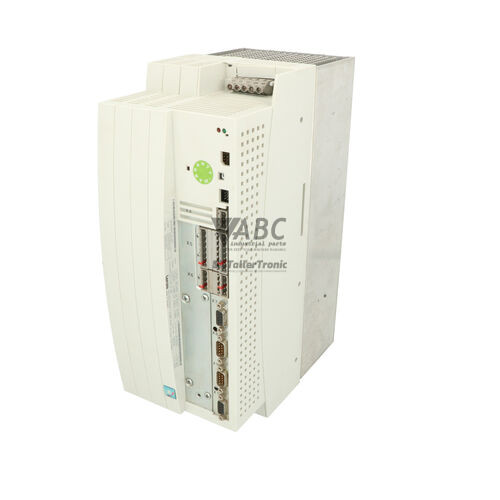
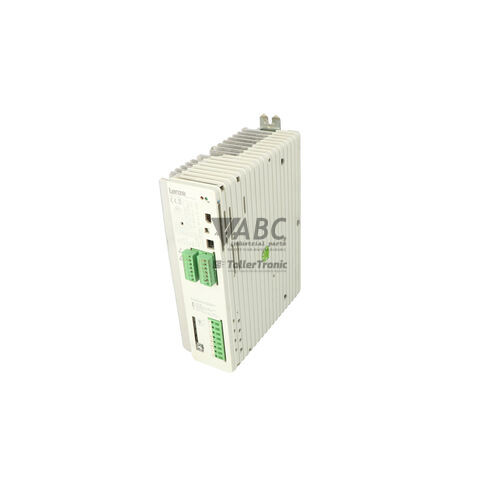
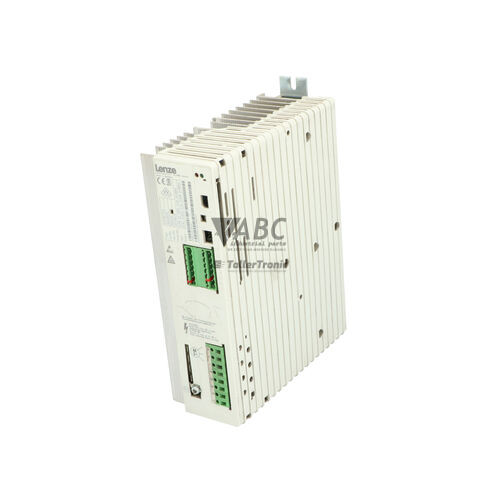
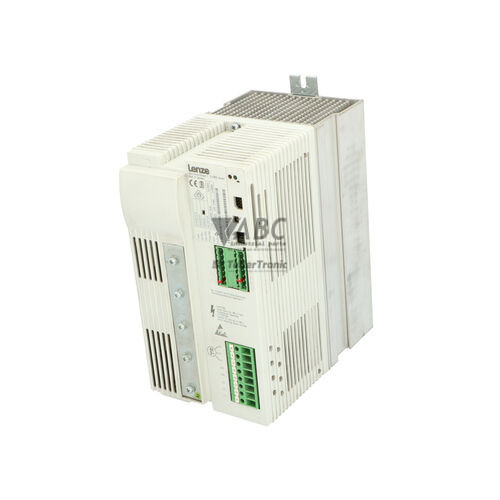
The Lenze 00402971 (model EVS9327-EP) is a 15 kW servo inverter from the Lenze 9300 Servo series designed for precise motion control in automated manufacturing environments. Operating across a supply voltage range of 320 V AC to 528 V AC, this unit delivers a continuous rated output current of 32 A and a maximum output current of 48 A for up to 60 seconds to satisfy heavy dynamic acceleration cycles. Housed in an IP20 enclosure, the EVS9327-EP integrates an onboard positioning controller that handles point-to-point and path-controlled positioning tasks directly, eliminating the need for separate motion controller hardware.
Connecting the drive into a system involves a Sub-D resolver feedback input (X7), configurable master frequency encoder channels, six digital inputs, four digital outputs, and two 12-bit differential analog inputs. Networking capabilities feature an onboard CANopen system bus interface alongside a 33-pin Automation Interface (AIF) expansion slot supporting plug-in fieldbus modules such as PROFIBUS-DP, DeviceNet, or INTERBUS. Placing a spare drive into service requires parameter alignment, which can be accomplished using Lenze Global Drive Control (GDC) software or an XT Keypad (EMF2102IB) to restore parameter sets stored in internal EEPROM memory. Technical specialists at ABC Industrial Parts can assist with parameter transfer and fieldbus configuration to help get replacement drives operating efficiently.
Diagnostic conditions are shown on the front panel via three status LEDs, including a green RUN indicator, a red FAIL light, and a yellow BUS/Status LED. Diagnostic troubleshooting is performed through GDC software, two-line text readouts on the XT Keypad, or by querying the code C0161 fault history memory, which stores the last eight fault events. Common field checks involve verifying heatsink and motor thermal limits, DC bus threshold levels (770 V DC overvoltage / 430 V DC undervoltage), output wiring for short circuits or ground faults, and resolver cable integrity. When internal hardware errors such as H05 or EEPROM corruption occur, board-level faults cannot be serviced in the field, making a tested replacement or repair service through ABC Industrial Parts the quickest route back to full operation.
Technical Specifications
| Manufacturer | Lenze |
| Part Number | 00402971 |
| Model / Type | EVS9327-EP |
| Product Family | 9300 Servo |
| Rated Power Output | 15 kW |
| Rated Output Current | 32 A |
| Maximum Peak Output Current | 48 A (for 60 seconds) |
| Supply Voltage Range | 320 - 528 V AC |
| Maximum Output Frequency | 480 Hz |
| Default Switching Frequency | 8 kHz |
| Ingress Protection Rating | IP20 |
| Feedback Interface | Sub-D Resolver Input (X7) / Master Frequency Encoder |
| System Bus Interface | Onboard CANopen (up to 500 kbit/s) |
| Extension Interface | 33-pin Automation Interface (AIF) |
| Digital I/O Channels | 6 Digital Inputs / 4 Digital Outputs |
| Analog Inputs | 2 Differential Inputs (12-bit resolution) |
Programming and Configuration
Drive configuration and parameterization for the Lenze EVS9327-EP are managed using Lenze Global Drive Control (GDC) software or the plug-in XT Keypad (EMF2102IB). The integrated positioning firmware allows users to define position profiles, acceleration ramps, and software limit switch boundaries directly inside the inverter. All operational parameters are preserved in non-volatile EEPROM memory, enabling parameters to be backed up, edited, or restored during equipment commissioning.
When installing a spare drive, setting parameter code C0002 to 1 reloads factory default parameters before restoring machine-specific backups. Motor thermal overload parameter C0016 and speed controller gains (C0070, C0071) must be configured to match motor data and mechanical load dynamics. Parameter extraction from an existing drive or backup file ensures exact preservation of indexing profiles and positioning loop parameters.
Communication and System Integration
The EVS9327-EP comes equipped with an onboard CANopen system bus interface supporting communication transmission speeds up to 500 kbit/s. This integrated interface allows real-time data exchange, axis synchronization, and parameter transfer across multiple Lenze 9300 drives and upper-level automation controllers without additional gateway hardware.
For integration into major industrial networks, the drive features a 33-pin Automation Interface (AIF) slot. This slot accommodates optional fieldbus communication modules, including PROFIBUS-DP (EMF2133IB), DeviceNet (EMF2175IB), and INTERBUS (EMF2113IB). Fitting the correct AIF module enables seamless communication with central PLCs while maintaining local CANopen bus coordination.
Diagnostics and Status Indication
Operational status and fault conditions on the EVS9327-EP are displayed using three front-mounted LEDs. Detailed diagnostics, live operating values, and trip messages are accessible via the plug-in XT Keypad text readout or through the GDC online diagnostic interface. The drive logs occurrences into fault history memory under parameter C0161, holding the eight most recent fault events with specific status details.
CAN system bus diagnostic registers continuously track fieldbus synchronization and network transmission quality. If communication interrupts occur on the system bus or through an optional AIF fieldbus extension, specific fault codes are triggered to help technicians identify whether the issue originates from cable integrity, bus termination settings, or network master activity.
Status LED Indicators
| LED | Color/Status | Meaning |
|---|---|---|
| RUN | Green - Solid / Flashing | Solid Green indicates drive is enabled and running; Flashing Green indicates drive is initialized and ready. |
| FAIL | Red - Solid / Flashing | Solid Red indicates an active fault (drive inhibited); Flashing Red indicates an active warning. |
| BUS / Status | Yellow - Solid / Flashing | Indicates system bus activity or specific fieldbus operational status. |
Replacement and Spare Part Considerations
When sourcing a replacement Lenze EVS9327-EP drive, verify that both the part number (00402971) and model code match the existing unit. Because this inverter contains internal positioning software routines, installing a replacement drive without transferring the parameter set will result in a unconfigured unit that cannot respond to position commands. Parameters must be loaded from a saved computer backup file or read from the original unit via the XT Keypad or GDC software.
Ensure that optional extension modules—such as PROFIBUS-DP (EMF2133IB) or DeviceNet (EMF2175IB)—are removed from the original inverter and properly seated into the replacement drive's 33-pin AIF slot. Resolver feedback connections on port X7, 120-ohm CAN bus termination switches, and motor thermal PTC sensor wiring on terminals T1/T2 must be re-connected following original panel schematics.
Before resuming automatic operations, confirm software limit switch parameters (P12), position controller gains, and thermal monitoring parameters (C0016) against machine specifications. In cases where internal EEPROM memory corruption (EEr) or hardware component failure (H05) prevents normal parameter export, parameter recovery or complete unit exchange will be necessary to restore production.
Error Codes & Fault Codes
The following error codes may be displayed during operation or diagnostics:
| Code | Name | Description | Possible Cause | Recommended Action |
|---|---|---|---|---|
| OH | Heatsink Temperature High | Heatsink temperature exceeded the allowable upper temperature threshold. | Insufficient cooling, fan defect, ambient temperature too high, heavy overload. | Check cabinet ventilation, clean heatsink, verify fan operation, reduce load. |
| OH3 | Motor Temperature High (PTC / Thermistor) | Motor temperature sensor connected to terminals T1/T2 registered thermal overload. | Motor thermal overload, blocked rotor, defective motor cooling fan, improper sensor connection. | Allow motor to cool down, check motor load, check thermistor wiring. |
| OH4 | Inverter I2t Thermal Overload | The thermal load capacity I2t of the inverter hardware threshold was exceeded. | Continuous operation above rated current, excessive acceleration dynamic cycles. | Check acceleration duty cycle, select larger drive size if required. |
| OU | DC Bus Overvoltage | DC bus voltage exceeded max threshold (approx. 770 V DC). | Braking energy too high, deceleration ramp too short, brake chopper defective or brake resistor open circuit. | Extend deceleration time, check braking resistor and internal brake chopper circuit. |
| LU | DC Bus Undervoltage | DC bus voltage fell below minimum threshold (approx. 430 V DC). | Mains supply failure, voltage dip, blown line fuse, defective line contactor. | Verify mains input voltage, check line fuses and wiring. |
| OC1 | Short Circuit / Overcurrent | Output peak current exceeded instantaneous trip limit. | Short circuit between phases at output, earth fault, severe mechanical jam, acceleration ramp too fast. | Inspect motor cable and motor winding insulation; check mechanical drive assembly for jamming. |
| OC2 | Earth Fault (Ground Fault) | Ground fault / earth current detected on motor output phases. | Short circuit to ground in motor cable or motor winding, ground leak. | Measure motor and cable insulation resistance with megohmmeter; replace damaged motor cable. |
| OC5 | I2t Motor Load Threshold | Motor I2t monitoring triggered motor overload protection. | Motor operated above continuous rating for extended duration. | Verify motor sizing and load demands, adjust thermal overload parameter C0016. |
| CE0 | System Bus Communication Error (CAN) | Communication error on internal CAN system bus interface. | Bus line interrupted, shielding error, incorrect bus termination resistors, wrong baud rate. | Check CAN wiring, termination switches (120 Ohm), and baud rate parameter setting. |
| CE1 | Automation Interface (AIF) Communication Error | Communication failure between controller board and AIF module (e.g. PROFIBUS module). | AIF module disconnected, fieldbus master stopped, bus interruption. | Check AIF module seating, fieldbus master status, and cable connection. |
| H05 | Internal Hardware Fault | Internal hardware fault detected during self-test or runtime monitoring. | Defective control board components, power section failure. | Internal hardware fault — return unit for repair or replace the drive. |
| EEr | EEPROM Memory Error | Checksum fault detected when reading parameters from internal EEPROM. | Power failure during parameter save, EEPROM chip failure. | Reload factory defaults (C0002 = 1) and re-commission. Internal board error if persistent — return unit for repair. |
| SD2 | Resolver Fault | Signal error or cable break on resolver feedback input (X7). | Resolver cable disconnected, broken wire, defective resolver sensor. | Check resolver connection X7, shield ground connection, and resolver coil resistance. |
| NMAX | Maximum Speed Limit Exceeded | Actual motor speed exceeded configured maximum limit by over 20%. | Unstable speed loop tuning, runaway motor load, field weakening error. | Check speed controller gains (C0070, C0071), motor resolver polarity, and encoder wiring. |
| PR0 | Positioning Error / Following Error | Position tracking error exceeded maximum allowable lag limit. | Position loop gain too low, mechanical blockage, acceleration limit too steep. | Check positioning parameters, mechanical drive assembly, and position controller tuning. |
| P12 | Software Limit Switch Reached | Target position lies outside software limit switch boundaries. | Incorrect positioning target command sent from PLC or profile generator. | Verify position command profile and software limit switch parameters. |
Frequently Asked Questions
What software is used to program and back up the Lenze EVS9327-EP?
The drive is parameterized and programmed using Lenze Global Drive Control (GDC) software. Alternatively, parameters can be adjusted and saved directly on the unit using the plug-in XT Keypad (EMF2102IB).
Can I replace an EVS9327-EP drive without transferring parameters?
No. The EVS9327-EP contains internal positioning firmware and custom motor configuration parameters. A replacement unit must have the original parameter set reloaded from an EEPROM backup or GDC software file before it can operate in the machine.
How are optional fieldbus protocols like PROFIBUS integrated into this drive?
Fieldbus communication is achieved by inserting an optional AIF communication card into the drive's 33-pin Automation Interface slot, such as the PROFIBUS-DP module (EMF2133IB), DeviceNet module (EMF2175IB), or INTERBUS module (EMF2113IB).
What does fault code SD2 indicate on the drive display?
Fault code SD2 indicates a resolver signal fault or cable break on feedback connector X7. Check the resolver cable connection, shield grounding, and resolver winding resistance.
How can I reset the EVS9327-EP drive to factory default parameters?
Set parameter code C0002 to 1 using either the XT Keypad or GDC software to restore factory default parameters.
What should be done if the drive displays internal hardware fault H05?
Fault H05 indicates an internal hardware failure detected during self-tests or runtime. This fault is not field-serviceable and requires returning the unit for professional repair or replacing the drive with a tested spare unit.
Take advantage of our exchange formula
A defective product does not have to be worthless. At ABC Industrial Parts, you can hand in defective products and immediately benefit from a discount on your new purchase. This is a smart way to save money while contributing to a circular economy.
Play it safe with our warranty conditions
Industrial plants prefer to keep running invariably, no matter what. Therefore, it is essential that you can rely on high-quality products and/or sustainable repairs. With our warranty conditions, you can count on certainty, whether you choose new, used or repaired products.
Data backup and recovery
Have you lost valuable parameters or data due to a malfunction while the manufacturer no longer provides support? At ABC Industrial Parts, we help you secure this data, both for common and specific products.
Specific firmware and hardware versions
If you are working with specific hardware or firmware versions that are no longer available from the manufacturer, ABC Industrial Parts is your partner. When making your enquiry, clearly state which versions you need, we will then look at the possibilities of supplying those versions, so that your installations continue to function optimally.
Disclaimer:
We are not an authorised distributor of Lenze.
Product photos are for illustration purposes only and may differ from the actual product delivered.
Some of the content on this page was created with the help of AI. While we strive to provide accurate and up-to-date information, errors may occur.