Lenze E84AVHCE7512SX0 8400 Highline C Frequency Inverter 0.75kW 230V


Het item werd toegevoegd aan uw offerteaanvraag
Product Information
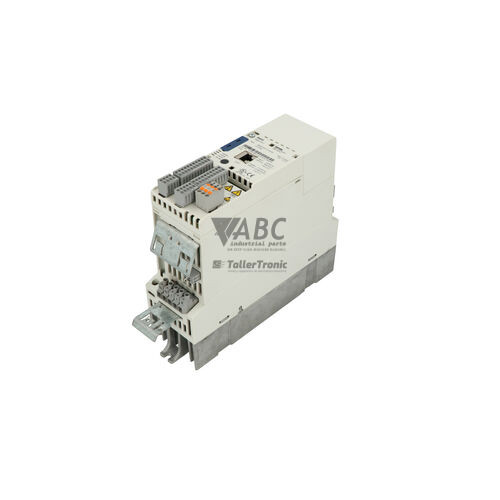
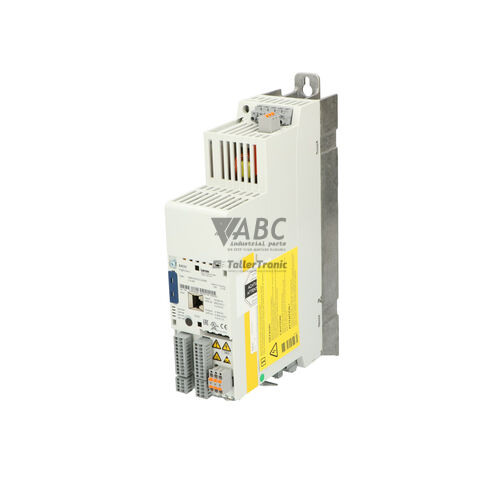
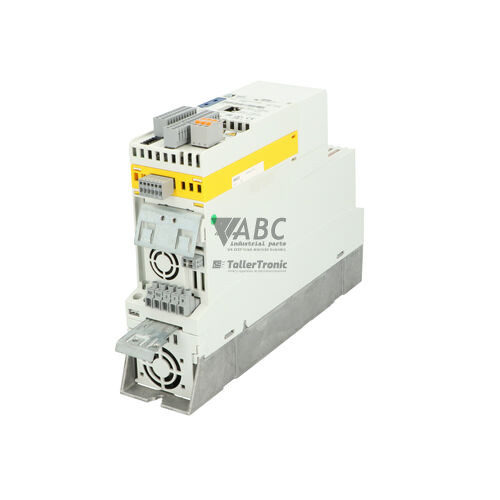
The Lenze E84AVHCE7512SX0 is a cabinet-mounted frequency inverter from the 8400 Highline C series, designed for controlled electric motor applications requiring precise speed and torque management. Delivering a rated power output of 0.75 kW with a 4 A rated output current and a maximum output current of 6 A, this unit operates across an input voltage range of 180 to 264 V AC (230 V AC nominal). The unit features an IP20 enclosure rating and supports standard V/f control, Sensorless Vector Control (SLVC), and closed-loop Vector Control (VC) across an output frequency range of 0 to 599 Hz. It includes integrated Safe Torque Off (STO) functionality certified to SIL 3 (IEC 61508) and Performance Level e (EN ISO 13849-1), providing hardware-based safety without extra external contactors.
System wiring and control integration are managed through 8 digital inputs, 4 digital outputs, 2 bipolar analog inputs, and 2 analog outputs, along with an onboard CANopen system bus interface. The inverter includes an extension slot to accommodate optional fieldbus communication modules for PROFINET, PROFIBUS-DP, EtherCAT, or EtherNet/IP networks. Commissioning a replacement unit is straight-forward due to the hardware-based Lenze Memory Module slot. By transferring the physical Memory Module (MM200 or MM300) from an existing drive to the spare unit, parameter configurations are immediately retained without requiring software connection. When parameter setup or system tuning is performed online, options include Lenze EASY Starter or Lenze Engineer software via the USB Diagnostic Adapter (E84AYCER), or direct local configuration using the Keypad XT (E84AYKCE). Expert assistance from ABC Industrial Parts can assist maintenance teams with spare sourcing and hardware preparation.
Operational diagnostic feedback is available through four front panel status LEDs: DRIVE READY, DRIVE ERROR, CAN RUN, and CAN ERR. Detailed fault tracking can be carried out via the Keypad XT display, PC diagnostic adapters, or CANopen diagnostic objects. Standard troubleshooting procedures should verify mains power levels on terminals, motor winding insulation resistance, and CANopen network termination resistors (120 Ohm) when bus faults occur. Common operational trips include motor short circuits (0x0011), DC-bus overvoltage (0x0021), DC-bus undervoltage (0x0031), or heatsink overtemperature (0x0051). If a internal hardware fault (0x00F1) or temperature sensor failure (0x0052) is indicated, internal repairs are required. Returning the damaged component for professional repair or acquiring a fully tested replacement from ABC Industrial Parts offers a dependable path to restoring machine operation.
Technical Specifications
| Manufacturer | Lenze |
| Part Number | E84AVHCE7512SX0 |
| Model / Type | 8400 Highline C |
| Component Type | Frequency Inverter |
| Rated Power | 0.75 kW |
| Supply Voltage | 230 V AC |
| Supply Voltage Range | 180 - 264 V AC |
| Rated Current | 4 A |
| Maximum Output Current | 6 A |
| Output Frequency Range | 0 - 599 Hz |
| Control Methods | V/f, Sensorless Vector Control (SLVC), Closed-Loop Vector Control (VC) |
| Integrated Safety | Safe Torque Off (STO) SIL 3 / PL e |
| Integrated Bus Interface | CANopen |
| Digital I/O | 8 Inputs / 4 Outputs |
| Analog I/O | 2 Inputs / 2 Outputs |
| Protection Rating | IP20 |
Programming and Configuration
Parameter setting and drive commissioning for the Lenze E84AVHCE7512SX0 are managed through Lenze engineering toolsets, including EASY Starter and Lenze Engineer. These software environments support full parameterization, axis tuning, and offline project creation. Connection between a PC and the inverter drive is established using the optional USB Diagnostic Adapter (E84AYCER), allowing real-time monitoring and diagnostic data transfer.
For localized setup without a computer, the plug-in Keypad XT (E84AYKCE) provides a clear screen interface to view error codes, alter parameters, and execute quick drive setups. System parameters, motor profiles, and application settings are stored directly on the removable Lenze Memory Module (MM200 or MM300). This non-volatile storage card permits fast transfer of configured drive setups directly between hardware units during maintenance.
Communication and System Integration
The Lenze E84AVHCE7512SX0 features an integrated CANopen system bus interface for multi-drive networking and real-time motion synchronization. The onboard CANopen interface allows direct access to internal drive parameters, control words, and diagnostic object registers across the bus network.
To enable higher-level industrial automation communication, the drive includes a dedicated extension slot for optional fieldbus communication modules. Supported protocols include PROFINET (E84AYCER), PROFIBUS-DP (E84AYCPM), EtherCAT (E84AYCEC), and EtherNet/IP (E84AYCEO). Terminal connections also provide 8 digital inputs, 4 digital outputs, 2 bipolar analog inputs, and 2 analog outputs for direct sensor and actuator integration.
Diagnostics and Status Indication
The front panel of the E84AVHCE7512SX0 incorporates LED indicators that offer clear status feedback regarding drive operation and fieldbus activity. These lights display real-time conditions for operational readiness, fault states, and CANopen communication status.
Detailed diagnostics are accessible by attaching the Keypad XT module or connecting a PC loaded with Lenze EASY Starter via the USB Diagnostic Adapter. Active fault conditions generate visual code outputs alongside subcodes, enabling rapid isolation of power supply, cabling, thermal, or motor load faults.
Status LED Indicators
| LED | Color/Status | Meaning |
|---|---|---|
| DRIVE READY | Active | Indicates operational readiness status of the inverter drive |
| DRIVE ERROR | Active | Indicates active drive fault or alarm condition |
| CAN RUN | Active | Indicates status of the onboard CANopen system bus interface |
| CAN ERR | Active | Indicates communication error on the CANopen bus |
Replacement and Spare Part Considerations
When replacing a failed Lenze E84AVHCE7512SX0 inverter, ensure the replacement unit matches the exact 0.75 kW power rating and 230 V supply voltage requirements. Verify whether optional communication modules (such as PROFINET or PROFIBUS) are installed in the existing unit's extension slot, as these must be moved to the replacement drive to preserve network integration.
Downtime during unit swap-out can be reduced by transferring the plugged Lenze Memory Module (MM200 or MM300) from the original drive to the replacement hardware. This avoids manual parameter entry or laptop software uploads. Before re-commissioning, verify that safety wiring connected to the Safe Torque Off (STO) terminals is correctly terminated to ensure full SIL 3 / PL e safety operation.
Error Codes & Fault Codes
The following error codes may be displayed during operation or diagnostics:
| Code | Name | Description | Possible Cause | Recommended Action |
|---|---|---|---|---|
| 0x0011 | Short circuit / Earth fault (OC1) | Short circuit or earth fault on output motor phase terminals. | Motor cable short circuit, earth fault in motor winding, motor power rating too high. | Check motor wiring and insulation resistance. Check motor parameters. If error persists with motor disconnected, internal power section hardware failure - return unit for repair. |
| 0x0012 | Overcurrent during acceleration (OC2) | Output current exceeded maximum threshold during acceleration. | Acceleration time set too short, motor load blocked, incorrect motor control parameters. | Increase acceleration time (ramp-up time), check mechanical drive system for jamming. |
| 0x0021 | Overvoltage DC bus (OU) | DC-bus voltage has exceeded upper shut-off threshold. | Regenerative energy from motor during deceleration, deceleration time set too short, missing braking resistor. | Increase deceleration time, check braking chopper / install braking resistor, check supply line voltage. |
| 0x0031 | Undervoltage DC bus (LU) | DC-bus voltage fell below minimum operating limit. | Mains voltage interrupted or too low, phase failure, supply transformer overload. | Check line supply voltage and fuse connections, verify mains connection terminals. |
| 0x0051 | Heatsink overtemperature (OH) | Heatsink temperature exceeded upper limit threshold. | Inadequate cooling, fan failure, ambient temperature too high, dirty heatsink fins. | Clean heatsink, inspect enclosure ventilation/fan, lower ambient operating temperature. |
| 0x0052 | Heatsink temperature sensor fault (OH1) | Invalid reading or open circuit from internal heatsink temperature sensor. | Internal temperature sensor damaged or disconnected. | Internal hardware fault - return unit for repair. |
| 0x0055 | Motor overtemperature (OH5) | Motor temperature sensor (PTC/KTY/TP) triggered or I2t thermal motor monitoring limit exceeded. | Motor overload, blocked motor cooling, incorrectly parameterised thermal motor model. | Allow motor to cool down, check motor load and ventilation, verify sensor wiring at terminals T1/T2. |
| 0x0061 | Motor phase failure | One motor phase connection is interrupted. | Interrupted motor line cable, motor contactor opened during operation, unbalanced current. | Check motor wiring, motor terminal block, and any intermediate motor contactors. |
| 0x0071 | Mains phase failure | Line input voltage missing one phase or high voltage ripple detected. | Blown main fuse, interrupted power supply lead. | Check input fuses and mains wiring. |
| 0x0081 | CANopen bus fault (Bus Off) | Integrated CANopen communication error or bus off state reached. | Incorrect baud rate, missing bus termination resistor, wiring fault, noisy environment. | Check CANbus wiring, shielding, termination resistors (120 Ohm), and node ID settings. |
| 0x00A1 | Memory Module error | Error accessing or reading data from the plugged Memory Module. | Corrupted parameter set, non-matching drive hardware data, defective Memory Module. | Re-seat Memory Module, rewrite parameter set from PC tool, or replace Memory Module. |
| 0x00A2 | Memory Module missing | No Memory Module detected in the unit slot. | Memory Module not plugged in or improperly inserted. | Turn off power, plug valid Memory Module into slot, reapply power. |
| 0x00F1 | Internal fault / Hardware error | Internal control board or processor fault detected. | Internal circuit board malfunction. | Internal hardware fault - return unit for repair or replace inverter. |
Frequently Asked Questions
How do I transfer parameters to a replacement Lenze E84AVHCE7512SX0 drive?
Drive parameters can be transferred directly by removing the Lenze Memory Module (MM200 / MM300) from the old unit and plugging it into the replacement drive. Alternatively, parameters can be uploaded and restored using Lenze EASY Starter or Lenze Engineer software with a USB Diagnostic Adapter.
What software is used to configure the E84AVHCE7512SX0 frequency inverter?
The inverter is configured using Lenze EASY Starter or Lenze Engineer software platforms connected via a USB Diagnostic Adapter (E84AYCER). Local adjustments can also be made directly using the Keypad XT (E84AYKCE).
What integrated safety capabilities does the E84AVHCE7512SX0 drive feature?
The drive includes integrated Safe Torque Off (STO) functional safety certified up to SIL 3 according to IEC 61508 and Performance Level e (PL e) according to EN ISO 13849-1.
Which fieldbus communication protocols are supported?
The drive features an onboard CANopen system bus interface. It also accepts optional extension modules for PROFINET (E84AYCER), PROFIBUS-DP (E84AYCPM), EtherCAT (E84AYCEC), and EtherNet/IP (E84AYCEO).
What does fault code 0x0081 indicate on the drive?
Fault code 0x0081 indicates a CANopen bus error (Bus Off state). Recommended troubleshooting includes checking CANbus wiring, verifying node ID settings, checking shielding, and ensuring proper 120 Ohm termination resistors are installed.
What should be done if the drive displays fault code 0x00F1 or 0x0052?
Fault codes 0x00F1 (Internal hardware fault) and 0x0052 (Heatsink temperature sensor fault) indicate internal hardware failures that cannot be serviced in the field. The unit must be returned for repair or replaced.

Take advantage of our exchange formula
A defective product does not have to be worthless. At ABC Industrial Parts, you can hand in defective products and immediately benefit from a discount on your new purchase. This is a smart way to save money while contributing to a circular economy.
Play it safe with our warranty conditions
Industrial plants prefer to keep running invariably, no matter what. Therefore, it is essential that you can rely on high-quality products and/or sustainable repairs. With our warranty conditions, you can count on certainty, whether you choose new, used or repaired products.
Data backup and recovery
Have you lost valuable parameters or data due to a malfunction while the manufacturer no longer provides support? At ABC Industrial Parts, we help you secure this data, both for common and specific products.
Specific firmware and hardware versions
If you are working with specific hardware or firmware versions that are no longer available from the manufacturer, ABC Industrial Parts is your partner. When making your enquiry, clearly state which versions you need, we will then look at the possibilities of supplying those versions, so that your installations continue to function optimally.
Disclaimer:
We are not an authorised distributor of Lenze.
Product photos are for illustration purposes only and may differ from the actual product delivered.
Some of the content on this page was created with the help of AI. While we strive to provide accurate and up-to-date information, errors may occur.