Lenze E84AVHCE7514SX0 8400 HighLine C Frequency Inverter


Het item werd toegevoegd aan uw offerteaanvraag
Product Information
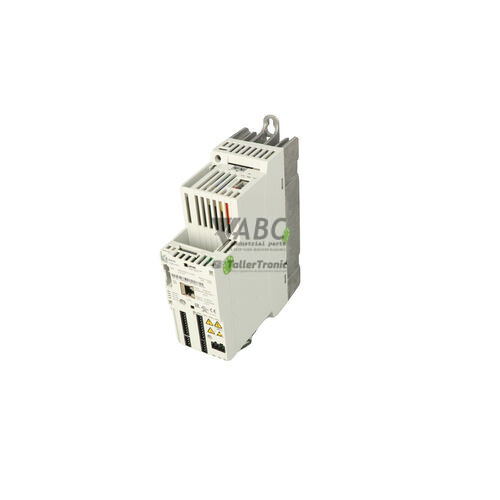
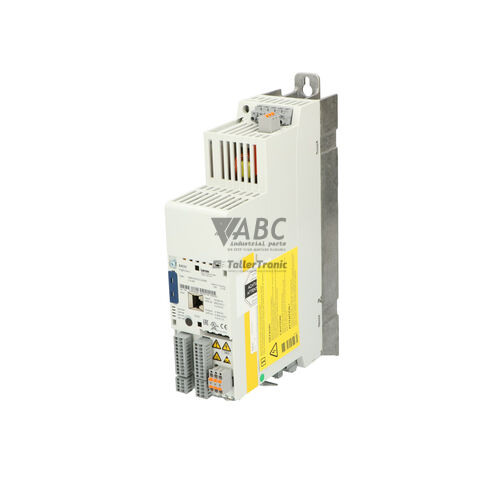
The Lenze E84AVHCE7514SX0 is a 0.75 kW cabinet-mounted frequency inverter within the 8400 HighLine C series and Inverter 8400 family. Operating on a 3-phase supply voltage from 320 V to 528 V AC with a rated mains current of 3.2 A, this compact drive delivers a continuous output current of 2.4 A and an output frequency range of 0 to 599 Hz at an 8 kHz switching frequency. Engineered for precision speed, torque, and positioning control in packaging machinery, material handling, textile manufacturing, and automotive assembly, the unit supports Linear V/f, Square-law V/f, Sensorless Vector Control, and Servo Control modes. Physical interface features include 8 digital inputs, 4 digital outputs, 2 analog inputs, 2 analog outputs, and hardware-integrated dual-channel Safe Torque Off (STO) functional safety.
Network integration and hardware interfacing are provided via an onboard CANopen system bus alongside a modular MCI cassette slot that accepts option cards for PROFINET (E84AYCER), PROFIBUS (E84AYCPM), EtherCAT (E84AYCEC), and EtherNet/IP (E84AYCEO). Commissioning and parameter management are performed using software tools such as EASY Starter or L-force Engineer, or physically via the Keypad XT display (E84AYKPT) and USB Diagnostic Adapter (E84AYCCA). The unit features a pluggable EASY Memory Module (E84AYM200) that stores all device parameters and firmware alignments. Swapping this memory module directly into a replacement unit enables tool-free parameter restoration during hardware servicing, avoiding the need for on-site software programming tools. ABC Industrial Parts supports maintenance teams by supplying replacement drives, memory modules, and compatible expansion options.
Status monitoring and diagnostic feedback are provided via four front-panel LED indicators (DRIVE READY, DRIVE ERROR, CAN RUN, CAN ERR), keypad display readouts, and online diagnostic objects in EASY Starter. Common system interruptions, such as overvoltage (OU), undervoltage (LU), earth faults (OC2), or fieldbus timeouts (CE0/CE1), can be resolved using standard site checks on supply lines, braking resistors, and network cabling. If the DRIVE ERROR LED remains solid red upon initial power-up or an internal fault code (PINT) is registered, an internal control board or power section failure is indicated. Because internal hardware faults cannot be serviced in the field, replacing the inverter or choosing a tested exchange unit from ABC Industrial Parts provides the fastest path to restoring production.
Technical Specifications
| Manufacturer | Lenze |
| Part Number | E84AVHCE7514SX0 |
| Model / Type | 8400 HighLine C |
| Product Family | Inverter 8400 |
| Component Type | Frequency Inverter |
| Rated Power | 0.75 kW |
| Supply Voltage Range | 320 - 528 V AC |
| Mains Rated Current | 3.2 A |
| Continuous Output Current | 2.4 A |
| Output Voltage Range | 0 - 400 V AC |
| Output Frequency Range | 0 - 599 Hz |
| Switching Frequency | 8 kHz |
| Control Method | V/f, Sensorless Vector Control, Servo Control |
| Functional Safety | Safe Torque Off (STO) |
| Onboard Communication | CANopen |
| Digital Inputs / Outputs | 8 / 4 |
| Analog Inputs / Outputs | 2 / 2 |
| Mounting Type | Cabinet Installation |
Programming and Configuration
The Lenze E84AVHCE7514SX0 inverter uses the Lenze EASY Engineering toolset, including EASY Starter and L-force Engineer, for configuration, tuning, and diagnostic tasks. PC connectivity is established through the USB Diagnostic Adapter (E84AYCCA) attached to the diagnostic interface, or remotely over a configured fieldbus network.
Parameter sets, motor calibration data, and application profiles reside on the pluggable EASY Memory Module (E84AYM200). During initial installation, configurations can be uploaded from software or restored directly from a backup. Local parameter adjustments, manual motor control, and operational monitoring can also be executed directly at the cabinet using the pluggable Keypad XT (E84AYKPT) display accessory.
Communication and System Integration
An onboard CANopen system bus interface is integrated directly into the control connection block, facilitating control, parameterization, and state monitoring without requiring additional options. Dedicated CAN RUN and CAN ERR LEDs on the front panel provide network status tracking.
For integration into major fieldbus networks, the drive features a modular MCI option slot that accepts pluggable communication cassettes. Supported MCI cards include PROFINET (E84AYCER), PROFIBUS (E84AYCPM), EtherCAT (E84AYCEC), and EtherNet/IP (E84AYCEO), enabling direct connectivity to centralized PLCs and plant network infrastructure.
Diagnostics and Status Indication
Visual status indication on the front panel of the E84AVHCE7514SX0 consists of four LEDs indicating drive operational status and fieldbus connectivity. The DRIVE READY and DRIVE ERROR LEDs show operational state, active warnings, and trip conditions, while the CAN RUN and CAN ERR LEDs monitor CANopen bus traffic and fault states.
Comprehensive diagnostic routines, real-time message tracking, and fault history logs can be accessed using the Keypad XT module or by connecting EASY Starter online via the USB Diagnostic Adapter (E84AYCCA). CANopen status objects also allow full diagnostic monitoring across the fieldbus network.
Status LED Indicators
| LED | Color/Status | Meaning |
|---|---|---|
| DRIVE READY | Green - Off / Flashing / Solid Green | Off: No supply voltage or initialization active. Flashing: Drive ready / inhibited. Solid Green: Drive operational / running. |
| DRIVE ERROR | Red - Off / Flashing / Solid Red | Off: Normal operation, no fault active. Flashing: Warning active. Solid Red: Trip / Fault active (drive disabled). If solid red persists immediately upon power up, indicates internal hardware failure. |
| CAN RUN | Green - Off / Flashing / Solid Green | Indicates CANopen network communication status (Off = stopped, Flashing = pre-operational, Solid Green = operational). |
| CAN ERR | Red - Off / Flashing / Solid Red | Indicates CANopen bus error / bus-off status. |
Replacement and Spare Part Considerations
To swap a Lenze E84AVHCE7514SX0 inverter efficiently, transfer the pluggable EASY Memory Module (E84AYM200) from the existing unit to the replacement drive. The memory module transfers all drive settings and parameter structures upon power-up without requiring software tools on-site.
Ensure that any installed MCI fieldbus module (such as PROFINET E84AYCER or PROFIBUS E84AYCPM) is transferred to the new drive's MCI cassette slot. Confirm that hardware settings, node addresses, and safety terminal connections match the original installation layout.
For long-term hardware planning during lifecycle transitions, the Lenze i550 Cabinet Inverter (model number i55AE275F01000000S) is designated as the recommended successor unit for new system designs and control cabinet updates.
Error Codes & Fault Codes
The following error codes may be displayed during operation or diagnostics:
| Code | Name | Description | Possible Cause | Recommended Action |
|---|---|---|---|---|
| OC1 | Short Circuit | Short circuit detected at the inverter output stages or motor terminals. | Short circuit in motor cable; phase-to-phase short in motor winding; motor cable too long; acceleration ramp too steep. | Check motor and wiring for short circuit; verify motor insulation; check acceleration time. |
| OC2 | Earth Fault | Ground fault / earth fault detected at the inverter output. | Ground fault in motor winding or motor cable; capacitive leakage current in long shielded motor cables. | Check motor cable and motor windings for insulation resistance to ground. |
| OC5 | I*t Overload Motor | Thermal motor overload calculated via I2t monitoring model. | Continuous current exceeding motor rated current; motor mechanically blocked or overloaded. | Check mechanical load for blockage or binding; adjust I2t motor protection settings. |
| OU | Overvoltage DC Bus | DC bus voltage exceeds the maximum allowed threshold. | Excessive regenerative energy during deceleration; deceleration ramp too short; braking chopper or resistor defective or missing. | Extend deceleration time; install or check external brake resistor. |
| LU | Undervoltage DC Bus | DC bus voltage dropped below the allowable lower limit. | Mains supply voltage too low; phase failure; main power outage. | Check mains input voltage and supply line connections. |
| OH | Heatsink Overtemperature | Inverter heatsink temperature exceeds maximum limit. | Inadequate ventilation; fan defective or blocked; ambient temperature too high; dirty heatsink cooling fins. | Clean heatsink cooling fins; verify operation of internal fan; check cabinet ventilation. |
| OH1 | Inverter Interior Overtemperature | Temperature inside the drive housing exceeds upper threshold. | High ambient temperature inside control cabinet; failure of internal circulating fan. | Improve control cabinet cooling; verify operating conditions. |
| OH3 | Motor Overtemperature (Sensor) | Motor temperature sensor (PTC/TNC/KTY) triggered an overtemperature alert. | Motor thermal overload; cooling fan on motor failed; sensor cable broken or shorted. | Allow motor to cool down; check motor cooling fan and mechanical load; inspect temperature sensor connection. |
| OH7 | Brake Resistor Overload | Calculated thermal load on external braking resistor exceeded allowable limit. | Braking duty cycle too high; brake resistor undersized. | Extend deceleration time or install higher continuous power brake resistor. |
| CE0 | CAN Communication Error | Communication failure or time-out on the onboard system bus (CANopen). | Interrupted bus cable; improper bus termination resistors; duplicate node ID; incorrect baud rate. | Inspect CAN wiring and bus termination (120 Ohm); verify baud rate and node address settings. |
| CE1 | Communication Module Failure | Communication fault between inverter control board and installed MCI option module. | MCI module missing, unplugged, or defective; network master disconnected. | Verify proper seating of MCI module; check network master cable and protocol settings. |
| PR0 | Parameter Error | Parameter set in memory module or drive EEPROM is corrupted or incompatible. | Memory module removed during save operation; parameter file corrupted; memory module from incompatible drive generation. | Reload valid parameter set using EASY Starter or restore factory default settings. |
| PINT | Internal Hardware Fault | Processor or internal hardware control board failure detected. | Internal electronics fault; corrupted internal firmware; power component failure. | Internal hardware failure non-field-serviceable. Power cycle the unit; if error persists, return unit for repair or replace inverter. |
| NMAX | Max Speed Exceeded | Motor actual speed exceeded max permitted limit setting. | Incorrect feedback setup; unstable speed controller tuning; overhauling load. | Check speed controller settings; inspect load and encoder feedback wiring. |
Frequently Asked Questions
How are parameters transferred to a replacement Lenze E84AVHCE7514SX0 drive?
Parameter transfer is performed tool-free by swapping the pluggable EASY Memory Module (E84AYM200) from the old inverter into the replacement unit. Alternatively, parameter sets can be loaded using EASY Starter software via the USB Diagnostic Adapter (E84AYCCA) or programmed using the Keypad XT module.
Which fieldbus interfaces are available for the E84AVHCE7514SX0?
The inverter includes built-in CANopen communication terminals. It can also be integrated into PROFINET, PROFIBUS, EtherCAT, or EtherNet/IP networks by installing the corresponding optional MCI expansion module into the MCI cassette slot.
What does a solid red DRIVE ERROR LED indicate on startup?
A solid red DRIVE ERROR LED immediately upon power-up indicates an active fault condition or an internal hardware failure. If power cycling does not clear the error, or if fault code PINT is logged, internal hardware components are damaged and the unit must be repaired or replaced.
Does the E84AVHCE7514SX0 drive include integrated safety functions?
Yes, the drive is equipped with dual-channel Safe Torque Off (STO) functional safety terminals, satisfying modern safety standard requirements without requiring external mains contactors.
What is the recommended successor model for the Lenze 8400 HighLine 0.75kW drive?
The recommended successor model for migration and new cabinet designs is the Lenze i550 Cabinet Inverter, specifically model number i55AE275F01000000S.

Take advantage of our exchange formula
A defective product does not have to be worthless. At ABC Industrial Parts, you can hand in defective products and immediately benefit from a discount on your new purchase. This is a smart way to save money while contributing to a circular economy.
Play it safe with our warranty conditions
Industrial plants prefer to keep running invariably, no matter what. Therefore, it is essential that you can rely on high-quality products and/or sustainable repairs. With our warranty conditions, you can count on certainty, whether you choose new, used or repaired products.
Data backup and recovery
Have you lost valuable parameters or data due to a malfunction while the manufacturer no longer provides support? At ABC Industrial Parts, we help you secure this data, both for common and specific products.
Specific firmware and hardware versions
If you are working with specific hardware or firmware versions that are no longer available from the manufacturer, ABC Industrial Parts is your partner. When making your enquiry, clearly state which versions you need, we will then look at the possibilities of supplying those versions, so that your installations continue to function optimally.
Disclaimer:
We are not an authorised distributor of Lenze.
Product photos are for illustration purposes only and may differ from the actual product delivered.
Some of the content on this page was created with the help of AI. While we strive to provide accurate and up-to-date information, errors may occur.