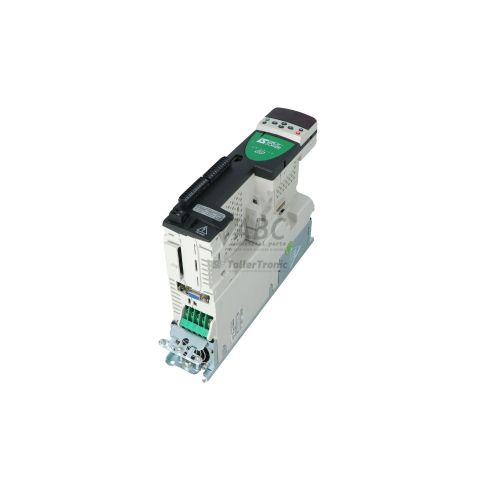
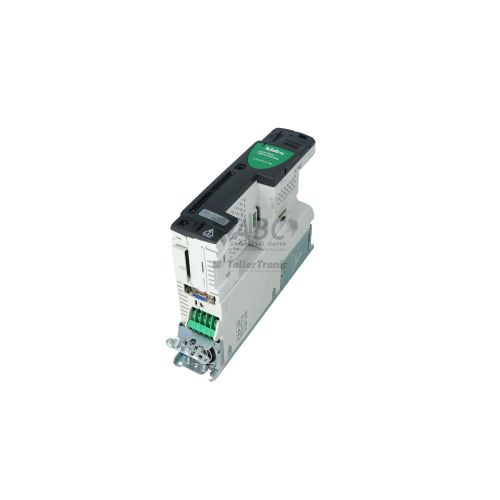
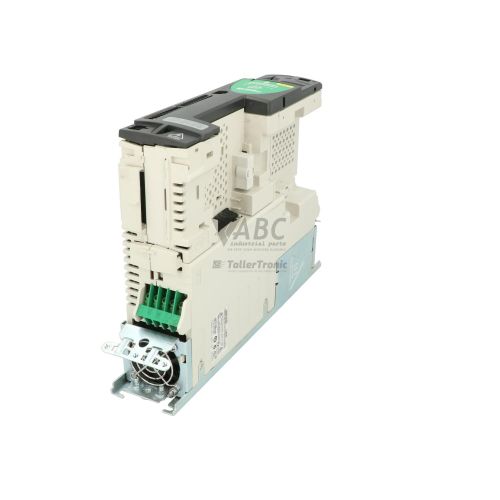
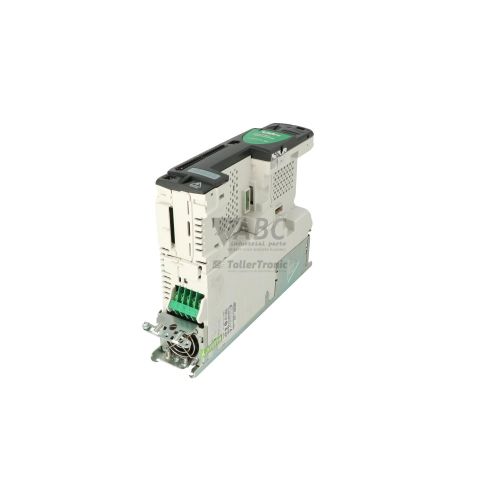
Control Techniques 3098-0015 DST1402 Digitax Servo Drive


Het item werd toegevoegd aan uw offerteaanvraag
Product Information
The Control Techniques 3098-0015, model DST1402, is a compact digital AC servo drive in the Digitax DST family designed for closed-loop speed, torque, and position control of permanent magnet AC synchronous motors. Operating on a 380 V AC to 480 V AC 3-phase input supply at 48 Hz to 62 Hz, this drive delivers a continuous output current of 3.0 A RMS with a 300% peak overload capacity (9.0 A RMS) to handle high-dynamic acceleration profiles. It utilizes sinusoidal vector control with selectable PWM switching frequencies up to 12 kHz for smooth and quiet motor performance in positioning, indexing, and electronic gearing machinery.
System integration is accomplished through the built-in RS-485 serial port supporting Modbus RTU, ANSI x3.28, and native CT-Protocol. The drive includes an expansion slot compatible with UD7x series option modules, allowing direct fieldbus connectivity to PROFIBUS-DP (UD71), DeviceNet (UD74), CTNet (UD75), CANopen (UD77), and Interbus (UD73), or customized application execution using the UD70 coprocessor module. Putting a replacement DST1402 drive into service requires parameter transfer from the existing drive or backup file via CTSoft software or the front panel. ABC Industrial Parts can assist maintenance teams with parameter extractions, configuration alignment, and donor drive preparation to ensure rapid commissioning.
On-side monitoring and troubleshooting are supported by a front-panel 7-segment display that shows operational status codes such as ready (rd) or inhibit (ih), as well as active trip codes (tr). Drive history is retained in Parameter 0.47 and Menu 10 trip logs. While line faults such as supply phase loss (Ph), overvoltage (OV), or undervoltage (UV) can be cleared after checking external power connections and fuses, hardware error codes including HF01, HF02, HF05, or PS point to internal power or CPU board failures. Internal hardware defects are not field-serviceable, making a tested replacement or exchange unit from ABC Industrial Parts the most reliable solution to minimize line downtime.
Technical Specifications
| Manufacturer | Control Techniques |
| Part Number | 3098-0015 |
| Model / Type | DST1402 |
| Product Family | Digitax DST |
| Component Type | Servo Drive |
| Supply Voltage Range | 380 - 480 V AC |
| Input Phases | 3 |
| Supply Frequency | 48 - 62 Hz |
| Continuous Output Current | 3.0 A RMS |
| Peak Output Current | 9.0 A RMS |
| Output Voltage | 480 V AC |
| Switching Frequency | 12 kHz |
| Control Method | Sinusoidal Permanent Magnet AC Servo Control |
| Serial Communication Interface | RS-485 |
| Communication Protocols | Modbus RTU, CT-Protocol, ANSI x3.28 |
| Option Slot Compatibility | UD7x Option Modules (UD70, UD71, UD73, UD74, UD75, UD77) |
Programming and Configuration
Parameter management and drive commissioning for the Control Techniques 3098-0015 DST1402 are performed using CTSoft software via the built-in RS-485 serial connection. CTSoft provides access to drive parameter menus, real-time oscilloscope traces, and complete parameter backup and restore capabilities. When equipped with the UD70 coprocessor option module, the drive can also execute complex motion control and custom user programs developed in the SyPT System Programming Tool.
When installing a spare drive, parameter settings must match the motor feedback type, current limits, gain tuning, and fieldbus node addresses of the original unit. If parameter corruption occurs or an EEF fault is displayed, default parameters can be loaded by setting Parameter 0.00 to 1233 for a 50 Hz supply network or 1244 for a 60 Hz network, followed by a drive reset.
Communication and System Integration
The DST1402 features an onboard RS-485 serial communication port configured for multi-drop networks using Modbus RTU, ANSI x3.28, or native CT-Protocol. This interface supports remote parameter monitoring, drive control commands, and cyclic status word transfers from a host controller or HMI.
Network connectivity can be extended using the internal option module slot, which accepts Control Techniques UD7x modules. Supported network interfaces include PROFIBUS-DP via the UD71 module, Interbus via UD73, DeviceNet via UD74, CTNet via UD75, and CANopen via UD77. Fieldbus options allow seamless integration into centralized PLC and motion control architectures.
Diagnostics and Status Indication
The front panel of the DST1402 includes a 7-segment alphanumeric display that provides real-time status and diagnostic feedback. During normal operation, the display shows operational states such as 'rd' (ready) or 'ih' (inhibit). When a protection circuit is triggered, the display flashes a specific trip code (e.g., 'tr') to indicate the precise fault condition.
Advanced diagnostics can be accessed through Parameter 0.47 and Menu 10, which log recent trip history and operational timestamps. Commissioning technicians can also monitor status words and parameter variables in real time over RS-485 or through the CTSoft software monitoring interface.
Status LED Indicators
| LED | Color/Status | Meaning |
|---|---|---|
| 7-Segment Display | Alphanumeric display | Displays drive operational status code or diagnostic trip code (e.g., 'rd' = ready, 'ih' = inhibit, 'tr' = trip) |
Replacement and Spare Part Considerations
The Control Techniques 3098-0015 (DST1402) is a discontinued drive from the original Digitax DST series. Maintaining legacy automated machinery requires direct-replacement DST1402 spare units to preserve existing panel layouts, power connections, and feedback wiring without requiring control cabinet redesigns.
When installing a replacement unit, verify that installed UD7x fieldbus modules (such as UD71 PROFIBUS or UD74 DeviceNet) are physically swapped over to the replacement drive. Motor parameters, encoder setup, and gain parameters must be uploaded from CTSoft software or transferred manually before starting the system.
For facility modernizations or complete system redesigns where legacy replacement is no longer practical, Control Techniques recommends migrating to the Digitax HD or Unidrive M700 series.
Error Codes & Fault Codes
The following error codes may be displayed during operation or diagnostics:
| Code | Name | Description | Possible Cause | Recommended Action |
|---|---|---|---|---|
| O.ct | Over Current | Instantaneous output current threshold exceeded on drive output stages | Short circuit on drive output terminals, phase-to-phase or phase-to-earth motor winding short, damaged motor cable, severe acceleration mismatch, motor stall | Check motor and motor cable insulation with megohmmeter. Inspect motor feedback device. Check acceleration/deceleration rates. If trip persists with motor cable disconnected, internal IGBT power module failure—replace drive unit. |
| O.ht1 | Heatsink Over Temperature | Drive power stage heatsink temperature exceeded allowable operating limit | Cooling fan failed or blocked, heatsink clogged with dust, ambient temperature exceeds rated operating range, excessive continuous overload | Clean heatsink cooling fins, check internal enclosure airflow, verify fan operation, allow drive to cool down. |
| O.ht2 | Internal Over Temperature | Internal air temperature inside the drive enclosure exceeded limit | High panel ambient temperature, panel fan failure, insufficient clearance around drive | Improve control panel ventilation and cooling. |
| O.Ld | Drive Overload (I2t) | Accumulated thermal overload limit reached due to prolonged high current demand | Mechanical jam or overload on motor, incorrect motor current parameters, excessive duty cycle | Check mechanical load for sticking or jamming. Verify motor rated current parameters. |
| O.SPd | Over Speed | Motor rotational speed exceeded maximum allowed threshold | Speed loop instability, incorrect encoder resolution setting, runaway motor load | Check feedback wiring and parameter settings for encoder PPR. Check speed controller gains. |
| OV | Over Voltage | DC bus voltage exceeded maximum safety threshold | Excessive mechanical regeneration during deceleration, braking resistor open circuit or missing, decelerating excessive inertia too fast | Increase deceleration time, verify braking resistor value and wiring, check AC supply voltage level. |
| UV | Under Voltage | DC bus voltage dropped below minimum operating limit | AC supply failure, line voltage dip, open supply fuse or circuit breaker, loss of input phase | Measure input AC line voltage across all three phases, check power connections and fuses. |
| Ph | Input Phase Loss | Loss of one of the three AC supply phases | Blown input fuse, loose supply connection, unbalance on AC supply network | Check AC supply line fuses and input wiring connections. |
| Et | External Trip | External trip signal activated via control terminal digital input | External safety circuit, thermal switch on braking resistor or motor activated | Inspect external trip circuit loop and connected sensors. |
| EEF | EEPROM Fault | Corrupted parameter data or hardware checksum failure in onboard EEPROM | Power interrupted during parameter save operation, internal EEPROM hardware failure | Load default parameters (Parameter 0.00 = 1233 for 50Hz or 1244 for 60Hz and reset). If error persists, internal hardware fault — replace drive unit. |
| enc1 | Encoder Phase Error | Fault detected in motor feedback encoder commutation signals | Loose feedback cable, noise interference on encoder lines, wrong encoder UVW phasing, faulty encoder | Check encoder cable shielding and grounding. Verify commutation sequence. |
| enc2 | Encoder Power / Cable Fault | Feedback encoder supply current or channel wire break fault | Broken encoder cable wire, loss of +5V/+15V encoder power supply | Check continuity of feedback cable and connector pins. |
| PS | Internal Power Supply Failure | Internal SMPS supply rails (+15V, -15V, +5V) out of tolerance | Internal power board failure | Internal hardware failure — return unit for repair or replace drive unit. |
| HF01 | Hardware Fault 01 - Power Board Fault | Hardware fault detected on internal power board during boot or execution | Internal circuit failure or damaged gate drive circuitry | Internal hardware failure — replace drive unit. |
| HF02 | Hardware Fault 02 - Internal Current Sensor Fault | Current feedback offset voltage out of specification | Damaged current transducer or internal measurement circuitry | Internal hardware failure — replace drive unit. |
| HF05 | Hardware Fault 05 - CPU Board / Memory Error | Internal microprocessor memory fault or bus error | Control board malfunction | Internal hardware failure — replace drive unit. |
Frequently Asked Questions
What is the continuous and peak current rating of the Control Techniques 3098-0015 DST1402?
The DST1402 drive provides a continuous output current of 3.0 A RMS and a 300% peak overload capacity of 9.0 A RMS for high-torque dynamic moves.
Which software tool is used to program and configure the DST1402 servo drive?
CTSoft software is used for drive configuration, parameter tuning, and monitoring via the built-in RS-485 serial port. When a UD70 coprocessor module is installed, user programming can also be created using the SyPT System Programming Tool.
Which fieldbus networks can be connected to the Digitax DST1402?
The drive supports fieldbus communication through UD7x option modules inserted into its expansion slot, including PROFIBUS-DP (UD71), Interbus (UD73), DeviceNet (UD74), CTNet (UD75), and CANopen (UD77).
How do I clear an EEF fault code on the Control Techniques 3098-0015 drive?
An EEF code indicates corrupted EEPROM parameter data. Reset the drive to factory default values by setting Parameter 0.00 to 1233 (for 50 Hz mains) or 1244 (for 60 Hz mains) and initiating a reset. If the fault persists, internal hardware replacement is required.
What should be done if a hardware fault code such as HF01, HF02, or HF05 appears?
Hardware fault codes (HF01, HF02, HF05) and internal power supply faults (PS) indicate permanent internal power stage or control board failures that are not field-serviceable. The drive unit must be repaired or replaced.
Take advantage of our exchange formula
A defective product does not have to be worthless. At ABC Industrial Parts, you can hand in defective products and immediately benefit from a discount on your new purchase. This is a smart way to save money while contributing to a circular economy.
Play it safe with our warranty conditions
Industrial plants prefer to keep running invariably, no matter what. Therefore, it is essential that you can rely on high-quality products and/or sustainable repairs. With our warranty conditions, you can count on certainty, whether you choose new, used or repaired products.
Data backup and recovery
Have you lost valuable parameters or data due to a malfunction while the manufacturer no longer provides support? At ABC Industrial Parts, we help you secure this data, both for common and specific products.
Specific firmware and hardware versions
If you are working with specific hardware or firmware versions that are no longer available from the manufacturer, ABC Industrial Parts is your partner. When making your enquiry, clearly state which versions you need, we will then look at the possibilities of supplying those versions, so that your installations continue to function optimally.
Disclaimer:
We are not an authorised distributor of Control Techniques.
Product photos are for illustration purposes only and may differ from the actual product delivered.
Some of the content on this page was created with the help of AI. While we strive to provide accurate and up-to-date information, errors may occur.